Travel connectivity guide
Mombasa eSIM: Mobile Data for Your City Trip
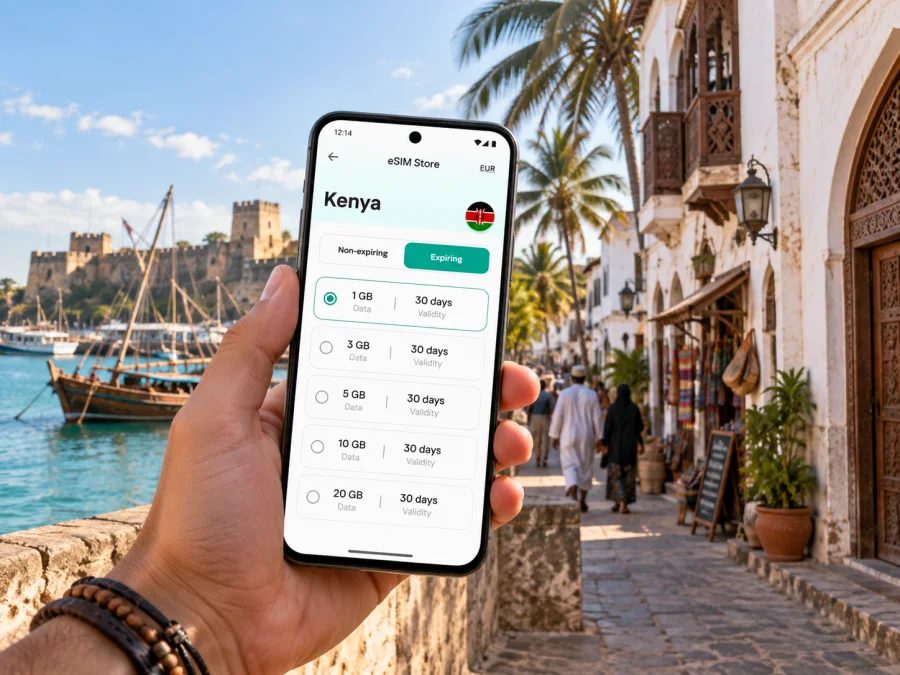
Mombasa eSIM: mobile connection and internet for your city trip
Mombasa rewards a little planning. The historic streets around Old Town, the business district on Mombasa Island, hotels in Nyali and journeys towards the South Coast can all belong to one itinerary, but they do not sit in one compact walking area. A working mobile internet connection helps you check your route, contact your host, confirm a pickup and keep travel details close at hand as you move between them.
An eSIM is a digital SIM profile that you can install on a compatible device. For a visit to Mombasa, it can be a convenient way to prepare mobile data for maps, messaging, ride coordination and online bookings without swapping out your usual physical SIM. It does not replace every travel arrangement: check the selected tariff’s country coverage, data allowance, validity and activation terms before you rely on it.
Plan for Mombasa’s geography, not just the hotel address
Mombasa is a coastal city shaped by its island, harbor and mainland districts. Your daily route may cross a bridge, a causeway or the Likoni ferry connection. That matters when estimating how much time you need and when deciding what to keep accessible on your phone.
A simple itinerary map can help separate the main areas:
| Area | What a visitor may use it for | Useful mobile tasks |
|---|---|---|
| Mombasa Island and the central business district | Offices, shops, transport connections and everyday errands | Pinning an address, messaging a colleague, checking directions on foot |
| Old Town and the waterfront | Historic lanes, architecture, markets and visits near Fort Jesus | Saving a meeting point, translating a phrase, finding the return route |
| Nyali and the north coast | Beach stays, restaurants and leisure visits | Coordinating a pickup, checking a reservation, navigating between stops |
| Changamwe and Miritini | Airport-side journeys and the SGR terminus area | Sharing arrival details, confirming onward transport, keeping tickets available |
| Likoni and the southern approach | Ferry crossings and onward trips towards the South Coast | Checking the route before departure and agreeing where to meet after crossing |
These are planning cues rather than a promise about journey times. Traffic, weather, queues and service arrangements can change the practical route. Before leaving, check the day’s conditions with your transport provider and keep the exact destination address saved offline as a backup.
Arrival: get the first leg in order
Most air travelers arrive through Moi International Airport, which serves Mombasa. Before departure, save your accommodation’s full address, booking confirmation and the name or contact details of whoever is meeting you. If you have a pickup arranged, agree on the meeting point and what to do if your flight is delayed. A data connection is especially useful for exchanging a short message after landing, but it is sensible to keep the booking details available without relying on a live connection.
At the airport, choose transport that suits your arrival time, luggage and destination. If a driver is collecting you, use the agreed pickup instructions rather than assuming a particular curb or terminal meeting point. If you are arranging a ride yourself, confirm the vehicle and destination in the app or directly with the provider before setting off. Avoid sharing unnecessary personal details in public spaces.
The airport is not the only possible entry point. Some visitors arrive by train at the Mombasa Terminus in Miritini, while others reach the city by road or sea. For rail arrivals, note that Miritini is outside the island’s central districts; do not assume that “Mombasa station” means you are already beside your hotel. Confirm the onward transfer and meeting point in advance.
Move between the island, Nyali and the South Coast
Routes in Mombasa often involve a crossing. Nyali Bridge links the island with the northern side, while the Likoni ferry connects the island with Likoni to the south. The Makupa Causeway is another important link towards the mainland. Which one makes sense depends on your starting point and destination; a map search alone cannot predict traffic or waiting conditions.
For a day with several stops, use this routine:
- Enter the complete destination name and address, not only a business name that may have duplicates.
- Check whether the route uses a bridge, causeway or ferry crossing.
- Ask your driver or accommodation about current local conditions if timing matters.
- Share the intended meeting point with anyone traveling separately.
- Keep enough battery and data for a route change or a message after the crossing.
The Likoni ferry is part of the city’s everyday transport geography as well as a route used by visitors heading south. If your plans include Diani or another South Coast destination, treat that as a separate leg from your Mombasa city stay. Confirm the current road and crossing arrangements before you go; access patterns and delays can change. For a tight connection, leave a generous margin rather than building an itinerary around an assumed crossing time.
Choose a data plan around the way you travel
The right data allowance depends on your habits and itinerary, not on a generic “tourist” estimate. A traveler who mainly checks messages and directions may use data differently from someone who uploads video, works on calls or shares a hotspot. Review the tariff details in the purchase flow and choose according to your own expected use.
| Your travel pattern | What to consider when choosing |
|---|---|
| A brief city stop with a few map checks | Whether a smaller allowance and short validity fit the actual visit |
| Several days across Mombasa and nearby coast | Whether the tariff’s validity covers every travel day and transfer |
| Remote work from a hotel or meeting venue | How much data video calls and file transfers may require; check Wi-Fi as a separate option |
| Frequent photo or video uploads | Whether uploads can wait for trusted Wi-Fi, reducing mobile data use |
| A multi-stop Kenya itinerary | Whether the chosen tariff applies to every intended destination, not only Mombasa |
Kaspersky eSIM Store is an app and website where you can select, arrange and activate an eSIM with a suitable tariff for mobile internet while traveling abroad. Before choosing, compare the stated data amount, validity period, destination and price shown for the option. Tariff conditions can differ, so use the displayed details rather than assuming every plan has the same rules.
When your route extends beyond the city, it can help to consider the whole trip before selecting a destination. You can review eSIM tariff options for travel in Kenya and check whether the terms fit the places and dates on your itinerary. The page is for the country; your day-to-day plan should still reflect where you will actually travel and how you expect to use data.
Use maps and messaging without wasting data
Navigation is one of the most practical reasons to have mobile data during a Mombasa visit. At the same time, a few preparations make your phone more useful if your signal is limited or you want to conserve data.
Before leaving your accommodation:
- Download an offline map area where your map app supports it.
- Save the hotel, airport, railway terminus and any meeting place as pins.
- Screenshot tickets, booking details and key directions.
- Share your live location only when it is useful and with people you trust.
- Use text messages for simple updates when a voice or video call is unnecessary.
- Turn off automatic app updates and large cloud uploads while using mobile data.
Neighborhood choices shape your connection needs
Where you stay affects what you do with your phone each day. Mombasa Island can suit visitors with meetings, errands or historic sites on the island. Nyali may make sense for a beach-oriented stay or for access to the north coast. Accommodation near Changamwe or Miritini can be practical for a particular airport or rail itinerary, though it may mean more planning for visits to the island. These are broad orientation points: compare the location with your own schedule before booking.
For hotel selection, consider more than the district name:
- How far is the property from the places you expect to visit?
- Is your first or final transfer already arranged?
- Does the accommodation have reliable Wi-Fi for large downloads or work sessions?
- Is the entrance easy to identify on a map, especially for late arrivals?
- Will you need to cross the city during peak travel periods?
Mobile data complements hotel Wi-Fi. It is useful between locations, for confirming a ride or opening a map away from the property. Wi-Fi can be suitable for larger downloads or video meetings when the connection is secure and appropriate for your needs. Neither should be treated as a guarantee of uninterrupted service.
For business trips and short stopovers
A work visit usually involves more than reaching one office. You may need to move between a hotel, a client address, a port-side meeting or a transport terminal. Keep calendar entries, addresses and contact names in one place, then share only the information needed with colleagues. If a meeting time is fixed, confirm the route and pickup plan earlier rather than relying on a last-minute map estimate.
For a short stopover, prioritize the essentials: a way to contact your onward transport, the next departure details, a clear return plan and enough time to get back. Avoid trying to fit distant neighborhoods into a narrow window. If you leave the airport or station area, account for the return journey and any crossing on the route. A lightweight data plan can support the practical tasks, while offline copies of tickets and addresses provide a backup.
Install and activate your eSIM with care
An eSIM must be supported by your device, and some devices may also be locked to a mobile operator. Check both points before purchase using the device compatibility check, then read the selected tariff’s installation and activation instructions. Menu names and the order of steps can vary by phone model and operating system.
A sensible setup sequence is:
- While connected to Wi-Fi, choose a tariff for the right destination and dates.
- Review its data allowance, validity, activation trigger and any other listed conditions.
- Install the eSIM by following the instructions shown for your device.
- Label the new line clearly so you can distinguish it from your regular SIM.
- Before travel, check which line is selected for mobile data and what your primary SIM will do abroad.
- Activate or enable the travel eSIM according to the tariff instructions; do not assume installation alone starts or uses the plan in a particular way.
- Once in Kenya, check that mobile data is assigned to the intended line and follow any network-selection guidance provided with the tariff.
For step-by-step help, follow the Android eSIM installation instructions or the iOS eSIM installation instructions. Keep access to Wi-Fi until the profile is installed and the setup is complete. If you are unsure whether data has started, check the tariff’s activation terms rather than toggling settings repeatedly.
An eSIM tariff for travel is generally intended for mobile data. Do not assume it includes a standard local phone number, voice minutes or SMS unless the specific tariff states that it does. You can continue using your usual number for calls or verification where your home plan allows it, but check roaming charges and line settings with your existing provider before departure.
Frequently asked questions
Is an eSIM useful if I am staying only in Mombasa?
It can be useful if you want mobile data for maps, messaging and travel coordination around the city. Whether it suits you depends on the tariff’s country coverage, duration, allowance and price, as well as how much data you expect to use.
Will one city plan cover trips from Mombasa?
Check the destination and coverage terms shown for the tariff. Mombasa is in Kenya, but a trip may continue to other places or cross into another country. Confirm that the tariff applies to each destination on your route before choosing it.
Does a data eSIM replace my regular phone service?
Not necessarily. A travel eSIM may be designed for mobile data and may not include a local number, voice calls or SMS. Keep your usual line if you need it, and review its roaming settings and charges with your provider.
What should I do if directions change during the day?
Check the route again, confirm the destination with your driver or host, and send a concise update to anyone meeting you. Offline map data and saved addresses are useful backups, but current local advice matters when traffic or crossing conditions affect timing.
Plan your trip
Mombasa can mean a walk through Old Town, a meeting on the island, a hotel in Nyali, or an onward journey through Miritini and across the southern side of the harbor. Start with the places and dates on your own itinerary, then choose a data allowance and validity that match those plans. Save the addresses, check your crossing and transfer arrangements, and keep a backup of essential travel details.
Before departure, use Kaspersky eSIM Store to review the available options and prepare a compatible device according to the tariff instructions. Choose an eSIM tariff for your trip in Kenya, confirm its terms, and set up the profile while you have a reliable Wi-Fi connection. That preparation leaves you better placed to use maps and messages as you make your way around Mombasa.


