
Travel connectivity guide
Monaco eSIM: mobile internet guide
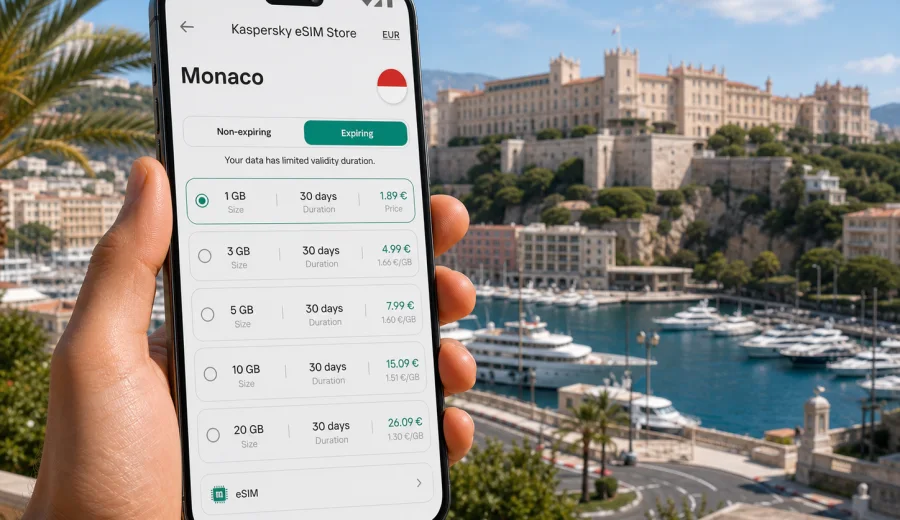
eSIM for Monaco: mobile connection and internet for your trip
Monaco is compact, busy and highly connected, but a trip there still needs a practical mobile internet plan. You may arrive through Nice, cross the border by train, move between Monte Carlo, La Condamine and Fontvieille in a single day, and depend on maps, ride apps, restaurant bookings, tickets and messengers from the first hour. An eSIM can make that easier because you do not need to look for a physical SIM card after arrival or change the SIM already in your phone.
This guide explains how to prepare mobile connection and internet for Monaco with an eSIM, how to choose a data package, what to check before purchase, and how Kaspersky eSIM Store can help you choose, set up and activate an eSIM tariff for a foreign trip. The focus is mobile data for travel: ordinary phone calls and SMS are usually not included unless a specific tariff says otherwise.
Why eSIM is useful in Monaco
Monaco is a small country, but the online tasks during a visit are not small. You may need data for navigation on steep streets, instant translation, hotel check-in messages, restaurant reservations, taxi coordination, mobile tickets, banking confirmations and sharing plans with your group. Public Wi-Fi can help in some places, yet it is not something to rely on for every transfer, queue or late change of schedule.
An eSIM is a digital SIM profile that can be installed on a compatible device. For a Monaco trip, it lets you prepare a mobile data tariff before departure or shortly after arrival. You keep your primary SIM in the phone, choose the eSIM line for mobile data, and use internet-based apps as usual.
The main benefits are practical:
- you can prepare mobile internet before entering Monaco;
- you do not need to search for a physical SIM card shop;
- you can compare data volume, validity period and price before choosing;
- you can keep your regular SIM available for calls or bank messages, depending on your device settings;
- you can reduce dependence on public Wi-Fi in stations, cafes, hotels and event venues.
The important limitation is also simple: eSIM is not a universal promise of coverage at every point or a replacement for every mobile service. Local network conditions, device settings, tariff terms and roaming-data requirements can affect the connection. Read the tariff details before buying and check your device first.
Monaco travel scenarios where mobile data matters
Monaco often becomes part of a wider Riviera route, but the country itself has specific mobile-data moments. You may be moving quickly between transport, the harbor, hotels, conference venues, museums, beach areas and hillside viewpoints. Because the distances are short, people often underestimate how often they will use mobile internet.
| Scenario in Monaco | Why mobile internet helps | What to plan |
|---|---|---|
| Arrival from Nice airport | Transfer updates, train times, map navigation and messaging | Install the eSIM before the transfer or keep Wi-Fi available for activation |
| Monte Carlo visit | Reservations, tickets, photo backups and group coordination | Choose enough data for maps, messenger calls and media sharing |
| Business trip or event | Email, calendar changes, ride apps and secure access to work tools | Consider a larger data package and check tethering rules if needed |
| Day trip from France or Italy | Cross-border navigation and route changes | Check whether a country, regional or global tariff fits the full route |
| Family travel | Shared plans, emergency contact and entertainment for children | Estimate data use across all travelers and devices |
For a short visit, maps and messaging may be enough. For a longer stay, remote work, video calls or frequent photo uploads can use data quickly. The best tariff is not always the largest one; it is the one that fits your length of stay, habits and route.
How much data do you need for Monaco?
Data use depends on behavior more than destination. Monaco has many moments when you may reach for your phone, but your actual consumption depends on whether you stream video, upload photos over mobile data or use Wi-Fi at the hotel.
Use this simple estimate:
- 1-3 GB can be enough for a short visit with maps, messengers, email and light browsing.
- 5-10 GB is more comfortable for several days with regular navigation, social media, restaurant searches and moderate photo sharing.
- 10-20 GB suits a longer stay, business travel, repeated video calls or a Riviera route where you do not want to monitor every megabyte.
- More than 20 GB may be useful if you use cloud backups, video streaming, hotspot mode or work tools heavily, provided the selected tariff allows your intended use.
Before choosing, think in tasks instead of numbers. A traveler who uses maps and text messages may need little data. A traveler who uploads high-resolution videos from the harbor and joins video meetings needs a different package.
What to check before buying an eSIM tariff
The most important check is device compatibility. Not every smartphone, tablet or laptop supports eSIM, and some devices can be locked by a mobile operator. Before you pay for a tariff, check your device and confirm that it supports eSIM installation.
Also review these points:
1. Destination coverage. Make sure Monaco is included in the selected tariff. If your route also includes France or Italy, check whether a regional option is more suitable.
2. Validity period. Some tariffs are built for a few days, others for longer stays. Match the validity period with your travel dates.
3. Data volume. Choose data based on actual tasks: maps, messages, work, hotspot use, streaming or media uploads.
4. Activation timing. Read when the validity period starts. It may begin after installation, after first network connection or according to the tariff terms.
5. Data roaming setting. Some eSIM profiles may require data roaming to be enabled for the eSIM line. Follow the tariff and installation instructions.
6. Calls and SMS. Travel eSIM tariffs usually focus on mobile data. If you need ordinary voice calls or SMS, check the tariff details separately.
7. Transfer rules. An eSIM may not be transferable to another device after activation. Install it on the device you will use during the trip.
These checks take a few minutes and prevent the most common problems: buying a tariff for the wrong route, installing on an unsupported phone, or activating too early.
Choosing a tariff for Monaco
When choosing a Monaco eSIM tariff, start with your itinerary. Monaco may be the only destination, or it may be one stop in a route along the French Riviera. A country-specific tariff is often straightforward when Monaco is the main destination. A regional or global tariff may be more convenient when the same trip includes several countries.
Use this decision guide:
| Your trip | Better fit to consider | Reason |
|---|---|---|
| One or two days in Monaco | Small country data package | Enough for maps, messaging and light browsing |
| Weekend stay with many bookings and photos | Medium data package | More margin for navigation, social media and restaurant searches |
| Business trip | Medium or larger data package | Email, work chat and video calls can use data quickly |
| Monaco plus France or Italy | Regional or multi-country option | Reduces the need to change profiles between borders |
| Family trip with several phones | Separate eSIM plans per compatible device | Keeps data use predictable for each traveler |
At this stage, compare price, data amount, validity and destination. Kaspersky eSIM Store is an app and website where you can choose, arrange and activate an eSIM with a suitable mobile-data tariff for a foreign trip. If Monaco is your destination, you can review options and choose an eSIM tariff for Monaco before you travel, then install it on a compatible device.
How to install and activate eSIM for Monaco
Installation is usually easiest before departure, while you still have stable Wi-Fi and time to check settings. Activation can depend on the tariff, so follow the instructions shown after purchase.
General setup flow:
1. Check that your device supports eSIM and is not locked to one operator.
2. Choose Monaco or the route that matches your trip.
3. Select the data volume and validity period.
4. Complete the tariff order in Kaspersky eSIM Store.
5. Open the eSIM details in your profile or email.
6. Install the eSIM by following the on-screen steps or using the QR code.
7. Set the eSIM line for mobile data when you are ready to use it.
8. If the instructions require it, enable data roaming for the eSIM line.
9. Test the connection after arrival and keep your primary SIM settings as you need them.
For device-specific steps, use the Android installation guide or the iOS installation guide. The exact menu names can differ by phone model and operating-system version, so follow the device screen carefully.
Do not delete the eSIM profile after installation unless support instructions tell you to. Deleting a profile can make reinstallation difficult or impossible, depending on the tariff conditions.
Practical settings for a smoother trip
Before you leave for Monaco, prepare your phone as if you might need internet immediately after crossing the border. That does not mean rushing activation; it means avoiding setup under pressure.
Checklist before departure:
- install the eSIM while connected to stable Wi-Fi;
- save the QR code or installation email where you can find it;
- check which SIM is used for mobile data;
- keep your primary number available for calls or bank messages if needed;
- turn off automatic cloud backup on mobile data if your package is small;
- download offline maps as a fallback;
- confirm whether hotspot mode is allowed by the tariff if you plan to share data;
- keep customer support access details available.
Checklist after arrival:
- choose the eSIM line for mobile data;
- enable data roaming for the eSIM if the instructions require it;
- restart the phone if the network does not appear after several minutes;
- check that apps are not using mobile data in the background too aggressively;
- monitor remaining data in your account or app.
Small settings can make a large difference. Automatic video playback, cloud photo backup and system updates may consume more data than maps or messaging. If you choose a small package, disable background-heavy tasks until you are on trusted Wi-Fi.
eSIM, roaming and local SIM cards: what is different?
There is no single best option for every traveler. The right choice depends on how long you stay, how much data you need, and whether you want to prepare everything in advance.
| Option | Strength | Limitation |
|---|---|---|
| Travel eSIM | Can be prepared without a physical card; easy to compare data and validity | Requires compatible unlocked device; usually data-focused |
| Standard roaming | Uses your current SIM and number | Price and data limits depend on your home operator |
| Local physical SIM | May suit long stays or special local needs | Requires finding a shop, physical card handling and possible language barriers |
| Public Wi-Fi | Useful as backup in hotels or cafes | Not always available when moving; may require logins or be unsuitable for sensitive tasks |
For Monaco, eSIM is often attractive because the country is small and many travelers arrive through another country. Preparing mobile data in advance can reduce friction during the first transfer and make short visits easier. However, you should still compare your home roaming terms and the eSIM tariff conditions before deciding.
Useful facts for planning mobile internet in Monaco
Monaco has a dense urban environment, major events, high visitor traffic and many indoor locations. This affects how you should think about data use and phone behavior.
- Monaco is very small geographically, so your route may include several districts in one day.
- Many travelers enter through France, especially via Nice, so cross-border planning matters.
- High-profile events can create crowded areas where mobile networks may feel slower.
- Navigation is helpful because Monaco has elevation changes, tunnels and pedestrian routes that are not always obvious.
- Hotel Wi-Fi is useful, but you may still need mobile data for transfers, ticketing and messaging outside the hotel.
- If you use your phone as a camera, disable automatic uploads on mobile data unless your package is large enough.
The practical conclusion: choose a tariff with a little margin. Running out of data during a short, busy trip is more inconvenient than carrying a modest unused balance.
Common mistakes to avoid
Some eSIM problems are not caused by the tariff itself. They come from timing, settings or assumptions.
Avoid these mistakes:
1. Buying before checking compatibility. Always verify that the exact device model supports eSIM.
2. Choosing the wrong destination. Monaco, France and regional Europe options are not automatically the same thing.
3. Activating too early. Check when the validity period starts before installation or first use.
4. Forgetting data roaming for the eSIM line. If instructions require it, the eSIM may not connect until roaming is enabled for that line.
5. Leaving mobile data on the wrong SIM. Your phone may continue using your primary SIM if you do not change settings.
6. Expecting a phone number. Many travel eSIM tariffs are for mobile data, not ordinary calls or SMS.
7. Deleting the profile. Removing the eSIM from the device can create recovery problems.
If the connection does not appear immediately, wait a few minutes, check the selected data line, confirm roaming settings for the eSIM, restart the device and review the installation instructions. If questions remain, contact support with your device model and tariff details.
FAQ: eSIM and internet in Monaco
Can I install an eSIM before I travel to Monaco?
Yes, in many cases you can install the eSIM before departure while connected to Wi-Fi. Check the tariff rules to understand when the validity period starts and when you should activate mobile data.
Will a Monaco eSIM give me a local phone number?
Usually no. Travel eSIM tariffs commonly focus on mobile data. For voice calls and messages, you can use internet-based apps, or keep your primary SIM active if your device settings and home operator terms allow it.
Do I need Wi-Fi to install eSIM?
You need an internet connection to download and install the eSIM profile. Stable Wi-Fi before departure is usually the most convenient option.
Can I use one eSIM on several devices?
An eSIM is normally installed on one compatible device. If several travelers need mobile data, each compatible device usually needs its own setup.
Can I use hotspot mode in Monaco?
It depends on the tariff and device settings. If you plan to share data with a laptop or another phone, check the tariff conditions before purchase.
What happens if I use all data?
Your mobile data may stop or slow according to the tariff conditions. Check whether top-up is available in your account or app.
Should I choose Monaco only or a regional tariff?
If your trip is only Monaco, a Monaco tariff can be simple. If you will also spend time in France, Italy or other countries, compare regional options and choose the one that matches the full route.
Final preparation before your Monaco trip
A good mobile internet setup is not only about buying data. It is about knowing that your device is compatible, the tariff covers the right destination, the validity period matches your dates, and your phone settings are ready when you arrive. For Monaco, that preparation is especially useful because trips are often short, event-driven and connected to cross-border transfers.
Before departure, check your device, choose a data volume with a little margin, install the eSIM on stable Wi-Fi and keep the instructions available. Then, when you reach Monaco, you can focus on navigation, bookings, messages and plans instead of searching for a physical SIM card.
To prepare mobile internet for your route, open Kaspersky eSIM Store and choose an eSIM tariff for your Monaco trip. Review the data amount, validity period and tariff terms, then install the eSIM on a compatible device before you need it.