
Travel connectivity guide
Mongar eSIM Guide for Mobile Internet
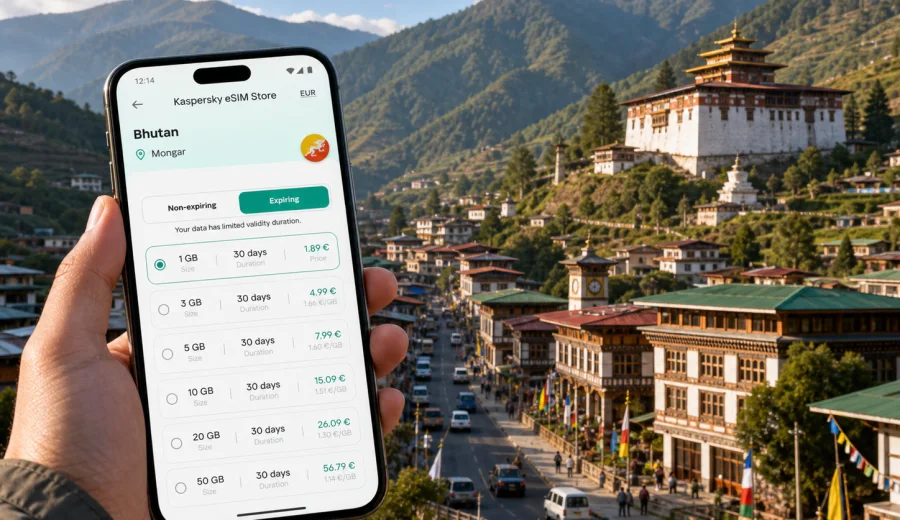
Mongar eSIM guide: mobile connection and internet for a trip to eastern Bhutan
Mongar is a practical hill town in eastern Bhutan, used by travelers for regional work, hospital visits, government offices, hotel stops, family trips, and onward routes toward Trashigang, Lhuentse, Bumthang, and central Bhutan. It is not a city where every task happens inside one compact tourist district. You may arrive after a long mountain drive, check into a guesthouse on a slope, meet colleagues near the town center, or leave again early the next morning.
For that kind of trip, mobile internet is not only about browsing. It helps you confirm a hotel entrance, message a driver, open a booking, share a location, check the next road segment, and keep work or family contacts updated. An eSIM can make this easier because you can prepare mobile data before you reach Mongar, without looking for a physical SIM card during a tired arrival.
This guide focuses on the city experience: arrival, local movement, hotels, short stopovers, business visits, navigation, and trips from Mongar to other parts of Bhutan. The country matters because the eSIM destination is Bhutan, but the planning advice stays centered on how you actually move through Mongar.
Why mobile internet matters in Mongar
Mongar is smaller than Thimphu, but it is important for eastern Bhutan. Travelers often use it as a working base, an overnight stop, or a connection point between districts. The town sits in hilly terrain, so a short distance on a map can involve a climb, a curved road, or a less obvious pickup point.
Mobile internet helps with everyday travel tasks:
- finding your hotel or guesthouse after a long drive;
- sharing a precise location with a taxi driver, guide, colleague, or host;
- checking weather before a road journey;
- opening booking confirmations and saved documents;
- using maps around steep streets and side roads;
- messaging family or work contacts after arrival;
- translating short practical phrases when needed;
- joining a call or opening a document during a business visit.
Hotel Wi-Fi can be useful once you are settled, but it does not help before check-in, during a taxi pickup, or while you are moving between meetings. A prepared eSIM gives you a mobile data option for those gaps.
Where Mongar trips create data needs
Mongar trips often combine city errands with road travel. Your data plan should cover the moments around the town as well as the stay itself.
| Situation in Mongar | Why mobile data helps | Planning tip |
|---|---|---|
| Arrival by road | Hotel address, driver messages, family updates | Install the eSIM before the final travel day |
| Hotel check-in | Booking details, maps, reception contact | Save key documents offline too |
| Business visit | Email, chat, calls, shared files | Choose more data if calls are likely |
| One-night stop | Food search, route checks, next pickup time | Keep the plan active until departure |
| Regional route | Navigation, road timing, location sharing | Count the full route, not only Mongar |
| Local errands | Offices, hospital, market, taxi points | Use location pins instead of vague directions |
The value of eSIM in Mongar is control. You can make small decisions quickly when the route, meeting point, or timing changes.
Arrival in Mongar: prepare before the mountain road
Many visitors reach Mongar by road. The journey can be scenic and long, with winding sections and changing weather. After several hours in a vehicle, the first internet tasks are usually simple: tell someone you arrived, confirm tomorrow's plan, find your accommodation, and check whether any messages require a reply.
Before you leave for Mongar, prepare this checklist:
- Install your eSIM while you still have stable Wi-Fi.
- Download offline map areas for Mongar and the road corridor.
- Save hotel names, addresses, and contact details outside email.
- Keep digital copies of bookings, insurance, and travel documents available offline.
- Check that your phone supports eSIM and is not locked to one operator.
- Decide whether you need data only in Bhutan or for a wider route.
Offline preparation still matters. eSIM supports mobile data where service is available, but mountain terrain and indoor spaces can affect signal. A reliable travel setup combines mobile data with saved information.
Moving around the town
Mongar movement can be more vertical than it looks. A hotel, office, hospital entrance, restaurant, or taxi point may be close in distance but not on the same level of the town. Mobile internet helps you avoid unnecessary walking and makes coordination easier.
Use your data connection to:
1. Open the route before leaving your hotel.
2. Share a location pin with a driver or host.
3. Keep messaging available while waiting at a pickup point.
4. Check whether a place is reachable before walking uphill.
5. Use translation or search for quick practical questions.
If you are in Mongar for work, keep battery and data in mind together. Location sharing, email, and messaging can drain a phone faster than casual sightseeing. A power bank is useful on days with multiple appointments or a long onward drive.
Hotels and guesthouses: why eSIM helps before Wi-Fi
Hotel Wi-Fi is helpful after check-in, but the awkward moments often happen before that. You may arrive in the evening, need to identify the correct entrance, or message reception from the road.
With an eSIM already installed, you can use mobile data for:
- opening booking confirmations on arrival;
- messaging your hotel with an estimated arrival time;
- checking the exact entrance or road approach;
- contacting your group if rooms are in different buildings;
- arranging a taxi or pickup for the next morning;
- switching to a work chat before Wi-Fi is available.
This is useful if you want to keep your regular SIM in the phone for your usual number while using the eSIM for travel data, where your device settings allow it.
Choosing an eSIM data plan for Mongar
Choose a plan by behavior, not only by destination name. Two travelers can both visit Mongar and need very different data amounts.
| Traveler profile | Typical use | What to prioritize |
|---|---|---|
| Stopover traveler | Maps, messages, hotel details | Modest data and short validity |
| Business visitor | Email, calls, documents, calendar changes | More data and enough validity for delays |
| Regional traveler | Route checks, location sharing, photo backup | Validity for the full eastern Bhutan route |
| Family visitor | Messaging, video calls, local coordination | More data if video calls are frequent |
| Offline planner | Saved maps plus occasional browsing | Smaller data amount may be enough |
If you continue from Mongar to Trashigang, Lhuentse, Bumthang, or another district, include those days in your calculation. A plan that looks large for one city can be reasonable for a longer route through Bhutan.
How Kaspersky eSIM Store fits into the trip
Kaspersky eSIM Store is an app and website where you can quickly choose, arrange, and activate an eSIM with a suitable mobile data plan for an international trip. For a Mongar article, the correct destination link is Bhutan, because Mongar belongs to Bhutan and city pages use the country plan page.
The practical flow is:
1. Check that your device supports eSIM.
2. Choose Bhutan as the destination.
3. Compare available data amounts, validity periods, and prices.
4. Arrange the plan before departure or while you have reliable Wi-Fi.
5. Install the eSIM on your compatible device.
6. Set the eSIM as the data line when you are ready to use it.
If you are preparing specifically for Mongar, you can choose an eSIM plan for your trip to Bhutan before the long road segment begins. This lets you handle installation calmly at home, at an airport, or in a hotel with stable Wi-Fi instead of during arrival.
Kaspersky eSIM Store should be understood as a way to prepare mobile internet for travel through an eSIM plan. It is not a mobile network operator, and the details of coverage, data amount, validity, and activation depend on the selected plan.
Device compatibility: check first
Not every phone or tablet supports eSIM. Some devices have regional versions, operator locks, or settings that affect installation. Before arranging a plan, check your device and confirm that it supports eSIM for travel.
Your compatibility check should include:
- the exact phone model, not only the brand;
- whether the device is unlocked for mobile network use;
- whether your phone can keep your regular SIM and travel eSIM active as expected;
- whether the operating system is updated;
- where to select the eSIM as the mobile data line.
This is worth doing before the Mongar travel day. If installation fails during a long road journey, fixing it later can be inconvenient.
Installing an eSIM before a Mongar trip
Install the eSIM while you have stable Wi-Fi and enough time to follow the instructions. Use the Android eSIM installation guide or the iOS eSIM installation guide depending on your device.
A practical setup sequence:
1. Arrange the plan while connected to reliable Wi-Fi.
2. Install the eSIM before the long travel day.
3. Name the line clearly, such as "Bhutan travel data".
4. Keep your regular SIM settings unchanged unless you understand the impact.
5. Set the eSIM as the mobile data line when appropriate.
6. Check whether data roaming must be enabled for that eSIM profile.
7. Open a map or messaging app to confirm data is working.
Do not delete an installed eSIM profile unless you are sure you no longer need it and understand the plan conditions. Some profiles cannot simply be moved to another device after activation.
Keeping data use under control
Maps and messaging are usually manageable. The bigger surprises are automatic updates, cloud photo backup, high-resolution media in chats, and background sync after a long offline period.
To make your Mongar data plan last longer:
- turn off automatic app updates over mobile data;
- pause cloud photo and video backup until Wi-Fi is available;
- download offline maps before the trip;
- reduce video quality in meeting or streaming apps;
- use Wi-Fi for large document uploads;
- check which SIM is selected for mobile data;
- restrict background data for apps you do not need on the road.
This matters on eastern Bhutan routes, where you may want data for several travel days rather than one evening in town.
Business trips and working days
Mongar can be part of public-sector, healthcare, education, development, construction, or regional coordination work. The town may be quiet, but business travel still needs dependable communication.
Mobile internet supports:
- calendar changes while you are in transit;
- messages with a driver, host, or local office;
- opening shared documents before a meeting;
- sending updates after site visits;
- using maps between a hotel, office, hospital, and restaurant;
- keeping two-factor authentication available for work tools.
If you expect video calls, choose more data than you would for a simple stopover. Also check whether your workplace tools require SMS verification. Travel eSIM plans for mobile internet usually do not include a standard phone number, voice calls, or SMS unless the selected plan states otherwise. For calls and messages, many travelers use internet-based apps.
Short stopovers in Mongar
A one-night stay still benefits from prepared mobile data. The tasks are concentrated: arrive, find the hotel, confirm the next morning's pickup, eat, message family or colleagues, and check the route ahead.
For a short stop, keep this list simple:
- save the hotel location offline and online;
- confirm pickup time in writing;
- charge the phone overnight;
- avoid large media downloads on mobile data;
- keep the eSIM active until you no longer need navigation;
- keep the next route visible before leaving town.
If your Bhutan trip is longer than the Mongar stop, choose plan validity for the whole journey.
Trips from Mongar to nearby districts
Mongar is often a connection point for eastern Bhutan. You may continue toward Trashigang, visit routes toward Lhuentse, return toward Bumthang, or use the town as an overnight base. Travel time depends on terrain and conditions, so mobile internet helps you coordinate rather than guess.
Use data for:
- checking the next accommodation before departure;
- confirming pickup time and route expectations;
- sharing your location during a long drive;
- updating someone if arrival time changes;
- keeping emergency contacts and insurance details accessible;
- checking messages at rest stops.
Still download maps and key documents. In mountain regions, the best approach is to be online when possible and prepared when signal varies.
Common mistakes to avoid
| Mistake | Why it causes trouble | Better approach |
|---|---|---|
| Waiting until arrival to set up data | You may be tired or away from stable Wi-Fi | Install the eSIM before the travel day |
| Depending only on hotel Wi-Fi | You need internet before check-in and while moving | Keep mobile data ready |
| Choosing data only for Mongar town | The route may include several districts | Count the full itinerary |
| Ignoring compatibility | Unsupported or locked phones may not install eSIM | Check the exact device first |
| Leaving backups on mobile data | Photos and apps can use data quietly | Restrict background data |
| Expecting a phone number | Many travel eSIM plans are data-only | Use internet apps unless the plan says otherwise |
FAQ: eSIM and mobile internet in Mongar
Is an eSIM useful if my hotel has Wi-Fi?
Yes. Wi-Fi helps after you connect to it. An eSIM can support maps, messages, route checks, and arrival coordination before and between Wi-Fi locations.
Should I choose a Mongar-specific plan?
Choose Bhutan as the destination, then decide the data amount and validity based on your stay in Mongar and any onward travel.
Can I use eSIM for normal calls and SMS?
Travel eSIM plans for mobile internet usually focus on data. They do not include a standard phone number, voice calls, or SMS unless the selected plan says so. You can use internet-based calling and messaging apps through mobile data.
When should I install it?
Install the eSIM before departure or before the long road segment, while you have reliable Wi-Fi. Activation timing depends on the plan instructions.
How much data do I need?
For maps, messaging, hotel details, and light browsing, a modest plan may be enough. Add more data for video calls, photo backup, document uploads, or a longer eastern Bhutan route.
What if signal changes on the road?
Keep offline maps and saved documents ready. eSIM helps with mobile data where service is available, but mountain routes can still have changing signal conditions.
Prepare mobile internet for Mongar before you travel
Mongar is manageable when you prepare well. The town itself is practical and compact, but the journey around it can include long drives, steep streets, changing schedules, and meeting points that are easier to handle with mobile data.
Before the trip, check your device, compare data amounts and validity, install the eSIM on stable Wi-Fi, and keep offline backups for the road. When you are ready to plan mobile internet for Bhutan, you can prepare an eSIM plan for your Mongar trip through Kaspersky eSIM Store and arrive with a clearer connectivity setup.