
Travel connectivity guide
Mongo eSIM: mobile internet for Chad travel
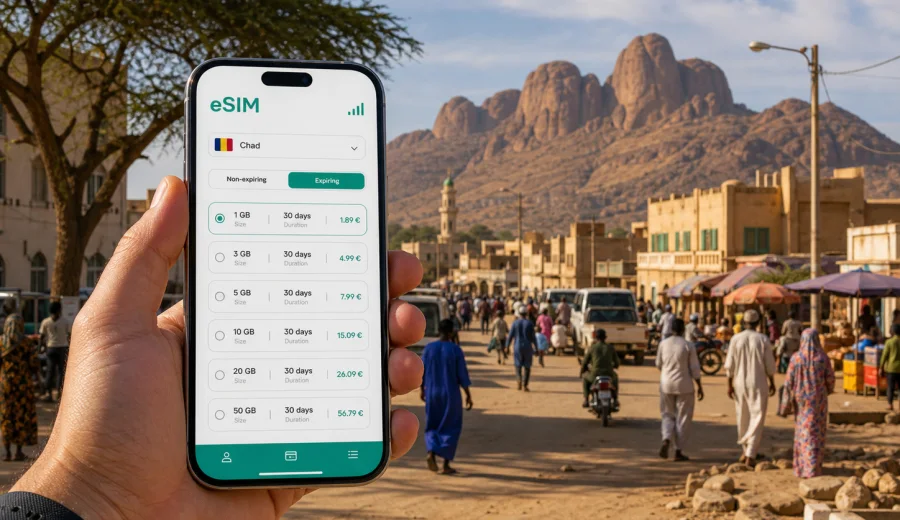
Mongo eSIM: mobile connection and internet for a trip to Chad
Mongo is a practical stop for travelers crossing central Chad, working in the Guera region, visiting local partners, or using the town as a base before moving toward smaller communities. It is not a city where you want to solve mobile internet at the last minute. Routes can be long, distances between reliable Wi-Fi points can feel larger than they look on a map, and many useful tasks depend on a phone: confirming a hotel, sharing your location with a driver, checking a road plan, translating a short message, or sending documents after a meeting.
An eSIM helps you prepare mobile internet before you reach Mongo. Instead of searching for a physical SIM card after arrival, you can set up a digital SIM profile on a compatible phone, choose a data plan for Chad, and use mobile data for everyday travel tasks.
This guide focuses on Mongo: arrival, local movement, hotels, business days, stopovers, and onward trips from the city.
Why mobile internet matters in Mongo
Mongo is a regional center rather than a dense capital-city environment. For travelers, that changes the way a phone is used. You may not be jumping between metro stations or airport lounges, but you may need connection in moments when there is no convenient desk to ask, no printed timetable, and no predictable hotel Wi-Fi.
Mobile data is useful in Mongo for:
- confirming arrival times with a driver or local host;
- checking saved maps and route alternatives before leaving town;
- using messaging apps when voice calls are not included in a data plan;
- keeping travel documents, booking confirmations, and meeting notes accessible;
- translating basic phrases when visiting shops, offices, or guesthouses;
- coordinating onward road travel across the Guera region;
- sharing live location during pickups, site visits, or evening returns.
The main value of preparing an eSIM is control. You can review the destination, amount of data, validity period, and price before the trip. Then, when your phone connects to a local mobile network according to the selected plan conditions, you are not dependent only on roaming, public Wi-Fi, or finding a shop at the right time.
Arrival scenarios: getting online before you reach town
Many visitors to Mongo enter Chad through N'Djamena and continue by road, while others travel between regional towns. The moment you need mobile internet may come before you are physically in Mongo: during the drive, at a pickup point, or while arranging the next leg of the journey.
Common arrival scenarios:
| Scenario | Why data helps | What to prepare |
|---|---|---|
| Road transfer from N'Djamena | You may need to update pickup times, check progress, or share location | Install eSIM before departure and keep offline maps ready |
| Regional work visit | Schedules can change during the day | Keep messaging apps, email, and document access available |
| Short stop in Mongo | You have limited time to find lodging or transport | Save hotel details and activate data before local movement |
| Onward travel from Mongo | Routes may need confirmation close to departure | Check traffic notes, contacts, and map pins while still in town |
An eSIM does not replace good trip planning. In Chad, it is still wise to download offline maps, keep important phone numbers saved locally, and carry written addresses. The eSIM simply gives you another layer of flexibility when mobile data is available through the selected tariff and local network conditions.
Local movement: maps, pickups, and daily errands
In Mongo, a travel day may include short rides across town, walking between offices and markets, or moving between a guesthouse and a meeting point. The details matter. A driver may identify a place by a local landmark rather than a street address. A hotel may share a pin that is easier to understand on a map. A colleague may change the meeting location after you have already left.
Use mobile internet in Mongo for small, practical tasks:
1. Save map pins for your hotel, main meeting point, and pickup location.
2. Send your location before entering an unfamiliar area.
3. Keep a local contact available in your messenger.
4. Check the route before leaving Wi-Fi.
5. Take screenshots of key directions in case data is temporarily weak.
This is where eSIM preparation feels less like a travel extra and more like a simple habit. You can land or arrive with the data profile already installed, then activate it according to the plan instructions when you are ready to use mobile data.
Hotels, guesthouses, and Wi-Fi expectations
Hotel Wi-Fi in regional cities can vary. It may be suitable for basic messages at one property and unreliable at another. It may work well in the lobby but not in the room. Power, router placement, and the number of connected guests can all affect the experience.
For a Mongo stay, treat hotel Wi-Fi as helpful but not as your only connection. Mobile internet is useful when you need to:
- send a file before leaving for a meeting;
- check a booking confirmation outside the hotel;
- use maps while looking for the property;
- stay reachable during dinner or local errands;
- keep a backup connection if Wi-Fi is slow at peak hours.
If your trip includes remote work, video calls, large uploads, or constant cloud sync, plan carefully. eSIM data plans usually have a defined traffic allowance and validity period. A light traveler may need only messaging and maps, while a field team or business traveler may need a larger package or stricter data discipline.
Choosing data for Mongo: match the plan to the trip
The best data amount depends on what you actually do in town. Do not choose a plan only by the number of days. A two-day work visit with maps, email, and document exchange can use more data than a week of light messaging.
Use this simple estimate:
| Trip style in Mongo | Typical phone use | Data approach |
|---|---|---|
| Short stopover | Messages, maps, hotel confirmation | Smaller package, offline maps downloaded |
| Business visit | Email, files, ride coordination, messaging | Medium package with enough validity for delays |
| Field or NGO-style movement | Photos, documents, location sharing, team chats | Larger package and strict app controls |
| Slow regional travel | Navigation, weather checks, onward planning | Package with validity that covers the full route |
Before you choose a tariff, check whether your phone supports eSIM and whether it is unlocked for mobile data profiles. You can use the internal compatibility window to check your device before buying. This step is important because eSIM support depends on the exact phone model, region, and device settings.
A practical data checklist before leaving for Mongo
Prepare your phone while you still have stable Wi-Fi:
- update your operating system if needed;
- download offline maps for Mongo and the wider route;
- save your hotel address, driver contact, and meeting locations;
- turn off automatic video downloads in messaging apps;
- pause cloud photo backup on mobile data;
- save passport, visa, insurance, and booking files for offline access;
- install the eSIM profile before departure if the plan instructions allow it;
- read when the data plan validity starts, because this can differ by tariff.
This checklist is especially useful if you are moving from the airport or capital directly toward the Guera region. The less you need to configure on the road, the easier it is to focus on arrival, safety, and timing.
Where Kaspersky eSIM Store fits into the trip
Kaspersky eSIM Store is an app and website where you can choose, arrange, and activate an eSIM with a suitable mobile data plan for an international trip. For Mongo, the relevant destination is Chad rather than a separate city page inside the product. You choose the country, compare available data amounts and validity periods, and follow the installation steps for your device.
If you want to prepare before leaving, you can choose a mobile internet option for a trip to Mongo in Chad and keep the plan ready for the moment you need mobile data. Review the traffic allowance, validity period, destination, price, and activation rules before checkout.
An eSIM plan is usually focused on mobile data. It may not include a regular phone number, voice calls, or SMS unless those features are clearly stated in the selected tariff conditions. For calls and short updates, many travelers use internet-based messengers over mobile data.
Installation: do it before the busy part of the journey
The best time to install an eSIM is not when you are standing with luggage, trying to find your driver, or preparing to leave Mongo for another road segment. Install it while you have stable Wi-Fi and enough time to read the steps calmly.
For setup help, follow the official device instructions: Android installation guide or iOS installation guide. The exact screens can vary by phone model and operating system version, but the general workflow is straightforward:
1. Choose the destination and a suitable data plan.
2. Complete the purchase process.
3. Install the eSIM profile using the provided instructions.
4. Label the eSIM clearly, for example "Chad data".
5. Set mobile data to the eSIM when you are ready to use it.
6. Enable data roaming for the eSIM if the instructions or device settings require it.
7. Keep your primary SIM active only if you need it for calls, SMS, or banking verification.
Do not delete the eSIM profile after installation unless you are sure you no longer need it. Some profiles cannot simply be moved to another device or reinstalled in the same way after activation.
Business trips and field visits
Mongo can be part of a practical work itinerary: meetings with local organizations, logistics checks, regional coordination, supply visits, or project travel. In that context, mobile internet is not only for convenience. It helps keep the day organized and reduces the number of tasks you must solve at a hotel desk or with a driver waiting outside.
For business travelers, a useful phone setup includes:
- calendar and meeting documents available offline;
- messaging apps pinned for priority contacts;
- cloud files downloaded before leaving strong Wi-Fi;
- a second authentication method that does not depend only on SMS;
- a power bank for long days outside the hotel;
- a clear eSIM label so you do not confuse personal and travel data lines.
Short stopovers in Mongo
For a stopover, the goal is simple: arrive, find the right place, stay reachable, and leave without wasting time. You may not need a large data package, but you do need mobile data at the moments when decisions happen.
Use mobile data first for messages, maps, hotel confirmation, and onward travel checks. Save entertainment, heavy uploads, and app updates for Wi-Fi.
Road trips from Mongo
Mongo is often relevant because of movement beyond the city. Travelers may use it as a base for regional work or as a stop between larger destinations. On these routes, mobile data can be intermittent depending on terrain, distance, local network conditions, and the selected plan, so keep offline tools ready.
Before leaving town:
- tell someone your route and estimated arrival time;
- save offline maps for the next segment;
- download any documents you may need at checkpoints or meetings;
- charge your phone and power bank;
- make sure your eSIM is selected for mobile data;
- keep a written version of key addresses and contacts.
Common mistakes to avoid
The most common errors are buying before checking eSIM compatibility, installing the profile on the wrong device, deleting it after activation, leaving photo backup active on mobile data, assuming data includes voice calls or SMS, and waiting until the road transfer to read setup instructions. Most problems are preventable if you prepare while you still have time, Wi-Fi, and a calm environment.
Quick FAQ
Is eSIM useful for Mongo if I already have roaming?
Yes. Compare your operator's roaming conditions with the eSIM data plan conditions, especially data volume, validity period, and cost. Keep your primary SIM active if you need your regular number.
Can I use eSIM for calls in Mongo?
Most travel eSIM plans are mainly for mobile internet. They may not include a standard phone number, voice calls, or SMS unless the tariff says so. Messaging and calling apps can usually work over mobile data.
Should I install the eSIM before arriving in Chad?
It is usually better to install the profile before the busy travel moment, using stable Wi-Fi. Read when validity begins before switching it on.
How much data do I need?
For light maps and messaging, a smaller package may be enough. For work documents, frequent location sharing, hotspot use, or a longer route from Mongo, choose more data and manage background usage carefully.
What if mobile data is weak outside Mongo?
Use offline maps, saved documents, and written contact details as backup. Mobile connection depends on local networks, terrain, device settings, and plan conditions.
Final preparation before you go
Before your trip to Mongo, make your phone part of the travel plan. Check eSIM compatibility, choose a data package that fits your route, install the profile on stable Wi-Fi, save offline maps, and adjust background data settings. This preparation is simple, but it can make arrival, local movement, hotel coordination, and onward road travel much smoother.
To get ready, choose an eSIM data plan for Chad in Kaspersky eSIM Store, review the tariff details, and activate it according to the instructions for your device and travel timing.