
Travel connectivity guide
Mongolia eSIM: mobile internet travel guide
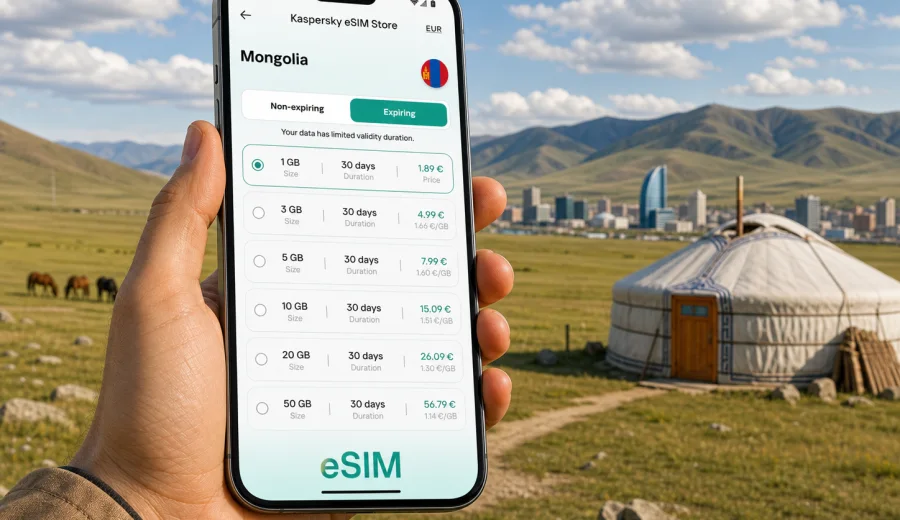
eSIM in Mongolia: mobile connection and internet for your trip
Mongolia is a country where mobile internet can shape the whole travel experience. The distance between places is large, routes can change with weather, and many useful travel tasks now depend on a phone: maps, hotel messages, ride apps, bank notifications, translation, boarding passes, and calls through messengers. An eSIM helps you prepare mobile connection before the trip without looking for a physical SIM card after arrival.
This guide explains how to use eSIM for mobile internet in Mongolia, how to choose a suitable data plan, what to check before purchase, and how to avoid common setup mistakes. It is written for travelers who want a practical plan for staying online in Ulaanbaatar, during transfers from Chinggis Khaan International Airport, on trips to Terelj National Park, the Gobi Desert, Kharkhorin, Khuvsgul Lake, or other routes across the country.
An eSIM is a digital SIM profile built into a compatible smartphone or tablet. Instead of inserting a plastic SIM card, you install a mobile data profile and select it in your device settings. In the context of Kaspersky eSIM Store, eSIM is used for mobile internet in international travel. It usually does not include a regular local phone number, voice calls, or SMS unless the selected plan says otherwise. For calls and messages, you can use internet-based apps.
Why eSIM is useful for Mongolia
Mongolia is not a destination where you should rely only on finding Wi-Fi whenever you need it. Hotels, cafes, airports, and guesthouses may offer Wi-Fi, but your most important online moments often happen between those places: checking a pickup point, confirming a tour start time, translating a sign, opening a map, or messaging a driver.
eSIM can be useful because it lets you:
- prepare mobile internet before you leave home;
- avoid searching for a physical SIM card counter after a long flight;
- keep your primary SIM in the phone for bank alerts and important messages;
- choose a data plan by traffic volume and validity period;
- use maps and messengers without depending on public Wi-Fi;
- manage the eSIM profile from your phone settings and the app or website.
The main advantage is control. You can look at the data amount, validity period, destination, and price before choosing a plan. That is especially helpful for Mongolia, where a short city stay and a long overland route need very different amounts of data.
Mobile internet scenarios in Mongolia
Different trips create different data needs. A traveler who spends three days in Ulaanbaatar will not use mobile internet in the same way as someone crossing several regions with a guide. Before choosing an eSIM plan, think about the real situations where you will need your phone.
| Travel scenario | Typical online tasks | What to consider |
|---|---|---|
| Arrival in Ulaanbaatar | maps, taxi or transfer messages, hotel check-in, translation | You may want data ready before landing or soon after arrival. |
| Business trip | email, calendar, messenger calls, document access | Choose enough data for daily work and check hotspot rules. |
| Short city break | navigation, bookings, restaurants, social apps | A smaller data package may be enough if you use hotel Wi-Fi carefully. |
| Gobi or steppe tour | offline maps, guide communication, photo backup when available | Coverage can vary outside towns, so download key data in advance. |
| Long multi-region route | messaging, route changes, weather checks, banking | Longer validity and more data are usually more convenient. |
For remote routes, mobile data should not be your only safety tool. Download offline maps, save important addresses, keep emergency contacts available offline, and agree on meeting points with your guide or host. eSIM is useful for staying online where service is available, but no mobile plan can replace good travel preparation in sparsely populated areas.
How much data you may need
There is no single correct amount of data for Mongolia. Your usage depends on trip length, habits, and how often you can use trusted Wi-Fi. Instead of choosing randomly, estimate the tasks you will perform every day.
| Data use level | Suitable for | Examples |
|---|---|---|
| Light | short trips, careful Wi-Fi use | messaging, maps, ride or transfer updates, email checks |
| Medium | active travel days | navigation, translation, browsing, social media, booking changes |
| Heavy | work or media-heavy travel | video calls, large file sharing, hotspot use, frequent photo backup |
Practical ways to reduce data use:
- download offline maps before traveling outside Ulaanbaatar;
- save hotel addresses, booking confirmations, and guide contacts offline;
- turn off automatic app updates over mobile data;
- disable automatic cloud photo upload unless you need it;
- use lower quality for video calls when the connection is limited;
- monitor data usage in phone settings during the trip.
If you are traveling with a group, avoid assuming one phone can cover everyone through hotspot all day. Hotspot use can consume data quickly and drain the battery. It is better to treat hotspot as a temporary backup unless the plan conditions and your battery setup support heavier use.
How to choose an eSIM plan for Mongolia
When comparing eSIM options for Mongolia, focus on the details that affect your route rather than on the largest number on the screen. A plan is only suitable if it matches your destination, device, trip length, and data habits.
Use this checklist:
- Destination: confirm that the plan is intended for Mongolia or for a region that includes Mongolia.
- Validity: match the plan duration to your travel dates with a small buffer.
- Data amount: choose enough traffic for navigation, messaging, work, and backup tasks.
- Activation rules: check when the validity period starts and whether you need to install before travel.
- Device support: make sure your smartphone or tablet supports eSIM and is not locked to another operator.
- Hotspot: check whether tethering is allowed if you plan to connect a laptop or another phone.
- Top-up options: see whether you can add more data if your trip changes.
Kaspersky eSIM Store is an app and website where you can quickly choose, set up, and activate an eSIM with a suitable mobile data plan for an international trip. For this destination, you can view mobile internet options for Mongolia and compare the available plan conditions before you travel.
This is a good moment to check your itinerary. If Mongolia is the only country on your route, a country plan may be the clearest choice. If you are also traveling through nearby countries, compare whether a regional or global option better fits the full journey. The best plan is the one that matches your actual route, not just the first country where you land.
Device compatibility: check before you buy
Before purchasing any eSIM plan, confirm that your device supports eSIM. Many recent iPhone, Samsung Galaxy, Google Pixel, and some other devices support eSIM, but support varies by model, region, and carrier lock status. Some phones sold in certain markets may have different SIM capabilities from similar-looking models sold elsewhere.
Start with three checks:
- Does your device model support eSIM?
- Is the device unlocked for use with another mobile profile?
- Do you know where eSIM settings are located on your phone?
You can check your device before choosing a plan. This step is important because an eSIM profile is tied to device support and setup rules. If your device cannot use eSIM, you may need another connectivity option for the trip.
If you travel with two devices, decide in advance which device should hold the eSIM. A phone used for maps, messengers, and banking is often the best choice. A tablet may be useful for work, but it is less convenient for navigation and transport updates unless you carry it all day.
When to install and activate eSIM
For most travelers, the practical approach is to buy and install the eSIM while you still have a stable internet connection, then activate mobile data for the eSIM profile when it is appropriate according to the plan instructions. Do not wait until you are in a taxi queue, on a rural road, or away from Wi-Fi.
A simple setup flow looks like this:
1. Check that your phone supports eSIM and is unlocked.
2. Choose a Mongolia plan with a suitable amount of data and validity.
3. Complete the purchase and open the eSIM details.
4. Install the eSIM profile by following the instructions on your device.
5. Name the eSIM profile clearly, for example "Mongolia data".
6. Keep your primary SIM for calls or bank messages if you need it.
7. Select the eSIM profile for mobile data when you are ready to use it.
8. Enable data roaming for the eSIM profile if the instructions require it.
For installation guidance, use the official step-by-step pages for Android setup and iOS setup. The exact screen names can vary by device model and operating system version, so follow the instructions shown for your phone as well.
Using eSIM beyond the capital
Mongolia rewards preparation. In Ulaanbaatar and other populated areas, your mobile internet needs may feel similar to other destinations: maps, rides, restaurant searches, messaging, and payments. Outside cities, the pattern changes. You may spend long periods on the road, move through areas with limited service, or stay in places where Wi-Fi is basic.
For trips to Terelj, the Gobi Desert, Khuvsgul Lake, Kharkhorin, or multi-day steppe routes, use eSIM as one layer in a broader communication plan:
- download maps and route notes before leaving the city;
- ask your guide where mobile service is usually available;
- save key contacts and addresses offline;
- avoid using all data on entertainment early in the trip;
- keep a charged power bank for long driving days;
- tell family or colleagues that replies may be delayed in remote areas.
This balanced approach prevents disappointment. eSIM can make travel smoother where mobile service is available, but Mongolia's geography means that offline preparation still matters.
eSIM compared with roaming, Wi-Fi, and a local SIM
Travelers usually compare four ways to stay online: international roaming, public Wi-Fi, a local physical SIM card, and eSIM. Each option has a place, but they solve different problems.
| Option | Advantages | Possible limits |
|---|---|---|
| International roaming | Uses your current SIM and number | Costs can be high or unclear depending on your home plan. |
| Public Wi-Fi | Useful in hotels, airports, and cafes | Not always available when you need maps, transport, or messages. |
| Local physical SIM | Can be useful for longer stays | Requires finding a sales point and changing or adding a SIM card. |
| eSIM | Can be prepared in advance and used without a plastic SIM | Requires a compatible unlocked device and careful setup. |
For many visitors, eSIM is the most convenient middle path: it gives you mobile internet without replacing your main SIM card and without relying only on Wi-Fi. It may also help control travel connectivity costs because the plan details are visible before purchase. Still, compare the options against your own roaming package and trip length before deciding.
FAQ about eSIM for Mongolia
Can I use eSIM for mobile internet in Mongolia?
Yes, if your destination plan includes Mongolia and your device supports eSIM. Check the plan conditions, install the profile correctly, and use the eSIM for mobile data according to the setup instructions.
Does eSIM include a Mongolian phone number?
Usually, travel eSIM plans are focused on mobile data. They normally do not include a regular local phone number, voice calls, or SMS unless the plan details clearly say so. For calls and messages, use internet-based apps.
Should I install eSIM before arriving in Mongolia?
It is usually more convenient to install eSIM while you still have stable Wi-Fi. Activation rules can differ by plan, so read when the validity period starts and follow the instructions for your device.
Will eSIM work in remote areas?
Mobile service can vary by location, terrain, and local network conditions. eSIM is useful where service is available, but for remote routes you should download maps and key travel information before leaving populated areas.
Can I keep my usual SIM active?
In many dual SIM phones, you can keep your primary SIM active for calls or messages and use eSIM for mobile data. Check your device settings carefully so you do not accidentally use your home roaming data.
What should I do if I run out of data?
Check your account or app for available options. Depending on the selected plan conditions, you may be able to add more data or choose another suitable plan. It is better to monitor usage before the balance reaches zero.
Quick planning summary
For a short Mongolia trip, prepare eSIM before departure, download offline maps, and choose a plan that covers your city days and transfers. For longer routes, add more data, check validity carefully, and keep essential information offline. For remote travel, treat mobile internet as helpful but not guaranteed in every location.
The most important decisions are:
- choose a plan that matches Mongolia or your full regional route;
- make sure the validity period covers your whole stay;
- check eSIM support and carrier lock status before purchase;
- install while you have reliable internet;
- keep your home SIM settings under control;
- avoid heavy background data use during the trip.
Prepare your Mongolia eSIM before you travel
A little preparation can make the first day in Mongolia much easier. With Kaspersky eSIM Store, you can choose the destination, review available data plan conditions, install the eSIM on a compatible device, and manage mobile internet for your trip through the app or website.
Before you pack, check your device, estimate your data needs, and choose an eSIM plan for your trip to Mongolia. That gives you a clearer mobile connection plan before arrival and helps you spend less time looking for Wi-Fi or a physical SIM card when the trip has already started.