Travel connectivity guide
Mongu eSIM: Mobile Internet in Zambia
Mongu eSIM for Mobile Connection and Internet: A Practical Zambia Travel Guide
Mongu is a regional town in western Zambia where a useful mobile connection can make arrival, local transport and day-to-day planning easier. A data eSIM can help you check maps, contact your accommodation, confirm a transfer or message colleagues without changing the physical SIM in your phone. It is still important to plan around the realities of a smaller destination: coverage depends on the local network and exact location, and a working data plan does not replace offline directions, confirmed transport or a local voice number.
Mongu sits beside the Zambezi floodplain and serves as a practical base for travel in Western Province. Visitors may come for work, to visit family, to continue towards Kalabo or to learn about the Lozi cultural landscape associated with the Barotse floodplain and the Kuomboka ceremony. These are not all trips through a dense urban grid. A little preparation before leaving Lusaka or another major hub can save time when you arrive.
What to expect from mobile internet in Mongu
Think of mobile data in Mongu as a useful tool, not a guarantee that every service will work everywhere. In town, use it for maps, accommodation messages, email and transport coordination. Outside town or near water, signal can change; a good hotel connection does not prove the same network will work on the next leg.
Travel eSIM options may connect through a named Zambian network. Check the exact plan before buying. A package labelled for Zambia does not promise identical service in Mongu, on the road to Limulunga, or farther west. Coverage depends on the provider’s terms and local infrastructure.
| Travel task | How data can help | Sensible backup |
|---|---|---|
| Meeting a driver | Send a message while data is available | Agree on a meeting point and save the number |
| Finding accommodation | Open a map and saved pin | Download an offline map and keep the address in writing |
| Moving around town | Check route options and contact a taxi | Ask your host which transport suits the trip |
| Travel beyond town | Recheck route details before departure | Confirm road and vehicle conditions locally |
| Work messages | Use messaging or calls where bandwidth allows | Save key files offline |
An eSIM plan is usually designed for mobile data. Unless its terms say otherwise, do not expect a Zambian phone number, ordinary calls or SMS. Keep your home SIM available if your device supports dual SIM, and check your operator’s roaming charges.
Arriving in Mongu: plan the final connection
Mongu has a provincial aerodrome listed by Zambia Airports Corporation Limited, but that does not confirm that an airline flies on your travel date. Check schedules with the airline or charter operator. Intercity buses also serve Mongu; confirm departure details shortly before travelling.
Save the bus terminal, accommodation and appointment location before departure. Agree on a specific meeting point rather than relying on a live map pin. A phone may connect only after you install and select the eSIM and register on a supported local network; this can take a few minutes and may require Wi-Fi.
Mongu’s transport includes buses, minibuses and car taxis, with a bus terminus in town. Taxis also serve residential areas and routes toward places such as Sefula, Namushakende, Muoyo and Limulunga Royal Village. Ask your host which option suits your destination, and confirm the fare and pickup point before setting off.
A simple arrival routine
- Save your destination. Keep the accommodation name, address, phone number and map pin available offline.
- Confirm your pickup. Agree on a meeting point and how the driver will identify you.
- Select your data line. Choose the travel eSIM in your phone’s mobile settings.
- Wait for registration. Allow a few minutes, then check that the eSIM is active.
- Test a basic task. Open a simple webpage before relying on navigation.
- Keep a fallback. If data does not connect, use Wi-Fi when available and contact your host.
You do not need to remove your home SIM to install a travel eSIM. Menu wording varies by phone, so follow the instructions for your exact device.
Choosing a plan for Mongu and Western Province
An eSIM destination page is a starting point for checking a Zambia plan; it is not a promise of a specific signal around every neighbourhood or attraction. Before selecting a package, compare its stated country or region, data allowance, validity period, price, activation conditions, supported network and hotspot rules. Confirm whether validity starts at installation, first network connection or another event stated in the plan terms.
Estimate your usage from the activities you actually expect. Text messages, map searches and email generally use less data than video calls, photo uploads, cloud backups and streaming. If you have a work trip, include laptop tethering only if the plan permits hotspot use and the phone supports it. Choose enough data to leave a margin for route changes, but do not pay for an allowance simply because it is the largest available.
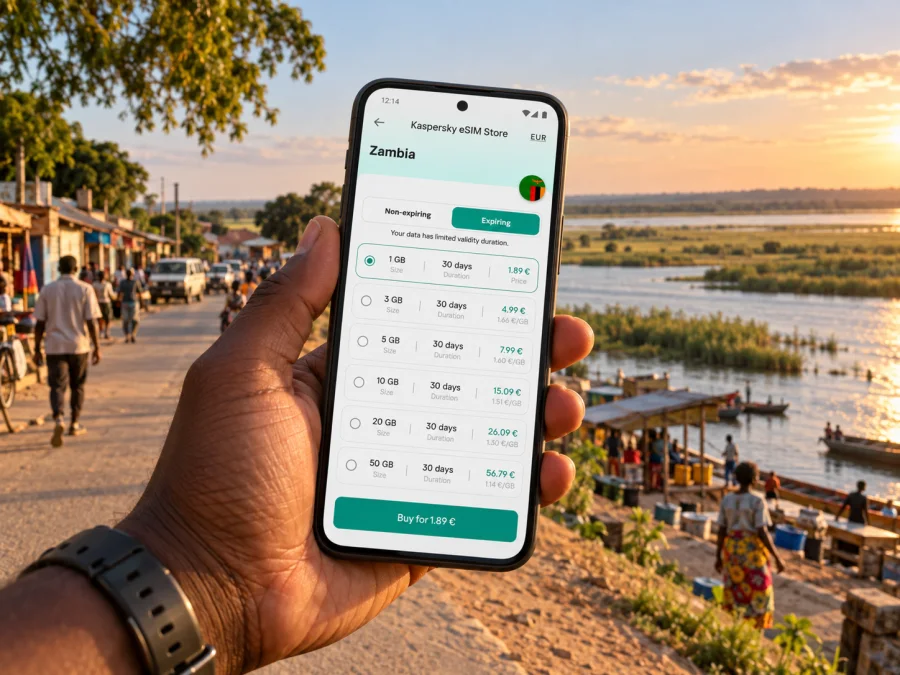
For the journey to Mongu, you can check the current eSIM options for Zambia. Review the details shown for the selected plan, including where it is valid and what starts its validity period. Availability and terms can change; the page should be treated as a place to review current options, not as a city-specific coverage map.
Match the package to your itinerary
| Your trip pattern | What to check before choosing |
|---|---|
| Short stay in Mongu town | Validity dates, enough data for maps and messages, and whether activation can wait until arrival |
| Several days with work calls | Expected video-call use, hotspot permission, data top-up terms and a reliable Wi-Fi backup |
| Mongu plus Limulunga or nearby stops | Whether the plan is countrywide, then confirm local signal expectations with the host or operator |
| Travel onwards toward Kalabo or other rural areas | Route conditions, offline maps, vehicle arrangements and the possibility of gaps in mobile service |
| A longer Zambia itinerary | Whether one package covers all destinations and whether another regional plan is more suitable |
Do not use a map marker or a carrier’s broad country label as proof of coverage at a particular lodge, road or riverside location. For an essential meeting, medical appointment or transfer, confirm details with a person at the destination and keep the contact information offline.
Mongu’s geography changes how you use navigation
Mongu is closely connected to the Zambezi and Barotse floodplain, where waterways and seasonal conditions shape travel. The local development plan describes speedboats, canoes and privately operated cruise boats on the Zambezi and canals. Arrange any water journey with a local provider; a map cannot confirm whether a boat is operating or a route is appropriate that day.
For a cultural visit, river trip, craft centre or village journey, ask your accommodation to confirm the destination, route, departure time and transport provider. Save directions before leaving a dependable connection. A map may not show informal tracks or current local advice.
The council’s development plan notes sandy soils outside the urban area and says four-wheel-drive vehicles are necessary there. Confirm vehicle and road conditions with a local driver or host. In the wet season, allow extra time and ask about current conditions; an older map cannot confirm that a rural route remains passable.
Useful offline preparation
- Download the map area while you have a stable connection.
- Save accommodation, bus terminal and meeting-point pins.
- Screenshot essential directions and booking details.
- Keep critical phone numbers and your next destination in writing.
- Carry a power bank for a long road or boat day.
- Share your itinerary with someone who is not travelling with you.
Offline maps do not show current closures or local advice. Refresh them before departure and ask locally when a route matters.
Accommodation, meetings and everyday errands
Before travelling, ask your accommodation to confirm its exact location, the best route from the bus terminal or aerodrome, and whether it can arrange a transfer. Keep the reply offline.
For business visits, download meeting files before leaving a reliable connection. Arrange an audio-only or phone fallback for calls. A hotspot can drain the battery and may be restricted by the plan, so check its terms beforehand.
For errands, save the destination and agree whether your driver will wait or return later. Ask your host for a landmark and pickup time; confirm urgent arrangements directly rather than relying on a message that may send only after the phone reconnects.
If visiting around the Kuomboka ceremony or another major event, arrange accommodation and transport through local contacts and check current timing. Save reservations and agree on a meeting point in advance; a fixed landmark is more dependable than a moving map pin in a crowd.
Device compatibility and preparation
Check that your exact phone variant supports eSIM and is not locked to a home carrier. Support can differ between similar model names and regional versions. Check whether your device is compatible before choosing a plan.
Before travel, update your phone over Wi-Fi, confirm access to your installation details and keep the device charged. Do not delete an eSIM profile during troubleshooting unless instructed; some profiles cannot be reinstalled. Check home-SIM roaming settings and charges.
Installing and activating an eSIM
Install only with a stable internet connection, a compatible unlocked device and the plan’s installation details. Follow the Android eSIM installation instructions or iOS eSIM installation instructions. Keep the QR code or activation details secure.
- Read the conditions. Check destination, device requirements, validity trigger and data terms.
- Connect to Wi-Fi. Keep internet access during installation.
- Add the eSIM. Follow your phone and provider instructions.
- Select the data line. Choose the travel eSIM when you are ready to use it.
- Enable roaming only if instructed. Apply the setting to the correct line.
- Wait and test. Registration may take a few minutes; then open a basic webpage.
If installing before departure, check when validity begins. Some plans start on first connection; others use a different trigger. Follow the plan guidance if you want to delay use.
If your data does not work
Confirm mobile data is enabled, the travel eSIM is selected, airplane mode is off and the plan is valid. Check whether roaming must be enabled. Wait for registration and restart only if appropriate. Avoid deleting and reinstalling the profile unless instructed.
If pages do not load, check remaining data and any APN or network instructions. With no signal, try again in an open area or later; buildings and distance affect reception. Ask your host about local service and use Wi-Fi for urgent coordination. Contact provider support with your device and plan details, never your password or one-time code.
Keep a fallback for moments when connectivity matters: an address saved offline, confirmed pickup, charged battery and a way to contact your host. A local physical SIM may be another option if you need a local number, subject to current registration requirements and availability in Mongu.
Common questions
Can I use an eSIM in Mongu?
Possibly, if your device supports eSIM, is unlocked and the plan is valid in Zambia on a network available where you are. National availability does not promise signal at every address or along every road.
Is a particular mobile network generation guaranteed?
No. Reception and technology vary by carrier and location. Check the plan’s named network and ask your host about reception at your destination.
Will a data eSIM give me a Zambian phone number?
Usually not unless the plan explicitly includes a number and voice service. Many travel eSIMs are data-only. Keep another way to make ordinary calls if needed.
Can I rely on mobile data throughout the Barotse floodplain?
No plan should be assumed to work continuously in rural areas. Download maps and bookings, confirm transport locally and prepare a communication fallback.
Should I install the eSIM before travelling?
You can if the plan allows it. Check when validity begins, because installation and activation are not always the same event. Use Wi-Fi and follow the provider’s setup instructions.
A practical Mongu connectivity checklist
Before you leave:
- Confirm your itinerary and transport with the airline, bus company, accommodation or local host.
- Check eSIM compatibility for the exact device variant and confirm the phone is unlocked.
- Review the Zambia plan’s network, validity, data amount, activation trigger and hotspot terms.
- Install the profile over Wi-Fi if you choose to do so, then follow the plan’s activation guidance.
- Download offline maps and save destination addresses, bookings and key phone numbers.
- Keep your home SIM’s roaming settings and costs in mind.
After arrival:
- Confirm which line handles mobile data.
- Test a simple connection before leaving the arrival point.
- Save the bus terminal, accommodation and pickup point in your map app.
- Ask locally about transport and road conditions for journeys outside town.
- Carry a power bank and keep critical information available offline.
Prepare your connection before the journey
For a trip to Mongu, combine mobile data with local advice and offline preparation. An eSIM can make it easier to check directions, send updates and handle everyday online tasks when the selected plan has service, while saved details and confirmed transport cover the moments when it does not. Compare the plan terms with your own itinerary, check your device, and install the profile on a reliable connection.
When you are ready, review the current Zambia eSIM options in Kaspersky eSIM Store, a website and app that help you choose, arrange and activate an eSIM with a suitable travel data plan. Confirm the plan’s current conditions before checkout, then keep your Mongu addresses and route information available offline as well.


