Travel connectivity guide
Monterrey eSIM: Mobile Data for Your City Trip
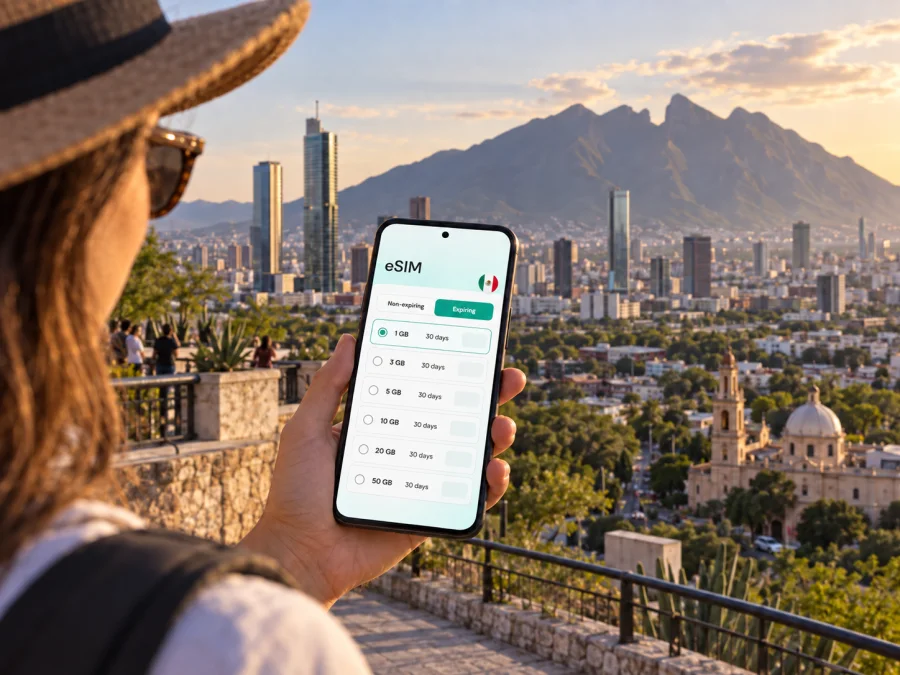
Monterrey eSIM for Mobile Connection and Internet
Monterrey is a city of long distances, mountain views, business districts and busy roads. A working mobile connection helps you check an address after landing, follow a route across the metropolitan area, message a hotel and keep plans flexible when traffic changes. An eSIM can provide mobile data for these tasks without replacing the physical SIM already in your phone.
This guide focuses on using mobile internet in Monterrey: arriving at the airport, choosing where to stay, moving between the center and surrounding districts, and planning a short visit or work trip. The right setup depends on your itinerary, device and data needs, so it helps to prepare before you leave.
Why mobile internet matters in Monterrey
Monterrey is the capital of Nuevo León and part of a wide metropolitan area. A visitor may move between the historic center, offices in San Pedro Garza García, Parque Fundidora and a hotel in another municipality. These are not all walkable from one another. Mobile data can help you check an address, follow a route, message a host, confirm a booking or coordinate a pickup.
The Sierra Madre Oriental and Cerro de la Silla shape the city’s setting, while major roads connect districts spread across the valley. A map pin may point to the wrong entrance of a large complex, so confirm the street address and building name. Keep essential destinations saved in your notes as well as your map app.
An eSIM plan for travel is intended for mobile data. It does not automatically add a Mexican phone number, standard calls or SMS; check the selected plan’s terms. Keep your regular line available if you need it for calls or account verification, and use internet-based messaging where appropriate.
Arrival at Monterrey International Airport
Monterrey International Airport (MTY) is in Apodaca, northeast of central Monterrey. Reaching downtown or another municipality involves a road transfer across the metro area; travel time varies with traffic, destination and time of day. Avoid planning a tight connection around a fixed estimate.
Before leaving the terminal, confirm the full address of your first stop. “Monterrey” may refer to the municipality or the wider metro area: a central hotel and an office in San Pedro Garza García are different journeys. Save the address, neighborhood and building name before travel.
Arrival checklist
- Use available airport Wi-Fi if you need to message someone before the travel eSIM is ready.
- Confirm the pickup zone and vehicle details in your booking.
- Share your estimated arrival time with the hotel or colleague.
- Keep the destination visible during the drive, especially on a first visit.
If the eSIM is installed but not yet in use, review its activation instructions and validity conditions before switching mobile data to it. Plans can differ in when validity begins. Keep setup details available offline until you know the connection works.
Choose a base that fits your plans
Choose accommodation by where you will spend time. Central Monterrey is convenient for civic spaces and museums; San Pedro Garza García is a separate municipality and a common base for business visits; hotels near Parque Fundidora can suit an event or a park-focused itinerary. Compare the actual address with your schedule instead of relying on a broad “Monterrey” label.
| Plans | What to check |
|---|---|
| Meetings downtown | Distance to the office and likely cross-town traffic. |
| Meetings in San Pedro | Full building address; repeated transfers from a central hotel can add time. |
| Fundidora or an event | Venue entrance, hotel route and pickup point. |
| Museums and the historic center | Walking distances, opening hours and a convenient return route. |
| Overnight stop | Airport transfer and next departure point before sightseeing. |
Open the hotel address in a map and confirm the entrance, cross street and lobby instructions. For a late arrival, ask where a car should stop.
Moving around: roads, Metro and walking
Many journeys across Monterrey’s metropolitan area are most practical by car, taxi or ride-hailing service. Traffic, weather, roadworks and events can change travel times. Check the route before leaving and allow a buffer for an airport transfer or appointment.
Metrorrey’s Metro has Lines 1, 2 and 3 serving parts of Monterrey and nearby municipalities. It is useful for destinations near the network, but it does not provide door-to-door access everywhere. Check the current official map and service information before traveling because access and arrangements can change. Mobile data can help with route planning; transit fares and payment are separate from a data plan.
Walking works for short stretches around a compact destination, such as a museum area, plaza or park. Districts are farther apart, and weather can make long walks uncomfortable. Check crossings and shade before setting out.
For smoother trips: enter the street address as well as the venue name; verify the map pin is at the correct entrance; save hotel and meeting details offline; agree on a named pickup point; and carry a power bank if you navigate throughout the day. A map is a planning aid, not a guarantee of traffic or arrival time.
Districts and city stops where data is handy
Historic center and Macroplaza
The central area is a practical base for civic landmarks, museums and older parts of the city. Macroplaza sits within this central setting, so cultural stops nearby can be combined into a half-day plan. Check current opening hours and exact entrances before setting out. A connected phone helps confirm a venue, find a café between visits or change the order of stops.
Barrio Antiguo
Barrio Antiguo is known for historic streets, restaurants and evening activity. Agree on a precise meeting place rather than a district name, and choose a clear pickup point if streets are busy. Keep the hotel address saved so you can show it to a driver or reopen directions quickly.
Parque Fundidora and Paseo Santa Lucía
Parque Fundidora is a major urban park and cultural venue. Paseo Santa Lucía connects the park area with the historic center; the canal walk is about 2.5 km. Check locally for current access, boat operations and event changes. Download tickets or booking details before arriving, and agree on an entrance if your group may split up.
San Pedro Garza García
This neighboring municipality is a frequent destination for business travelers, offices, restaurants and shopping. Use the full address when arranging transport. If you have several appointments, group them geographically and check drive times on the day. Mobile data is useful for receiving schedule changes and locating the right building entrance.
Cerro de la Silla
Cerro de la Silla is one of Monterrey’s most recognizable landmarks. A city viewpoint, trailhead and summit route are different destinations. For an outdoor visit, confirm the access point and current local guidance; do not assume mobile coverage on a trail. Save directions offline and carry water.
Picking a data plan for your itinerary
Start with the places you will visit, length of stay and usual phone habits. A brief stop with a hotel, one meeting and an airport transfer differs from a week of navigation, photo uploads and video calls. Automatic backups, video and app updates can use more data than maps and text messages.
Kaspersky eSIM Store is an app and website where you can choose, arrange and activate an eSIM with a suitable plan for mobile internet on an international trip. Compare the destination, data allowance, validity and price with your itinerary. Terms vary by plan. To prepare for Monterrey, review mobile data options for Mexico and choose according to how you expect to use your phone.
| Activity | Data planning note |
|---|---|
| Maps and address searches | Allow for route checks and loading nearby places. |
| Messaging and email | Usually lighter use; attachments and shared photos add up. |
| Voice or video calls in apps | Video uses more data; Wi-Fi can suit longer calls. |
| Social feeds and photo uploads | Autoplay and frequent uploads can increase usage. |
| Streaming or hotspot use | Can consume substantial data; check your allowance. |
Download maps and documents on Wi-Fi, disable automatic media downloads and postpone large updates if you want to conserve data. Check your remaining allowance and top-up terms if plans change.
Prepare your phone before leaving
Confirm that your phone supports eSIM and is not locked in a way that prevents another mobile plan. Device variants differ by market, so check the exact model. Check whether your device supports eSIM before selecting a plan.
Install the eSIM while you have a stable internet connection and follow the plan’s instructions. Keep your regular line available for calls, SMS or authentication codes if needed. The travel eSIM is for mobile data unless the plan description says otherwise.
Installation checklist
- Confirm eSIM support and that the phone is not carrier-locked.
- Read whether setup requires Wi-Fi and when validity begins.
- Add the eSIM profile using the on-screen steps; do not delete it during troubleshooting unless instructed.
- Label the line clearly and select it for mobile data when appropriate.
- Follow the plan’s activation and data-roaming instructions; device settings differ.
- Open a map and messaging app to confirm data is working.
Use the relevant walkthrough: Android eSIM installation instructions or iPhone eSIM installation instructions. Keep the QR code or setup details private and accessible until installation is complete.
Short trips beyond Monterrey
Some visitors make a day trip to Santiago or another outdoor destination in Nuevo León. Confirm the exact destination, transport, return timing and any activity requirements in advance. Do not assume urban mobile coverage will continue unchanged outside the city. Download directions, reservations and essential contacts before leaving, and check that your plan covers every destination on the route.
If mobile data does not work as expected
Check the basics before changing several settings at once:
- confirm the eSIM profile is enabled and selected for mobile data;
- check plan validity, destination and remaining allowance;
- review whether data roaming is required by the instructions;
- toggle airplane mode or restart the phone if recommended;
- use Wi-Fi to review order details or contact support.
Avoid deleting the eSIM profile as a first step; reinstallation may depend on plan conditions. If needed, consult the setup instructions and support details supplied with your purchase.
Frequently asked questions
Is an eSIM useful for a city visit to Monterrey?
It can provide mobile data for maps, messages, bookings and ride coordination without swapping a physical SIM. Check device compatibility and plan terms; arrange another option for ordinary calls or SMS if needed.
Can I use the Metro with mobile internet?
Data can help you check the current network map and plan the walk at each end of a journey. It does not replace the fare or payment method. Check current Metrorrey service details before traveling.
How much data will I need?
That depends on length of stay and usage. Navigation and messaging differ from video calls, streaming or hotspot use. Estimate from your habits, then review allowance and validity.
Is service guaranteed on every outing?
No. Buildings, terrain, congestion and local network availability can affect service. Save essential addresses offline, especially before leaving the metro area or heading outdoors.
A simple plan for staying connected
For Monterrey, prepare around your actual route: know where you land, confirm whether your hotel is central or in another municipality, save the addresses you will use, and allow extra time for road journeys. Check the current Metro network if it serves your destinations, and keep offline copies of anything essential. Select an eSIM plan by its coverage area, data allowance and validity rather than by a vague estimate of what a city trip “usually” needs.
When you are ready, use Kaspersky eSIM Store to choose and set up an eSIM for your visit. Explore eSIM options for travel in Mexico, review the plan terms, and install it using the instructions for your device before you set out.


