
Travel connectivity guide
Monteverde eSIM: mobile internet guide
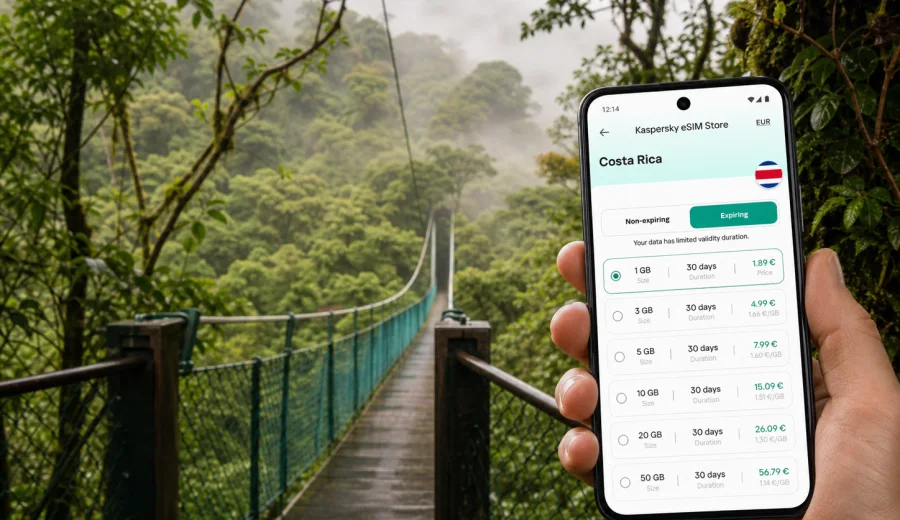
Monteverde eSIM: mobile connection and internet for a cloud forest trip
Monteverde is one of the places in Costa Rica where mobile internet becomes part of the trip plan, not just a convenience. The roads climb into the mountains, the weather changes quickly, hotels can be spread between Santa Elena, Cerro Plano and the forest reserves, and many activities require timed transfers. If you arrive with an eSIM already prepared, you can open your shuttle confirmation, message your lodge and keep your route visible while the road winds through the hills.
For most travelers, Monteverde is not a classic city with a grid of streets and a single central station. It is a mountain travel hub: Santa Elena is the practical center, Cerro Plano has many hotels and restaurants, and the Monteverde Cloud Forest Biological Reserve, Curi-Cancha Reserve, Selvatura Park and other attractions sit along roads where walking distances can look shorter on a map than they feel in fog, rain or steep terrain. A reliable mobile connection helps you make small decisions throughout the day.
This guide focuses on using eSIM and mobile internet specifically for Monteverde: arriving from San Jose or Liberia, moving between lodges and reserves, planning cloud forest activities, handling business calls, taking short stopovers and continuing to other parts of Costa Rica.
Why mobile internet matters in Monteverde
Monteverde rewards flexible planning. Morning weather can be clear, then cloud cover moves in. A shuttle may ask you to wait outside a hotel rather than at a formal terminal. A restaurant may be a short taxi ride away, but the road may be dark after sunset. When your phone is online, you can react calmly instead of looking for Wi-Fi at the exact moment you need directions.
Typical Monteverde situations where mobile data helps:
- confirming a shared shuttle pickup after landing in Costa Rica;
- sending your hotel an arrival update when mountain roads slow the drive;
- checking walking time between Santa Elena and Cerro Plano before choosing a restaurant;
- opening maps for the road to Monteverde Cloud Forest or Curi-Cancha;
- messaging guides before a hanging bridges tour, coffee farm visit or night walk;
- using translation, banking, ride coordination and weather apps away from hotel Wi-Fi;
- keeping work email, video calls and two-factor authentication available during a mountain stay.
Monteverde is also a good example of why travel connectivity should be planned before you lose patience. You may spend several hours in transit, and you may arrive after dark. If your phone depends only on public Wi-Fi, every change of plan requires a cafe, a hotel lobby or a patient driver. An eSIM gives you a more independent way to keep mobile internet ready on a compatible phone.
Arrival routes: where eSIM starts helping
Most visitors reach Monteverde from Juan Santamaria International Airport near San Jose, from Liberia in Guanacaste, from La Fortuna, or from Pacific coast towns such as Tamarindo, Samara, Manuel Antonio or Jaco. The final part of the route usually involves mountain roads, curves, weather and a slower pace than the distance suggests.
| Arrival route | Why data is useful | Practical tip |
|---|---|---|
| San Jose airport to Monteverde | Long transfer, airport coordination, hotel updates | Activate your travel data before leaving the airport area if your plan allows it |
| Liberia airport to Monteverde | Rural stretches and changing road conditions | Save your hotel address and keep the driver's contact visible |
| La Fortuna to Monteverde | Lake and mountain transfers, mixed shuttle formats | Keep the voucher and meeting point offline as well as online |
| Pacific coast to Monteverde | Multi-hour ride with potential route changes | Share your ETA with the lodge before the signal gets weaker |
If you use a shared shuttle, mobile internet is helpful at the beginning and end of the journey. At the start, you can confirm the pickup point and contact the operator if the van is late. Near Monteverde, you can message the lodge, send your live location if needed, and check whether the reception desk expects a late arrival.
If you rent a car, do not rely only on live navigation. Download an offline map as a backup before the trip, then use mobile data for traffic, route changes, weather, restaurant hours and messaging. Mountain weather and road conditions can affect travel time, and a prepared phone helps you make decisions without pulling over repeatedly to search for Wi-Fi.
Where to base yourself: Santa Elena, Cerro Plano or near the reserve
Monteverde travel planning is easier when you think in zones.
Santa Elena is the practical center. It has supermarkets, many restaurants, tour offices, bus and shuttle coordination points, and a high concentration of budget and mid-range lodging. If you want to walk to dinner, compare tour options or keep things simple without a car, this is often the most convenient base.
Cerro Plano sits between Santa Elena and the Monteverde reserve area. Many lodges, cafes and viewpoints are spread along this road. It can feel calmer than the center, but distances matter more. Mobile internet helps you check whether a walk is realistic, call a taxi through your accommodation, or coordinate a tour pickup.
Staying near the Monteverde Cloud Forest Biological Reserve or other reserve entrances gives you quiet mornings and faster access to trails, but you may be farther from restaurants and services. In that case, you will use mobile data less for city-style browsing and more for logistics: guide messages, weather checks, maps, hotel communication and onward transport.
Before choosing a hotel, check three details:
1. How far it is from Santa Elena on foot and by road.
2. Whether tours pick up directly at the property.
3. Whether you will need taxis after dark or in heavy rain.
Mobile internet will not change Monteverde's geography, but it makes the practical gaps easier to manage.
How much data do you need for Monteverde?
Your data use depends on how you travel. Monteverde is not a place where you usually stream video all day, but it is a place where maps, messages and photos can add up. Cloud forest activities also generate many quick checks: weather, trail timing, tour confirmations, bank alerts, translation, restaurant searches and photo backups.
| Traveler profile | Common data use | Suggested planning logic |
|---|---|---|
| Short stopover, 1-2 nights | Maps, messages, hotel and shuttle coordination | Choose enough data for travel days, not only the time in town |
| Nature-focused trip, 3-4 nights | Navigation, tour apps, photo sharing, weather checks | Keep uploads for hotel Wi-Fi if you want to save data |
| Remote worker | Email, cloud documents, messaging, occasional calls | Check the validity period and keep a backup plan for video calls |
| Family or group organizer | Multiple confirmations, maps, restaurant searches | Plan for one phone to act as the main coordination device |
| Costa Rica route traveler | Monteverde plus La Fortuna, beaches or San Jose | Choose a plan that matches the full Costa Rica itinerary |
For many trips, the biggest mistake is choosing data only for the days spent in Monteverde. The travel days matter too. You may need mobile internet at the airport, during the transfer, while checking into a hotel, and again when leaving for La Fortuna, the Pacific coast or San Jose.
Choosing an eSIM plan before the trip
An eSIM is useful when you want mobile data without picking up a physical SIM card after arrival. With Kaspersky eSIM Store, you can choose a destination and a suitable eSIM plan for mobile internet in an international trip, then install it on a compatible device. The key is to match the plan to your real itinerary: arrival airport, Monteverde nights, onward travel and the apps you expect to use.
Before you choose a plan, write down four things:
- your arrival airport and first transfer;
- how many nights you will spend in Monteverde;
- whether you will continue to another Costa Rican destination;
- whether you need data mainly for maps and messaging or also for work calls and media uploads.
For a Monteverde trip, the relevant destination is Costa Rica. If you want to prepare before departure, you can choose an eSIM plan for your Monteverde and Costa Rica trip after checking your dates, data needs and device compatibility.
Keep the product role clear: Kaspersky eSIM Store is an app and website that helps you choose, order, install and activate an eSIM with a suitable mobile data plan for travel. The exact conditions, data volume, validity period and availability depend on the selected plan. Review those details before payment, especially if your route includes several countries or a longer stay.
Device compatibility checklist
Not every phone or tablet supports eSIM, and some devices may be locked to a mobile operator. Check this before you depend on an eSIM for Monteverde logistics.
Use this quick checklist:
- your phone supports eSIM;
- the device is not locked to one carrier;
- you have a stable internet connection for installation before travel or at the airport;
- you know which SIM will handle calls and which one will handle data;
- data roaming can be enabled for the eSIM if the selected plan requires it;
- you keep the installation QR code or instructions accessible until setup is complete.
If you are not sure, check your device before choosing a plan. This matters more in Monteverde than it might in a big city because you may not want to troubleshoot setup for the first time after a long mountain transfer.
Installing eSIM before Monteverde
The easiest approach is to install your eSIM while you still have a stable connection: at home before departure, at the airport before the transfer, or at your hotel if you prefer to activate later. Read the plan details carefully because installation, activation and validity can vary by plan.
General setup flow:
1. Choose the Costa Rica destination and a plan that fits your dates and data needs.
2. Complete the order and open the installation details.
3. Install the eSIM on a compatible device.
4. Label the eSIM clearly, for example "Costa Rica data".
5. Keep your primary SIM for calls or messages if you need it.
6. Turn on mobile data for the eSIM when you are ready to use the plan.
7. Check whether data roaming must be enabled for that eSIM profile.
For detailed setup, use the official Android eSIM installation guide or the iOS eSIM installation guide. Do not delete an installed eSIM profile unless you are certain you no longer need it; many eSIM profiles cannot simply be moved to another device after activation.
Mobile internet for local movement
Monteverde movement is a mix of walking, hotel shuttles, taxis, shared tour pickups and occasional rental cars. You can walk within parts of Santa Elena, but sidewalks, rain, darkness and hills affect what is comfortable. Between Santa Elena, Cerro Plano and reserve entrances, a map can underestimate the effort.
Use mobile data for:
- checking the real route before deciding to walk;
- messaging your hotel for taxi or pickup advice;
- confirming whether a tour includes transportation;
- sharing your location when meeting a driver;
- checking restaurant closing times before taking a taxi;
- navigating back after dark without relying on memory.
If you travel with a group, assign one person as the connectivity lead. That phone keeps the shuttle voucher, hotel chat, map pins and tour confirmations. Other phones can stay on Wi-Fi or use lighter data. This simple division helps avoid confusion when a driver asks for one contact number or when the group separates between a cafe and a tour office.
Cloud forest activities that need good coordination
Monteverde's main attractions are not only in one place. The Monteverde Cloud Forest Biological Reserve, Curi-Cancha Reserve, Santa Elena Cloud Forest Reserve, hanging bridges, zipline parks, coffee and chocolate tours, night walks and viewpoints can all involve different entrances, start times and pickup rules.
Before each activity, keep these details accessible:
- exact start time and check-in time;
- meeting point or hotel pickup location;
- guide or tour operator contact;
- cancellation or weather policy if supplied;
- offline map pin for the entrance;
- return transport plan.
Mobile internet is especially useful for early mornings and evenings. A birdwatching tour may start before breakfast. A night walk may end when taxis are less visible. Rain can make you change clothes, shift dinner plans or ask whether a pickup is still running. With an eSIM active, you can handle those details from the trailhead, the lodge gate or a cafe rather than searching for a password-protected Wi-Fi network.
Practical data-saving habits
Monteverde's landscape encourages photos and videos, but you do not need to upload everything through mobile data. A few habits keep your plan useful for the moments that matter.
| Habit | Why it helps |
|---|---|
| Download offline maps before the transfer | Navigation still works if the signal drops in a valley |
| Save vouchers as PDFs or screenshots | You can show them even when an app fails to load |
| Turn off automatic cloud backups on mobile data | Photos and videos can consume data quickly |
| Use hotel Wi-Fi for large uploads | Mobile data stays available for navigation and messaging |
| Keep messaging apps active | Most travel coordination uses small amounts of data |
| Check usage once per day | You can adjust habits before running out |
For business travelers and remote workers, the same logic applies to work apps. Download large documents on Wi-Fi, schedule important video calls where the hotel connection is stable, and use eSIM mobile data for fallback messaging, calendar updates, login codes and transfer updates. Monteverde is a forest destination, not a dense business district, so treat mobile data as a practical backup for essential communication rather than the only foundation for high-bandwidth work.
For a one-night stopover, keep the plan simple: save your hotel address, screenshot the first tour voucher, pin dinner options near your lodging, confirm onward transport before evening and reserve mobile data for live updates. Monteverde can be misty, cool and dark earlier than a beach town, so arriving with maps and messaging ready makes a short stay much easier.
Trips from Monteverde
Monteverde often sits in the middle of a Costa Rica itinerary. Common onward routes include La Fortuna, Arenal, Manuel Antonio, Tamarindo, Samara, Nosara, Jaco, San Jose and Liberia. Each route has its own transport style, and mobile internet helps with transitions.
Use eSIM data before leaving Monteverde to:
- confirm the next pickup time;
- check whether the shuttle collects you at the hotel or a central point;
- download the next offline map area;
- send your ETA to the next accommodation;
- review whether your plan's validity covers the remaining days;
- top up or choose another suitable plan if your trip is longer than expected.
If your itinerary crosses borders after Costa Rica, check plan coverage before assuming one plan fits the next country. If you stay within Costa Rica, the Costa Rica destination page is the right place to evaluate options for the full route.
Quick answers about eSIM in Monteverde
Is Monteverde a good place to use eSIM?
Yes, if your device supports eSIM and the selected plan fits Costa Rica. It is especially useful for transfers, maps, tour coordination, hotel messaging and onward travel.
Should I install eSIM before arriving in Monteverde?
That is usually the smoother choice. Install it while you have stable Wi-Fi or airport connectivity, then activate according to the plan instructions when you are ready to use mobile data.
Can eSIM replace every travel communication need?
It can help with mobile internet, but most travel eSIM plans do not include a regular phone number, voice calls or SMS unless stated in the plan conditions. Use internet-based calling and messaging apps when appropriate.
Will I still need offline maps?
Yes. Offline maps are a sensible backup for mountain roads, forest areas and any place where the signal may vary.
Is public Wi-Fi enough for Monteverde?
Hotel and cafe Wi-Fi can be useful, but it does not help while you are between places, waiting for a pickup, arriving late or navigating to a reserve. Mobile data gives you more independence.
Final preparation checklist
Before you leave for Monteverde, run through this list:
- confirm your arrival airport, transfer and hotel address;
- save vouchers for shuttles, tours and lodging;
- download offline maps for San Jose or Liberia, the route to Monteverde and the local area;
- check that your phone supports eSIM and is not carrier-locked;
- choose a data plan that covers your full Costa Rica itinerary, not only Monteverde nights;
- install the eSIM while you have a stable connection;
- label the eSIM and understand when the plan becomes active;
- keep mobile data available for maps, messages and travel updates;
- use Wi-Fi for large photo and video uploads.
Monteverde is easier to enjoy when connectivity is already handled. The cloud forest, hanging bridges, birdwatching walks and mountain roads all ask for attention; your phone should quietly support the trip rather than become another task. Before departure, use Kaspersky eSIM Store to prepare an eSIM plan for mobile internet in Costa Rica, check the conditions, install it on a compatible device and arrive in Monteverde ready to navigate, message and adjust your plans calmly.