
Travel connectivity guide
Montreal eSIM for mobile internet
Montreal eSIM: mobile connection and internet for a smarter city trip
Montreal is easy to love and easier to navigate with mobile internet. The airport is west of downtown, the metro is fast but not always obvious on the first day, and many useful details - transit alerts, restaurant bookings, bike routes, hotel messages - live online. An eSIM gives you a practical way to prepare mobile connection before you arrive in Canada.
This guide is for visitors who want predictable mobile internet in Montreal: weekend travelers, business visitors, conference guests, families, and digital workers.
Why mobile internet matters in Montreal
Montreal works best when you can move between plans quickly. A morning in Old Montreal can turn into an afternoon on Mount Royal, a dinner reservation in Plateau-Mont-Royal, and a late ride back from Little Italy or Griffintown. Mobile data helps with the small decisions that keep the day smooth:
- checking live public transport routes before entering the metro;
- opening maps in underground shopping areas and busy downtown streets;
- confirming hotel messages, entry codes, and late check-in instructions;
- comparing ride-hailing, taxi, BIXI bike-share, metro, and walking times;
- translating French menus, signs, and service messages when needed;
- finding indoor alternatives when weather changes quickly.
Montreal is bilingual in many travel settings, but French is part of everyday life. Mobile internet helps you respond to weather, traffic, festival crowds, restaurant availability, and transit schedules.
Arrival: from YUL to your first address
Most international visitors arrive through Montreal-Trudeau International Airport, often shown as YUL. Your first mobile-data task usually comes before you see the city center.
Typical arrival use cases include:
| Arrival moment | Why data helps | Practical action |
|---|---|---|
| Baggage claim | Check messages from your hotel or host | Confirm check-in time and address |
| Airport exit | Compare bus, taxi, and ride-hailing options | Choose based on time, bags, and weather |
| First ride | Follow the route into the city | Notice if the driver or bus takes a detour |
| Downtown arrival | Find the exact door or lobby | Use maps and street-level cues |
The 747 bus is a common public transport option between the airport and central Montreal. Many travelers choose taxis or ride-hailing when they have luggage, arrive late, or stay outside downtown. In all cases, data is useful immediately: you can message the hotel, check the route, and avoid relying on airport Wi-Fi.
If you install an eSIM before departure, you can usually finish the technical setup while you are still at home on a stable connection. Then, after arrival, you only need to activate or enable the correct mobile data line according to the instructions for your device and tariff conditions.
Where an eSIM helps most in the city
Montreal has strong visitor zones, but they are spread out. Old Montreal, downtown, Plateau-Mont-Royal, Mile End, Griffintown, Little Italy, Jean-Talon Market, and Olympic Park can all appear in one itinerary. Data helps you move between them without rebuilding the day around hotel Wi-Fi.
The value of an eSIM is steady rather than dramatic: you can confirm a restaurant, find the right metro exit, check a museum time, translate a sign, or change a route when weather or crowds make the original plan less practical.
Montreal trip types and data needs
Your ideal data amount depends on how you travel. A light traveler who downloads offline maps and mainly uses messaging needs less than someone who works from a hotel, uploads video, or uses maps all day.
| Trip style | Typical data behavior | What to plan for |
|---|---|---|
| Weekend city break | Maps, messengers, restaurant search, tickets | A modest data package may be enough |
| Business trip | Email, calendar, ride-hailing, hotspot in short bursts | Choose extra allowance for work tasks |
| Family trip | Maps, bookings, translation, entertainment for children | Plan more data and avoid video streaming on mobile data |
| Stopover | Airport transfer, maps, messaging | Short validity can be practical |
Video, cloud backup, social media uploads, and hotspot use can consume data quickly. Use reliable hotel Wi-Fi for heavy downloads and keep mobile data for navigation, messaging, transport, and time-sensitive tasks.
Before you buy: check your phone and travel pattern
An eSIM is practical only if your device supports it and is not restricted in a way that prevents installation. Before choosing a tariff, check the basics:
- your smartphone or tablet supports eSIM;
- your device is not locked to a carrier that blocks other mobile profiles;
- your operating system is updated enough for eSIM installation;
- you have access to email or the app where the QR code or installation details arrive;
- you know whether you want to install before departure or after arrival;
- you understand when the tariff validity starts, because this can vary by plan.
Think through your route as well. If you are staying only in Montreal, a Canada-focused option may be enough. If you cross into another country or combine regions, compare the available directions and conditions before choosing.
How to choose an eSIM tariff for Montreal
For a Montreal article, the correct destination is Canada. The city is the focus of your travel plan, but the eSIM tariff is selected for the country or region where mobile data will be used. That matters if your route includes day trips or domestic travel after Montreal.
A practical selection process looks like this:
1. Estimate your trip length: one day, a weekend, a week, or longer.
2. List your main data tasks: maps, messengers, work, hotspot, uploads, or streaming.
3. Choose the destination that matches your route in Canada.
4. Compare data volume and validity period.
5. Check device compatibility before payment.
6. Install the eSIM while you still have stable Wi-Fi.
7. Keep your primary SIM available for banking messages if you need them.
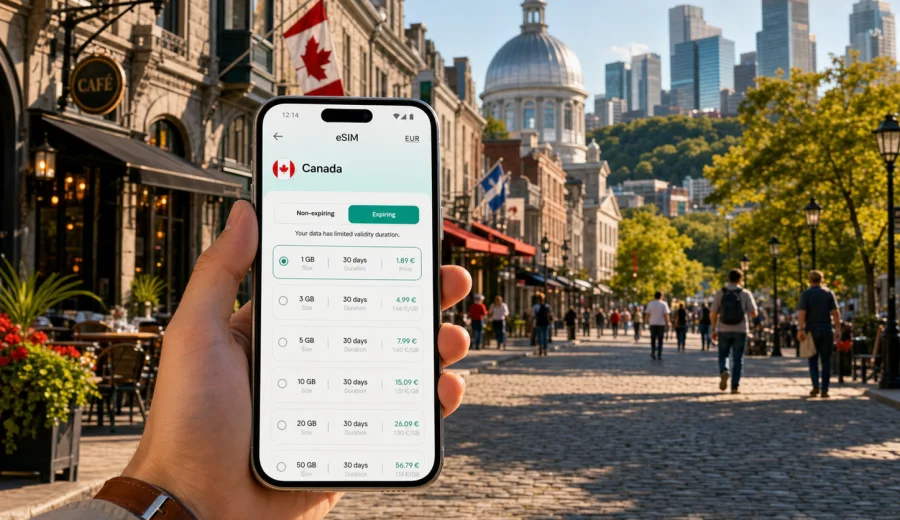
If you want to prepare before arrival, Kaspersky eSIM Store helps you choose, arrange, and activate an eSIM with a suitable mobile data tariff for your trip. For Montreal travel, you can compare eSIM plan options for Canada and select the data volume and validity period that match your itinerary.
Setup checklist before flying to Montreal
Use this checklist a day or two before departure, not in the airport queue.
- Confirm that your device supports eSIM and is unlocked for travel use.
- Save your accommodation address offline.
- Download offline maps for central Montreal as a backup.
- Install the eSIM profile while connected to reliable Wi-Fi, if your chosen instructions allow it.
- Give the eSIM line a clear label, such as "Canada data".
- Check whether data roaming should be enabled for the eSIM line.
- Pause automatic cloud backups, app updates, and large media downloads on mobile data.
For installation steps, follow the instructions for your operating system: Android eSIM installation guide or iOS eSIM installation guide. Menus can vary by device model and software version, so use the guide together with the instructions shown on your phone.
Before paying, also check your device for eSIM support. Compatibility is a simple step, but skipping it can create avoidable stress right before a trip.
Local movement: metro, buses, walking, and bikes
Montreal's metro is one of the easiest ways to move between major visitor zones: downtown, Old Montreal, the Plateau, Jean-Talon Market, Olympic Park, and many business addresses. Mobile data helps when you combine metro with walking or buses.
The city is also strong for walking. Old Montreal, the Old Port, downtown, the Plateau, Mile End, and the canal areas reward slow movement. Data helps you avoid doubling back, find entrances, check winter walking times, and adjust routes when festivals or construction change streets. BIXI bike-share is popular in warmer months, and mobile data helps with stations, routes, and app access.
For taxis and ride-hailing, data is useful at night, during bad weather, or when your hotel is far from a metro line. Keep your pickup point precise. Montreal has narrow streets, busy hotel entrances, and event areas where meeting a driver one block away can be easier.
District notes for mobile internet
Use the city by neighborhood, not only by landmark. Old Montreal needs walking directions and restaurant checks. Downtown needs office-tower entrances and event tickets. Plateau-Mont-Royal and Mile End need maps for cafes, murals, bus routes, and late dinner plans. Griffintown, Little Italy, Jean-Talon Market, and Olympic Park often combine metro, bus, and walking, so live route checks are useful.
Business trips and conferences
Montreal is a regular destination for conferences, academic travel, technology events, aviation meetings, healthcare events, creative industries, and finance-related trips. Business visitors often need mobile data for tasks that are too important to leave to venue Wi-Fi:
- checking calendar updates while moving between meetings;
- opening QR codes and event apps;
- using maps to reach a dinner venue after a meeting;
- turning on a hotspot briefly when a laptop needs a backup connection.
If you expect work use, choose more data than you would for a leisure weekend. Video calls and hotspots are the main risk. For confidential work, follow your company's security rules and avoid open public Wi-Fi when mobile data is a better option.
Hotels, apartments, and longer stays
Hotel Wi-Fi in Montreal is often good enough for heavy use, but it is not a complete substitute for mobile internet. You still need data for arrival, navigation, transport, and messages outside. Apartment stays make mobile data useful because entry codes, parking rules, and host messages often arrive online.
For longer stays, think in weekly patterns:
| Situation | Data tip |
|---|---|
| Hotel with strong Wi-Fi | Use eSIM data for movement and backup |
| Apartment rental | Keep data active for host messages and entry details |
| Winter visit | Keep data available for indoor route changes and ride-hailing |
In winter, indoor routes, taxis, and real-time transport checks become more important. In summer, festivals and outdoor plans can increase map use, social sharing, and group chats.
Stopovers and short visits
If you have only a few hours or one night in Montreal, mobile internet can be the difference between a relaxed stop and a guessing game. You may need luggage storage, airport transfer timing, restaurant availability, and the fastest route back to YUL.
For short visits, keep the plan simple:
1. Decide whether you are leaving the airport area.
2. Save the return route before you start sightseeing.
3. Keep enough battery for maps and ride-hailing.
4. Avoid heavy downloads on mobile data.
5. Use mobile data for transport, messages, and timing.
A stopover is not the moment to experiment with unfamiliar connectivity steps. If possible, install and label your eSIM before the trip.
Trips from Montreal
Montreal is a practical base for Quebec City, Ottawa, the Laurentians, and the Eastern Townships. Mobile data helps most when you leave the dense city center because you rely more on navigation, updated travel times, messages, and backup plans. If your route crosses a border, check the tariff destination carefully before you travel.
Practical data-saving habits
You can make a moderate data package last longer with a few simple habits:
- download maps, playlists, podcasts, and documents on Wi-Fi;
- turn off automatic app updates on mobile data;
- use hotel Wi-Fi for large uploads;
- close navigation when you no longer need turn-by-turn directions;
- check which apps used the most data each evening;
- keep your primary SIM and eSIM settings clear so the right line uses data.
Common mistakes to avoid
The most common mistake is waiting until arrival to solve everything. Airport Wi-Fi can be busy, your phone battery may be low, and you may be tired. Another mistake is choosing a tariff only by price. Data volume, validity period, destination, and activation rules matter. Also remember that many eSIM data tariffs do not include a regular phone number, voice calls, or SMS unless the plan conditions say so.
FAQ: eSIM and mobile internet in Montreal
Is an eSIM useful for a weekend in Montreal? Yes, especially for maps, transport checks, restaurant searches, messaging, and ride-hailing from the moment you arrive.
Should I install the eSIM before arriving in Canada? In many cases, installing before departure is more convenient because you can use stable home Wi-Fi and avoid setup stress at the airport.
Can I use eSIM data for calls? Many travel eSIM tariffs focus on mobile data and may not include a regular phone number, voice calls, or SMS. You can usually use internet-based calling apps over mobile data.
Will an eSIM help in the metro? It helps before and after rides, when you check routes, exits, walking directions, and service changes. Save key route details before entering stations.
Final preparation for your Montreal trip
A good Montreal connectivity setup is simple: check your device, choose the right Canada data option for your trip length, install the eSIM on stable Wi-Fi, and keep mobile data for the moments that matter most.
Before you leave, use Kaspersky eSIM Store to choose an eSIM plan for your trip to Montreal and review the data volume, validity period, destination, and activation details. Prepare it before travel, keep your instructions accessible, and arrive with mobile internet ready for the city.