
Travel connectivity guide
eSIM for Montserrat: mobile internet guide
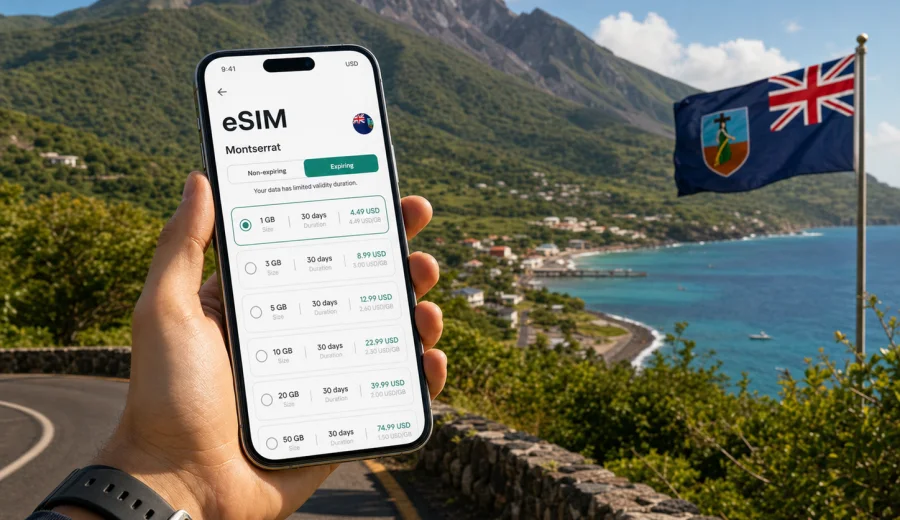
eSIM for Montserrat: mobile connection and internet for your trip
Montserrat is a small Caribbean island where distances look simple on a map, but a reliable mobile connection can still make the trip much easier. You may need internet before leaving the airport, while checking ferry or flight updates, navigating between Little Bay and Brades, arranging a driver, sending photos from the coast, or staying in touch during a hike near the island's volcanic landscapes. An eSIM helps you prepare mobile internet before the trip without looking for a physical SIM card after arrival.
This guide explains how to use an eSIM for Montserrat, what to check before buying a data plan, how much traffic different travel scenarios may need, and how Kaspersky eSIM Store can fit into your preparation. The focus is practical: choosing a suitable data plan, installing it on a compatible device, and understanding the limits before you rely on it during the journey.
Why mobile internet matters in Montserrat
Montserrat is not a destination where every day follows the same route. Many visitors arrive via Antigua, continue by air or ferry, and then move between coastal areas, viewpoints, guesthouses, offices, beaches, restaurants, and nature trails. Even if your accommodation has Wi-Fi, mobile internet is useful for the gaps between fixed connections.
Typical situations where a data eSIM can help:
- checking flight or ferry changes before transfer;
- messaging a host, driver, colleague, or tour guide;
- using maps when roads curve around hills and valleys;
- paying attention to weather changes before outdoor plans;
- uploading travel documents to a booking app;
- using translation, banking, ride coordination, or email;
- sharing a hotspot with a laptop when your phone plan allows tethering.
Montserrat is also a place where planning matters. Some routes and services may be less frequent than in larger islands, so being able to check messages, confirmations, and directions at the right moment can save time. A prepared eSIM does not replace common travel planning, but it gives you a clearer way to keep mobile data ready.
What an eSIM gives you during a Montserrat trip
An eSIM is a digital SIM profile installed on a compatible smartphone or tablet. Instead of inserting a plastic SIM card, you add the profile in the device settings and use it for mobile data. For international travel, this is useful because you can prepare the plan before departure or shortly after arrival, depending on the instructions for the selected tariff.
For Montserrat, a travel eSIM is mainly about internet access. In most cases, the plan is designed for mobile data. A regular phone number, standard voice calls, and SMS are not included unless the conditions of a specific plan say otherwise. For calls and messages, many travelers use internet-based apps over the data connection.
The practical advantages are straightforward:
- you avoid changing your main SIM card;
- you can keep your home number active for banking codes or incoming calls if your device supports dual SIM use;
- you see the data allowance and validity period before purchase;
- you can choose a plan for the country or route rather than relying only on standard roaming;
- you reduce dependence on public Wi-Fi in airports, cafes, lobbies, and waiting areas.
The important limitation is just as clear: eSIM performance depends on the selected tariff, the compatible device, the local network situation, terrain, building materials, and current conditions. No travel eSIM should be treated as a guarantee of perfect service in every valley, road, or indoor location.
Montserrat travel scenarios and data needs
The right data allowance depends less on the length of the trip and more on how you use your phone. A traveler who checks maps and messages may need far less data than someone who joins video meetings or uploads high-resolution media every evening.
| Travel scenario | Common internet use | Practical data approach |
|---|---|---|
| Short leisure visit | maps, messaging, bookings, light browsing | choose a modest plan and use hotel Wi-Fi for heavy uploads |
| Week-long stay | navigation, email, photos, calls via apps | choose a larger allowance with enough validity for the full trip |
| Remote work | email, cloud files, calls, laptop hotspot | check tethering rules and choose more data than you expect |
| Multi-island route | Antigua transfer plus Montserrat stay | confirm whether you need only Montserrat coverage or a regional option |
| Family trip | several devices, shared plans, children online | consider separate eSIMs or careful hotspot use if supported |
As a rough planning habit, separate essential and heavy tasks. Essential tasks include maps, confirmations, messaging, email, and banking. Heavy tasks include video calls, streaming, cloud backup, app updates, and large photo uploads. If you want your data to last, move heavy tasks to trusted Wi-Fi and keep the eSIM for mobility.
Before you choose an eSIM plan
Before you prepare an eSIM for Montserrat, check a few conditions. They are simple, but skipping them can create problems at the airport, in a transfer, or late in the evening when support from a shop is harder to find.
Checklist before buying:
- Your phone or tablet supports eSIM.
- The device is not locked to one mobile operator.
- You know whether you need data only or also a regular phone number.
- The selected plan covers Montserrat or the region you will actually visit.
- The data allowance matches your expected use.
- The validity period covers the days when you need mobile internet.
- You understand when the plan starts counting validity and data usage.
- You have a stable internet connection for installation.
If you are not sure about device support, use the compatibility check before purchase: check your device. Device names can be confusing because the same phone model may have different regional versions, and some devices sold through operators may be restricted.
When eSIM is especially useful in Montserrat
An eSIM is convenient when you want the trip to start without an extra errand. On a small island, this can matter more than it first appears. If your arrival time is tight, if your accommodation is outside the busiest areas, or if you need to coordinate with people right away, having mobile data ready can reduce friction.
Practical examples:
- You land and need to message a driver before leaving the terminal area.
- You arrive from Antigua and want to confirm the next leg of your transfer.
- You are staying near Little Bay, Brades, Salem, or another area and need directions.
- You are visiting viewpoints or beaches and want offline maps plus live updates.
- You are traveling for work and need email before reaching accommodation Wi-Fi.
- You want to avoid joining every available public Wi-Fi network just to send a message.
For many trips, the best setup is a combination: install the eSIM before departure while you have stable home Wi-Fi, keep your primary SIM active for important messages, and use the eSIM as the mobile data line after arrival when the selected plan is ready to use.
Choosing a data plan for Montserrat
Kaspersky eSIM Store is an app and website where you can quickly choose, arrange, and activate an eSIM with a suitable tariff for mobile internet in an international trip. It is not a mobile operator and does not own the network. The useful role is the travel scenario: select the destination, review the available data options, install the eSIM on a compatible device, and manage the plan through the site or app.
For a Montserrat trip, look at three plan details first:
1. Data allowance. Choose enough gigabytes for maps, messages, bookings, and the way you normally use your phone.
2. Validity period. Match the plan duration to your travel dates, including arrival and departure days.
3. Destination coverage. Make sure the plan applies to Montserrat or to the regional route you need.
If your travel dates are set and your device is compatible, you can choose an eSIM plan for your Montserrat trip before you leave, then keep the installation details ready for when you need them. This is often easier than comparing options while tired after a transfer.
How to estimate your data allowance
Data planning is not exact, but a few habits make the choice easier. Think about the tasks you cannot postpone and the tasks that can wait for Wi-Fi.
Light use may include:
- messaging throughout the day;
- map searches and route checks;
- email without large attachments;
- occasional browsing;
- booking confirmations and digital tickets.
Moderate use may include:
- frequent photo sharing;
- voice calls through messaging apps;
- social media browsing;
- work email with attachments;
- using maps for long periods.
Heavy use may include:
- video calls;
- streaming video or music for long sessions;
- backing up photos and videos to the cloud;
- laptop hotspot use;
- downloading apps, system updates, or large files.
For Montserrat, consider the rhythm of the trip. If you spend most days outdoors or moving between places, mobile data becomes more important. If you spend long periods in one hotel, villa, office, or family home with reliable Wi-Fi, a smaller plan may be enough.
How to install and activate an eSIM
The exact steps depend on your phone, operating system, and the selected plan. In general, you need a compatible device, a stable internet connection for setup, and access to the eSIM details after purchase. Installation may use a QR code or an on-screen profile in the app or website.
Basic setup flow:
1. Confirm that your device supports eSIM and is not operator-locked.
2. Choose the Montserrat plan that fits your trip.
3. Complete the order and open the eSIM details.
4. Add the eSIM profile in your phone settings.
5. Select the eSIM line for mobile data.
6. Keep your primary SIM active only if you need it for calls, SMS, or banking codes.
7. Check whether data roaming must be enabled for the eSIM line.
8. Wait a few minutes for the device to register on a local network when you arrive or activate the plan according to its conditions.
For device-specific setup, use the official guides: Android installation instructions and iOS installation instructions. Install the eSIM while you have reliable Wi-Fi, especially if you are preparing before a flight or ferry transfer.
eSIM, roaming, local SIM, and Wi-Fi compared
No single option is ideal for every traveler. The best choice depends on arrival timing, device support, budget, travel style, and how much you value setup simplicity.
| Option | Best for | What to check |
|---|---|---|
| Travel eSIM | preparing mobile data before or during the trip | device compatibility, plan coverage, data amount, validity |
| Home roaming | keeping the simplest setup with your existing line | roaming price, daily caps, fair-use rules, bill limits |
| Local SIM | longer stays or users who specifically need a local number | shop availability, documents required by the seller, device SIM slot |
| Public Wi-Fi | large downloads at accommodation or office | network trust, availability, speed, login limits |
Many travelers use more than one option. For example, you may keep home roaming disabled for data, use an eSIM for movement around Montserrat, and rely on accommodation Wi-Fi for video calls or photo backups. This keeps mobile data focused on tasks that need mobility.
What to know about coverage and reliability
Montserrat's geography is part of its appeal: hills, coastlines, volcanic terrain, small settlements, and less urban density than many larger destinations. The same geography can affect mobile signal. A data eSIM can be very useful, but it should be treated as one part of your travel setup, not as a promise that every location will have the same experience.
Use these habits for more reliable access:
- save key addresses and booking details offline;
- keep important phone numbers written down or stored locally;
- carry a power bank for long outdoor days;
- test mobile data before leaving your accommodation;
- avoid waiting until the last minute to download tickets or route details;
- use Wi-Fi for large files when it is available and trusted.
If your route includes Antigua or another country before or after Montserrat, check whether a country plan is enough or whether a regional option would better match your itinerary. Do not assume that a plan for one destination automatically covers another.
Quick planning summary
For a smoother Montserrat trip, prepare mobile internet the same way you prepare documents and accommodation details.
Key points to remember:
- eSIM is useful for mobile data, maps, messages, bookings, and work tasks.
- Your device must support eSIM and be free from operator restrictions.
- The selected plan should cover Montserrat and match your trip length.
- Heavy data use can drain an allowance quickly.
- Installation is easiest before travel on stable Wi-Fi.
- Keep important documents and instructions available offline.
- Use hotel or office Wi-Fi for large downloads when appropriate.
FAQ
Can I use an eSIM for mobile internet in Montserrat?
Yes, if your device supports eSIM, is not locked to another operator, and the selected plan covers Montserrat. Check the plan conditions before purchase and install the eSIM according to the instructions for your device.
Does a travel eSIM include calls and SMS?
Usually no. Travel eSIM plans in this context are intended for mobile internet. A regular phone number, standard voice calls, and SMS are not included unless the conditions of a specific tariff clearly say otherwise. You can use internet-based apps for calls and messages over mobile data.
Should I install the eSIM before I arrive?
In many cases, yes. Installing before departure is convenient because you can use stable Wi-Fi and avoid setup pressure after arrival. Check the plan conditions so you understand when validity begins and when mobile data can be used.
Can I keep my main SIM active?
Often yes, if your phone supports dual SIM use. You can use your main SIM for calls or SMS and the eSIM for mobile data. Review your device settings carefully so data traffic does not accidentally use your home roaming line.
Is eSIM better than airport Wi-Fi?
It depends on the task. Airport or accommodation Wi-Fi can be useful for large downloads, but an eSIM is more practical when you are moving around, checking maps, messaging contacts, or avoiding unknown public networks for sensitive tasks.
What if my eSIM does not connect immediately?
Wait a few minutes, confirm that the eSIM is selected for mobile data, check whether data roaming must be enabled for that eSIM line, restart the device, and review the Android or iOS installation guide. Local signal conditions and indoor locations can also affect connection.
Prepare your Montserrat mobile internet before you travel
Montserrat rewards travelers who plan the basics early: transfers, accommodation, offline documents, power, and mobile data. With a compatible device, an eSIM can make that preparation cleaner because you do not need to swap a physical SIM card or search for a store when you arrive.
Use Kaspersky eSIM Store to review the available options, compare the data allowance and validity period, and choose an eSIM plan for Montserrat that fits your route. Then install it with stable Wi-Fi, keep the instructions available, and start the trip with a clearer mobile internet plan.