Travel connectivity guide
Morne Rouge eSIM: Mobile Internet in Grenada
Morne Rouge eSIM: Mobile Connection and Internet Guide
Morne Rouge is a small coastal area on Grenada’s southwest side, best known to visitors for Morne Rouge Beach, also called BBC Beach. It is not a separate city: the Grenada Tourism Authority lists the beach in the St. George’s area. That distinction matters when you plan arrival, transport and mobile data. Your days may center on the bay, while errands, ferries, historic sights and many services take you toward Grand Anse or the capital.
A reliable mobile internet plan can make those transitions easier. You can check a driver’s meeting point, save a route, message your accommodation or look up opening hours without depending entirely on hotel Wi-Fi. A travel eSIM is one option for data, provided your phone supports eSIM, is unlocked and the selected plan covers Grenada on terms that fit your trip. It does not replace local knowledge or guarantee reception at every beach, hotel or road.
What to know about Morne Rouge before you arrive
Morne Rouge sits beside a sheltered bay south of Grand Anse. The Grenada Tourism Authority describes BBC Beach as a half-mile crescent of white sand with shallow, usually calm water, and notes that the beach is publicly accessible. The beach is the main visitor landmark; accommodation and restaurants are spread through the surrounding area rather than arranged as a dense downtown grid.
That layout affects how you use a phone. A map pin can bring you to the general beach access or your lodging, but the last part of a trip may still depend on a clearly shared entrance, driveway or meeting point. Ask your host for a location pin and a short written description. Save both before leaving a stable connection, especially if your accommodation is set back from the main road.
Morne Rouge is also a useful base for combining beach time with the wider southwest. Grand Anse, True Blue and Lance aux Epines are nearby destinations by road, while St. George’s has the harbour-side Carenage, shops and services. “Nearby” does not mean a walk is always the easiest choice: heat, rain, road conditions, luggage and the exact address can change what feels practical. Check the route on the day and choose a taxi, bus or walk based on the whole journey rather than map distance alone.
Quick orientation
| Trip need | What to plan for in Morne Rouge |
|---|---|
| First arrival | Confirm the property’s exact pin and arrange how your driver will identify it. |
| Beach day | Save the BBC Beach location and your return pickup point before settling in. |
| St. George’s visit | Check bus direction and service hours, or agree the taxi fare and destination in advance. |
| Short stay | Keep a modest data reserve for maps, messages and changes to transport plans. |
| Island excursion | Download key directions and meeting details before leaving the southwest coast. |
Landing at Maurice Bishop International Airport
Most air travellers arrive at Maurice Bishop International Airport (MBIA) at Point Salines, on Grenada’s southern tip. The Grenada Airports Authority places the airport about seven kilometres by road from St. George’s and says it is adjacent to the Grand Anse hotel area. Morne Rouge is in the same general southwest coastal zone, but your actual drive depends on the address, traffic and route. Do not use the St. George’s distance as an estimate for your own lodging.
Before departure, send your accommodation a message asking for the recommended airport transfer arrangement, the exact drop-off pin and whether the driver needs to call on arrival. Save the response offline or take a screenshot. If you have no data when you land, you will still have the core details needed to find the correct vehicle and destination.
At the airport, taxis and rental cars are among the available options. The Airports Authority publishes taxi rates by destination zone; the listed rates include Grand Anse and other St. George’s-area locations, but a fare for a specific Morne Rouge address may need confirmation with the driver. Agree on the fare and currency before setting off, and verify whether it is per person or for the vehicle. If you have booked a transfer, compare the driver’s name and instructions with the message from your accommodation.
A simple arrival sequence reduces the number of things you need to solve at once:
- Turn off airplane mode when permitted and check whether your chosen data line is enabled.
- Open the saved accommodation pin and confirm it matches the driver’s destination.
- Message your host or driver that you have arrived; avoid relying on a call if your travel eSIM is data-only.
- Keep the route visible during the ride and check that the vehicle is heading toward the southwest coast.
- Once checked in, connect to the property’s Wi-Fi if available, then review the rest of your trip and data use.
An eSIM can help with maps and messaging on arrival, but installation and activation timing vary by provider and plan. Read the plan’s instructions before departure. Some profiles can be installed in advance and begin validity only when they connect in the destination; others may have different activation rules. Do not assume a purchase date, installation date and validity start are the same event.
Moving between the beach, Grand Anse and St. George’s
Morne Rouge is a relaxed beach base, not a transport hub with a dense urban street network. For every trip, check the destination name, its pin and the return plan. This is especially useful when you are going to a restaurant, a tour pickup, a marina or an unfamiliar lodging entrance. A generic search result may identify the beach area but not the precise driveway or meeting point.
Grenada’s Tourism Authority describes local buses as operating Monday to Saturday, from 6:00 a.m. to 9:00 p.m. It says buses display zone stickers at the front, a conductor can help passengers, and fares vary by route from EC$2.50 to EC$6.50. Use these as general published details, not a promise about a particular departure, stop or service on your travel date. Confirm the route with the conductor and check current operating conditions locally. Carry an offline note of your destination name in case a mobile map is slow to load.
Taxis and water taxis are also available in Grenada, according to the Tourism Authority. For a land taxi, ask your accommodation to explain local pickup conventions and confirm the price before departure. For a water taxi, verify the departure point, operating hours, payment method and return service directly with the provider. A mobile connection helps coordinate the plan, but it does not replace checking that the service is running.
Use mobile data in a focused way while moving around:
- Open the route before you leave and let the map load fully.
- Save the destination and your lodging as starred places.
- Share your estimated arrival time with the person meeting you.
- Download a map area or save directions while connected to Wi-Fi, if your map app supports offline use.
- Keep the phone charged; a bright screen, GPS and camera can drain the battery quickly in a long beach day.
A small routine matters more than constant checking. Look at the route at the start, confirm major turns when needed and put the phone away when you are walking through traffic or boarding. At the beach, protect the device from sand, salt spray, heat and direct sun; a sealed pouch can help, though touchscreens may be harder to use through it.
Choosing data for Morne Rouge and a Grenada itinerary
The right eSIM plan depends on how you use data, how long you stay and whether your route includes other islands. A trip spent mostly at one accommodation with occasional messaging has a different pattern from a week of navigation, video calls and photo uploads. Estimate by activity rather than choosing solely by the largest data allowance.
| Typical use | What to consider |
|---|---|
| Maps and messages | A small allowance may be enough for light use, but background app updates can add traffic. |
| Browsing and bookings | Allow extra room for image-heavy pages and repeated searches. |
| Video calls or remote work | Check the plan’s data cap, validity, hotspot rules and any speed limits before relying on it. |
| Photo and video backup | Pause automatic cloud uploads on mobile data if you want to preserve your allowance. |
| Island-hopping | Confirm every country or territory on the route is explicitly included; a Grenada plan may not cover the rest of the Caribbean. |
Before buying, compare the listed destination, data amount, validity period, activation conditions and supported network arrangements in the plan details. Coverage depends on the local partner network, device, terrain, buildings and congestion. A beach-facing room, a hillside road and an indoor restaurant can produce different results. Treat any coverage map or plan description as guidance, not a guarantee of service at a precise point.
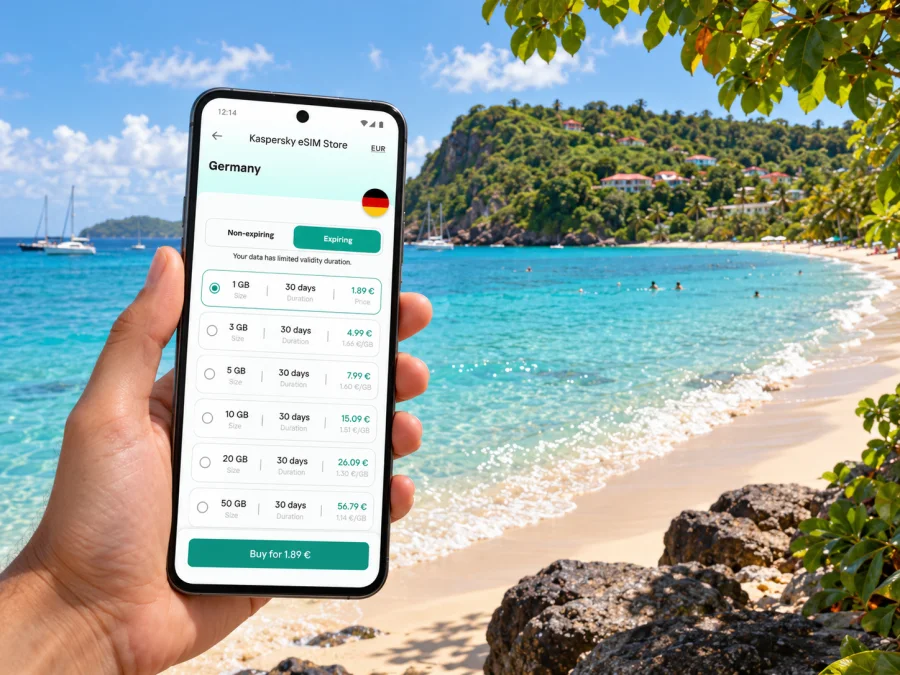
Kaspersky eSIM Store is an app and website where travellers can choose, purchase and activate an eSIM with a suitable plan for mobile internet abroad. To review the current Grenada options and terms, see the available eSIM plans for Grenada. Check the current plan details there before deciding; availability, price and included data may change, and a country page should not be read as a promise of coverage at every address in Morne Rouge.
For a short beach break, list the tasks you expect to do: maps, messages, restaurant searches and booking updates. A longer stay may add work calls or frequent photo sharing. If your accommodation has Wi-Fi, use it for large updates and backups, and reserve mobile data for directions and communication away from the property. Check usage after the first day and adjust habits if it is running down faster than expected. Keep plan information and support details available offline.
Device readiness and installation
An eSIM only works if the device variant supports it and the phone is not restricted by a carrier lock. Hardware support differs by model, sales region and sometimes carrier configuration, so a model family name alone may not settle the question. Check your exact device variant in its settings or manufacturer documentation and check whether your device supports eSIM before purchasing. If your phone offers two SIM lines, confirm how to select the eSIM for mobile data while keeping your usual line available for calls or messages, if desired.
Install the profile using a stable internet connection and follow the instructions for your specific device. If the installation uses a QR code, display it on another screen or print it before starting; a phone cannot normally scan a code displayed on itself without an alternative setup method. Avoid deleting an installed profile while troubleshooting unless the provider’s instructions tell you to do so, because reinstalling may not be possible under every plan’s rules.
Setup sequence before you leave
- Confirm eSIM compatibility and that the device is unlocked.
- Review the plan’s country, data allowance, validity, activation and roaming details.
- Install the eSIM over reliable Wi-Fi, following the provider’s steps for Android or iOS.
- Label the line clearly, for example “Grenada data,” so you can identify it in settings.
- Decide when to enable the eSIM and which line should use mobile data; keep data roaming off or on according to the plan instructions.
- Save the confirmation, support contact and activation guidance somewhere accessible offline.
- On arrival, select the eSIM for mobile data and allow it to register. If it does not connect, check the plan instructions and device settings before making changes.
Activation may require selecting the eSIM as the data line, enabling data roaming for that line, or restarting the phone. These steps vary. Follow the instructions attached to the purchased plan rather than applying every setting by default. The eSIM is generally intended for data; it does not automatically provide a regular local phone number, voice calls or SMS unless the specific plan says otherwise. Internet messaging and calling apps may work over data, subject to the app and connection.
Work, meetings and short stays
For remote work, test the connection before an important call. Ask your accommodation about Wi-Fi, power and a quiet space; if you depend on mobile data, confirm hotspot support and any limits in the plan terms. A full signal icon does not guarantee stable video. For a short excursion, save the pickup point, return time and organizer’s contact before leaving. Keep a screenshot or written copy of the booking in case a message will not load.
When mobile internet is inconsistent
Connectivity can vary with terrain, weather, indoor walls, network load and the partner network selected by a plan. If service drops around a cove, in a building or on a hillside road, move to an open area if it is safe, wait briefly and retry. Then check that the eSIM is enabled, selected for data and configured according to the provider’s instructions. Restarting the phone may help in some cases, but avoid deleting the eSIM profile as a first step.
A useful troubleshooting order is:
- Check whether airplane mode is off and the eSIM line is turned on.
- Confirm the eSIM is selected for mobile data.
- Verify the plan is active and within its validity period.
- Review any required data-roaming setting in the plan instructions.
- Restart the phone, then allow time to register on a local network.
- If the issue continues, use saved Wi-Fi or ask the provider’s support team for the plan-specific next step.
Download anything essential before leaving Wi-Fi: maps, accommodation details, tickets, emergency contacts and booking references. If a page will not load, avoid repeatedly refreshing large content. Send a short text instead of a photo, and wait until you have a stable connection for uploads. These habits make a temporary dead zone manageable without implying that any service is available everywhere.
Common questions
Is Morne Rouge a city?
No. In this guide, Morne Rouge refers to the coastal area and Morne Rouge Beach (BBC Beach) in the St. George’s area of Grenada. Use the exact name of your accommodation or destination when booking transport, because a broad map label may not identify the correct entrance.
Is there Wi-Fi on BBC Beach?
Wi-Fi depends on an individual accommodation or venue; do not assume beach-wide public access. Ask your host whether guests can connect and keep mobile data or offline directions for the return trip.
Can I rely on a bus for every trip from Morne Rouge?
The Tourism Authority publishes local bus hours and fare ranges, but that does not confirm a specific route or departure for your day. Check the route and service locally, look at the bus zone sticker and ask the conductor. For a late return or a time-sensitive transfer, arrange another option in advance.
Will a travel eSIM include calls and text messages?
Many travel plans are data-only and do not include a regular number, voice service or SMS. Check the plan description. Internet messaging and calling apps may work over data, but they require a working connection and may not replace calls to local numbers.
Should I install the eSIM before travelling?
Installing over reliable Wi-Fi can be convenient, but check when validity begins: installation, first connection in Grenada or another stated event. Align that condition with your travel dates.
What if I am visiting other Caribbean islands too?
Check each destination in the plan terms. Grenada coverage does not automatically mean that a plan includes another country or territory. A regional plan may be suitable for an island-hopping route only when its current inclusion list and validity match every stop.
Prepare your connection for Morne Rouge
Before you leave, confirm your device variant supports eSIM, check the current Grenada plan terms, install the profile according to its instructions and save your transport and accommodation details offline. In Morne Rouge, use mobile data for the practical moments that matter—finding a pickup, navigating between the beach and your lodging, or updating a booking—while keeping an offline fallback for places where service is limited.
Use the Kaspersky eSIM Store app or website to review and choose a plan for the trip. Explore current Grenada eSIM options and compare the allowance, validity and activation conditions with your itinerary before completing your selection.


