
Travel connectivity guide
Mostar eSIM for mobile internet
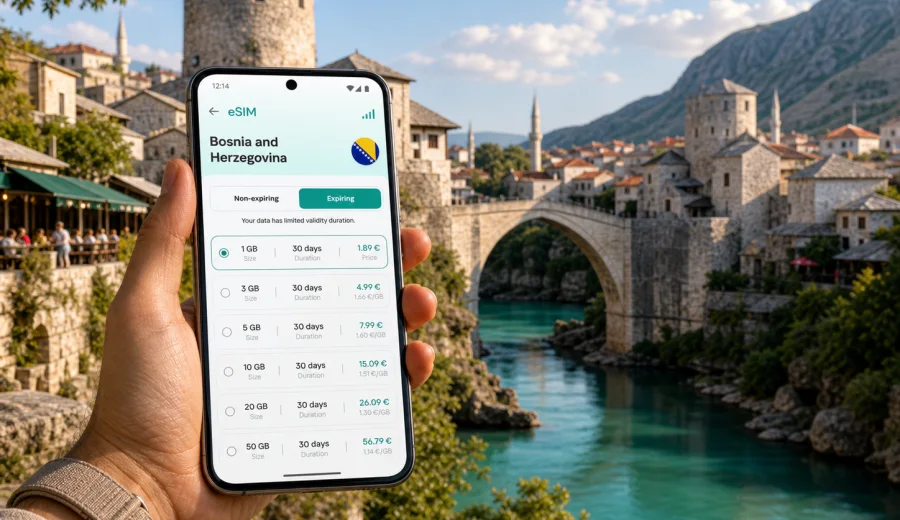
Mostar eSIM: mobile connection and internet for your trip
Mostar is compact, but a trip there can depend heavily on mobile internet. You may arrive by bus from Sarajevo, by car from Croatia, on a day trip from Dubrovnik, or through a route that includes Blagaj, Pocitelj, or Kravica Waterfall. In each case, you may need maps, taxi apps, hotel messages, digital tickets, and quick contact.
An eSIM helps you prepare mobile internet before you start moving through Mostar. Instead of looking for a physical SIM card after arrival, you can install a digital SIM profile on a compatible phone, choose the right data package for Bosnia and Herzegovina, and use mobile data when the plan is active and local network conditions allow it.
This guide focuses on practical Mostar scenarios: the first hour after arrival, walking in the Old Town, crossing the Neretva River, using buses and taxis, and planning short trips around Herzegovina.
Why mobile internet matters in Mostar
Mostar is easy to explore on foot, yet it is not always easy to navigate without live data. The historic center has narrow lanes, stepped streets, stone courtyards, small bridges, riverside paths, and many similar-looking turns. Offline maps are useful, but live mobile internet helps when plans change.
Moments when a mobile connection is useful:
- finding the best walking route from the bus or train station to your hotel;
- checking whether your accommodation is on the west or east side of the Neretva;
- messaging a host when streets are pedestrian-only or hard to access by car;
- using maps around Stari Most, Kujundziluk, the Crooked Bridge, and riverside viewpoints;
- checking opening hours for museums, restaurants, and tour meeting points;
- calling through messengers when your regular SIM is not set up for roaming data;
- translating menus, signs, and short messages;
- monitoring traffic before a day trip to Blagaj or Kravica Waterfall.
Mostar is also a common stop on wider Balkan routes. If you cross borders before or after the city, check whether a country plan or a regional plan best matches your route.
Arrival scenarios: how eSIM helps in the first hour
Most visitors reach Mostar by intercity bus, train, private transfer, rental car, or organized tour. The city is not large, but the arrival point can still shape how much data you need immediately.
| Arrival point or route | What you may need mobile data for | Practical tip |
|---|---|---|
| Mostar bus station or train station | Walking route, hotel contact, taxi coordination | Save your hotel address offline, then use live maps for the last turn-by-turn section |
| Transfer from Sarajevo | Driver messages, arrival time updates, route checks | Activate mobile data when you enter Bosnia and Herzegovina if your plan allows it |
| Day trip from Dubrovnik | Border timing, meeting point messages, group coordination | Check whether your plan covers Bosnia and Herzegovina and any other country on the route |
| Rental car route through Herzegovina | Navigation, parking, fuel stops, weather | Download offline maps, but keep mobile data for traffic and detours |
| Hotel arrival in the Old Town | Pedestrian streets, luggage drop-off, access instructions | Ask the hotel for the nearest drivable point before arrival |
The first hour is often when public Wi-Fi is least convenient. With an eSIM already installed, you can switch to the travel data line and handle the basics without searching for a SIM shop.
Mostar neighborhoods and local movement
For a short city break, you will probably move between the Old Town, the west bank, the bus and train station area, and riverside viewpoints. In the Old Town, mobile data is mainly about walking navigation around Stari Most, Kujundziluk bazaar, Koski Mehmed Pasha Mosque, and the Crooked Bridge. On the west bank, it helps with restaurants, hotels, shopping, and transport.
Near the bus and train station, data is useful for schedules, onward tickets, and last-minute messages. For viewpoints above the city, download maps first and keep mobile data for location sharing or ride coordination.
How to estimate data for a Mostar trip
Your data needs depend more on behavior than on the size of the city. Mostar can be light on data if you use offline maps and hotel Wi-Fi. It can become data-heavy if you stream video, upload many photos, join video calls, or work remotely.
Use this estimate as a planning guide:
| Trip style | Common data use | Suggested planning approach |
|---|---|---|
| Half-day stopover | Maps, messenger, tickets, light browsing | A small data package may be enough if you prepare offline maps |
| Two-night city break | Navigation, restaurant searches, photo uploads, ride coordination | Choose a plan with enough data for daily movement and backup |
| Business trip | Email, cloud documents, calls through meeting apps | Prioritize a larger data allowance and stable hotel Wi-Fi as backup |
| Balkan route | Maps, border updates, hotels across countries | Check country and regional plan validity before buying |
| Family trip | Multiple searches, shared navigation, messaging, entertainment | Consider how many devices and users depend on one phone |
A practical rule: keep mobile data for tasks that must work outside Wi-Fi, and move heavy uploads, app updates, and video streaming to trusted hotel Wi-Fi. This helps your eSIM data last longer during the parts of the trip where it matters most.
Choosing an eSIM plan for Mostar
For a city article, the key destination is the country where the city is located. Mostar is in Bosnia and Herzegovina, so you should look for an eSIM plan that includes Bosnia and Herzegovina or a regional option that explicitly fits your route.
Before you choose, check five details:
1. Destination validity: the plan should include Bosnia and Herzegovina for a Mostar trip.
2. Data volume: compare light navigation use with heavier business or media use.
3. Duration: match the validity period with your arrival and departure dates.
4. Activation rules: check when the validity period starts and how the plan is activated.
5. Device support: your phone or tablet must support eSIM and must not be locked by an operator.
Kaspersky eSIM Store is an app and website where you can choose, arrange, and activate an eSIM with a suitable mobile internet plan for an international trip. For Mostar, you can review options for Bosnia and Herzegovina and prepare an eSIM plan for your trip to Mostar before you leave or while you still have reliable Wi-Fi.
The goal is not to buy the biggest package automatically. A short stopover traveler who only needs maps and messaging may need far less data than a consultant joining video calls from a hotel. A couple sharing navigation and booking tasks from one phone may need more than a solo traveler who stays mostly offline. Choose based on the real trip, not on the city name alone.
Before buying: compatibility and phone settings
An eSIM only works on a compatible device. Before you pay for any plan, confirm that your phone supports eSIM and that it is not restricted by your mobile operator. You can use the internal compatibility check here: Check your device.
Also review these settings before your trip:
- Your main SIM can usually remain active for calls and SMS, while the eSIM handles mobile data.
- Data roaming may need to be enabled for the eSIM line, depending on the plan instructions and device.
- Your phone should have an internet connection during installation, usually through Wi-Fi.
- The QR code or installation details should be stored somewhere accessible, but not shared publicly.
- If you use two-factor authentication through SMS, keep your primary number available.
For Mostar, this setup is convenient because you can keep your regular number for bank codes or urgent calls while using the eSIM for maps, messengers, and browsing. Check the exact plan conditions if you expect voice calls or SMS through the travel plan, because many eSIM data plans are focused on mobile internet and do not include a regular phone number.
How to install and activate eSIM for a Mostar trip
Install the eSIM while you have a stable internet connection. Many travelers prefer doing this at home or in the hotel before heading out. Follow the instructions for your phone model and the plan you selected.
Basic setup flow:
1. Check that your device supports eSIM and is not operator-locked.
2. Choose Bosnia and Herzegovina or the relevant regional destination.
3. Select a data volume and validity period that match your Mostar itinerary.
4. Complete the purchase and open the installation details.
5. Add the eSIM profile to your phone.
6. Set the eSIM as the mobile data line when you want to use the travel plan.
7. Turn on data roaming for the eSIM line if the instructions require it.
8. Keep your primary SIM selected for calls or SMS if you still need your regular number.
For step-by-step setup, use the Android installation guide or the iOS installation guide. The exact screens can vary by phone model and operating system version, so follow the prompts on your device carefully.
If mobile data does not start immediately, check the selected data line, roaming setting for the eSIM, remaining data balance, and whether the plan has already been activated. Connection can take a few minutes and depends on the device, plan conditions, and local network availability.
Practical Mostar use cases
Walking the Old Town
Mostar's Old Town is best explored slowly, but mobile internet helps you keep orientation. Use live maps for the route from your hotel to Stari Most, then switch to low-data behavior: photos, short searches, messages, and saved places.
Hotels and apartments
Many Mostar stays are in guesthouses, apartments, and small hotels where arrival instructions may come through messaging apps. Mobile data helps if the host sends a gate code, parking location, or updated meeting time. This is especially useful when a property is near pedestrian streets and the taxi cannot stop at the exact door.
Business travel
For meetings, conferences, or remote work, do not rely only on public Wi-Fi. Use hotel Wi-Fi for heavy tasks, but keep eSIM data as a backup for email, chat, document access, and route changes.
Stopovers and day trips
A short Mostar visit often has tight timing. You may need to coordinate with a driver, check a group tour meeting point, or confirm when the bus leaves. Mobile internet keeps those small details manageable, especially if you are crossing between Croatia and Bosnia and Herzegovina on the same day.
Trips from Mostar
Mostar is a common base for Blagaj, Pocitelj, Kravica Waterfall, Medjugorje, and longer routes through Herzegovina. Outside the city center, Wi-Fi is less predictable, so keep offline maps downloaded and use mobile data for live navigation, opening hours, weather, and contact with your driver or accommodation.
Data-saving checklist for Mostar
Use this checklist before you leave your hotel or apartment:
- Download an offline map of Mostar and the surrounding region.
- Save your hotel address, bus station, and key viewpoints.
- Keep the eSIM line selected for mobile data only when you need it.
- Turn off automatic app updates and cloud photo backup on mobile data.
- Use compressed photo uploads in messengers when possible.
- Save tickets, booking confirmations, and passport copies offline.
- Check your remaining data before day trips outside the city.
- Keep a small data reserve for departure day.
This approach keeps the eSIM plan focused on travel tasks: navigation, booking changes, transport, messages, and urgent searches. It also reduces the chance that background apps consume data before you need it.
Quick answers about eSIM in Mostar
Is an eSIM useful for a short visit to Mostar?
Yes, especially if you need maps, hotel messages, taxi coordination, digital tickets, or route updates. For a very short stop, choose a data allowance that matches light use.
Do I need a Bosnia and Herzegovina plan for Mostar?
Mostar is in Bosnia and Herzegovina, so the selected plan should include Bosnia and Herzegovina. If you also travel to Croatia, Montenegro, or Serbia, check whether a regional plan better matches your route.
Can I install eSIM after arriving in Mostar?
You can install it after arrival if you have Wi-Fi or another internet connection for setup. It is usually easier to install before departure.
Will eSIM give me a local phone number?
Many travel eSIM plans focus on mobile data and may not include a regular phone number, voice calls, or SMS.
Can I keep my usual SIM active?
In many phones, yes. You can keep your primary SIM for calls or SMS and use the eSIM for mobile data. The exact behavior depends on your device.
What if my phone does not support eSIM?
You will need another mobile internet option, such as roaming from your current operator or a physical SIM where available.
Final preparation before you arrive
For Mostar, a good mobile setup is simple: install the eSIM in advance, confirm that the plan includes Bosnia and Herzegovina, download offline maps, save accommodation details, and keep mobile data for the moments when Wi-Fi is not available. That covers the practical parts of the trip: reaching your hotel, finding streets around Stari Most, coordinating transport, and planning short routes through Herzegovina.
Kaspersky eSIM Store helps you choose, arrange, and activate an eSIM with a suitable mobile internet plan for travel. Before your Mostar trip, review the available options and choose an eSIM plan for Bosnia and Herzegovina that fits your dates, route, and expected data use.