
Travel connectivity guide
Moundou eSIM: Mobile Internet for Chad Travel
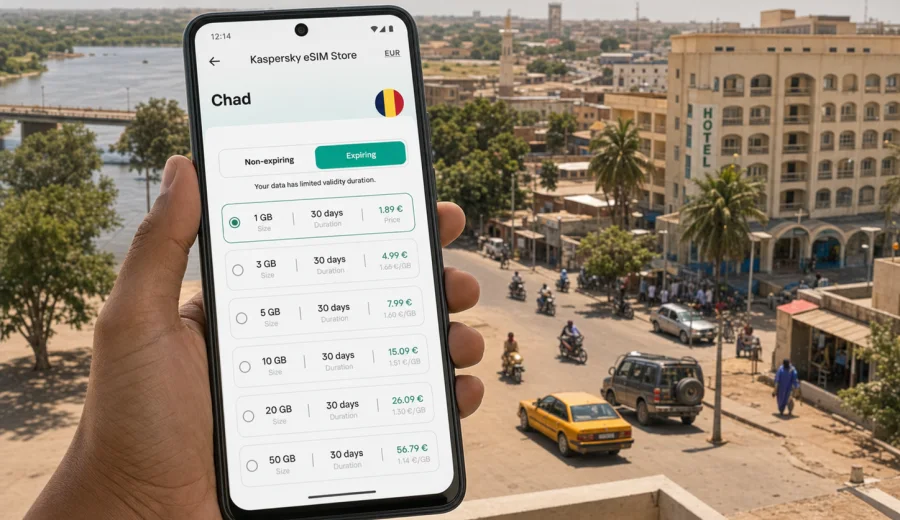
Moundou eSIM: mobile connection and internet for a trip to Chad
Moundou is a practical city for travelers who need reliable mobile internet from the first day of a trip to southern Chad. You may be arriving for business, visiting partners in Logone Occidental, stopping on a route between N'Djamena and the south, or using Moundou as a base for travel along the Logone River region. In each case, the same question appears quickly: how will you use maps, messages, booking details, translation tools, and work apps without depending only on hotel Wi-Fi or a local SIM counter?
An eSIM can make this part of the trip easier. It is a digital SIM profile that lets you use mobile data on a compatible phone without inserting a physical SIM card. With Kaspersky eSIM Store, you can choose and activate an eSIM with a suitable data plan for an international trip, then manage it through the site or app. The focus is mobile internet: ordinary voice calls and SMS are not included unless the conditions of a specific plan say otherwise.
This guide is written for Moundou, not for Chad in general. It looks at the moments when connection matters in the city: arrival, road transfers, local transport, hotel check-in, meetings, navigation between districts, and short trips from Moundou to nearby towns.
Why mobile internet matters in Moundou
Moundou is one of Chad's main cities and an important center in the south of the country. Many visitors come for work connected with local organizations, agriculture, logistics, regional trade, education, or development projects. Others pass through while traveling between N'Djamena, Doba, Sarh, and communities near the Logone River.
The city is easier to navigate when your phone is online before you need help. You may need mobile data to:
- confirm a hotel address after arrival;
- message a driver, colleague, host, or local contact;
- check a map before taking a moto-taxi or car transfer;
- translate a short note in French, Arabic, or a local language context;
- open email attachments for a meeting;
- share your location with a travel companion;
- use messaging apps when a normal voice number is not the main communication channel;
- check onward travel details if your route continues outside Moundou.
Public Wi-Fi can be useful, but it is not a complete travel plan. Hotel Wi-Fi may work only in certain parts of the building, cafes may not be convenient for work calls, and you may need internet before you reach either of them. A prepared eSIM gives you another option for mobile data during the trip, subject to the selected plan, device compatibility, and local network conditions.
Arrival scenarios: airport, road, and first transfer
Travel to Moundou often involves planning beyond a single airport terminal. Some visitors arrive through N'Djamena and continue by road or domestic arrangements. Others may use Moundou Airport if it fits the itinerary. In both cases, the most sensitive connection moments are usually before you are settled at the hotel.
If Moundou is your first stop
Before leaving the arrival area, you may want to message your driver, check whether your hotel has confirmed the booking, and save an offline copy of the address. Mobile internet helps you avoid doing all of this on a shared Wi-Fi network or while asking several people for directions.
If you arrive by road
Road arrivals need their own preparation. Your phone can help you track approximate progress, stay in touch with the person expecting you, and coordinate the final drop-off point in Moundou. If the route is long, download maps and key documents before departure, then use mobile data for updates when connection is available.
If Moundou is a stopover
Some travelers spend only one night in Moundou before continuing to another city or project site. In that case, a small or medium data plan may be enough for messaging, route checks, and hotel logistics. If you expect video calls, file uploads, or remote work, choose more data and check the validity period carefully.
Where eSIM is useful inside the city
Moundou does not require a tourist-style checklist to make mobile data valuable. The need appears in ordinary moments: finding a meeting point, confirming a pickup, checking a route, or sending a document before leaving the hotel.
| City situation | Why mobile data helps | Practical tip |
|---|---|---|
| Hotel check-in | You can show booking details, message reception, or send arrival time updates | Save the address offline before travel |
| Business meetings | You can open maps, email, calendars, and shared documents | Keep key files available offline too |
| Local transport | You can confirm pickup points and share your location | Agree on a clear landmark in advance |
| Walking between stops | You can check orientation without searching for Wi-Fi | Download an offline map as backup |
| Trips from Moundou | You can message contacts before leaving the city | Check data allowance before long travel days |
An eSIM is especially useful if your schedule moves between several places in one day. For example, you might start at a hotel, visit an office, stop near a market area, and then continue to a meeting outside the center. Even light mobile data use can remove friction from that kind of day.
Choosing an eSIM data plan for Moundou
For a trip to Moundou, choose the plan by country coverage first. A city article still uses the country plan because the eSIM needs to match Chad, not only one city. Then look at the data volume and validity period.
A practical way to decide:
1. Count the number of days you will be in Moundou and nearby areas.
2. Estimate whether you will mostly use messaging and maps, or also video calls and file sharing.
3. Check whether the plan is only for Chad or part of a wider regional route.
4. Review when the validity period starts and how long it lasts.
5. Make sure your device supports eSIM before you pay.
For a short Moundou stop, light usage may include messages, maps, email, booking apps, and translation. For a work trip, plan for heavier usage: document downloads, cloud tools, ride coordination, calls through messaging apps, and hotspot use if the plan and device settings allow it.
A simple data estimate for Moundou travel
These estimates are only planning examples. Your real usage depends on app settings, video quality, background sync, updates, and whether you use your phone as a hotspot.
| Trip style | Typical usage | What to watch |
|---|---|---|
| 1-2 day stopover | Messaging, maps, email, hotel details | Avoid automatic photo backups |
| 3-5 day city stay | Navigation, work messages, light browsing, translation | Download maps and documents on Wi-Fi when possible |
| Business week | Email, documents, calls through apps, route checks | Video meetings can use data quickly |
| Regional route | Moundou plus other cities or project sites | Confirm that the plan covers the route you need |
If you will rely on mobile data for work, choose a plan with more allowance than your minimum estimate. It is easier to manage a comfortable data buffer than to reduce essential usage during a full day of meetings and transfers.
Prepare mobile internet before you travel
The best time to think about mobile internet for Moundou is before the first transfer. You do not need to activate everything days in advance, but you should understand the steps and check that your phone is ready.
Before departure:
- check that your phone supports eSIM;
- check that your phone is not locked to one mobile operator;
- update the operating system if needed;
- make sure you can access email or your account during setup;
- save hotel names, addresses, and local contact numbers offline;
- download offline maps for Moundou and your route to the city;
- keep your primary SIM active if you need your usual number for banking or verification messages.
If you are ready to choose a data option for the trip, you can view eSIM plans for Chad and select the plan that fits your Moundou itinerary. This is the country landing page for the city article because Moundou belongs to Chad, and the plan should match the destination country.
Device compatibility comes first
Not every phone supports eSIM, and some models differ by region of sale. Before choosing a plan, check your device compatibility. Also check whether the device is locked by a mobile operator. A compatible, unlocked device is the starting point for using an eSIM profile during your trip.
This check is important for Moundou because you may not want to solve a device issue after a long road transfer or just before a meeting. If your phone cannot use eSIM, you need another connection plan, such as a physical SIM or a roaming option from your existing mobile operator.
How to install an eSIM for a Moundou trip
The exact screens depend on your phone model and operating system, but the general sequence is straightforward. You choose a suitable plan, receive the eSIM details, add the profile to your phone, and select it for mobile data when you are ready to use it.
Basic setup steps:
1. Choose Chad as the destination for your Moundou trip.
2. Select a data plan by allowance and validity period.
3. Complete the order and open the eSIM details in your account, app, or email.
4. Add the eSIM profile to your phone using the on-screen steps or QR code.
5. Set the eSIM as the mobile data line when you want to use it.
6. If required by your phone or plan settings, enable data roaming for that eSIM profile.
7. Wait a few minutes for the device to register on an available local network.
For detailed device steps, use the Android installation guide or the iOS installation guide. It is usually better to read the instructions before departure, even if you plan to activate mobile data only after arriving in Chad.
Moundou travel situations and data priorities
Different travelers use mobile internet differently. A plan that fits a short stopover may feel too small for a project visit with daily calls and file sharing.
Business visit
For a business trip, mobile data is less about sightseeing and more about control. You may need email, calendars, shared documents, voice notes, messaging, and location sharing. Keep large files saved offline before leaving the hotel, and use mobile data for updates, coordination, and urgent work.
Hotel-based stay
If your hotel has usable Wi-Fi, eSIM can still be valuable outside the building. Use Wi-Fi for heavy downloads when you trust the network and mobile data for transport, maps, and messages while moving around Moundou.
Field visit or regional route
If Moundou is the base for nearby visits, prepare for changing connection quality. Save maps, contacts, and documents offline. Use mobile data when available, but do not make the whole day depend on one live cloud document.
Short stopover
For a one-night stay, your main needs may be simple: contact the hotel, confirm a driver, check the onward route, and message home. A smaller data allowance can be enough if you avoid streaming, cloud backups, and automatic app updates.
Local movement: maps, landmarks, and backup plans
Mobile data helps with navigation, but it should not be your only navigation tool. In Moundou, as in many cities, addresses may be explained through landmarks, hotels, offices, road names, neighborhoods, or known public places. Ask your host or driver for a simple landmark-based description before you move.
A good local movement routine:
- save the destination name and phone number;
- take a screenshot of the map while connected;
- share your approximate arrival time with the person waiting;
- keep a power bank if you will be out all day;
- use mobile data for route checks, not for constant streaming in the background;
- turn off automatic uploads if data allowance is limited.
This approach keeps mobile internet useful without wasting data on avoidable background activity.
What eSIM does and does not replace
An eSIM for travel is mainly a mobile data tool. It can help you use messaging apps, maps, email, web browsing, translation tools, and internet-based calls. It does not automatically give you a local phone number, ordinary voice calls, or SMS. If those are included, the plan conditions should say so clearly.
For many Moundou trips, data is the main need. Local partners, drivers, hotels, and colleagues often coordinate through messaging apps or internet calls. Still, keep your regular SIM available if you need banking codes, account verification, or your usual number during the journey.
Practical checklist before leaving for Moundou
Use this checklist before your departure day:
- Your phone supports eSIM and is not operator-locked.
- You know whether your main SIM must stay active for calls or verification messages.
- You have selected a data plan that covers Chad.
- You understand the plan validity period and data allowance.
- You have saved the eSIM installation details where you can access them.
- You have downloaded offline maps for Moundou and the arrival route.
- You have saved your hotel, meeting location, driver contact, and emergency contact offline.
- You have disabled automatic cloud backups and app updates on mobile data.
- You have checked whether your phone needs data roaming enabled for the eSIM profile.
This checklist is useful even for experienced travelers. The goal is not to make the setup complicated; it is to remove avoidable problems when you are tired, in transit, or preparing for a meeting.
Common mistakes to avoid
Waiting until the last minute to check compatibility
Device compatibility is not a detail. If your phone does not support eSIM or is locked to another operator, you need a different plan for mobile internet in Moundou.
Choosing by price alone
The right plan depends on data allowance, validity period, destination coverage, and your itinerary. A very small plan can be inconvenient if you need maps, calls through apps, and work files every day.
Using mobile data for everything
Streaming, automatic photo backup, system updates, and large file sync can consume data quickly. Use mobile data for travel tasks and save heavy downloads for a network you intentionally choose.
Forgetting the arrival route
If you travel to Moundou by road, save route details and contacts before you leave. Connection can vary during long transfers, so offline preparation remains important.
FAQ: eSIM and mobile internet in Moundou
Is eSIM useful for a trip to Moundou?
Yes, if your phone supports eSIM and you need mobile internet for maps, messages, hotel details, work apps, and local coordination. It is especially useful when you want to prepare data access before arrival or avoid looking for a physical SIM immediately.
Which destination should I choose for Moundou?
Choose Chad. Moundou is a city in Chad, so the relevant eSIM plan should cover the destination country. If your route includes other countries, review whether a regional or broader plan is more appropriate.
Can I use eSIM for normal phone calls in Moundou?
Usually, travel eSIM plans are focused on mobile data. Ordinary voice calls, SMS, and a local phone number are not included unless the plan conditions say otherwise. You can use messaging apps and internet calls over mobile data.
Should I install the eSIM before traveling or after arriving?
You can prepare the eSIM before departure and activate mobile data when it makes sense for your plan and itinerary. Read the installation instructions in advance so you are not learning the process during a transfer or right before a meeting.
Do I still need offline maps?
Yes. Mobile internet is helpful, but offline maps are a sensible backup for Moundou and for road travel in Chad. Download maps, addresses, and contact details before you need them.
Can I use a hotspot with an eSIM?
It depends on your phone settings and the selected plan conditions. If hotspot use is important for a laptop or second device, check the plan details first and monitor data usage closely.
Final preparation for your Moundou trip
Moundou rewards practical preparation. If your phone is ready before arrival, the first day becomes simpler: you can contact your driver, confirm the hotel, open a map, message colleagues, and continue to the next stop without searching for a physical SIM card at the wrong moment.
Before you travel, check your device, estimate your data needs, and choose a plan that matches your route and length of stay. Kaspersky eSIM Store helps you choose, set up, and activate an eSIM with a suitable mobile data plan for an international trip, while you remain responsible for checking device compatibility and the conditions of the selected plan.
If Moundou is on your itinerary, choose an eSIM plan for your trip to Chad before you need mobile internet for transport, hotel check-in, navigation, or work in the city.