Travel connectivity guide
Moyogalpa eSIM: Mobile Internet in Nicaragua
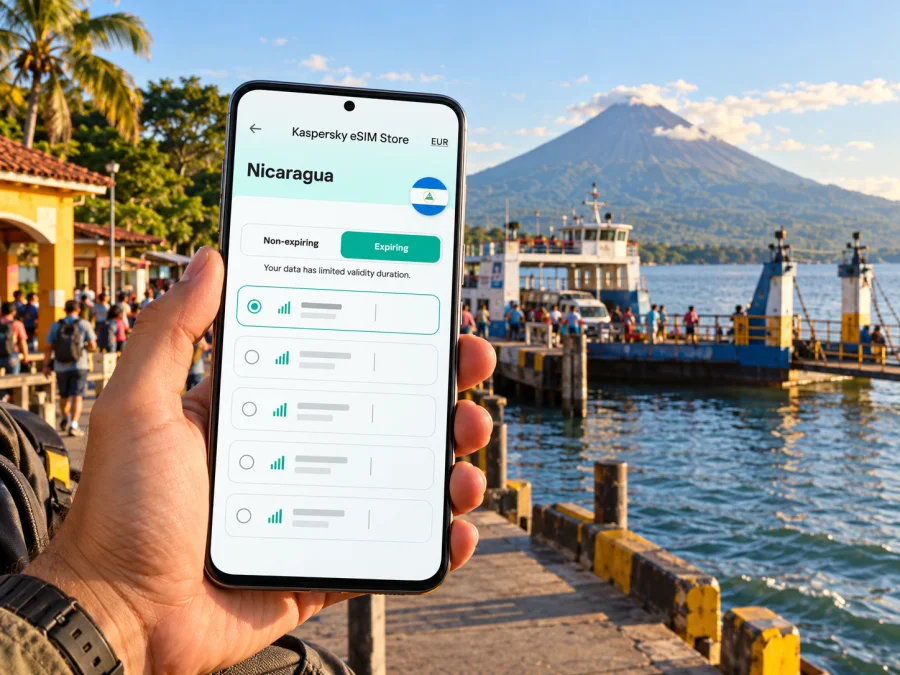
Moyogalpa eSIM: mobile connection and internet for Ometepe
Moyogalpa is often the first place visitors see on Ometepe: ferries arrive at its lakeside port, the town is backed by Volcán Concepción, and roads from here lead toward beaches, farms and trailheads around the island. A reliable mobile connection can make the practical parts of that journey easier: finding your accommodation, confirming a pickup, checking a route or messaging someone when plans change. It is still useful to plan for places where signal or data may be limited, especially once you leave the town centre and travel into rural areas.
Moyogalpa is a municipality on the western side of Ometepe Island in Nicaragua’s Lake Cocibolca. It is a town and an island gateway rather than a large urban centre. The ferry crossing from San Jorge on the mainland is the main arrival route described by Nicaragua’s tourism and airport authorities. The airport authority lists an air terminal in La Paloma, about 2 km south of Moyogalpa, but its published flight details may not reflect current operations. Confirm transport availability and schedules directly before building a tight connection around them.
This guide focuses on using mobile internet around Moyogalpa: arriving by ferry or air, navigating the town, arranging onward transport, visiting nearby places and preparing an eSIM for Nicaragua. Coverage, plan terms and device compatibility depend on the service and equipment you use; no single connection can be assumed to work in every part of the island.
Why mobile internet helps in Moyogalpa
Moyogalpa is compact, but trips from town quickly extend across Ometepe. Mobile data can help you find an accommodation, confirm a pickup, check a route or message someone when plans change. It is most useful for logistics rather than as a substitute for local advice or offline preparation.
Typical uses include:
- At the port, contact a host or driver and confirm the meeting point.
- In the centre, find an address, restaurant or cash point.
- On the island road, follow a route and share an arrival estimate.
- During a day trip, coordinate a return ride or check a meeting place.
- For work, handle light messaging or email while keeping a backup for calls.
Save key directions and contacts before leaving a reliable connection. Mapped travel times may not reflect road conditions, and data reception can vary beyond the town.
Arriving at Moyogalpa: keep the first connection simple
Most visitors reach Ometepe by crossing Lake Cocibolca from San Jorge to Moyogalpa. The island’s airport authority describes the lake route as about 17 km and roughly an hour, but actual departures and duration can vary. Check the operator’s current notice before travel, especially if you have a same-day onward connection. Nicaragua’s tourism site also describes ferry travel from San Jorge as the island route.
Before boarding, download the map you need, save your accommodation name and directions, and keep confirmations accessible offline. If a host shares a location pin, open it before boarding and note a nearby landmark; pins can be imprecise around property entrances or rural turnoffs.
After arrival, use data for the immediate task: message your driver, verify the meeting place, then follow your route. Follow port staff and provider instructions if boarding or pickup arrangements change; do not rely on a map alone to identify the correct ferry or vehicle.
Arrival checklist
- Keep accommodation details and contact information available offline.
- Agree whether a driver will meet you and what to look for.
- Save the route from the port to your first stop.
- Carry a power bank if you expect a long day of navigation.
- Reconfirm return transport independently; schedules can change.
Choose an eSIM plan for the full route
A trip that starts in Moyogalpa may continue across Ometepe or elsewhere in Nicaragua. Estimate how many days you will use data and whether your main tasks are maps and messages or also photo uploads and video calls. Plan for the whole itinerary rather than only the arrival day.
| Travel pattern | Estimate | Prepare |
|---|---|---|
| Brief town stay | Days and map or messaging use | Offline map; limit photo backup |
| Several island stops | Total stay and rural travel | Offline routes and host contacts |
| Work and sightseeing | Email, calls or video meetings | Test apps and plan a backup |
| Wider Nicaragua itinerary | Every destination and validity | Check each plan’s stated coverage |
This is a planning framework, not a coverage promise. Reception can vary with network conditions, terrain and buildings; a country listing does not establish service at a particular hotel, dock, road or viewpoint.
eSIM readiness: device, line and settings
Before choosing a plan, verify that your exact device variant supports eSIM and is not carrier-locked. Regional versions of the same product family can differ, so a model name alone may not be enough. Check the phone settings or manufacturer documentation and check whether your device supports eSIM before payment.
Check that your phone has room for another mobile plan and whether it can keep your usual line active while using the travel eSIM for data. Controls vary by model; do not assume two lines can use data simultaneously. A travel data plan does not automatically include a local number, voice minutes or SMS. Review the plan details; internet calling apps need working data or Wi-Fi.
Before purchase, confirm:
- Nicaragua is in the plan’s stated destination.
- Validity duration and start condition match your dates.
- Data amount suits maps, messages, browsing and any hotspot use.
- Your exact device supports eSIM and is unlocked.
- Installation method, support details and refund conditions are clear.
Kaspersky eSIM Store is an app and website where you can choose, arrange and activate an eSIM with a suitable plan for mobile internet on an international trip. The Nicaragua page is a country-level destination page, not a Moyogalpa-specific coverage guarantee. Review the displayed destination, data amount, validity, price and terms before purchase; details can change. Browse current eSIM options for Nicaragua and confirm the stated destination matches your itinerary.
Install before leaving, activate at the right time
When possible, install the eSIM over stable Wi-Fi and allow time to follow the setup screens. Keep your usual line available until you have checked important account access and travel messages. Follow the instructions for your phone: eSIM setup for Android or eSIM setup for iOS. Menu names vary by version.
Installation and activation may be separate. A plan can be installed in advance, while validity may begin at installation, first connection or another stated trigger. Read that plan’s instructions before changing settings.
- Connect to Wi-Fi and open the installation instructions.
- Add the eSIM using the specified method; do not delete the profile if setup is delayed.
- Label the line clearly, such as “Nicaragua travel data.”
- Select it for mobile data when the plan should begin.
- Enable data roaming for that eSIM only if the plan instructions require it; turn roaming off for your home line if you want to avoid using it accidentally.
- Test a webpage or messaging app and verify which line is selected.
Do not remove a working profile as the first troubleshooting step. Some eSIMs cannot be reinstalled after deletion, depending on their terms. If data does not work, check the selected line and activation status, then follow plan guidance or contact support.
Getting around the town and island
Moyogalpa’s port and central area are useful orientation points. The national tourism map describes taxis, motorcycle taxis, accommodation, restaurants and small shops around the port. Not every ride or service can be booked online, so agree on destination, price and meeting point directly with the provider.
For a short walk, an offline map may be enough. For longer journeys, ask your accommodation which transport option fits the road and weather. The airport authority describes collective transport between the island’s municipalities as well as private taxi, motorcycle taxi and motorcycle rental. These are general options, not a live timetable or guarantee of availability at a particular hour.
Punta Jesús María is reached along the road toward Altagracia. The official tourism page places it about 5 km from Moyogalpa and notes that its sand spit changes with the season. Check local conditions before setting out, download the route, preserve battery for the return, and agree on pickup arrangements if you are not travelling with your own vehicle.
| Place or task | How data can help | Save offline |
|---|---|---|
| Port and town centre | Confirm a meeting point or locate an address | Host contact and walking directions |
| La Paloma area | Check the route to the air terminal | Departure confirmation and transfer contact |
| Punta Jesús María | Follow the road and share an arrival estimate | Return transport and map |
| Rural accommodation | Recheck a junction or message your host | Written directions and pickup details |
A route line is only one part of the decision. Ask locally about road surface, rain and access before choosing a bicycle, scooter or walking route. Stop somewhere safe before checking your phone.
Where a connection may be less dependable
Reception can change as you leave Moyogalpa’s centre. Terrain, distance from network equipment, indoor walls and local demand all affect service. An eSIM cannot create coverage where the underlying network has none, and a country label does not establish reception at a specific dock, hotel or viewpoint.
Prepare for gaps: download offline maps, save ferry details and host instructions, keep key numbers in your contacts and carry a charged power bank. If someone expects you, send a check-in before leaving a dependable connection and agree on a fallback meeting point. Public Wi-Fi may be available at some businesses, but its availability and quality vary; ask staff rather than planning around it.
Planning for work, short stops and day trips
Short stop near the port: save your next driver’s contact and directions before the ferry docks. Use data for a message or map check rather than assuming you can complete a large upload.
Several nights on Ometepe: estimate data for the whole stay, not only time in town. Send your next host an arrival estimate while you still have service.
Remote work: email and text usually use less data than video calls, but neither a plan allowance nor a signal guarantees a stable meeting. Ask about accommodation Wi-Fi, test your apps and arrange a backup for important calls.
Day trip: save the route and meeting instructions before leaving. Keep enough battery for the return and ask locally about conditions. A mobile signal does not replace water, local safety advice or a clear return plan.
Data habits that make a small plan go further
Maps and messaging are often lighter data tasks than automatic photo backups, app updates or video streaming. Actual use depends on your settings. To manage an allowance:
- Set cloud photo backup to Wi-Fi only.
- Download maps, tickets and media in advance.
- Disable automatic app updates over mobile data if available.
- Check plan balance and validity periodically.
- Confirm tethering is permitted before using a laptop; background sync can consume data quickly.
Troubleshooting a travel eSIM in Moyogalpa
If data stops, check the eSIM is enabled and selected for mobile data, then verify the plan is active and has remaining data. Move to a safe open location and review whether the plan requires data roaming for the travel eSIM. Restart or briefly toggle airplane mode only as the instructions advise. Contact support if the issue continues.
A weak signal in one room does not necessarily mean the eSIM is faulty. Do not delete a working profile or reset network settings as a first step; depending on the plan, a deleted profile may not be reinstallable.
Frequently asked questions
Is Moyogalpa a city or a municipality?
Moyogalpa is a municipality and its principal town on the western side of Ometepe. For visitors, it is a compact town and ferry gateway rather than a large urban centre. Confirm whether a direction refers to the town, municipality or port area.
Does a Nicaragua eSIM guarantee service at the port or on every island road?
No. A plan’s destination describes where it is intended to be used; reception at a specific place depends on local network conditions, terrain and device. Keep offline directions for rural travel.
Can I install an eSIM before travelling?
Often, but timing depends on the plan’s activation rules. Read when validity begins, install over Wi-Fi and keep the instructions available.
Will an eSIM give me a local number?
Not automatically. Check the individual plan for voice or SMS. Internet-based calls and messages need working data or Wi-Fi.
Is there an airport in Moyogalpa?
The airport authority lists an air terminal in La Paloma, about 2 km south of Moyogalpa. Its published flight details may be out of date, so confirm current service directly before relying on a flight.
A practical Moyogalpa preparation list
Before leaving for Nicaragua, check the items that apply:
- [ ] Confirm your exact phone variant supports eSIM and is unlocked.
- [ ] Review the plan destination, data, validity, price and conditions.
- [ ] Install the profile over Wi-Fi and understand its activation trigger.
- [ ] Save offline maps and accommodation directions for Ometepe.
- [ ] Keep ferry or flight confirmations and pickup contacts available offline.
- [ ] Ask your accommodation about transport and road conditions.
- [ ] Carry a charger or power bank and recheck schedules near departure.
Use mobile data as a flexible travel tool and keep essentials offline. In Moyogalpa, prepare for the ferry arrival, confirm your first ride and expect reception to change as you travel away from the town.
Prepare your eSIM for Moyogalpa
Before your trip, choose a plan whose Nicaragua destination, data allowance and validity fit the dates and activities you have planned. Check device compatibility, read the activation conditions, then install the eSIM when you have stable Wi-Fi. Explore the current Nicaragua eSIM options in Kaspersky eSIM Store and review the displayed terms before you decide. Keep an offline map and your essential travel details ready for the parts of Ometepe where a mobile connection may be limited.


