
Travel connectivity guide
Mozambique eSIM: mobile internet guide
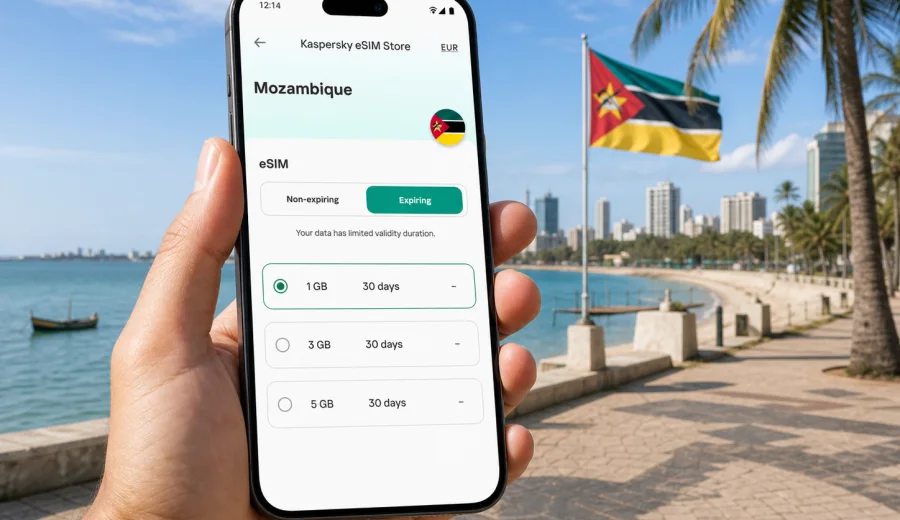
eSIM in Mozambique: mobile connection and internet for your trip
Mozambique is a country where mobile internet can be useful from the first minutes of a trip. You may need maps after landing in Maputo, a messaging app during a transfer to the coast, booking details for a hotel in Vilankulo, or navigation between cities such as Beira, Nampula, Pemba and Tete. An eSIM helps you prepare mobile data before you travel, without looking for a physical SIM card on arrival.
This guide explains how to use an eSIM for Mozambique, how to choose a data plan, what to check before payment, and how to keep your mobile connection predictable during the journey. The focus is practical: data volume, validity period, device compatibility, installation steps and everyday travel scenarios.
Kaspersky eSIM Store is an app and website where you can quickly choose, arrange and activate an eSIM with a suitable mobile internet plan for an international trip. It is not a mobile operator and does not own a network. The app and site help you prepare the eSIM setup, review plan conditions and manage the selected option on a compatible device.
Why eSIM can be useful in Mozambique
Mozambique trips often combine several different travel situations. A business visitor may stay mainly in Maputo and need email, taxi apps and video calls over messengers. A leisure traveler may move from the capital to beaches, islands, reserves or regional cities. A family trip may involve transport updates, hotel confirmations, route planning and regular contact with people at home.
In these situations, eSIM is useful because it gives you a data profile that can be installed digitally. You do not need to remove your main SIM card, search for a shop immediately after arrival, or rely only on public Wi-Fi. You can keep your primary number in the phone and choose the eSIM profile for mobile data.
Typical uses include:
- checking the route from the airport to accommodation;
- receiving booking confirmations and transport updates;
- using maps while moving between districts or cities;
- messaging family, colleagues or travel partners;
- translating short phrases and checking opening hours;
- using mobile banking or payment confirmations when needed;
- joining work calls through internet-based apps, if the connection allows it;
- sharing hotspot data with a laptop or another device when the selected plan and device support tethering.
An eSIM plan for travel usually focuses on mobile data. It may not include a local phone number, voice calls or SMS. If calls and messages are important, check the conditions of the selected plan before you rely on it. Many travelers use internet-based calling and messaging apps through the eSIM data connection.
What to check before choosing a plan
Before you choose an eSIM plan for Mozambique, start with the practical shape of the trip. The right option for a short city visit is different from the right option for a multi-stop route along the coast or a working trip with daily video meetings.
| Question | Why it matters | Practical choice |
|---|---|---|
| How long will you stay? | Plan validity should cover the trip dates. | Match the validity period to the full stay, including arrival and departure days. |
| How much data do you use? | Maps, messaging and email use less data than video and cloud sync. | Choose a larger package if you expect calls, uploads or laptop hotspot use. |
| Where will you travel? | Routes outside one city may create different connectivity needs. | Check the destination, plan conditions and local network behavior. |
| Is your phone unlocked? | A carrier-locked phone may not accept another mobile profile. | Confirm that the device is not restricted by your home operator. |
| Does your device support eSIM? | eSIM works only on compatible models. | Check compatibility before payment and before departure. |
The most important point is not to overfocus on price alone. Look at the full set of conditions: country, data allowance, validity, activation rules, top-up options, support and device requirements. A very small package may be enough for basic messaging, but it can run out quickly if you use maps all day or allow background apps to sync freely.
eSIM, roaming or local SIM: which option fits your trip?
Travelers usually compare three ways to stay online in Mozambique: international roaming from a home operator, a local physical SIM card, or a travel eSIM. Each can make sense depending on the trip.
| Option | Good for | Points to watch |
|---|---|---|
| International roaming | Short trips where convenience matters and your home operator offers clear terms. | Pricing, fair-use rules and data limits can vary significantly. |
| Local physical SIM | Longer stays where you are ready to visit a shop and follow local registration or setup steps. | Time on arrival, language barriers, shop availability and device SIM-slot management. |
| Travel eSIM | Travelers who want to prepare mobile data digitally and keep their main SIM in the phone. | Requires eSIM-compatible, unlocked device and careful review of plan conditions. |
An eSIM can be a good middle option when you want less friction on arrival and clearer control over the selected data package. It can also reduce dependence on public Wi-Fi in airports, cafes, hotels and transport hubs. Still, it is important to set expectations correctly: coverage, speed and availability depend on the local network environment and the chosen plan conditions.
How much mobile data might you need?
There is no single correct data package for Mozambique, because travelers use the internet differently. A person who mainly checks maps and messages can use much less data than a person who uploads videos, joins meetings or shares a hotspot with a laptop.
Use this planning guide:
| Travel style | Common online activity | Data planning approach |
|---|---|---|
| Light use | Messaging, maps, email, boarding passes and hotel details. | A smaller package can work if you keep media auto-downloads off. |
| Standard travel | Maps, social media, browsing, ride apps, translation and daily photo sharing. | Choose a mid-range package and monitor data use. |
| Work trip | Email, cloud files, calls through apps and occasional hotspot use. | Choose more data and avoid large updates on mobile data. |
| Family or group travel | Shared navigation, multiple devices and frequent messaging. | Consider a larger package or separate plans for key devices. |
To save data, download offline maps before departure, disable automatic photo backup on mobile data, update apps over trusted Wi-Fi before the trip, and switch off background refresh for heavy apps. These small steps can make a plan last longer without changing how you use essential travel services.
A practical Mozambique travel checklist
Use this checklist a few days before departure:
- Confirm that your smartphone or tablet supports eSIM.
- Check that the device is not locked to one carrier.
- Update the operating system if an update is already planned.
- Keep your primary SIM active if you need bank SMS or calls.
- Download offline maps for Maputo and other planned regions.
- Save hotel addresses, transport confirmations and emergency contacts.
- Review the data amount and validity period before choosing a plan.
- Install the eSIM while you still have stable internet, if the plan allows it.
- Keep the QR code or installation details available until setup is complete.
- Learn where to switch mobile data between your primary SIM and eSIM.
Before you pay for any eSIM plan, check your device. This is especially important if you use an older phone, a device bought through a carrier contract, or a model that has different eSIM support depending on region.
How to install and activate eSIM for Mozambique
The general installation flow is simple, but exact screens depend on your phone model and operating system version. In Kaspersky eSIM Store, after you choose and arrange a plan, the eSIM appears in your profile on the website or in the app. You can then follow the setup instructions and use the QR code or on-screen installation flow.
For step-by-step setup, use the official guides: Android installation guide and iOS installation guide.
In most cases, the process looks like this:
1. Check that your device supports eSIM and is unlocked.
2. Choose Mozambique as the destination and review available plan conditions.
3. Complete the order for the selected data package.
4. Open the eSIM details in your profile or app.
5. Install the eSIM using the provided instructions.
6. Give the eSIM profile a clear label, such as Mozambique data.
7. Set the eSIM as the line for mobile data when you are ready to use it.
8. Enable data roaming for the eSIM profile if the setup instructions require it.
9. Keep your primary SIM for calls or SMS if you still need it.
Do not delete the eSIM profile after installation unless you are sure you no longer need it. In many cases, an eSIM cannot simply be moved to another device after activation. If you change phones during the trip, check the plan conditions and contact support before making changes.
When to install the eSIM
Many travelers prefer to install the eSIM before departure while they still have stable home Wi-Fi. This can reduce stress on arrival because the profile is already on the phone. However, activation rules can differ by plan. Some plans start validity only after connecting to a supported local network, while others may have different conditions. Always read the plan details before installation and activation.
A balanced approach is:
- choose the plan before travel;
- install the eSIM when you have reliable internet;
- keep mobile data on your primary SIM until you are close to departure or arrival;
- switch mobile data to the Mozambique eSIM when you are ready to use it;
- check that the correct line is selected for mobile data.
If the eSIM does not connect immediately after arrival, wait a few minutes, check that mobile data is enabled for the eSIM profile, confirm that data roaming is enabled if required, and restart the phone if the instructions recommend it. Connection behavior can depend on the device and local network conditions.
Where eSIM helps during a Mozambique trip
Mozambique is not only one city or one travel scenario. Your internet needs may change as you move through the country. Here are common examples.
Arrival in Maputo. Mobile data helps with airport pickup details, taxi or transfer coordination, maps, hotel check-in information and messaging. Having an eSIM prepared in advance can make the first hour more predictable.
Business meetings. For a work trip, eSIM data can support email, calendar updates, messaging apps and document access. If you need video calls, choose a plan with enough data and keep large file transfers for reliable Wi-Fi.
Coastal travel. Travelers visiting beach destinations often use maps, weather checks, reservations and photo sharing. Data use can rise quickly if cloud backup is enabled, so review app settings before departure.
Regional routes. If your itinerary includes several cities or long transfers, mobile data can help with navigation, transport messages and quick checks of accommodation details. Keep important documents available offline as well.
Family coordination. Groups often need messaging, shared locations and booking references. Decide which devices need their own data plan and which can rely on hotspot sharing, if allowed by the plan and practical for your devices.
If you want to prepare before departure, you can choose an eSIM plan for Mozambique in Kaspersky eSIM Store and review the available data volumes, validity periods and conditions for the trip.
Settings that help avoid data surprises
Small phone settings can have a large effect on how long your mobile data lasts. Before you travel, check these items:
- Turn off automatic video playback in social apps.
- Disable cloud photo and video backup on mobile data.
- Download playlists, maps and documents before departure.
- Set app updates to Wi-Fi only.
- Review which apps can use mobile data in the background.
- Use lower-quality video settings for calls when possible.
- Monitor remaining data in the app or device settings.
- Avoid using hotspot for large downloads unless you planned for it.
If you use two SIM profiles, check which line is assigned to mobile data. Many phones allow one profile for calls and SMS and another for data. This is helpful when you want to keep your home number active but use the eSIM for internet in Mozambique.
Common mistakes to avoid
The most common eSIM issues are usually preventable. Review these before the trip:
| Mistake | Why it causes trouble | Better approach |
|---|---|---|
| Buying before checking compatibility | Unsupported devices cannot install the eSIM profile. | Confirm eSIM support and carrier unlock status first. |
| Installing on the wrong phone | Some eSIM profiles cannot be transferred after activation. | Install only on the device you will use in Mozambique. |
| Forgetting data roaming for the eSIM | Some travel eSIM profiles require data roaming to connect. | Follow the setup instructions for the selected plan. |
| Leaving cloud backup active | Photos and videos can consume data quickly. | Pause backups or limit them to Wi-Fi. |
| Choosing only by price | A small plan may not fit a work-heavy or multi-city trip. | Compare data amount, validity and usage scenario together. |
It is also useful to keep a fallback: hotel Wi-Fi details, offline maps, saved addresses and key documents available without internet. eSIM makes mobile data easier to prepare, but good travel planning still includes offline access to essentials.
FAQ about eSIM and internet in Mozambique
Does eSIM for Mozambique include calls and SMS?
Most travel eSIM plans are designed for mobile data. A regular phone number, voice calls and SMS are not included unless the specific plan says otherwise. You can usually use internet-based calling and messaging apps over mobile data.
Can I keep my usual SIM card in the phone?
Yes, on many dual-SIM phones you can keep your physical SIM or primary eSIM active and use the travel eSIM for data. Check your phone settings so the right profile is selected for mobile internet.
Should I install the eSIM before I travel?
Installing before departure can be convenient if the plan conditions allow it. Read the activation details first, because validity rules can differ by plan.
What if my phone does not support eSIM?
You will need another way to connect, such as roaming from your home operator or a physical SIM option. Check compatibility before choosing a plan.
Can I use hotspot with an eSIM?
Hotspot support depends on your device and the conditions of the selected plan. Review the plan details and test with a small session before relying on it for work.
Will eSIM replace hotel Wi-Fi?
Not always. eSIM is useful for mobile internet while moving, but hotel Wi-Fi may still be better for large downloads, long video calls or backups. Use both sensibly.
What should I do if the eSIM does not connect?
Check that the eSIM profile is installed, mobile data is assigned to that profile, data roaming is enabled if required, and airplane mode is off. Restart the phone if needed. If the issue remains, contact support with your device model and plan details.
Quick planning summary
For Mozambique, eSIM is most useful when you want mobile internet prepared before arrival and do not want to manage a physical SIM card immediately after landing. It is especially practical for maps, transfers, bookings, messaging, work email and multi-city routes.
The best choice depends on four things:
- your device compatibility;
- your trip length;
- your expected data use;
- the plan validity and activation rules.
Check these before payment, install the eSIM carefully, label the profile clearly and switch mobile data to the eSIM only when you are ready to use it. Keep important travel information offline, and manage background app settings so your data package lasts through the trip.
Prepare your eSIM for Mozambique
Before you leave, make sure your device supports eSIM, choose a data amount that fits your travel style, and review the validity period and activation rules. Kaspersky eSIM Store helps you select, arrange and activate an eSIM plan for mobile internet during an international trip, while keeping the setup process clear on a compatible device.
When your itinerary is ready, prepare an eSIM plan for your Mozambique trip and keep the installation instructions available until the profile is working on your phone.