
Travel connectivity guide
Mtskheta eSIM for mobile internet in Georgia
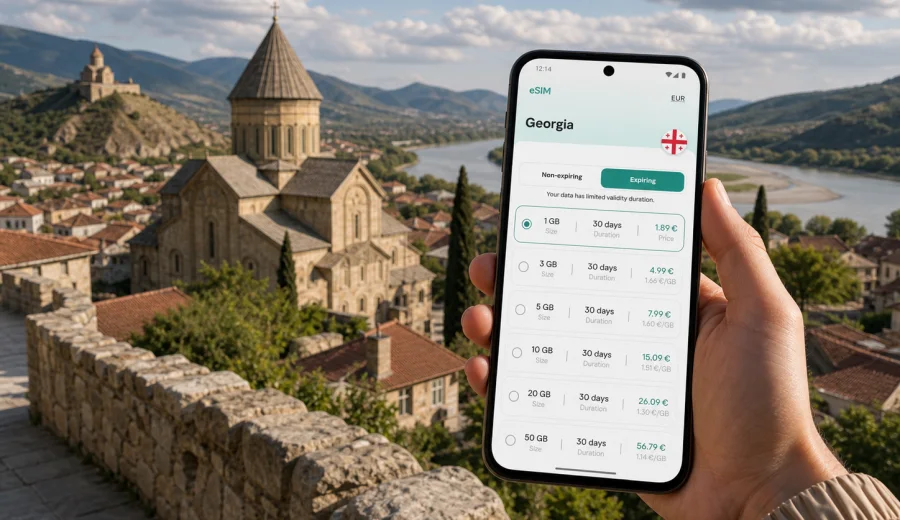
Mtskheta eSIM: mobile connection and internet for your trip
Mtskheta is close enough to Tbilisi for a half-day route, yet it feels very different once you start moving between its old streets, cathedral square, riverside viewpoints and hilltop monasteries. For many visitors, the city is the first stop outside the capital of Georgia: a short transfer, a taxi ride, a guided tour, a business break with a free afternoon, or a stop on the way toward the Georgian Military Road. In all of these scenarios, mobile connection and internet access matter more than they may seem when you plan the trip from home.
An eSIM can help you prepare mobile internet for Mtskheta without buying a physical SIM card after arrival. You choose a data plan for Georgia, install it on a compatible phone, and use mobile data for maps, messages, ride-hailing apps, hotel details, ticket confirmations, restaurant searches and route changes. The goal is practical: fewer interruptions between the airport, Tbilisi, Mtskheta and nearby viewpoints.
This guide focuses on the city experience: arriving in Georgia, getting to Mtskheta, walking between landmarks, using navigation in narrow streets, checking opening hours, keeping contact with drivers or colleagues, and planning short trips from the city.
Why mobile internet matters in Mtskheta
Mtskheta is compact, but it is not a place where every useful point is in one straight line. The old center, Svetitskhoveli Cathedral, Samtavro Monastery, riverside areas and the road to Jvari Monastery create a trip where you may move between pedestrian streets, viewpoints, taxi pickup points and regional roads. A stable data connection helps you avoid small delays that can become inconvenient when your day is short.
Typical mobile internet tasks in Mtskheta include:
- checking the route from Tbilisi International Airport or central Tbilisi;
- sharing your live location with a driver, guide or travel companion;
- opening maps around the old town and cathedral area;
- translating short messages, menus or signs;
- confirming hotel, guesthouse or tour details;
- using messengers for calls when your eSIM plan is data-only;
- checking the return route to Tbilisi before evening traffic;
- planning an onward route to Kazbegi, Gori, Uplistsikhe or wine regions.
Public Wi-Fi can be useful in hotels or cafes, but it does not cover the moments when you are most likely to need directions: at a pickup point, on a roadside viewpoint, at the edge of the old town or while changing plans between stops. With an eSIM data plan, you can be less dependent on finding Wi-Fi before every small decision.
Arrival scenarios: airport, Tbilisi and first transfer
Most international visitors reach Mtskheta through Tbilisi. You may land at Tbilisi International Airport, spend a night in the capital, then continue to Mtskheta by taxi, private transfer, rental car, tour bus or minibus. If Mtskheta is your first day trip, mobile internet is useful before you even see the city.
For example, you may need to:
1. Message your driver after baggage claim.
2. Check whether your accommodation in Tbilisi offers early check-in.
3. Save the route to Mtskheta before leaving the city.
4. Compare pickup points if you join a group tour.
5. Share your estimated arrival time with a hotel or host.
If your trip starts with a late flight, the value of preparation is even clearer. You may not want to look for a SIM counter, compare unfamiliar local offers or depend on airport Wi-Fi while arranging transport. Installing an eSIM before departure can make the first connection easier: after arrival, you can switch the eSIM on, follow the device instructions and start using the selected data plan when it is active.
Where eSIM helps during a Mtskheta visit
Mtskheta is often visited as a short route, so time is important. You may have only four or five hours between leaving Tbilisi and returning for dinner, or you may stop in Mtskheta during a longer regional drive. Mobile data helps you keep that time under control.
| City moment | Why internet helps | Practical example |
|---|---|---|
| Arrival from Tbilisi | Confirm the correct drop-off point | Ask the driver to stop near the old town or cathedral entrance |
| Walking route | Avoid unnecessary backtracking | Move between Svetitskhoveli Cathedral, small streets and riverside areas |
| Jvari Monastery | Check road time and pickup details | Coordinate a taxi for the hilltop viewpoint |
| Lunch or coffee break | Choose a convenient stop | Search nearby cafes and check recent reviews in your app |
| Hotel or guesthouse stay | Keep booking details available | Message the host if you arrive later than planned |
| Return trip | Adjust plans quickly | Decide whether to return to Tbilisi, continue west or add another stop |
The city is easy to enjoy slowly, but the surrounding routes are not always walkable. Jvari Monastery, for instance, is best planned as a separate ride rather than a casual walk from the center for most travelers. A working data connection helps you coordinate that ride, check the map and stay reachable if plans change.
City routes where data use can add up
Travelers often underestimate data use in a small city because they do not plan to stream video or work for hours. In practice, several modest tasks can add up across a day.
Common data use in Mtskheta:
- map navigation while moving between Tbilisi and Mtskheta;
- photo backups if cloud sync is enabled;
- messenger calls to coordinate transport;
- translation apps for short conversations;
- browsing restaurant menus and reviews;
- checking weather before visiting viewpoints;
- opening digital tickets, booking confirmations or travel documents;
- uploading photos from cathedral square, old streets or river views.
If your phone automatically uploads photos and videos, consider limiting cloud sync to Wi-Fi. This keeps more of your data plan available for navigation, messaging and practical travel tasks.
How to choose an eSIM data plan for Mtskheta
For a city article, the plan should still be chosen by country. Mtskheta is in Georgia, so you need a plan that covers Georgia or a regional option that includes it. The best choice depends on how long you will stay, whether you are visiting only Mtskheta or several Georgian cities, and how heavily you use mobile data.
Use this simple planning model:
| Trip style | Suggested planning focus | What to check |
|---|---|---|
| Half-day from Tbilisi | Small data allowance may be enough | Maps, messaging and basic browsing |
| Weekend in Mtskheta and Tbilisi | Balance data volume and validity period | Hotel Wi-Fi, photo uploads, daily navigation |
| Business trip near Tbilisi | Reliability of access and spare data | Calls in messengers, email, documents |
| Regional route through Georgia | Longer validity and more data | Navigation between cities and transport coordination |
| Heavy content use | Larger package or top-up option | Video, cloud backup and hotspot needs |
Before choosing a plan, check the data allowance, validity period, destination coverage, activation rules and whether top-up is available. If your main phone number must remain active for calls or banking messages, you can usually keep your physical SIM or primary eSIM for voice and use the travel eSIM for mobile data, depending on your device settings and operator conditions.
For Mtskheta, it is usually better to think in terms of the full Georgia route rather than the old town alone. If your itinerary includes Tbilisi, Mtskheta, Gori, Kazbegi or Kakheti, plan enough data for transport days, not just sightseeing hours.
Preparing your phone before the trip
The most important step is device compatibility. eSIM works only on supported smartphones, tablets or other compatible devices, and some phones may be locked by an operator. Before you buy a plan, check your device, confirm that eSIM is available in your phone settings, and make sure your device can use mobile data with a travel eSIM.
A practical pre-trip checklist:
- update your phone system before departure if an update is already planned;
- keep enough battery during installation and first activation;
- connect to a stable internet connection while installing the eSIM;
- save your order details and QR code access where you can find them;
- check whether data roaming must be enabled for the eSIM profile;
- decide which SIM profile will handle mobile data after arrival;
- disable automatic cloud backups on mobile data if your package is limited.
Kaspersky eSIM Store helps you choose, order and activate an eSIM with a suitable data plan for international travel. For a Mtskheta route, you can choose a data plan for your trip to Georgia before departure and keep the setup ready for arrival. Place the eSIM on the device you will actually carry in Georgia, because transferring an activated eSIM to another device may not be possible under the conditions of a specific profile or plan.
How to install and activate an eSIM
Installation is usually easiest before travel, while you have a reliable home or hotel connection. After purchase, follow the instructions shown in your account or app. You can also use the step-by-step Android installation guide or iOS installation guide if you want to check the process before the trip.
General steps:
1. Confirm that your phone supports eSIM and is not locked to one operator.
2. Choose Georgia as the destination or select a regional plan that includes Georgia.
3. Review the data amount, validity period, price and activation conditions.
4. Install the eSIM profile using the provided instructions or QR code.
5. Name the profile clearly, for example "Georgia data".
6. On arrival, set the eSIM as the mobile data line when you are ready to use it.
7. Check whether data roaming must be enabled for that eSIM profile.
Keep your primary SIM settings under control. If you want to avoid accidental roaming charges on your home line, check which line is assigned to mobile data and which line is used for calls and messages. A travel eSIM plan is commonly focused on mobile data; ordinary phone calls and SMS are not included unless the plan conditions say otherwise. For voice communication, many travelers use messenger calls over mobile internet.
Mtskheta transport and navigation tips
Mtskheta is close to Tbilisi, but transport still needs attention. The trip may involve a taxi, private driver, rental car, minibus or tour transfer. Mobile internet gives you a backup when pickup details are unclear or when you decide to add a stop.
Useful habits for the city:
- save your hotel and return address before leaving Tbilisi;
- keep the Georgian spelling of your destination if your driver asks;
- download an offline map as a backup, then use mobile data for live updates;
- pin your pickup point after visiting Svetitskhoveli Cathedral;
- check road time before going up to Jvari Monastery;
- keep a messenger channel open with your guide or driver;
- confirm whether your tour returns to the same place or continues onward.
If you are renting a car, data access can be even more important. Roads around Mtskheta are straightforward for experienced drivers, but you may still need navigation for exits, parking areas, fuel stops and onward routes. Do not rely only on memory after looking at the map once in the hotel.
Business trips and short stopovers
Mtskheta can appear in business travel in two ways: as a short cultural stop during a Tbilisi trip, or as a quieter overnight base near the capital. In both cases, mobile internet supports practical work tasks without turning the trip into a search for Wi-Fi.
For business travelers, eSIM can help with:
- checking calendar changes while moving between meetings and the city;
- joining a messenger call when hotel Wi-Fi is weak;
- opening ride details and receipts;
- sending quick files or images from the road;
- keeping a second device connected through hotspot if the selected plan and device allow it;
- staying reachable while traveling between Tbilisi and Mtskheta.
Before using hotspot, check whether tethering is supported by your phone settings and plan conditions. Also keep data limits in mind: laptop updates, cloud storage and video calls can consume much more data than map navigation.
A practical one-day Mtskheta data plan
Here is a simple way to think about mobile data during a typical day trip.
Morning:
- switch on the eSIM data line after arrival in Georgia or before leaving Tbilisi;
- check the route to Mtskheta and share your pickup details;
- keep booking or tour messages easy to access.
Midday:
- use maps around the old town and cathedral area;
- check cafes, opening details and return options;
- take photos, but postpone large uploads until Wi-Fi if your data package is modest.
Afternoon:
- coordinate a ride to Jvari Monastery or another viewpoint;
- check the road back to Tbilisi or onward to the next city;
- message your hotel, host or travel companion if timing changes.
Evening:
- review data usage in your phone settings or account;
- top up if the option is available and your route continues;
- keep the eSIM profile installed until you are sure the trip is finished.
This pattern is useful because it keeps the focus on real travel tasks. You do not need constant heavy browsing to benefit from mobile internet in Mtskheta. You need it at the moments when a missed message, wrong turn or unclear pickup point would cost time.
What to avoid when using mobile data in Georgia
An eSIM data plan can make a trip simpler, but it still needs sensible settings. Before and during your Mtskheta visit, avoid these common mistakes:
- buying a plan before checking device compatibility;
- installing the eSIM on a phone you will not use during the trip;
- leaving your home SIM as the active mobile data line by mistake;
- assuming that every eSIM plan includes calls or SMS;
- letting cloud backup, app updates or video streaming use most of your data;
- deleting an eSIM profile before the trip is over;
- waiting until you are on a roadside or at a pickup point to read installation instructions.
If something does not work as expected, check the basics first: active data line, data roaming setting for the eSIM profile if required, network selection, remaining data and validity period. If you still need help, contact support through the available product channel and include your device model and the step where the issue appears.
FAQ about eSIM for Mtskheta
Do I need a separate eSIM just for Mtskheta?
No. For a city trip, you normally choose a plan for Georgia or a regional plan that includes Georgia. Mtskheta is the city scenario; the coverage destination is the country or region stated in the plan conditions.
Can I install the eSIM before I fly to Georgia?
In many cases, yes. Installing before departure can be convenient because you can use a stable home connection and avoid doing setup at the airport. Check the activation rules of the selected plan so you understand when validity begins.
Will an eSIM give me a Georgian phone number?
Usually, travel eSIM plans are focused on mobile data. Calls and SMS are not included unless the specific plan says otherwise. You can use internet-based messengers for calls and messages when mobile data is active.
Is eSIM useful if my hotel has Wi-Fi?
Yes, because many key travel moments happen outside the hotel: airport arrival, taxi pickup, road navigation, walking routes, viewpoint stops and last-minute itinerary changes. Hotel Wi-Fi is helpful, but it does not replace mobile data while you move.
How much data should I choose for Mtskheta?
For a short day trip with maps and messages, a smaller package may be enough. If you also visit Tbilisi, upload many photos, use video calls or continue through Georgia, choose more data and a validity period that fits the full route.
Can I keep my usual SIM active?
Many dual-SIM phones let you keep your regular line active while using an eSIM for mobile data. Device behavior differs, so check your phone settings and your home operator's roaming conditions before departure.
Final checklist before you go to Mtskheta
Before leaving for Mtskheta, make sure you have:
- a compatible, unlocked device with eSIM support;
- an installed eSIM profile for Georgia or a suitable regional destination;
- the correct mobile data line selected on your phone;
- key addresses saved for Tbilisi, Mtskheta and your accommodation;
- offline maps as a backup;
- data-heavy sync and automatic updates controlled;
- a plan for contacting your driver, guide, hotel or travel companion.
Mtskheta is an easy city to add to a Georgia itinerary, but the trip works better when your phone is ready before you need it. With an eSIM data plan, you can navigate between the old town, cathedral area, viewpoints, hotels and return routes with fewer interruptions.
If you are planning Mtskheta as a day trip, overnight stay or stop on a wider Georgia route, prepare your mobile internet in advance and choose an eSIM data plan for Georgia through Kaspersky eSIM Store before you travel.