
Travel connectivity guide
Muara eSIM Guide for Mobile Internet
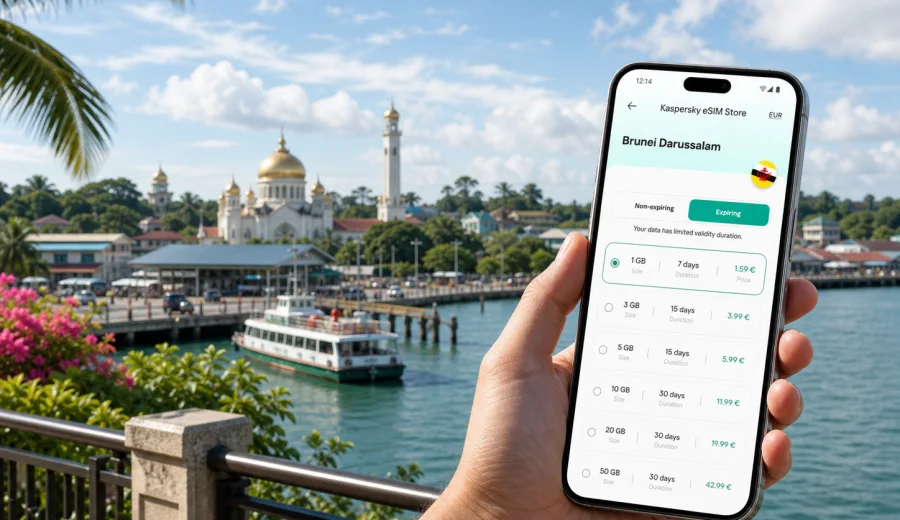
Muara eSIM guide: mobile connection and internet for your trip
Muara is a practical coastal base in Brunei Darussalam: a port town, a ferry gateway, a beach stop, and a useful point for travelers moving between Serasa, Muara Beach, Meragang, Bandar Seri Begawan, and Brunei International Airport. Mobile internet becomes important as soon as your trip depends on maps, pickup points, ferry timing, work messages, or a return ride after a beach visit.
An eSIM helps you prepare mobile data before you start moving around Brunei Darussalam. Instead of searching for a physical SIM card after arrival, you can install a digital SIM profile on a compatible phone and use it for navigation, messaging, bookings, email, translation, and route changes.
This guide is about Muara, not a general country overview. Brunei Darussalam is the destination for the plan, but the travel problem is local: how to keep mobile connection and internet ready while you arrive, move through the port area, visit the coast, or use Muara as a short stop on a wider route.
Why mobile internet matters in Muara
Muara is compact, but many trips through the town involve several separate points. You may start at the airport, meet a driver in Bandar Seri Begawan, go to Muara Port, continue to Serasa Ferry Terminal, stop at a beach, and return to a hotel outside town. In that pattern, your phone is the tool that keeps the itinerary connected.
Mobile data is useful for:
- checking the route from the airport or Bandar Seri Begawan to Muara;
- confirming pickup details before you leave your hotel;
- opening the correct terminal, port gate, beach, or meeting point in maps;
- sharing a live location with family, colleagues, or a driver;
- checking weather before a beach or ferry plan;
- using messenger calls when you do not have a local phone number;
- reading email and calendar updates during a port or business visit;
- saving time when a meeting point changes.
Public Wi-Fi may be available in some hotels, offices, or cafes, but mobile internet is more useful when you are between locations and need a quick decision.
Muara travel scenarios where eSIM helps
| Scenario in Muara | Why mobile data helps | Practical tip |
|---|---|---|
| Arrival from the airport | You may need maps and driver contact before reaching the coast | Install the eSIM before the trip if your plan allows it |
| Port or ferry movement | Pickup points and timing can be sensitive | Save terminal names and booking screenshots before leaving |
| Business visit | Email, documents, messaging, and maps may all be needed | Choose enough data if you will use hotspot or video calls |
| Beach visit | Wi-Fi may not be part of the day | Download offline maps and keep mobile data for updates |
| Staying in Bandar, visiting Muara | You move between hotel, road, coast, and return route | Use a Brunei Darussalam plan that fits the whole route |
| Short stopover | There may be little time to buy a physical SIM | Prepare eSIM in advance and keep essential apps ready |
eSIM does not replace planning, saved documents, or a charged phone. It gives you a mobile data layer for the parts of the day that happen away from fixed internet.
Check your device before choosing a plan
Before you choose an eSIM plan, make sure your phone or tablet supports eSIM and is not locked to one mobile operator. Compatibility is the first condition, because an eSIM profile can only be installed on a supported device.
Use this checklist:
- the device supports eSIM;
- the device is not carrier-locked;
- the operating system is up to date enough for eSIM installation;
- you can access the site, app, or email where installation details are shown;
- you know which SIM profile should use mobile data after setup;
- you understand whether the selected plan is data-only or includes anything else.
If you are unsure, check your device before you buy. It is better to confirm support at home than to troubleshoot while looking for a driver, terminal, or hotel transfer.
How to choose data for a Muara trip
Choose data based on the itinerary, not only on the number of days. A short business visit near the port can use more data than a longer leisure stay if you need hotspot, documents, calls, or cloud tools. A beach visit may use less data, but you still need maps, weather, messages, and transport coordination.
Before choosing, ask:
1. Will you stay in Muara, in Bandar Seri Begawan, or move between both?
2. Do you need data immediately after landing, or only when you head to the coast?
3. Will you use your phone as a hotspot for a laptop or another device?
4. Are you likely to make video calls or download work files?
5. Do you need data for one short transfer, several days, or a wider Brunei Darussalam route?
For light use, maps, messages, bookings, translation, and web searches are usually enough. For work, allow more data for files, calls, calendar changes, and tethering.
Arrival: the first hour online
Many Muara trips start somewhere else. You may arrive at Brunei International Airport, stay in Bandar Seri Begawan, or travel toward the coast for a ferry, port appointment, or beach day. The first hour is where mobile data is most useful because you are making decisions while moving.
A calm setup flow works well:
1. Install the eSIM before travel if the selected plan allows early installation.
2. Save hotel, terminal, meeting point, and return route details.
3. On arrival, select the eSIM profile for mobile data when you are ready to use it.
4. Enable data roaming for the eSIM if the plan instructions require it.
5. Open maps and messaging before leaving the airport, hotel, or terminal area.
6. Keep your primary SIM available for important calls or messages if your device supports dual SIM use.
Do not wait until you are late for a ferry, pickup, or site visit to check the connection. A few minutes of setup before moving can prevent avoidable confusion.
Preparing an eSIM plan for Muara
Kaspersky eSIM Store is an app and website where you can choose, arrange, and activate an eSIM with a suitable mobile data plan for an international trip. For a Muara itinerary, choose Brunei Darussalam as the destination and review the data amount, validity period, price, and plan conditions before purchase.
If Muara is part of your route, you can prepare an eSIM plan for your trip to Brunei Darussalam before arrival. Then use the eSIM according to the selected plan terms when you need mobile internet for maps, messages, transport, ferry details, or work updates around Muara.
The important point is control: you see the plan conditions, install the eSIM on a compatible device, and decide when to use that mobile data profile during the trip.
Moving around Muara, Serasa, and the coast
Muara travel can involve places that sound close but matter differently on the ground: Muara Port, the town area, Serasa Ferry Terminal, Muara Beach, Serasa Beach, coastal roads, and connections back toward Bandar Seri Begawan. If you are using a taxi, arranged transfer, rental car, or driver, mobile data helps you avoid vague directions.
Practical uses include:
- sending a location pin instead of only writing an address;
- checking whether a driver is waiting at the right point;
- opening the exact terminal rather than a general town search;
- adjusting the route if a meeting or pickup point changes;
- keeping hotel, ferry, and work contacts reachable through messaging apps.
For Serasa Ferry Terminal, keep booking references and the terminal name saved before leaving your accommodation. For beach plans, download the area in your map app and keep enough battery for the return ride. Mobile data is helpful, but offline backups make the day more reliable.
Staying in Bandar Seri Begawan and visiting Muara
Many travelers use Bandar Seri Begawan as the overnight base and visit Muara for a port meeting, ferry movement, beach trip, or family plan. In that case, your mobile internet should support the whole Brunei Darussalam route, not just the moment you reach the coast.
For a day trip from the capital, keep your hotel address, return route, Muara or Serasa destination, transport contact, booking confirmation, and key screenshots ready before you leave. Hotel Wi-Fi helps at the start and end of the day; mobile data helps on the road, at a terminal, or when a pickup time changes.
Business travel around Muara
Muara is relevant for business travelers because of port-related activity and coastal logistics. A workday may involve site access, document checks, messaging with local contacts, and travel between the coast and the capital. Choose data with email, maps, messenger calls, document previews, photo uploads, and possible hotspot use in mind.
If hotspot use matters, review the selected plan conditions before purchase. Some eSIM data plans may allow tethering and some may have limits depending on the plan. For work trips, set cloud backup, app updates, and large media downloads to Wi-Fi only so mobile data remains available for meetings, routes, and urgent messages.
How to install and activate your eSIM
The exact installation flow depends on your device and selected plan, but the usual sequence is simple: check compatibility, choose the destination and plan, complete the order, install the eSIM profile, and select it for mobile data when you are ready to use it.
If you need device-specific steps, use the Android installation guide or the iOS installation guide. Keep another internet connection available during installation, because your phone may need to download and confirm the eSIM profile before mobile data is ready.
After installation, check:
- the eSIM profile appears in mobile network settings;
- mobile data is assigned to the eSIM profile when needed;
- data roaming is enabled for the eSIM if the plan instructions require it;
- your primary SIM is still selected for calls or messages if you need it;
- background app updates are limited on mobile data.
Connection can take a few minutes and may depend on the device, plan settings, and local network conditions. If something does not work immediately, review the installation steps and profile settings before changing several options at once.
Data-saving tips for Muara
| Setting | Why it matters | What to do |
|---|---|---|
| App updates | They can use data in the background | Set updates to Wi-Fi only |
| Cloud photo backup | Beach and travel photos can be large | Pause backup on mobile data |
| Video calls | Useful for work, but data-heavy | Lower quality when possible |
| Offline maps | Reduces repeated map downloads | Save Muara, Serasa, and Bandar areas |
| Hotspot | Other devices can drain data quickly | Use only when needed and monitor it |
| Streaming | Often unnecessary during transfers | Save downloads for Wi-Fi |
Check data use once a day if your trip lasts more than one day. If additional data options are available for your selected plan, review them before you run out during a transfer or work appointment.
eSIM, calls, and messages
Many travel eSIM plans are mainly for mobile data. They may not include a local phone number, voice calls, or SMS unless this is clearly stated in the selected plan conditions. Use mobile data for messenger calls, hotel chats, driver coordination, maps, email, bookings, and document access. Keep your primary SIM active if you need messages or calls to your usual number.
FAQ
Is there a separate city eSIM plan for Muara?
For this type of trip, you normally choose Brunei Darussalam as the destination. Muara is the city focus of your itinerary, while the mobile data plan is selected for the country or region shown in the plan details.
Is eSIM useful for a port or ferry visit?
Yes. Mobile data helps with maps, messages, booking details, and pickup coordination if your plan is active and a local network connection is available. Keep offline copies of key documents as a backup.
Does eSIM include normal phone calls?
Many travel eSIM plans focus on mobile data and do not include a regular phone number, voice calls, or SMS unless the plan details say otherwise. Use internet-based calling apps when data is available, and keep your primary SIM ready if you need your usual number.
Final checklist for Muara
Before you leave:
- confirm that your device supports eSIM;
- choose Brunei Darussalam as the destination for a Muara trip;
- review data amount, validity, and plan conditions;
- install the eSIM while you have a stable connection;
- save booking confirmations, key addresses, and offline maps;
- limit background data use.
On arrival:
- select the eSIM for mobile data;
- enable data roaming for the eSIM if required;
- confirm maps, driver, ferry, hotel, or meeting details;
- monitor data if you will use hotspot or video calls.
Choose an eSIM plan for Muara
Muara is a small coastal town with travel patterns that depend on timing: port appointments, ferry movement, beach visits, airport transfers, and short routes from Bandar Seri Begawan. That is when mobile internet is most useful. It keeps maps, messages, bookings, and work updates available while you are moving.
Before your trip, check that your device supports eSIM, review the plan conditions, and choose data that matches your actual itinerary. Kaspersky eSIM Store helps you choose, arrange, and activate an eSIM with a suitable mobile data plan for an international trip, so you can prepare before arrival and spend less time solving connection issues on the road.
If Muara is part of your Brunei Darussalam route, you can choose an eSIM plan for travel in Brunei Darussalam and set up your mobile connection before the trip.