Travel connectivity guide
Mukalla eSIM: Mobile Internet for Yemen
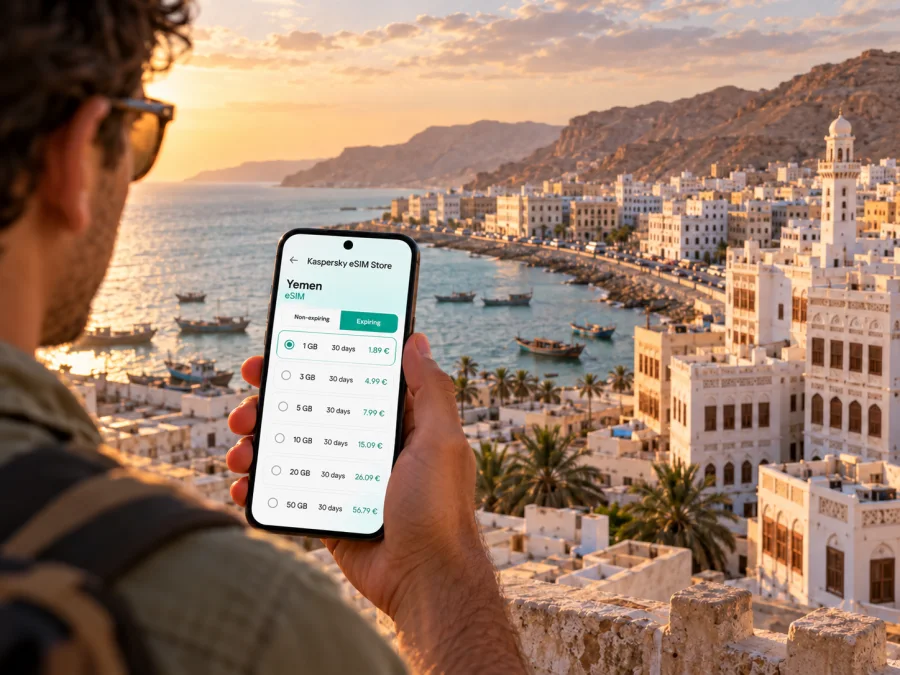
Mukalla eSIM for mobile connection and internet: a practical guide
Mukalla, the capital of Hadhramaut, lies on the Arabian Sea coast of southern Yemen. A visit can involve an airport arrival, a coastal drive, a meeting in town and a route beyond Hadhramaut. For each of those steps, maps, messages, booking details and work files depend on a reliable way to get online. An eSIM can be one part of that preparation, provided the selected plan is valid for Yemen and its stated local network is suitable for your destination.
This is a connectivity guide, not a recommendation to travel. As of 17 October 2026, official government travel advice continues to advise against travel to Yemen because of the security situation. Conditions can change quickly, and a data plan cannot resolve travel, safety, airport or road-access risks. Check your government’s current advice, local instructions, entry requirements and departure options before making decisions. If you are already in Mukalla, use trusted local guidance and keep essential information available offline as well as online.
What mobile internet is useful for in Mukalla
The city’s coastal location and links with the wider governorate can make a visit involve an airport arrival, a coastal drive, meetings in town and onward travel through Hadhramaut. Maps, messages, booking details and work files all depend on having a usable way to get online, but no mobile plan can promise service in every place.
Data can help you contact a host, confirm a pickup, open an address, check an itinerary or retrieve a work document. Do not assume a short distance on a map is a short walk or that a route estimate reflects local conditions. Save the address in text, confirm the pickup point with your contact and follow local advice about where and when to travel.
Before setting out, keep an itinerary, airport code, important numbers and essential documents available offline. This backup is useful if mobile service drops, a flight changes or your phone battery runs low.
Arrival through Riyan Airport: plan for uncertainty
Mukalla’s civil airport is Riyan Airport (RIY), also referred to as Al-Rayyan or Al-Mukalla International Airport in some records. The civil aviation authority identifies it near Riyan, but an airport listing does not confirm that a particular flight is operating today. Routes, permissions and operations can change at short notice. Confirm the flight with the airline or organiser before leaving and again close to departure.
Use a layered arrival plan:
- Save your complete itinerary, flight number, booking reference and organiser’s contact details for offline access.
- Confirm the pickup arrangement directly and agree where to meet if the arrival time changes.
- Charge your phone and keep a power bank available if appropriate.
- Treat an eSIM as one possible way to get mobile data after it registers on a compatible local network, not as a guarantee of service at the airport.
- Follow airport and local directions if a flight or pickup changes; do not assume an old map pin remains suitable.
Use RIY when checking travel documents and flight details. It helps distinguish Mukalla’s airport from the city itself and similarly named places. Send the code to your pickup contact in advance.
Choosing a Yemen eSIM plan for a Mukalla stay
A city search can create the impression that Mukalla has its own separate eSIM network. Check the country and provider information attached to the actual plan instead. A Yemen plan is relevant only if its terms include Yemen and its stated local partner has service where you need it. A country label does not promise reception in every building, road corridor or neighbourhood.
The Yemen destination page in Kaspersky eSIM Store currently names MTN in the local provider field for its listed plans. This applies to those travel eSIM offers; it is not a claim that every Yemeni SIM or operator uses the same network. Yemen Mobile’s published 2023 results separately mention work on an embedded-SIM system. That describes Yemen Mobile’s programme and does not identify it as the provider for the travel eSIM listing. Provider names and arrangements can change, so recheck the selected plan before purchase.
A locally issued SIM may have different registration requirements, network access, number, voice features and support. A travel eSIM shown for Yemen is a separate arrangement with its own stated partner and data conditions. Do not assume it includes a Yemeni number, ordinary calls or SMS unless the plan explicitly says so.
| Check | Why it matters |
|---|---|
| Destination and provider | Confirm Yemen is included and read the current local provider entry. It applies to that offer, not every network in Yemen. |
| Data and validity | Match the allowance and duration to your stay; check when validity starts rather than assuming it begins on arrival. |
| Device and hotspot | Confirm eSIM support, unlocked status, regional model variant and any tethering conditions. |
| Voice and SMS | Check whether the plan is data-only and keep another method for ordinary calls if needed. |
| Coverage | Treat network availability as conditional; buildings, terrain, congestion and local conditions affect service. |
Think about your route, not only your hotel
Mukalla may be one stop in a longer journey through Hadhramaut or elsewhere in Yemen. A country plan can fit a multi-city itinerary, but its destination list still needs to match the whole route. If you cross a border, a Yemen-only plan should not be expected to cover the next country. Check every destination, including transfer stops.
For a road journey, mobile internet is one part of preparation, not a safety tool. Confirm that a route is currently advised and permitted, verify arrangements with a reliable local contact, and save the itinerary offline. Share the route with someone you trust and do not treat a map estimate as a safety assessment.
Before moving on, write down place names as well as map pins, confirm transport close to departure, keep the original SIM available if needed for calls or verification, and recheck current travel guidance. If the itinerary mentions Aden, Sayun, Socotra or an international connection, do not infer that an older route listing means flights are operating now. Verify with the carrier or organiser.
Kaspersky eSIM Store is an app and website where you can choose, purchase and activate an eSIM with a suitable data plan for an international trip. The plan’s mobile service is associated with the local provider shown in its listing. To review current Yemen options and terms, choose a data plan for Yemen. Recheck the provider, validity, allowance and price on the plan page when you decide.
Estimate data for the way you use your phone
Data use depends on your habits. Text messages and short emails generally use less than video meetings, large file transfers or automatic photo backups. Download map areas and work files where possible, pause cloud backups on mobile data, and monitor the eSIM balance. If you plan to tether a laptop, check plan terms and watch for background updates. These are planning principles, not fixed data estimates; apps and settings vary.
Check your device before you buy
An eSIM plan is useful only if your phone can install and use its profile. Support depends on the exact model and regional variant, and a carrier lock can prevent another provider’s eSIM from working. Verify the complete model code in device settings or with the manufacturer; do not rely on the retail family name alone.
Use the compatibility window to check whether your device supports eSIM. Also confirm that the phone is unlocked, has a current operating system and can access the internet during installation. If you use two SIMs, decide which line should handle mobile data and which should remain available for your usual number. An eSIM data plan does not automatically replace your primary SIM.
Imported, refurbished and carrier-managed phones deserve extra checking because regional support and restrictions can differ.
Install and activate before you need directions
Prepare the eSIM while you have a stable internet connection and time to follow the on-screen steps. Installation and first network registration are separate: adding a profile does not mean it is already connected. The exact sequence depends on the device and plan.
- Review the plan: confirm Yemen, the provider, validity and activation conditions.
- Check the phone: verify eSIM support, unlocked status and internet access.
- Install the profile: use the app flow or QR code supplied with the order; keep the code private.
- Label the line: use a clear name such as “Yemen data.”
- Choose the data line: select the travel eSIM for mobile data when you intend to use it.
- Follow the plan instructions: some devices or offers may require data roaming for the eSIM. Check carefully, since your home SIM may have different roaming charges.
- Test when appropriate: allow time for registration, then open a simple page. If it fails, check settings and plan instructions before removing the profile.
Follow the platform guides for Android eSIM installation or iOS eSIM installation. Menu names vary by software version. If a profile is already installed or its QR code has been used, do not delete it as a first troubleshooting step.
Check when plan validity starts. Purchase, installation, activation and data use may be separate events; follow the selected offer’s wording instead of assuming validity begins only on arrival.
Keep a backup connection plan
Signal can vary between buildings and along a route. Network availability, handset settings, congestion, power and maintenance can affect service, so keep essential information offline. Save your itinerary, addresses, contacts, map areas, travel documents and pickup details. Carry a suitable charger and agree on a backup way to reach important people.
Wi-Fi at accommodation or work can help with larger downloads, but availability and quality vary. A travel eSIM can reduce reliance on public Wi-Fi for routine tasks; it does not replace careful handling of accounts and devices.
Mukalla scenarios: what to prepare
- Short airport stop: keep arrival updates, pickup details and the next booking ready offline. Confirm the airport code and check the eSIM’s coverage and activation timing.
- Work visit: test email and document access before departure, download essential files and check tethering terms if you will connect a laptop.
- Several stops in Hadhramaut: confirm the plan includes Yemen, save addresses, share the route with a trusted contact and verify transport shortly before moving.
- One accommodation: ask your host what connection options are available; you may reserve mobile data for maps and messages while using trusted Wi-Fi for larger downloads.
These preparations support coordination. They do not establish that a route, flight or connection is available at a particular time.
Common connection problems and sensible checks
The phone shows no service: confirm Yemen is included, the eSIM line is on, mobile data is assigned to it and the plan’s network instructions have been followed. Allow time for registration. A local outage or lack of service in the current location may not be solved by restarting.
Apps do not load: check the selected data line and remaining plan balance, then test a basic webpage. If only one app fails, the problem may be specific to that service.
A map gives an unsuitable route: stop and consult a trusted local contact or current local instructions. A map may not reflect present access, closures or security advice.
The QR code fails: check the display and camera focus, then follow any manual setup instructions provided with the plan. Do not forward the code; it may be tied to your profile.
Service is intermittent: save needed information before entering a weak-signal area. Note the device model, software version, plan and error before contacting support. Do not delete the eSIM or rescan a one-time QR code unless the instructions say to.
Frequent questions
Does a Yemen eSIM guarantee service throughout Mukalla?
No. A country plan and listed provider do not guarantee signal in every building, neighbourhood or route. Device compatibility, terrain, congestion and local network conditions all matter. Keep key information offline.
Which local network does the travel eSIM use?
The current Yemen destination listing in Kaspersky eSIM Store names MTN for its listed travel eSIM offers. This should not be confused with a separate domestic SIM or another operator’s eSIM programme. Check the provider on the specific plan because arrangements can change.
Can I make ordinary calls and send SMS?
The travel eSIM offers are data plans unless the specific terms say otherwise. They do not automatically include a Yemeni phone number or standard voice and text service. Messaging apps can use data; ordinary calls require another suitable service.
Should I install the eSIM before arrival?
You may prepare it in advance if the plan permits, but first check when validity begins and whether installation triggers activation. Use a reliable connection, keep the QR code private and follow the offer’s instructions.
Will a regional plan cover travel beyond Yemen?
Only if its destination list includes every country on the itinerary. Do not assume a Yemen-only plan works across a border.
Can mobile data replace travel guidance?
No. A connection can help you retrieve information, but it cannot confirm that travel is safe, a road is open or a flight is operating. Check official advice and trusted local instructions before moving.
A practical preparation checklist
Before relying on mobile data in Mukalla, confirm each point that applies to your journey:
- The latest travel advice and local instructions have been checked.
- Flight details and airport code RIY have been confirmed with the airline or organiser.
- A pickup contact has the arrival information and a fallback plan.
- Yemen is included in the chosen eSIM plan, and its current local provider is understood.
- The device supports eSIM, is unlocked and has the correct regional variant.
- Data allowance, validity start, roaming requirements and tethering terms are clear.
- The eSIM has been installed using the official instructions, with the QR code kept private.
- The itinerary, addresses, contacts and essential documents are available offline.
- A backup way to contact important people has been agreed.
Prepare your mobile connection before you need it
If, after reviewing current travel advice and your itinerary, you need a data plan for Yemen, use Kaspersky eSIM Store to review the destination, provider, allowance and validity, then choose an option that fits your device and expected use. Explore eSIM data options for Yemen, verify the live terms before purchase, and install the eSIM with enough time to follow the device-specific instructions. Keep offline copies of travel details and local contacts so that a mobile connection remains one helpful part of your preparation, rather than the only one.


