
Travel connectivity guide
Mullins eSIM: mobile internet in Barbados
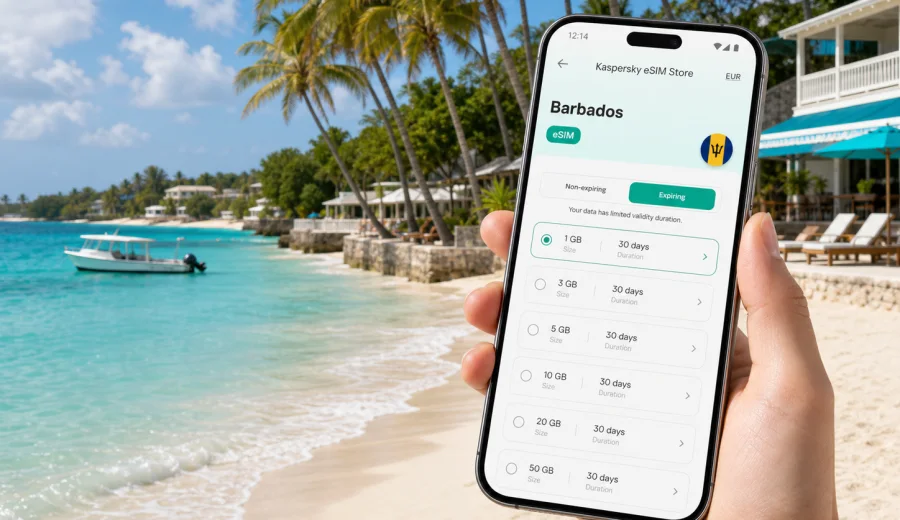
Mullins eSIM: mobile connection and internet for your Barbados trip
Mullins is a compact west-coast Barbados base where a reliable mobile connection can make the trip easier. The area is relaxed and beach-focused, but practical travel still happens on your phone: finding your driver after landing, messaging a villa host, checking the route from Grantley Adams International Airport, booking a table, using maps between Mullins, Speightstown, Holetown, and Bridgetown, or keeping work messages available.
An eSIM is useful here because many important travel moments happen away from hotel Wi-Fi. You may be in the airport arrivals hall, on the transfer across the island, on the beach, in a rental car, or outside a restaurant where the pickup point is not obvious. With a prepared eSIM on a compatible phone, you can use mobile data for maps, messengers, booking apps, email, and travel updates.
This guide focuses on Mullins as a city-page destination: arrival, local movement, beach days, hotels and villas, business trips, stopovers, and day trips from the west coast.
Why mobile internet matters in Mullins
Mullins is not a large city with a dense metro network and visible transport screens. It is a coastal travel area built around beaches, villas, restaurants, taxis, short drives, and flexible plans. That makes mobile data useful for simple but important tasks.
You may need internet in Mullins to:
- confirm a transfer from the airport to your hotel, villa, or apartment;
- send a map pin to a taxi driver or host;
- check walking distance before leaving the beach after sunset;
- find restaurants in Speightstown or Holetown;
- use airline, banking, insurance, and booking apps;
- keep messages active while moving between Wi-Fi zones;
- check weather, sea conditions, or the timing of a day trip;
- share your live location with family, friends, or colleagues.
Public Wi-Fi can help at accommodation and some restaurants, but it is not a complete travel plan. The inconvenient moments are usually the ones outside fixed Wi-Fi: a changed pickup point, a route question, or a late check-in message.
Arrival: from the airport to Mullins
Most international visitors arrive at Grantley Adams International Airport on the southeast side of Barbados. Mullins is on the west coast, so the transfer crosses a meaningful part of the island. Depending on route, traffic, and time of day, the ride can take around an hour or more.
Mobile data can help before you even reach the beach:
1. Confirm your driver, car number, or meeting point.
2. Send your host an arrival update.
3. Check the exact address and saved map pin.
4. Follow the route toward the west coast.
5. Keep airline and baggage updates available.
If you plan to activate an eSIM after landing, do it while you still have stable Wi-Fi or a calm place to check settings. Some eSIM tariffs start validity when installed; others start when the eSIM connects to a supported network. Read the selected tariff conditions before purchase and before activation.
Mullins travel scenarios where eSIM helps
| Situation | Why mobile data helps |
|---|---|
| Airport transfer | You can message the driver, confirm the address, and follow the route. |
| Villa check-in | Hosts may send gate codes, parking details, or arrival notes shortly before you arrive. |
| Beach day | You can coordinate lunch, taxis, reservations, and group meeting points. |
| West-coast movement | Maps help with short trips to Speightstown, Holetown, and nearby beaches. |
| Business stay | Email, calendar, authentication apps, and messenger calls remain available. |
| Family trip | One connected phone can handle routes, bookings, payments, and urgent updates. |
Because Mullins is compact, it is easy to underestimate data needs. A few map sessions, photo uploads, ride messages, and restaurant searches can add up over several days. If you use cloud backup, video calls, or hotspot mode, data use can grow much faster.
Local movement around Mullins
Mullins works well as a quiet base for exploring the west coast. Speightstown is close and useful for cafes, shops, waterfront walks, and a more local town atmosphere. Holetown is known for restaurants, shopping, nightlife, and beach clubs. Bridgetown is farther south and may matter for cruise connections, errands, historical sights, or business appointments.
Mobile internet helps because plans often change during the day. You may start with the beach, then switch to lunch in Speightstown, an afternoon in Holetown, or an evening reservation closer to your accommodation.
Use these habits for smoother movement:
- save your accommodation as a favorite location before your first ride;
- keep the property name, parish, and exact map pin handy;
- share a pin instead of only describing a street or beach entrance;
- check walking routes carefully, especially after dark.
How much data might you need?
The right data amount depends on how you travel. A beach-focused weekend can use little data if you save heavy uploads for Wi-Fi. A week with day trips, work calls, and family coordination can use much more.
| Trip style | Likely data use | Practical approach |
|---|---|---|
| Weekend in Mullins | Low to moderate | Maps, messaging, restaurant searches, and occasional photos. |
| One-week holiday | Moderate | Choose enough data for navigation, bookings, social apps, and transport. |
| Remote work from a villa | Higher | Use accommodation Wi-Fi for large calls and keep eSIM data as backup. |
| Family trip | Moderate to high | One traveler often handles routes, bookings, and group coordination. |
| Business visit | Variable | Email is light, but video calls and hotspot use can consume data quickly. |
Think about the full route: airport, transfer, hotel or villa, restaurants, local rides, day trips, and the return journey. Pause cloud backup on mobile data unless you intentionally want to spend your package on uploads.
Before you choose an eSIM for Mullins
Before arranging an eSIM tariff, check three basics:
- your phone supports eSIM;
- the phone is not locked to one mobile operator;
- the tariff conditions cover Barbados and match your trip length.
If you are not sure about device support, check your device before you arrange a tariff. This is especially important with older phones, phones bought through an operator contract, or devices where you have never used eSIM abroad.
Kaspersky eSIM Store is an app and website where you can quickly choose, arrange, and activate an eSIM with a suitable data tariff for mobile internet during an overseas trip. For a stay in Mullins, you can prepare an eSIM tariff for Barbados before you travel, then manage installation and activation from a compatible phone according to the selected tariff rules.
Setup checklist before departure
A calm setup before travel is better than changing settings in the arrivals hall:
1. Confirm eSIM compatibility and operator lock status.
2. Estimate your data needs for maps, messages, bookings, and work.
3. Choose Barbados as the destination.
4. Review data amount, validity period, price, and activation rules.
5. Install the eSIM while you have stable Wi-Fi.
6. Decide which SIM should use mobile data after arrival.
7. Save your airport, accommodation, and key west-coast locations in maps.
For installation, follow the appropriate device flow: Android installation instructions or iOS installation instructions. Screens can differ by model and operating system version, so read each step carefully.
Beach days without wasting data
Mullins Beach is the kind of place where you may spend hours without thinking about connectivity until you need it. You might coordinate lunch, check a taxi, confirm a pickup, or message someone arriving from another part of the island.
To keep data useful through the day:
- download playlists, maps, and reading material on Wi-Fi;
- turn off automatic cloud backup on mobile data;
- avoid long video uploads unless you have enough data left;
- keep the phone shaded and carry a small power bank if you use it for hours.
If you travel with a group, agree on one online meeting method before splitting up. A shared location, a messenger group, and a clear pickup point can prevent confusion when people move between beach, cafe, and accommodation.
Hotels, villas, and apartment stays
Mullins and the surrounding west-coast area include hotels, villas, holiday apartments, and private rentals. Wi-Fi quality can vary by property, room position, router setup, and guest load. An eSIM does not replace strong accommodation Wi-Fi for heavy laptop work, but it can provide a useful backup.
Mobile data helps with:
- receiving check-in instructions before you reach the property;
- messaging a host, concierge, or property manager;
- navigating to restaurants after dark;
- using banking or payment authentication;
- keeping travel documents available if Wi-Fi login fails.
If you plan to work from a villa, test the Wi-Fi early rather than five minutes before a meeting. Keep eSIM data as backup and check whether hotspot mode is allowed by the selected tariff and supported by your device.
Transport and navigation on the west coast
Travel around Mullins can involve taxis, private transfers, rental cars, buses, and short walks. Mobile internet supports each option differently.
| Transport option | How eSIM data helps |
|---|---|
| Taxi or private driver | Send a pin, confirm pickup time, and update the driver if plans change. |
| Rental car | Use live navigation and adjust routes to Holetown, Bridgetown, or the east coast. |
| Bus or shared route | Check your position on the coast road and avoid missing your stop. |
| Walking | Confirm distance, entrances, and safer route choices after dark. |
For rental cars, save offline maps as a backup even when you have mobile data. Coverage and app performance can vary by location, phone settings, network load, and weather.
Business trips and remote work
Mullins can be a comfortable base for travelers who combine work and beach time. Business connectivity is less forgiving than holiday browsing, so prepare before the first meeting.
Prepare a simple business connectivity plan:
- test work authentication apps before departure;
- download key documents before long transfers;
- confirm whether accommodation Wi-Fi is suitable for calls;
- use eSIM data as backup rather than for large file transfers where possible;
- keep a charger or power bank with you on meeting days.
If you need laptop hotspot, test it before the first important meeting.
Short stays and stopovers
A short stay in Mullins can benefit even more from prepared mobile data because there is less time to solve connection problems locally. With two or three days, you want the essentials to work quickly: airport transfer, check-in, beach plans, restaurant reservations, and the return route.
For a short visit:
- activate only when you need mobile data, based on the tariff rules;
- avoid unnecessary video uploads;
- save the departure airport route the night before leaving;
- keep airline and booking apps logged in;
- confirm checkout and transfer time while you still have Wi-Fi.
Convenience matters on short trips. Losing an hour to find connectivity can affect a large part of the stay.
Day trips from Mullins
Mullins is a practical west-coast base for trips to Bridgetown, the south coast, island viewpoints, gardens, caves, rum experiences, and the Atlantic-facing side of Barbados. These routes are exactly where mobile data reduces friction.
Before a day trip:
1. Save the destination and return route.
2. Check opening hours and booking details.
3. Take screenshots of reservations.
4. Keep a charger in the car or bag.
5. Set data-heavy apps to Wi-Fi only if your package is limited.
6. Share your planned route with someone in your group.
Do not rely only on memory for return routes after sunset. Roads and villa entrances can be harder to identify at night, especially after a full day out. A connected map and a saved accommodation pin can make the return smoother.
FAQ: eSIM for Mullins
Is Mullins a good place to use eSIM?
Yes. It helps with airport transfer, beach time, restaurants, taxis, villas, and day trips between Wi-Fi zones.
Do I need eSIM if my hotel has Wi-Fi?
Hotel Wi-Fi helps, but it does not cover arrival, local transport, beach time, or trips to other parts of Barbados.
Can I use eSIM for calls in Mullins?
Many travel eSIM tariffs focus on mobile data and may not include a phone number, voice calls, or SMS. If the tariff is data-only, use internet-based calling and messaging apps.
Should I install eSIM before flying?
Installing before departure can be convenient if you have stable Wi-Fi. Always check when validity starts.
Can I keep my regular SIM active?
On many compatible phones, yes. Keep your regular SIM for calls or messages and set the eSIM as the mobile data line if that is your intended setup.
Choose an eSIM tariff for your Mullins trip
Mullins rewards a relaxed pace, but the practical parts of the trip still move through your phone: arrival messages, maps, restaurant plans, taxi coordination, hotel instructions, work updates, and day-trip routes. Preparing mobile internet in advance can help you spend less time solving connectivity and more time using the west coast as you planned.
Before you go, check that your device supports eSIM, review your trip length and data needs, and choose a tariff that fits Barbados. With Kaspersky eSIM Store, you can choose an eSIM tariff for your trip to Mullins through the app or website, install it on a compatible device, and activate it according to the selected tariff rules.