
Travel connectivity guide
Mumbai eSIM for mobile internet
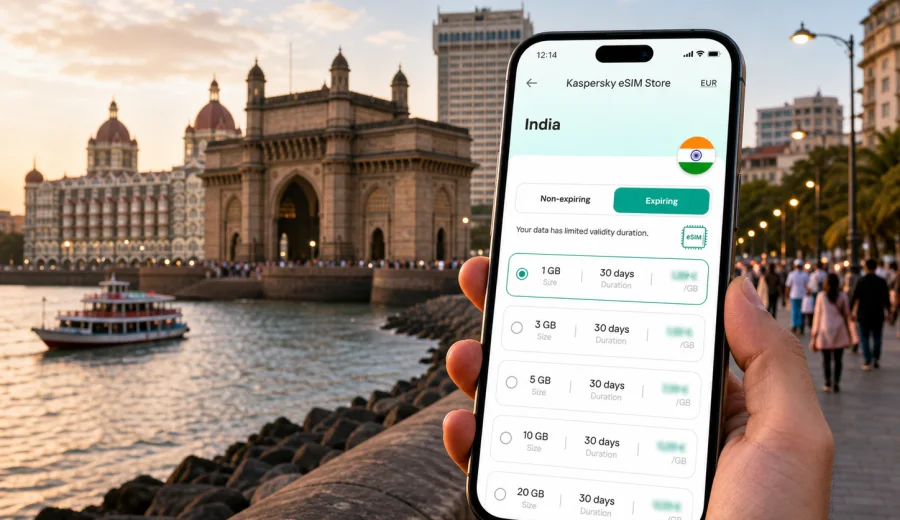
Mumbai eSIM: mobile connection and internet for a smoother city trip
Mumbai rewards travelers who can move quickly. The city is spread along the Arabian Sea, traffic can change the shape of a day, and many useful moments depend on mobile internet: checking a ride pickup point, finding the right railway platform, confirming a hotel address, messaging a driver, scanning a menu, or joining a video call between meetings.
For visitors, an eSIM is a practical way to prepare mobile data before arriving in India. Instead of looking for a physical SIM card after a long flight, you can set up a digital SIM profile on a compatible phone and use it for data during the trip. Kaspersky eSIM Store is an app and site where you can choose, arrange, and activate an eSIM with a suitable tariff for mobile internet in an overseas trip.
This guide is focused on Mumbai itself: arrival at the airport, transport around the city, hotel districts, business travel, short stopovers, and day trips from the city. India is the country context because the eSIM tariff must match the destination, but the real travel problem is local: staying online while Mumbai keeps moving around you.
Why mobile internet matters in Mumbai
Mumbai is not a city where you want to improvise every connection detail. A route that looks short on a map may take longer at peak time. A hotel entrance may sit on a service lane rather than the main road. A meeting in Bandra Kurla Complex, a dinner in Colaba, and a flight from Chhatrapati Shivaji Maharaj International Airport can all require different transport choices in the same day.
Reliable mobile data helps with:
- navigation between South Mumbai, Bandra, Andheri, Powai, Juhu, Worli, Lower Parel, and airport areas;
- ride-hailing pickup coordination in busy streets and hotel driveways;
- local train and metro route checks before you leave;
- restaurant reservations, delivery apps, and digital payments where supported;
- messaging hotels, hosts, colleagues, and drivers;
- translating addresses, signs, menus, and service messages;
- checking flight updates during monsoon weather or heavy traffic days;
- using maps while walking through dense neighborhoods.
The practical benefit of an eSIM is control. You can choose a data package for the country, install it on a compatible device, and arrive with a clearer plan for how your phone will connect. Conditions vary by selected tariff, so review data volume, validity period, destination coverage, and activation rules before purchase.
Arrival: what to prepare before landing in Mumbai
Most international travelers arrive through Chhatrapati Shivaji Maharaj International Airport. The first hour after landing is often when mobile internet is most useful: you may need to message your hotel, check the exact terminal pickup point, call a driver through an app, or confirm whether the quickest route into the city is via the Western Express Highway, Bandra-Worli Sea Link, or another road.
Before your flight, prepare three things:
1. Check that your phone supports eSIM and is not locked to one mobile operator.
2. Install the eSIM profile while you still have stable home internet or trusted Wi-Fi.
3. Keep your primary SIM active if you need bank SMS, airline alerts, or calls on your usual number.
An eSIM used for travel data usually does not include a local phone number, voice calls, or SMS unless the chosen tariff clearly states otherwise. For most city tasks, mobile data is enough: messaging apps, maps, email, browser searches, ride apps, and work tools all use internet traffic.
Mumbai travel scenarios where eSIM helps
| Travel moment | Why data matters | Practical tip |
|---|---|---|
| Airport arrival | You need pickup details, hotel messages, and map routing quickly. | Activate the eSIM according to the tariff rules before you leave the terminal. |
| Ride-hailing | Pickup points can be crowded or split by terminal and lane. | Keep the driver chat open and share your exact location if the app allows it. |
| Local trains | Station names, routes, and platforms can be confusing for first-time visitors. | Check the route before entering the station and keep a backup screenshot. |
| Business meetings | Delays are common when crossing the city. | Use live traffic estimates and message if a route changes. |
| Hotel check-in | Some hotels request online confirmations or digital forms. | Keep booking details saved offline as well as online. |
| Food and errands | Many venues rely on maps, menus, delivery, and payment apps. | Keep enough data for evening plans after daytime navigation. |
| Day trips | Routes to Elephanta, Lonavala, Alibaug, or Nashik may involve several transport legs. | Check the tariff validity for your whole India itinerary. |
Choosing data volume for Mumbai
The right eSIM tariff depends on how you use your phone. A traveler who mainly checks maps and messages will need much less data than someone who uploads videos, joins calls, or uses a laptop hotspot from a hotel room. Mumbai can also tempt you into more data use than planned because routes, weather, traffic, and venue details change often.
Use this simple estimate:
- Light use: maps, messaging, email, restaurant searches, and occasional browser checks.
- Medium use: regular navigation, ride apps, social media, photo uploads, and work chat.
- Heavy use: video calls, cloud documents, frequent uploads, streaming, or laptop tethering.
Do not choose only by price. Look at the full tariff conditions: data amount, validity duration, destination, activation moment, top-up options, and whether hotspot use is supported. If your trip includes Mumbai plus another Indian city such as Delhi, Goa, Bengaluru, Chennai, Hyderabad, Jaipur, or Kochi, choose a tariff that fits the full India route rather than only the first stop.
Where in Mumbai travelers use mobile data most
Mumbai has several visitor zones, and each creates a different connectivity pattern.
South Mumbai is common for first-time visitors because of Colaba, Fort, Marine Drive, the Gateway of India area, art galleries, cafes, and heritage hotels. You may walk more here, so maps and translation are useful. Streets can curve around old buildings, and a taxi pickup may be easier from a nearby landmark than from the exact door.
Bandra and Khar suit restaurants, shopping, nightlife, and coastal views. Mobile internet helps with ride-hailing because lanes, flyovers, and traffic restrictions can make a pickup point less obvious than it looks on a map.
Bandra Kurla Complex is a major business district. If your Mumbai trip is built around meetings, data reliability matters for calendar updates, secure work messages, map routing, and quick changes between offices, hotels, and the airport.
Andheri, Vile Parle, and the airport belt are practical for short stays. You may not see much of the city, but you will use your phone constantly for terminal timing, hotel shuttles, rides, food orders, and meeting locations.
Powai and Goregaon are common for business, conferences, studios, and longer stays. Distances can be deceptive, so live route checks help you decide whether to leave early or change plans.
Juhu, Worli, Lower Parel, and Mahalaxmi combine hotels, restaurants, offices, and leisure. A traveler may move between all of them in one day, making mobile data useful for comparing transport options.
Transport in Mumbai: online decisions throughout the day
Mumbai transport is layered. You may use app-based cars, black-and-yellow taxis, auto-rickshaws in permitted areas, suburban trains, metro lines, buses, ferries, or hotel cars. Even if you prefer one transport type, having mobile internet lets you compare choices when traffic or weather changes.
For visitors, the most common data tasks are:
- checking how long a road route really takes before leaving;
- confirming whether a railway or metro option is practical for the route;
- sharing live location with someone meeting you;
- finding the correct entrance to a station, office tower, hotel, or restaurant;
- checking ferry information for Elephanta Island plans;
- storing offline maps as a fallback before long outings.
Mumbai travel is easier when you make decisions in short loops: check the route, leave margin, confirm the pickup, watch for changes, and keep the destination address ready in English. During monsoon months, allow more time because rain can affect both road traffic and walking comfort.
When to set up your eSIM for Mumbai
The calmest moment to set up travel connectivity is before departure. Install the eSIM profile at home or at your hotel using trusted Wi-Fi, then activate it according to the instructions for the selected tariff. Some tariffs start validity when installed, others when connected to the supported network, so read the details before you begin.
Before buying, check your device compatibility. Your phone or tablet must support eSIM, and it should not be locked in a way that prevents adding another mobile profile. Keep your purchase details and QR code or in-app installation path available until the setup is complete.
If you want to prepare mobile data for the city in advance, you can choose an eSIM tariff for your Mumbai trip through Kaspersky eSIM Store. Select India as the destination, compare the available tariff conditions, and choose the data volume and validity period that match your route.
How to install and activate before the trip
Installation is usually straightforward, but it is worth doing carefully. Use a stable connection, do not interrupt the process, and avoid deleting the eSIM profile after activation unless support instructions tell you to. If you need device-specific guidance, follow the Android eSIM installation guide or the iOS eSIM installation guide.
A practical setup sequence:
1. Confirm that your phone supports eSIM and is unlocked for travel use.
2. Choose India as the destination and select a tariff with suitable data and validity.
3. Install the eSIM profile using the provided flow or QR code.
4. Label the new line clearly, for example "India travel data".
5. Keep your usual SIM for calls and SMS if you need it.
6. Set the eSIM as the mobile data line when you are ready to use it.
7. Enable data roaming for the eSIM if the setup instructions require it.
8. Test the connection after arrival and keep Wi-Fi available as a backup during setup.
Do not assume that eSIM data includes voice calls or SMS. If you need to call a local number, check whether your usual SIM can roam, whether your hotel can assist, or whether an internet-based call is enough. For most visitor tasks in Mumbai, data-first communication works well, but it should be planned.
Business trips to Mumbai
Business travel in Mumbai often means compressed schedules. A meeting in Bandra Kurla Complex, a site visit in Lower Parel, and a dinner in Colaba can be realistic on paper but demanding in traffic. Mobile internet helps you keep the day coordinated.
For a business trip, prioritize:
- enough data for maps, messages, email, and document access;
- a validity period that covers arrival and departure days, not just meeting days;
- hotspot support if you may connect a laptop;
- a backup plan for authentication messages on your primary SIM;
- offline copies of meeting addresses and hotel confirmations.
If your company uses security controls, check whether your work apps require specific mobile settings. Kaspersky eSIM Store is for choosing, arranging, and activating an eSIM with a suitable mobile internet tariff for travel; it is not a corporate network, VPN, or telecom operator. Keep company access rules separate from your travel data setup.
Short stopovers and one-night stays
Mumbai is also a transit city. If you have a long layover, one night near the airport, or a short meeting before another domestic flight, the right data setup can reduce friction. You may only need a modest data volume, but you still need it at the most time-sensitive moments: after landing, while moving between terminals or hotels, and when checking flight updates.
For a stopover, prepare:
- the hotel address in English and saved offline;
- airline app access and booking reference;
- ride app login before departure;
- a small data buffer for delays;
- a charger or power bank, because navigation and ride apps drain battery quickly.
If you do not plan to leave the airport area, choose a tariff based on the full trip rather than the stopover alone. A data package that also covers your next Indian destination may be more practical than a very short setup that ends too early.
Leisure routes: city walks and trips from Mumbai
Mobile internet is useful beyond basic navigation. In South Mumbai, it helps you plan a walk between the Gateway of India, Colaba Causeway, Kala Ghoda, Fort, and Marine Drive. In Bandra, it helps you move between cafes, boutiques, Bandstand, Carter Road, and dinner reservations. In Juhu, it helps with evening traffic and ride pickups after the beach.
For trips from Mumbai, data planning matters because the day may include several transport types. Elephanta Island involves a ferry and walking time. Lonavala and Khandala are popular hill-area escapes. Alibaug may involve road or ferry planning. Nashik can be a longer outing with early departure. In each case, save essential details offline, but keep mobile data available for schedule changes, weather checks, and route updates.
Mumbai eSIM checklist
Use this checklist before you fly:
- Your device supports eSIM.
- Your phone is not locked to a single operator.
- You know whether the eSIM tariff is data-only.
- The selected tariff covers India and fits the full trip length.
- You understand when validity starts.
- You have enough data for maps, ride apps, messages, and work tools.
- Installation instructions are saved or easy to reopen.
- Your primary SIM remains available if you need bank SMS or regular calls.
- Offline copies of hotel address, flight details, and key meetings are saved.
- A charger or power bank is packed for long city days.
Practical data-saving tips in Mumbai
Even with a comfortable data package, it is worth managing traffic usage. Mumbai days can be long, and you may use your phone more than expected.
- Download offline map areas before leaving Wi-Fi.
- Disable automatic cloud backups on mobile data.
- Send compressed images in messaging apps when quality is not important.
- Avoid video streaming on mobile data unless your package is large enough.
- Keep hotel, meeting, and airport addresses saved in notes.
- Use Wi-Fi for large app updates.
- Check which SIM line is assigned to mobile data before leaving the hotel.
These habits are especially useful during business trips, monsoon delays, or multi-city India itineraries where the same data package must last beyond Mumbai.
FAQ: eSIM, mobile connection, and internet in Mumbai
Is an eSIM useful for a first trip to Mumbai?
Yes, if your phone supports eSIM and you want mobile data ready for maps, ride apps, messages, hotel coordination, and travel updates. It is especially useful when you do not want to depend only on airport Wi-Fi or a physical SIM purchase after arrival.
Does travel eSIM data replace my normal phone number?
Usually no. Travel eSIM tariffs for mobile internet are commonly data-focused and may not include voice calls or SMS unless stated in the tariff conditions. Keep your usual SIM active if you need your regular number.
Can I install an eSIM after arriving in Mumbai?
You can, as long as you have a stable internet connection for setup and your device is compatible. Many travelers prefer installing before departure so the profile is ready when they land.
How much data do I need for Mumbai?
For light map and messaging use, a smaller package may be enough. For daily ride apps, uploads, work chat, and video calls, choose more data. If you will use hotspot or travel beyond Mumbai, allow extra margin.
Should I keep public Wi-Fi as a backup?
Yes. Hotel or airport Wi-Fi can help during setup, large downloads, or troubleshooting. Your eSIM can reduce dependence on public Wi-Fi for everyday travel tasks, but it is still wise to keep alternatives available.
Choose a tariff before Mumbai starts moving
Mumbai is easier when your phone is ready before the first ride, the first map search, and the first change of plan. An eSIM will not remove traffic, weather, or long distances, but it can make the city more manageable by keeping maps, messages, bookings, and travel tools available when you need them.
Before you leave, check device compatibility, review the tariff conditions, install the eSIM carefully, and keep your primary SIM available for calls or SMS if needed. Then use Kaspersky eSIM Store to prepare an eSIM tariff for your trip to Mumbai and choose the mobile internet package that fits your India itinerary.