
Travel connectivity guide
Munich eSIM: Mobile Internet for Your City Trip
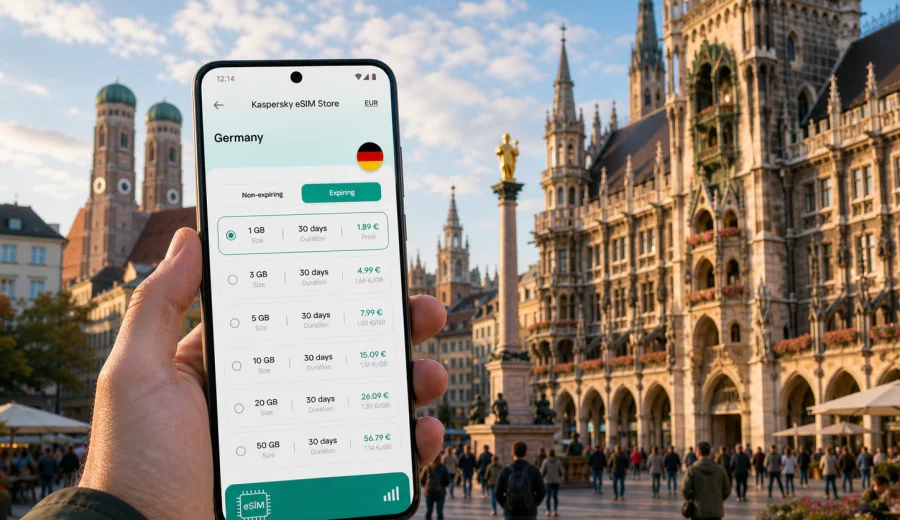
Munich eSIM: mobile connection and internet for your trip
Munich is an easy city to enjoy when your phone is ready before you land. You may need mobile internet as soon as you reach Munich Airport, find the S-Bahn into the center, open a hotel booking near Hauptbahnhof, message a host in Maxvorstadt, or check the quickest route from Marienplatz to a meeting in Schwabing. An eSIM can make these first moments simpler because you do not need to look for a physical SIM card after arrival.
This guide focuses on practical mobile connection in Munich: airport arrival, local transport, districts, hotels, business trips, short stopovers and trips from the city. It also explains how to choose an eSIM plan for Germany, what to check before buying, and how Kaspersky eSIM Store fits into the travel preparation process.
Why eSIM is useful in Munich
Munich is compact in the historic center, but a typical trip often spreads across several areas. You may arrive at Terminal 1 or Terminal 2, continue by S-Bahn to the city, use U-Bahn lines for museums and business districts, take a tram to a hotel, or leave the city for castles, lakes and Alpine towns. A working data connection helps you make these changes without relying only on hotel Wi-Fi or public hotspots.
An eSIM is a digital SIM profile installed on a compatible device. In a travel context, it is mainly useful for mobile internet. It usually does not replace your regular phone number, and ordinary voice calls or SMS are not included unless the selected plan states otherwise. For calls and messages, many travelers use internet-based apps once mobile data is available.
In Munich, mobile internet is especially useful for:
- checking the S1 or S8 route from the airport;
- opening train, U-Bahn, tram and bus maps;
- confirming hotel check-in details;
- using navigation in Altstadt, Maxvorstadt, Schwabing and Glockenbachviertel;
- booking taxis or ride services after evening events;
- managing meeting changes during business trips;
- translating short notices in stations, restaurants or shops;
- sharing location with family or colleagues;
- checking weather before day trips to the lakes or the Alps.
Arrival at Munich Airport
Munich Airport is outside the city center, so your first online task often happens before you reach your hotel. The S-Bahn journey to central Munich can take a while, and travelers commonly check platforms, delays, tickets, transfer routes and hotel addresses during the ride. If you arrive late, mobile data also helps you compare transport options before leaving the terminal.
Typical first-hour tasks include:
| Moment | Why mobile internet helps |
|---|---|
| After landing | Check messages, bookings and onward directions before leaving the terminal. |
| Baggage claim | Confirm whether your hotel has a late check-in process or door code. |
| Airport station | Compare S1 and S8 routes and check the best stop for your hotel. |
| Train to the city | Track stops and connection changes without depending on station Wi-Fi. |
| Arrival in the center | Open walking directions from Hauptbahnhof, Marienplatz or Ostbahnhof. |
If you install your eSIM before travel, you can switch mobile data to the eSIM profile after landing, once it is appropriate under the plan conditions. Some devices or plans may require data roaming to be enabled for the eSIM profile. Check the instructions and the selected plan details before you travel.
Local movement: U-Bahn, S-Bahn, trams and walking
Munich rewards short, precise navigation. The old town is walkable, but hotels, offices, exhibition venues and residential districts are spread across the network. A route may combine walking, U-Bahn, S-Bahn, tram and regional trains. Mobile internet makes the difference between guessing and adjusting calmly.
Choosing an eSIM plan for Munich
For a city article, the destination plan should match the country where the city is located. Munich is in Germany, so a Germany eSIM plan is the natural option for a Munich-only trip. If your route includes several European countries, check whether a regional Europe plan is more suitable. The right choice depends on the route, the number of travel days, and how much data you expect to use.
Use this simple decision table:
| Trip type | What to consider |
|---|---|
| Weekend in Munich | A smaller data volume may be enough for maps, messaging and bookings. |
| Business week | Choose enough data for email, documents, calls over internet apps and tethering if allowed. |
| Family trip | Each traveler may need their own data plan, especially if devices are used separately. |
| Oktoberfest or event visit | Expect more messaging, navigation and ride booking in crowded areas. |
| Munich plus Bavaria | Check validity across Germany and choose a period that covers the full route. |
| Multi-country route | Compare a Germany plan with a regional option that covers the other countries. |
Before selecting a plan, check the data volume, validity period, destination, start conditions and whether top-up is available. Do not assume that the highest data volume is always necessary. It is usually better to match the plan to realistic behavior: maps, messages and booking apps use less data than video calls, streaming, large file uploads and continuous hotspot use.
For a Munich trip, you can use Kaspersky eSIM Store to choose an eSIM plan for Germany after you have checked your route, device compatibility and expected data use.
Hotels and apartments
Hotels around Hauptbahnhof are convenient for arrivals, but the area can be busy. Mobile internet helps you check the walking route, confirm the entrance, message the property and switch to a taxi if your luggage is heavy. In apartments or smaller guesthouses, you may need to open check-in instructions, a key-box code or a message from the host before you have access to Wi-Fi.
If you stay in Schwabing, Maxvorstadt, Haidhausen or Sendling, you may rely on U-Bahn and tram connections more often. Save your hotel address offline as a backup, but keep mobile data available for real-time route changes.
Business trips and trade fairs
Munich is a common business destination, with offices across the city and events at Messe Munchen. A business traveler often needs maps, calendar updates, email, cloud documents and messaging during the day. If your phone supports hotspot sharing and the selected plan allows it, an eSIM can also help as a backup for a laptop. Check plan conditions first; tethering rules can vary.
For business use, choose a plan based on work habits, not only trip length. A three-day trip with many video calls can use more data than a week of light navigation and messaging. If possible, do large downloads on trusted private Wi-Fi and reserve mobile data for movement, meetings and urgent tasks.
Installation and activation
Install the eSIM when you have a stable internet connection, time to follow the steps, and access to the email or profile that contains the eSIM details. Many travelers prefer to install the eSIM before departure, then activate or start using it according to the plan conditions after arriving in Germany. Read the selected plan details carefully because the start of validity can depend on the plan and activation process.
Basic installation flow:
1. Check that your phone supports eSIM and is not locked to another carrier.
2. Choose the destination and plan that match Munich, Germany or your wider route.
3. Complete the plan setup in Kaspersky eSIM Store.
4. Add the eSIM profile to your device using the on-screen instructions or QR code.
5. Name the profile clearly, for example "Germany travel".
6. After arrival, select the eSIM profile for mobile data when you are ready to use it.
7. Enable data roaming for the eSIM profile if the instructions or plan require it.
8. Keep your primary SIM available for calls or SMS if you still need your usual number.
For detailed setup steps, use the instructions for Android or the instructions for iOS. The exact screens can vary by device model and operating system version.
Device compatibility checklist
Before buying any eSIM plan, confirm that your device can actually use it. Some phone models differ by region of sale, and some devices may be locked by a carrier. If a device is not compatible, an eSIM plan cannot solve that limitation.
Check the following:
- Your phone or tablet supports eSIM.
- The device is not carrier-locked.
- The operating system is up to date enough for eSIM setup.
- You can access the internet during installation.
- You know which SIM profile should handle mobile data after arrival.
- You understand whether the plan includes data only or any additional services.
- You know whether data roaming must be enabled for the eSIM profile.
If you are unsure, check your device before choosing a plan. This is especially important if you bought your phone in a different region, use a company-managed device, or plan to travel with an older model.
How much data do you need in Munich?
There is no single correct amount of data for every traveler. Light use usually means maps, messaging, booking apps and a few photo uploads. Moderate use includes frequent navigation, email, social apps and document access. Heavy use includes video calls, streaming, large uploads, hotspot use and cloud backup.
To keep data use predictable, download offline maps before leaving home, update apps before the trip, pause automatic cloud photo backup on mobile data, and use trusted hotel or office Wi-Fi for large files. For many city travelers, background uploads use more data than maps.
Day trips from Munich
Munich is often a base for day trips. Travelers may visit lakes, castles, historic towns, ski areas or Alpine viewpoints. Mobile internet is useful because routes can involve regional trains, buses, walking segments and changing weather.
Common day-trip tasks include checking regional train platforms, opening walking directions from a small station, confirming return times, messaging companions and checking weather before mountain or lake plans. If your route stays inside Germany, a Germany plan may be enough. If you cross into Austria or continue through several countries, check whether a regional plan better matches the full itinerary.
eSIM, roaming and public Wi-Fi
Traditional roaming can be convenient, but costs and conditions depend on your home carrier. A local physical SIM can also work, but it may require finding a shop after arrival. Public Wi-Fi helps in hotels and cafes, but it is not always available when you need a map, taxi, ticket or urgent message.
An eSIM gives you another way to prepare mobile internet before or during the trip. It does not guarantee a better price in every case or make your phone work in every possible location. The value is planning: you can review plan conditions, choose the destination, install the profile on a compatible device and use mobile data for the travel tasks that matter.
Quick preparation checklist for Munich
Use this checklist one or two days before departure:
- Save your hotel address and booking reference offline.
- Check your arrival terminal and expected route into Munich.
- Confirm that your device supports eSIM and is not carrier-locked.
- Choose a plan that covers Germany or your wider route.
- Install the eSIM while you still have stable internet.
- Label the eSIM profile clearly in your phone settings.
- Keep your primary SIM active if you need calls or SMS on your usual number.
- Download offline maps for Munich as a backup.
- Pause large automatic uploads on mobile data.
- Read the activation and validity conditions of the selected plan.
This preparation is especially useful if you land late, travel with children, arrive for a conference, or need to move directly from the airport to a meeting.
Frequently asked questions
Is an eSIM enough for a Munich trip?
It can be enough for mobile internet if your device is compatible and the selected plan covers Germany. It usually does not include a regular phone number, voice calls or SMS unless the plan states otherwise. Keep your primary SIM available if you need your usual number.
Should I install the eSIM before flying to Munich?
Many travelers prefer to install it before departure using a stable internet connection. Then they switch mobile data to the travel eSIM after arrival, according to the plan conditions. Check when the validity period starts before you activate or use the plan.
Can I use the eSIM for hotspot data?
Possibly, but it depends on the selected plan and device settings. If you need hotspot data for a laptop during a business trip, check the plan conditions first and choose a data volume that fits your work habits.
What if mobile data does not connect immediately?
Check that the eSIM profile is installed, selected for mobile data and allowed to use data roaming if required. Connection can take a few minutes and depends on the device, settings and local network conditions.
Choose an eSIM plan for your Munich trip
Munich is easiest when your phone is ready for the practical parts of travel: airport transfer, train changes, hotel access, district navigation, business messages and day trips from the city. An eSIM can reduce the need to search for a physical SIM card or depend on public Wi-Fi for every small task.
Before you travel, check device compatibility, review your route and choose a data volume that fits your real usage. Then use Kaspersky eSIM Store to choose an eSIM plan for your trip to Munich and Germany, install it on a compatible device, and keep mobile internet ready for the moments when you need it most.