Travel connectivity guide
Mwanza eSIM: Mobile Data for Your Tanzania Trip
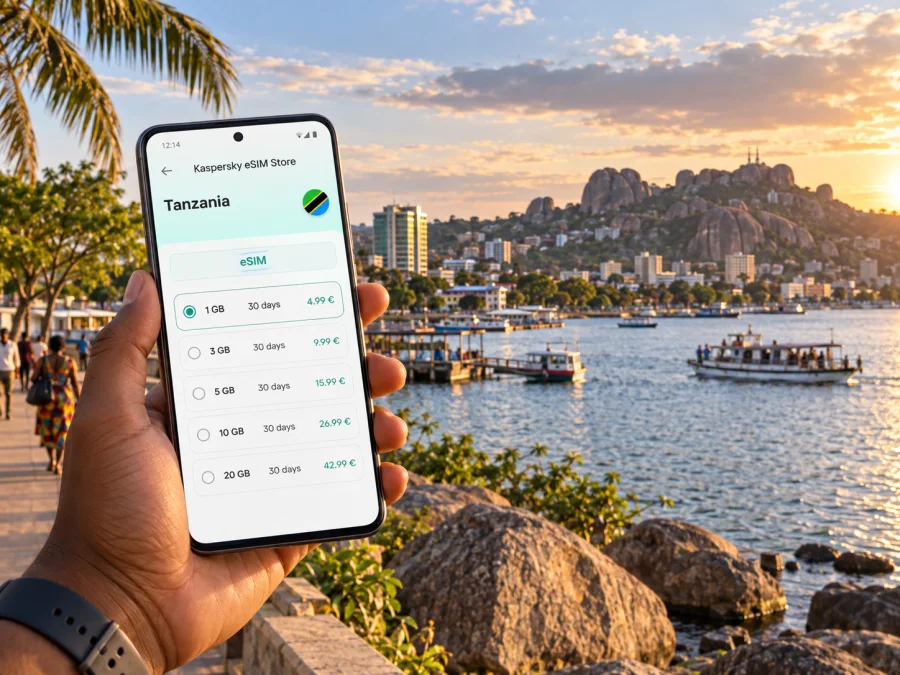
Mwanza eSIM: mobile connection and internet for your city trip
Mwanza is a working lakeside city as well as a gateway to journeys around Lake Victoria and north-western Tanzania. An arrival may lead straight to a hotel or meeting, while another day can involve a market, a waterfront stop, a boat departure or a longer trip beyond the city. Mobile internet helps join those pieces: check a meeting address, message a driver, follow a route and keep travel details close at hand.
An eSIM can make that preparation simpler for a compatible, unlocked phone. You can set up a digital SIM before travelling, then use the data allowance and validity period shown for the selected plan. Coverage and performance depend on the local network, your location and the plan terms, so it is useful to treat mobile data as a practical aid rather than a guarantee in every building, vehicle or stretch of road.
What mobile data helps with in Mwanza
Mwanza is a lakeside city shaped by hills and striking granite outcrops. Nyamagana and Ilemela are useful municipal names when checking an address, but visitors should save the exact hotel, office or meeting point. The shoreline is not one continuous promenade: port areas, roads and viewpoints sit in different parts of the city. A precise pin shared by a host is more useful than searching for “the lake.”
Mobile data can help you save a hotel address, check a route between the airport and town, message a driver, confirm a reservation or retrieve booking details. Save important information offline too, so a temporary signal gap does not derail the day. Use the phone as a tool for decisions, then look up and stay aware of your surroundings.
Arriving and getting oriented
Mwanza Airport serves the city and the wider Lake Zone. Before departure, save your accommodation address and agree how you will identify your pickup. If arranging transport after landing, check which mobile-data option will be available; do not make airport Wi-Fi your only way to find a driver or confirm a route.
On arrival, contact your host, confirm the vehicle and destination, then compare the map with the address you were given. Do not assume a map estimate accounts for traffic, road conditions or luggage collection. A local driver may know the best approach to a hotel or office; a map helps you follow the broad direction and communicate a meeting point.
Arrival checklist
- Keep the hotel name, full address and phone number in a note or screenshot.
- Confirm the pickup point and driver details before leaving the terminal.
- Save directions to tomorrow’s first destination after checking in.
- Share your location only with the person who needs it and for the time required.
Mwanza’s roads rise and bend around uneven terrain. Two places that look close on a map may not have a direct walking route. For a first journey, follow established roads and ask your accommodation about the practical pickup point. Use walking directions selectively, especially after dark or with luggage.
Choosing a base and moving between areas
Nyamagana and Ilemela can help orient you when checking an address, but they do not replace a neighbourhood or landmark. Hotels, offices, shops and transport connections are spread across the city. Compare the full route to your regular destination rather than only the straight-line distance to the lake or centre.
| Trip purpose | Check before booking | Useful phone task |
|---|---|---|
| Meetings or errands | Exact office location and travel time | Open a saved pin and message a contact |
| Short city visit | Access to transport and planned stops | Check directions and opening details |
| Lake outing | Departure point and return arrangement | Confirm the meeting point and retrieve messages |
| Onward journey | Distance to the bus or rail departure point | Keep tickets and changes accessible |
Taxis and locally arranged rides may be more practical than walking every route. Show the driver a map pin or written address if a place name is unclear. Save your hotel and workplace locations so you do not need to search each time. Ask locally about the best pickup point; entrances and familiar landmarks can be more useful than a map label.
If your day crosses different parts of the city, leave buffer time. A meeting, an errand and an evening departure can require more transfer time than a quick map check suggests. Navigation is useful when paired with a confirmed pickup and realistic schedule.
A day around town: use the phone for decisions, not every minute
Build a city day around fixed appointments, then group flexible visits nearby. Save one fallback meeting point and download directions where your map app allows it. The Bismarck Rocks and other granite formations are part of Mwanza’s distinctive landscape, but terrain is irregular. Ask a local host or guide about access, footwear and the safest approach to a particular spot; a map cannot confirm that a path is open or suitable.
At markets and busy commercial streets, note the next turn before entering a crowded passage. Keep the phone secure and step aside to check it. A quick glance followed by looking up is more practical than walking while reading a map.
Lake Victoria, the port and trips on the water
Mwanza is an important port city on Lake Victoria. Boats and ferries connect places around the lake, but operators, departure points and timetables can change. Confirm current details with the operator or a trusted local contact before travelling to the port, and make the return plan clear as well.
Mobile data helps confirm a booking, contact your host about a delay and share a revised arrival estimate. It does not replace the operator’s instructions or a confirmed ticket. Save booking details offline and ask which entrance or dock to use; a generic port pin may not identify the right departure point.
Saanane Island National Park is a known excursion option from Mwanza. Check current access, opening information and boat arrangements before setting out. Leave enough time for the boat journey and local transfers, and keep your device charged. For any lake outing, confirm the service, save contact details, agree on the return plan and check that your plan remains valid for the trip.
For travel beyond the city, explore eSIM plans for Tanzania and check that the selected option fits your full itinerary.
Hotels, workdays and short stopovers
For a business trip, the highest-value use of mobile internet is often mundane: opening a calendar invite, finding the correct office entrance, sending an updated arrival time and keeping presentation files available. Download documents before leaving the hotel, and store addresses in the calendar entry or a note. If a video call is important, use a reliable Wi-Fi connection when available and keep mobile data as a backup; performance varies by location and network conditions.
For a short stopover, avoid overloading the itinerary. Choose one primary destination and one optional stop within a practical distance. Keep the onward ticket, hotel contact and next transport details accessible offline. Before leaving luggage at a hotel or storage point, confirm its location and closing time directly. If the flight, train or bus departs early, prioritize the transfer back over a final sightseeing stop.
Families and small groups can reduce confusion by agreeing on a meeting point in advance. Each traveller can save the accommodation pin and the contact for the group lead. If someone’s phone battery is low, share the essential details while everyone is together instead of assuming that live location sharing will remain available.
Planning a journey out of Mwanza
Mwanza can be a starting point for journeys elsewhere in Tanzania, including trips toward parks and communities in the wider region. Do not assume a city plan covers every route or remote area. Before leaving, check that the selected plan includes each destination and review its data allowance and validity.
Save tickets, accommodation contacts and transfer instructions offline. Confirm departure details with the transport provider close to travel time, because schedules and operating arrangements can change. For a park or rural visit, ask the tour operator what connectivity to expect and where to keep printed or offline confirmations. Mobile data can simplify coordination in urban areas; saved details provide a fallback if service is intermittent.
How to prepare an eSIM for Mwanza
Kaspersky eSIM Store is an app and website where you can choose, arrange and activate an eSIM with a suitable plan for mobile data on an international trip. The available plan options show their destination, data allowance, validity and price. Review those details before purchase and select a plan that matches the length and likely data use of your stay.
Choose a data allowance based on your habits: maps and messages generally use less than frequent video calls, large uploads or streaming. Hotel Wi-Fi may be useful for heavier tasks. Review the selected plan’s terms.
Before purchase, check that your device supports eSIM and is not carrier-locked. Device support can vary by model and regional version, so confirm it in your phone settings or manufacturer information. Check your device compatibility. Keep access to Wi-Fi during setup, and avoid deleting an installed eSIM profile unless the instructions or support team advise you to do so.
Installation and activation: a practical sequence
Set up the eSIM when you have a stable internet connection and enough time to follow the on-screen steps. The exact screens vary by phone model and operating system version. Use the device-specific instructions for Android installation or iPhone installation, and follow the prompts shown on your device.
A useful sequence is:
- Confirm the destination, data allowance and validity.
- Check eSIM support and carrier-lock status.
- Install the profile over Wi-Fi using the device instructions.
- Select the eSIM for mobile data when ready, and check whether data roaming is required by the plan.
- Confirm the intended data line before using apps.
An eSIM data plan is not automatically a replacement for a regular number. Voice calls and SMS are not included unless the selected plan says otherwise; messaging apps can work over data. If your home SIM remains enabled, review its roaming settings and carrier terms.
Keep data use predictable
Keep data for the moments it helps most. Download maps and hotel details over Wi-Fi where possible, turn off automatic photo backups on mobile data, and check which line is selected for data after setup. Monitor the plan’s balance and validity in the app or account area. Use a trusted Wi-Fi connection for large downloads.
If a map does not update, check that mobile data is enabled for the intended eSIM and the plan is active. Move to a more open area and try again. If the issue continues, review the plan instructions and contact support. Reception may differ indoors, near the water, on the outskirts and along longer routes.
Which connection option fits your trip?
| Option | Useful when | Keep in mind |
|---|---|---|
| eSIM data plan | You want to prepare data before an international trip | Confirm device support, destination, allowance and validity |
| Home-carrier roaming | You want to keep your usual number available | Check your carrier’s current rates and conditions |
| Local physical SIM | You need a local SIM option or service not in a data plan | Check local requirements and allow time for an in-person step |
| Hotel or café Wi-Fi | You need connectivity while staying in one place | Quality varies; do not depend on it for every transfer |
These choices can complement one another. You may keep your regular number available for calls while using an eSIM for data. Your device and chosen plan determine which combinations are possible.
Common questions about mobile internet in Mwanza
Will an eSIM work throughout Mwanza?
No plan can promise service in every room, road or lakeside location. Reception depends on the local network, surroundings, device and plan. Save key addresses and tickets offline.
Can I use an eSIM for maps and messages?
Yes. Usage depends on how often you navigate, send photos or allow background updates. Download what you can over Wi-Fi and monitor your allowance.
Can I use one plan for Mwanza and an onward trip?
Only if its terms include every destination on your route. Check the plan’s listed destination and validity rather than inferring coverage from distance or national borders.
What if I lose data service?
Check airplane mode, mobile-data selection and the plan’s active status. Follow your device instructions and try another location. If needed, use saved details or trusted Wi-Fi to contact your host or support.
A simple Mwanza connectivity plan
Save arrival details and install the eSIM over Wi-Fi if you prefer to complete setup in advance. Use data to coordinate your first transfer, confirm time-sensitive transport directly and check destination coverage before travelling onward. Keep key information offline as a fallback.
Choose your plan before you travel
Review the destination, data allowance and validity period, then choose the option that fits your route through Mwanza and any onward stops. Kaspersky eSIM Store lets you prepare an eSIM through its app or website. Choose an eSIM plan for your trip to Tanzania.


