Travel connectivity guide
Nablus eSIM: Mobile Internet for Your Trip
Nablus eSIM: Mobile Connection and Internet for Your Trip
Nablus is a city to explore at street level: you may arrive with a hotel address, a meeting location, or a short list of places in the Old City, then spend the day adjusting plans as you go. A mobile connection helps you check directions, contact a host, confirm a pickup, and keep bookings and messages close at hand. An eSIM can be a practical option for mobile internet in Palestine when your device supports it and the selected plan covers your trip.
The city sits in a valley between Mount Gerizim and Mount Ebal. Its historic center is known for narrow market lanes, traditional soap-making, mosques, and food shops, while newer neighborhoods and services spread beyond the old streets. That mix shapes how visitors use their phones: a route that looks short on a map may involve a steep slope, a busy lane, or a change from walking to a car.
When mobile internet is useful in Nablus
A connection is most valuable at the transitions in your day: leaving your accommodation, meeting a driver, finding a less familiar street, or coordinating a change of plan. Keep your map, booking details, and key contacts accessible even if you expect to spend much of the day offline.
| Moment | What your phone can help with |
|---|---|
| Before leaving your hotel | Check the address, opening details shared by your host, and the route for the first stop. |
| In the Old City | Orient yourself at street entrances, message your guide, and save a meeting point before exploring the lanes. |
| Moving between neighborhoods | Compare walking and car routes, then confirm the destination name with your driver or host. |
| During a workday | Join scheduled calls where the connection and surroundings allow, and send updated arrival times. |
| On a day trip | Recheck the return arrangement and keep offline directions as a backup. |
Arrival and the first hour
Nablus is reached by road; visitors commonly arrive after entering the West Bank through a regional airport or another city. The exact route depends on your itinerary, current access arrangements, and the point where you enter. Do not assume that a map estimate reflects today’s journey time. Confirm the pickup location and route with your accommodation or local contact shortly before travel, and allow extra time for changes along the way.
Before you set off, save the accommodation’s name and address in a note that opens offline. If a driver is meeting you, agree on a clear landmark and a way to contact each other. Keep your phone charged and make sure you can access the eSIM installation details or account information without relying on an incoming text message. Your first connection is useful for confirming the last part of the trip, but it should not be your only copy of essential details.
Getting around the city
Nablus is compact in its central areas, yet the valley setting and surrounding slopes matter. In and around the Old City, walking is often the natural way to explore, while longer or uphill journeys may call for a taxi or a ride arranged by your host. A route planner can show direction and distance, but it may not tell you whether a lane is easy to walk with luggage, whether a street is busy, or whether a vehicle can reach a particular doorway.
Use a map as an orientation aid rather than as the only source of local guidance. For a hotel, meeting, or pickup, share the destination name in writing and confirm a recognizable nearby landmark. When the map pin and the address appear to disagree, ask your host before walking farther. In narrow streets, GPS may place you on a parallel lane; zoom out, check the street names, and compare your surroundings instead of making repeated turns based on a drifting dot.
A simple movement plan
- Save your accommodation and first destination before leaving.
- Ask whether the address is best reached on foot or by car.
- Agree on the pickup point before calling a taxi or meeting a driver.
- Keep the destination written in the form your local contact recognizes.
- Recheck the return plan before leaving a hilltop or outlying site.
This approach is especially helpful if you are carrying bags, traveling with children, or arriving after dark. A working data connection makes it easier to update people when plans change, but local advice remains useful for the final few streets.
Walking the historic center
The Old City rewards slow exploration. Market streets, courtyards, workshops, and food stops are close together, but their small scale can make it easy to lose your bearings. Download or save an offline map before you enter the lanes, then use mobile data to check a route when you reach a wider street. Choose a meeting point outside a particularly narrow passage if you are exploring with a group; a clear, easy-to-find place is more dependable than a moving map pin.
Be considerate when photographing shops, people, and religious sites. Ask before taking close-up pictures, and keep your phone away when you need both hands on steps or uneven paving. If you are buying olive-oil soap or stopping for kunafa, saving the shop location in your map can make it easier to return without interrupting the walk to search again.
Choosing an eSIM plan for a Nablus trip
Start with the complete itinerary, not just the number of nights in the city. A short visit that includes video calls, frequent map use, and photo uploads can use data differently from a longer stay with mostly messaging and browsing. If Nablus is one stop on a wider Palestine itinerary, check that the plan’s stated coverage matches every place where you expect to use it. Coverage, data allowance, validity, and activation conditions belong to the selected plan, so read those details before checkout.
A practical way to estimate your needs is to list the activities that use mobile data:
- Light use: messaging, occasional directions, and checking reservations.
- Regular use: frequent navigation, web browsing, and voice or video calls through internet apps.
- High use: sharing many photos, streaming, or using a phone as a hotspot for another device.
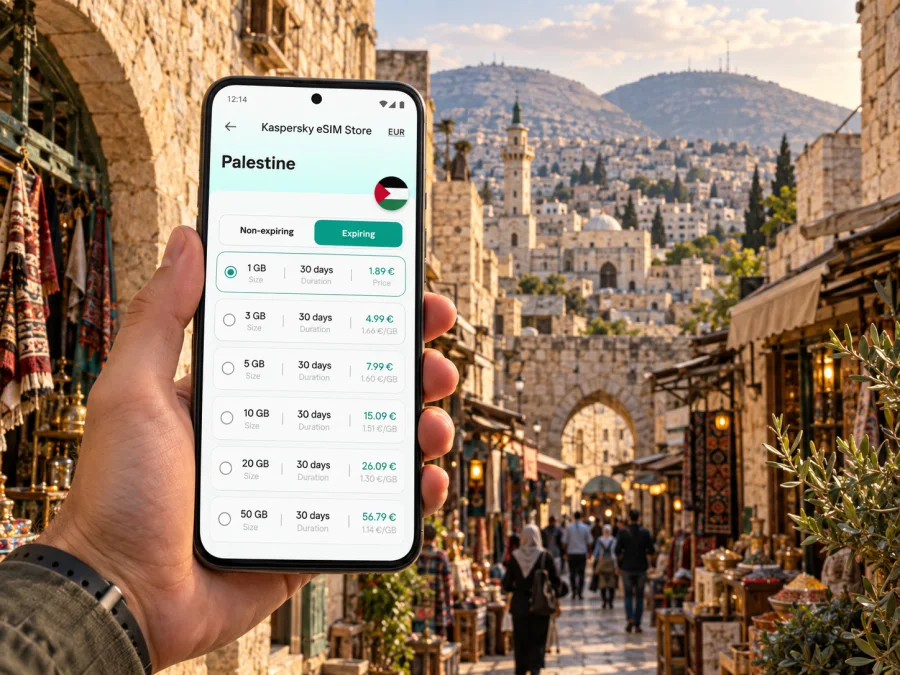
These are planning categories, not fixed data amounts. Prefer the plan details that match your actual trip length and habits, and use hotel Wi-Fi for large downloads when appropriate. You can review the available mobile internet options for Palestine before deciding. Kaspersky eSIM Store is an app and website where travelers can choose, arrange, and activate an eSIM with a suitable plan for mobile internet abroad; the plan’s own terms determine where and how it works.
A quick checklist before choosing
- Confirm the plan is valid in Palestine and for the dates you need.
- Compare the data allowance and validity period with your expected use.
- Read whether activation begins at installation, first connection, or another stated point.
- Check whether the plan requires data roaming to be enabled on its eSIM line.
- Review hotspot rules if you plan to connect a laptop or another phone.
- Keep your usual SIM available for calls and messages if you still need its number.
An eSIM plan for mobile data does not automatically include a regular phone number, standard voice calls, or SMS. If those matter, keep a separate way to receive important calls or messages and check the terms of your existing mobile service. Internet-based calling and messaging apps can be used when the plan and connection support them.
Device and setup checks
Before purchase, check whether your device supports eSIM and confirm that it is not locked to a carrier. Support can differ between regional versions of the same phone model. Make sure you can connect to Wi-Fi during setup and keep the installation instructions available. If you are unsure which line should provide mobile data, review the settings before you travel rather than changing them while trying to find your hotel.
Installing an eSIM before departure or after arrival
Check that your device supports eSIM, is carrier-unlocked, and has an internet connection for setup. Keep the QR code or profile details from your order available. Follow the provider’s plan instructions, since activation steps and timing can vary.
- Open the mobile or cellular settings on your phone.
- Choose the option to add an eSIM or mobile plan.
- Scan the QR code or enter the details supplied with your plan.
- Label the new line so you can recognize it later.
- Select the eSIM line for mobile data when you are ready to use it.
- Enable data roaming for that line only if the plan instructions require it.
- Wait for the line to register; setup or connection can take a few minutes.
For platform-specific steps, use the Android eSIM installation instructions or the iOS eSIM installation instructions. If you install the eSIM at home but want data to begin later, follow the plan’s activation terms and leave the line’s mobile data setting off until you are ready, where the device and plan allow this. Do not delete an installed profile to troubleshoot unless the plan instructions tell you to; some eSIMs cannot simply be reinstalled.
Staying oriented across neighborhoods
Your day may alternate between the Old City and newer neighborhoods. Plan each leg separately, especially for uphill destinations or places outside the historic core. Save your lodging address and a backup meeting point in an offline note as well as in your map; a screenshot can help if the map stops refreshing, though it will not show changed conditions.
For business travelers
A business visit benefits from having the office address, host’s contact details, and entry instructions saved before you leave. Test an important call from a quiet indoor location and agree on a fallback with colleagues. Download presentation files in advance, and ask your host for a practical pickup point; a short distance on the map can take longer by road through the hilly city.
For a short stopover
With only a few hours, choose one compact area rather than several distant stops. Confirm the road journey in both directions and current access with a trusted local contact before departing. Save your return pickup point and booking details offline; if timing is tight or conditions change, staying near the agreed pickup may be more practical.
Places and routes from Nablus
Nablus can be a base for nearby heritage visits, but check each route on the day with your host. Sebastia is a historic village roughly 12 kilometers northwest of Nablus; that distance is geographic context, not a current drive-time estimate or guarantee of access. Tell Balata and Mount Gerizim are also associated with the city’s historic landscape. Confirm transportation, opening arrangements, current access, and plan coverage for the full route before setting out. Keep the driver’s contact and return details available offline.
Accommodation and useful routines
Choose accommodation based on whether your itinerary is centered on Old City walks or on meetings and vehicle access. Confirm its exact address and arrival instructions directly, then save them offline. At checkout, verify transport and keep the eSIM selected for mobile data if you still need it.
Common connectivity questions
Will one eSIM work everywhere in Nablus?
Coverage depends on the selected plan and its partner networks, as well as local conditions and your device. Read the plan details and treat connectivity as something to verify for your specific route. A map saved offline and a written contact number provide useful backups.
Can I use the eSIM for ordinary calls?
Usually an eSIM plan intended for mobile data does not include a standard phone number, voice calls, or SMS unless its terms explicitly say otherwise. Keep your usual SIM active for those services if needed, and use internet calling apps only when data is available.
Should I install the eSIM before I reach Nablus?
You can install it before departure if the plan instructions allow it and you have Wi-Fi. Check when validity begins, because activation timing varies by plan. Keeping setup out of the arrival rush can be convenient, but follow the provider’s instructions and avoid turning on data before you intend to use it.
What if the map pin is inaccurate?
Move to a wider street if practical, compare the written address with nearby street signs, and contact your host or driver. GPS accuracy can be reduced between tall buildings or inside covered markets. Do not keep walking deeper into unfamiliar lanes solely because the dot on the map moves.
How much data should I choose?
Estimate it from the trip length and your habits. Messaging and occasional directions use less data than frequent video calls, hotspot use, or uploading many photos. Compare your estimate with the allowance and validity shown for each plan, and use Wi-Fi for large downloads when suitable.
A practical plan for the day
Before leaving your accommodation, check the route and return plan. Keep addresses and contacts in an offline note. Use mobile data for navigation and updates, and ask locally about steep approaches, vehicle access, and changes along the route.
Kaspersky eSIM Store helps travelers choose, arrange, and activate an eSIM with a plan for mobile internet abroad. Review the plan’s destination, validity, data allowance, and activation terms, then choose an eSIM plan for your trip to Palestine. Install it according to the platform instructions, check your device beforehand, and keep local addresses available offline so you can focus on exploring Nablus.


