
Travel connectivity guide
Nadi eSIM: mobile internet for Fiji travel
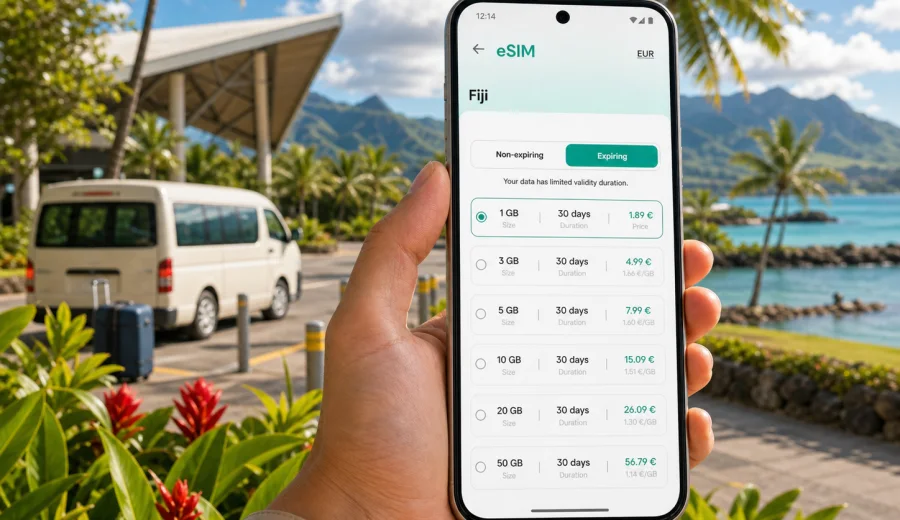
Nadi eSIM: mobile connection and internet for your Fiji trip
Nadi is often the first place where a Fiji trip becomes practical rather than theoretical. You land at Nadi International Airport, pass immigration, find a transfer, message your hotel, check ferry times, and decide whether you are heading to Denarau, Wailoaloa, the Coral Coast, the Yasawa Islands, or a meeting nearby. In those first hours, mobile internet is not a luxury. It is the tool that keeps the trip moving.
An eSIM can be useful in Nadi because many journeys start with quick decisions: which pickup zone to use, whether the resort shuttle has arrived, how long the drive to Port Denarau will take, where to exchange money, and how to contact a host if your flight lands early or late. Public Wi-Fi can help in airports and hotels, but it is not always where you need it most: at the curb, in a taxi, on the way to the marina, or while walking between restaurants and shops.
This guide focuses on Nadi as a city and travel hub. It explains where mobile connection matters, how to plan internet data for local movement, what to check before installing an eSIM, and how Kaspersky eSIM Store can help you prepare a suitable data plan for a trip to Fiji.
Why mobile internet matters in Nadi
Nadi is compact compared with major capital cities, but visitors rarely stay in one fixed area. A typical day can involve an airport arrival, a short hotel transfer, a ride to Denarau, a stop in Nadi Town, dinner near Wailoaloa Beach, and a morning ferry or domestic connection. Each step uses mobile data in small but important ways.
You may need internet in Nadi to:
- message a hotel, driver, tour desk, or local contact;
- use maps between the airport, Martintar, Namaka, Wailoaloa, Denarau, and Nadi Town;
- confirm ferry, resort transfer, and tour pickup details;
- check weather before a boat trip or day excursion;
- use a translation app, mobile banking app, or ride information;
- receive flight updates and boarding changes;
- share your location with family or colleagues;
- use messaging apps for calls when ordinary voice minutes are not included.
The value of an eSIM is preparation. Instead of searching for a SIM counter after a long flight or relying on one Wi-Fi network after another, you can arrange mobile internet in advance and be ready to connect once the eSIM is installed and activated according to the selected plan conditions.
The first hour after landing at Nadi International Airport
Nadi International Airport is the main arrival point for many Fiji visitors. Even if your final destination is another island, a resort area, or a domestic flight, the airport is where you often need your phone most.
Your first-hour connection tasks usually look like this:
1. Turn off aircraft mode and let your phone detect local networks.
2. Confirm your hotel transfer, shuttle, taxi, or pickup point.
3. Open a map for the route to your accommodation.
4. Check whether your ferry, domestic flight, or tour desk timing has changed.
5. Message family, colleagues, or your host that you have arrived.
6. Keep payment, booking, and identity documents available offline as a backup.
If you use an eSIM for data, remember that it usually supports mobile internet rather than a regular local phone number. Voice calls and SMS are not included unless the selected tariff clearly says so. For most travelers in Nadi, this is still enough because hotels, drivers, tour operators, and colleagues commonly coordinate by email or messaging apps.
Nadi areas where an eSIM is especially useful
Nadi is not just one resort strip. It is a working airport town, a gateway to island transfers, and a base for short stays. Mobile internet needs change by area.
| Area or route | Why you may need mobile data |
|---|---|
| Nadi International Airport | Arrival messages, transfer coordination, flight updates, maps |
| Namaka | Shops, local errands, restaurants, short taxi rides |
| Martintar | Hotels, cafes, nightlife, business stays, quick navigation |
| Wailoaloa Beach | Beach hotels, restaurants, pickup points, evening transport |
| Nadi Town | Markets, banks, local services, walking routes |
| Port Denarau | Ferries, marina transfers, resort shuttles, tour check-ins |
| Road to the Coral Coast | Maps, travel time checks, hotel messages, stops en route |
For a resort-only stay, you may use less data during the day and more in the evening for messaging, maps, and photo sharing. For a transfer-heavy trip, mobile data becomes more operational: pickup points, route checks, booking confirmations, and schedule changes.
How much data to plan for Nadi
There is no single correct data amount because a short stopover and a two-week island route are different trips. The useful question is not "How much data does Fiji need?" but "What will you do on your phone while moving through Nadi?"
Use this practical estimate:
| Trip style | Typical mobile internet use in Nadi |
|---|---|
| Overnight stopover | Messaging, maps, hotel check-in, airport updates |
| Resort stay based near Nadi | Messaging, maps, dining searches, light social media |
| Denarau and island transfer | Ferry details, pickup coordination, weather, maps |
| Business trip | Email, calendars, transport coordination, video-light tasks |
| Family trip | Shared location, messaging groups, maps, booking apps |
| Digital-heavy traveler | Cloud backups, video calls, streaming, large uploads |
To control usage, download offline maps before departure, keep hotel and transfer confirmations saved locally, and delay large photo backups until you are on trusted Wi-Fi. If you plan to use video calls, cloud storage, or streaming, choose a larger package and watch the validity period as carefully as the data size.
Choosing an eSIM plan before you arrive
Before choosing a plan, check three conditions: destination, data volume, and validity period. The destination should match Fiji, the data volume should fit your usage, and the validity period should cover the days when you actually need mobile internet. Some travelers only need data for the Nadi arrival and transfer day. Others need a plan for Nadi plus onward travel around Viti Levu or nearby islands.
Kaspersky eSIM Store is an app and website where you can quickly choose, arrange, and activate an eSIM with a suitable mobile internet tariff for international travel. If your trip starts in Nadi, you can prepare an eSIM plan for Fiji before departure and keep the setup ready for arrival, instead of waiting until you are tired, offline, and trying to solve transport details at the same time.
When comparing plans, look at:
- included data amount;
- validity period;
- destination coverage shown in the plan conditions;
- whether top-up is available;
- activation rules;
- whether the phone must have data roaming enabled for that eSIM;
- refund and support conditions before you start using the plan.
Avoid choosing only by headline data size. A larger plan with a short validity period may not suit a longer trip. A smaller plan may be enough for a stopover if you mainly use messaging and maps. The best option is the one that fits how you will actually move through Nadi.
Before buying: check device compatibility
Not every phone supports eSIM, and some devices are restricted by the carrier that originally sold them. Before you arrange a plan, confirm that your device supports eSIM and is not locked in a way that prevents adding another mobile plan.
Check your device before purchase if you are not sure. This is especially important when you travel with an older phone, a regional device model, a company-managed phone, or a handset bought through a carrier contract.
Also check these points:
- Your phone is unlocked for mobile plans from other providers.
- The operating system is updated enough to install an eSIM profile.
- You can access email or the app where your installation details are delivered.
- You know which SIM should handle calls and which should handle mobile data.
- You understand that many travel eSIM tariffs provide data only.
If you use your home SIM for banking messages or ordinary calls, keep it active for those functions and set the travel eSIM as the mobile data line. This helps avoid confusion when you land in Nadi and need both data access and important verification messages.
How to install and activate an eSIM for Nadi
The exact installation flow depends on your device and the plan instructions, but the preparation sequence is usually simple:
1. Choose Fiji as the destination and select a tariff that matches your trip.
2. Complete the order and open the installation details.
3. Install the eSIM profile on a compatible phone.
4. Name the line clearly, for example "Fiji data".
5. Keep your home SIM available if you need calls or SMS.
6. Activate the eSIM according to the plan instructions.
7. Set the eSIM as your mobile data line after arrival or at the recommended activation moment.
For device-specific steps, use the Android installation guide or the iOS installation guide. Install while you still have a stable connection, because downloading the eSIM profile requires internet access. Many travelers prefer to do this at home before the flight and then switch mobile data to the eSIM when it is time to use the plan.
Nadi transport scenarios where mobile data helps
Nadi transport can be easy when everything is prearranged, but delays, weather, and arrival timing still create small problems. Mobile internet reduces the friction.
For airport transfers, data helps you message a driver, send your current location, or confirm which exit you are using. For taxis, it helps you check the route and travel time. For resort shuttles, it helps you confirm whether the pickup is at the airport, your hotel, or Port Denarau. For domestic connections, it helps you track departure changes without walking back and forth between counters.
If you are moving from Nadi to Denarau, the drive is usually short, but phone data is still useful because ferry offices, resort desks, restaurants, and pickup areas can be spread around the marina. If you are heading toward the Coral Coast, maps and messaging matter more because the journey is longer and stops may be less predictable.
Practical transport checklist:
- Save hotel and transfer contacts before the flight.
- Keep booking references available offline.
- Download a map of Nadi, Denarau, and your onward route.
- Set the eSIM as the data line before leaving airport Wi-Fi.
- Keep enough battery for maps during the transfer.
- Use messaging apps for coordination when voice calls are not part of the tariff.
Hotels, resorts, and Wi-Fi: when eSIM still matters
Many hotels and resorts around Nadi offer Wi-Fi, but hotel Wi-Fi does not solve every travel moment. You may need data before check-in, after checkout, in a taxi, at a marina, near a restaurant, or while waiting for a delayed shuttle. Wi-Fi quality can also vary by room location, resort occupancy, and weather conditions.
An eSIM is most useful as your personal backup connection. You can use hotel Wi-Fi for large downloads and photo backups, then rely on mobile data for movement and time-sensitive tasks. This is a sensible split for Nadi because many important decisions happen outside your room: pickup timing, dinner plans, ferry windows, day-trip updates, and last-minute flight checks.
If you work remotely or have business calls, test your connection before an important meeting. Use hotel Wi-Fi where it is stable and keep mobile data available for messaging, calendar updates, and emergency hotspot use if your plan and device support tethering. Always check the selected tariff conditions before relying on hotspot mode.
Stopovers in Nadi
A Nadi stopover can be short but still data-intensive. You may have only one evening near Wailoaloa Beach, a few hours in Nadi Town, or a transfer window before a ferry. In this situation, the goal is not to use a lot of internet; the goal is to remove uncertainty.
For a stopover, prepare:
- accommodation address and check-in details;
- offline copies of onward tickets;
- a map of the airport area and your hotel;
- driver or shuttle contact details;
- the eSIM installed before departure if your device supports it;
- a small data plan with enough validity for arrival and departure.
Short stays are where an eSIM can feel especially practical. You do not want to spend a limited stopover comparing options at the airport or depending on hotel Wi-Fi before you can even reach the hotel.
Day trips and routes from Nadi
Nadi is a starting point for many Fiji routes. Travelers often continue to Denarau, nearby islands, the Garden of the Sleeping Giant, Sabeto hot springs, the Coral Coast, Lautoka, or other parts of Viti Levu. Some routes are short and organized; others depend on timing, weather, road conditions, or boat transfers.
Mobile internet helps you:
- confirm pickup windows for tours;
- check meeting points when a driver uses a hotel lobby or roadside stop;
- message a tour desk if your transfer is delayed;
- monitor weather before a boat trip;
- find your way back to the hotel after dinner;
- keep family or colleagues updated during longer transfers.
Coverage and speeds can vary by location, network conditions, terrain, building materials, and the selected plan. It is better to treat mobile data as an important travel tool, not as a guarantee that every remote beach or inland road will have the same connection quality as a hotel district.
Common mistakes to avoid
The most common eSIM mistake is waiting until you are already offline to solve connectivity. Install the eSIM profile while you have a stable connection. Keep the instructions available. Understand when the plan becomes active. Then use airport or hotel Wi-Fi only as a supplement, not as the whole strategy.
Other avoidable mistakes:
- choosing a plan without checking validity dates;
- forgetting to set the eSIM as the mobile data line;
- leaving data roaming disabled when the eSIM instructions require it;
- assuming a data-only eSIM includes regular calls or SMS;
- using cloud backup or video streaming on a small package;
- not checking whether the device supports eSIM before purchase;
- deleting an eSIM profile before you are sure you no longer need it.
For family trips, decide who needs mobile data most. One parent may need navigation and transport messages, while another phone can stay mostly on hotel Wi-Fi. For business trips, the main phone should be ready before boarding. For stopovers, keep the plan simple and focused on maps, messages, and tickets.
Quick planning guide for Nadi
Use this short guide to match your eSIM setup to your Nadi itinerary:
| Situation | Practical setup |
|---|---|
| You land late at night | Install before departure, keep hotel and transfer messages offline |
| You go straight to Denarau | Keep data ready for marina details and shuttle coordination |
| You stay near Wailoaloa | Use data for taxis, restaurants, maps, and beach-area movement |
| You work during the trip | Choose enough data for email and messaging, use Wi-Fi for large files |
| You have a family itinerary | Share key contacts offline and keep one phone reliably online |
| You continue to islands | Check validity and data volume for the full route, not only arrival day |
The simple rule is this: if a missed message could disrupt your transfer, check-in, ferry, meeting, or return to the airport, prepare mobile data before you need it.
FAQ: eSIM and mobile internet in Nadi
Is an eSIM useful if my hotel in Nadi has Wi-Fi?
Yes, because many travel tasks happen outside the hotel. You may need mobile internet at the airport, in a taxi, at Port Denarau, in Nadi Town, or while waiting for a pickup. Hotel Wi-Fi is helpful, but it is not a complete travel connection plan.
Can I use an eSIM for calls in Nadi?
Many travel eSIM tariffs are for mobile data only. Regular voice calls and SMS are not included unless the selected tariff says so. You can often use internet-based calling and messaging apps through mobile data.
Should I install the eSIM before flying to Fiji?
Installing before departure is often practical because you need an internet connection to download the eSIM profile. Activation timing depends on the plan instructions, so read them carefully before your trip.
How much data do I need for Nadi?
For maps, messages, booking apps, and light browsing, a modest package may be enough for a short stay. If you plan video calls, streaming, hotspot use, or frequent photo uploads, choose a larger package and monitor usage.
Can I keep my home SIM active?
In many dual-SIM phones, yes. You can keep your home SIM for calls or verification messages and use the eSIM for mobile data. Check your phone settings so the correct line handles data.
Prepare your Nadi eSIM before the trip
Nadi rewards practical preparation. A few minutes spent before departure can make arrival easier: your maps open, your hotel can reach you, your driver can find you, and your ferry or meeting details stay close at hand. Check device compatibility, choose the right validity period, install the profile while you have a stable connection, and keep your home SIM settings clear.
Kaspersky eSIM Store helps you choose, arrange, and activate an eSIM with a suitable mobile internet tariff for international travel. Before flying into Nadi, choose an eSIM plan for your Fiji trip so your first hours in the city are focused on the journey, not on searching for a connection.