Travel connectivity guide
Naha eSIM: Mobile Internet for Your Trip
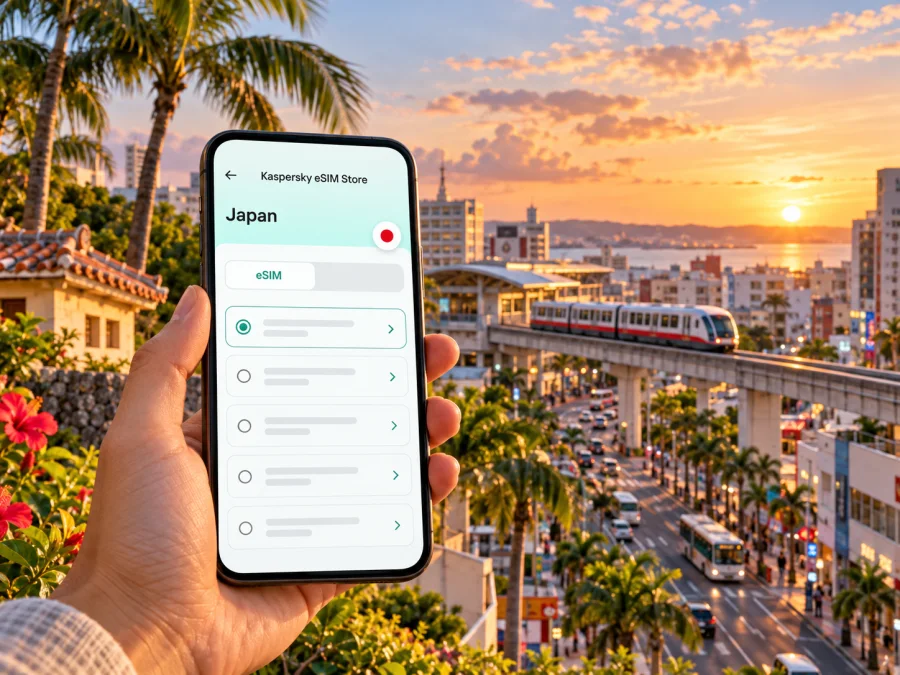
Naha eSIM: mobile connection and internet for your trip
Naha is often the first stop on a trip to Okinawa, but it is more than an airport gateway. The city combines a busy center, historic Shuri, markets and shopping arcades, a working port, and access to beaches and islands. A reliable way to get mobile internet can make each transition easier: checking a train platform after landing, finding a hotel entrance in a narrow street, looking up a bus departure, or confirming a ferry update.
An eSIM is a digital SIM profile that you add to a compatible, unlocked device. It can be prepared before departure and used for mobile data under the conditions of the selected tariff. It does not automatically include a Japanese phone number, voice calls, or SMS, so keep your usual number available for services that require it and use internet-based messaging for calls where appropriate.
This guide focuses on Naha itself and the practical routes visitors take through the city. The city is in Okinawa Prefecture, Japan, on the southern part of Okinawa’s main island. It is not an island separate from Japan, and it is not the same destination as the more distant Okinawan islands such as Ishigaki or Miyako. A plan labelled for Japan is therefore the relevant destination category to check for a stay in Naha; actual network access and conditions depend on the selected plan and its terms.
Why mobile internet is useful in Naha
Naha’s best-known central areas are walkable, but a visitor’s day may involve several modes of transport. The Yui Rail monorail links Naha Airport with stations through the city and onward toward Shuri and Urasoe. Buses serve destinations beyond the rail line, while taxis can be useful for luggage, late arrivals, or places away from a station. Maps, timetables, translation, restaurant searches, and booking messages all draw on the same data connection.
Getting online after landing at Naha Airport
Naha Airport is the main arrival point for visitors to the city. The airport’s English access information lists the monorail, taxis, buses, and road access as ways to leave the terminal. The airport terminal also connects to Naha Airport Station via a passage from the domestic terminal’s second floor. If you have an eSIM ready, a data connection can help you confirm the route and identify the right stop before you leave the building.
Before the flight, decide how you will get to your first address. Yui Rail is a straightforward option for many central destinations along its route. The airport’s bus information also lists direct services for different parts of Okinawa, including routes toward Kokusai Street, Chatan, Onna, Nago, and southern destinations. Bus routes, boarding points, and schedules can change, so match the bus to your exact destination and travel date rather than assuming that every service stops near your hotel.
A simple arrival checklist
- Keep the hotel name and address accessible offline. A Japanese address or map pin can be more useful than an English street name alone.
- Check the route from the airport to your accommodation. Compare the station or stop with the hotel’s own directions; the nearest station may still involve a walk with bags.
- Choose the transport mode before joining a queue. The monorail, bus, and taxi are separate options with different destinations and operating details.
- Connect your travel eSIM only when appropriate. Follow the installation and activation instructions for the specific plan. Some tariffs start their validity period at installation, while others start at first network connection; confirm the stated rule before activating.
- Retain access to your primary number. If you need calls or one-time SMS codes, confirm how your home SIM will behave and what roaming charges may apply.
Choosing an eSIM for a Naha itinerary
There is no separate city category required simply because you are staying in Naha. Start with Japan as the destination, then check whether the plan covers the places on your full itinerary. If your trip includes other countries, look for a regional option only if its listed destinations include each country you will visit. Do not infer coverage from a plan name alone.
Kaspersky eSIM Store is an app and website where you can select, arrange, and activate an eSIM with a suitable tariff for mobile internet during an international trip. The underlying network and service conditions are determined by the selected tariff and its provider.
| Your Naha routine | What to consider when comparing plans |
|---|---|
| A short city break | The validity period should cover arrival, sightseeing days, and departure, with a margin for delays. |
| A longer stay with regular navigation | Estimate daily map, messaging, browsing, and work use; compare the included data with that estimate. |
| Remote work or video meetings | Check whether the tariff permits hotspot use and whether the data allowance is adequate for calls and uploads. |
| Naha plus other parts of Okinawa | Confirm the destination coverage in the tariff terms for each place on your route; do not assume a city-only or Japan-wide service detail. |
| A multi-country trip | Compare a Japan option with a regional tariff only after checking the full country list and validity rules. |
Prices, data amounts, networks, and plan terms can change. Review what the current offer states at the time you purchase, including whether calls or SMS are included (they may not be) and what happens when data is used up. A plan for mobile internet should not be treated as a replacement for a local voice line when you need to call a Japanese number.
Check your device before you buy
Your phone must support eSIM, be unlocked for use with another mobile provider, and be able to use the required network technology. Support differs between exact model numbers, regional variants, and devices sold for particular operator markets. The same product family name does not prove that every market version has an eSIM chip or an available eSIM menu. Check the model number and sales market against manufacturer documentation, and confirm that the device is not locked to an operator. If an exact variant is not confirmed, treat compatibility as unverified until you check the device itself and its documentation.
To check, search the device settings for an option such as “Add eSIM” or “Add mobile plan,” and verify the exact model number against the manufacturer’s support information. A carrier-locked device may prevent activation even when its hardware supports eSIM. Before ordering, check whether your device supports eSIM and confirm the lock status with your current provider if necessary.
After confirming the exact device variant and operator lock status, review Japan eSIM options for your Naha trip and compare the current destination, allowance, validity, and activation terms with your itinerary.
Also check practical details that are easy to miss:
- the phone has enough battery and can connect to Wi-Fi for installation if the plan requires it;
- you can access the account or email used to receive setup details;
- the QR code or activation information is available on a second screen or printed copy if you will scan it with the same phone;
- your device can keep your primary SIM enabled while setting mobile data to the travel eSIM, if that is how you want to manage calls and data;
- the tariff’s validity start and activation conditions fit your arrival date.
Installing and activating the eSIM
If possible, install the profile before leaving home while you have stable Wi-Fi and time to read the plan’s instructions. Whether you should activate it immediately or wait until arrival depends on the plan’s validity rules. Follow those rules precisely: installation and first connection are not always the same event.
A typical setup flow is:
- Open the eSIM installation instructions for your operating system: Android setup guide or iPhone setup guide.
- Use the app or purchase confirmation to access the profile details. Keep the primary SIM active if you still need your usual number.
- Add the eSIM in the phone’s mobile-network settings, either by scanning the supplied QR code or following the available manual method.
- Label the new line clearly, for example “Japan data,” so you can distinguish it from your home SIM.
- Set the travel eSIM as the mobile-data line when the plan should be used. Keep data roaming for your primary SIM off if you want to avoid unintended home-provider charges; enable roaming for the eSIM only if the plan’s instructions require it.
- At the appropriate time, turn on the eSIM line and check that the device connects. If service does not appear, verify the selected data line, airplane mode, roaming setting, and the plan’s activation instructions before trying again.
Moving around the city
Yui Rail is the most useful fixed-route reference for many visitors. Its official route information lists Naha Airport, Asahibashi, Prefectural Office, Miebashi, Makishi, Omoromachi, Shuri, and stations farther toward Urasoe. This makes the line useful for connecting the airport with central Naha and for reaching areas on the route. It does not take you to every attraction or hotel door, so check the final walking leg on a map.
Kokusai-dori (also written Kokusai Street) is a central shopping and dining street roughly 1.6 kilometres long, according to the official Okinawa travel guide. Nearby arcades and side streets create a denser pedestrian area than the main road alone suggests. Mobile navigation is useful for finding a specific shop or restaurant, but the short distance between parallel streets can make it easy to take a wrong turn. Save the name and map pin of your destination before you start walking.
Shuri sits uphill from the center. The official tourism guide notes that Shurijo Castle Park can be reached by bus or by taking Yui Rail to Shuri Station and continuing on foot; it describes the walk from the station as about 15 minutes. Expect the actual journey to depend on your starting point, walking pace, weather, and any current access arrangements. Check the park’s current visitor information before travelling, as restoration work and opening arrangements can change.
| Area or trip | Connection planning |
|---|---|
| Airport to central Naha | Check whether your accommodation is closer to a Yui Rail station, a bus stop, or a taxi drop-off. |
| Kokusai-dori and Makishi | Use a saved destination pin for the side streets and arcades; keep the hotel address available for the return trip. |
| Tsuboya | Allow time for the final walk through smaller streets, and confirm the destination entrance rather than only the neighborhood. |
| Shuri | Plan the monorail or bus journey plus the uphill or walking portion; check current castle-park access details. |
| A meeting in Omoromachi | Confirm the exact building and entrance; business complexes can be a walk from the station platform. |
| A beach or port visit | Check the return transport option before leaving, especially if you are travelling outside the central area. |
Where to stay and how connectivity fits
Naha offers accommodation around the central shopping and dining area as well as in other parts of the city. The official travel guide notes that many options are concentrated around Kokusai Street. Choosing a base near a station can make rail trips simpler, while a hotel farther away may make buses or taxis more convenient. Check the walking route from the stop with luggage in mind; a short distance on the map can still include crossings, slopes, or a complicated entrance.
Beyond central Naha
Naha is a useful base and transport gateway, but travel beyond the city requires additional planning. Airport bus listings include routes toward central and northern Okinawa, Chatan, Onna, Nago, and southern destinations. The official Okinawa guide also describes ferries from Tomari Wharf to islands including the Kerama Islands, Kume, Tonaki, and Aguni, with other departures from Naha Wharf. Flight and ferry schedules can change, particularly with weather, so check the operator’s current information and leave enough time to return to the airport or hotel.
If your itinerary includes an island excursion or a resort outside Naha, check your eSIM tariff’s destination terms before you leave the city. A Japan destination label is not a substitute for reading the plan conditions, and no plan should be assumed to work in every location or under all conditions. Save ferry tickets, accommodation details, emergency contacts, and the return route offline. Mobile service can vary with the local network, indoor location, terrain, congestion, and weather-related disruptions.
Data habits that help on a city trip
You can preserve data and battery without making the phone difficult to use:
- Download a map of Naha and the areas you plan to visit over Wi-Fi.
- Save hotel addresses, transport tickets, reservations, and a screenshot of your itinerary.
- Use Wi-Fi for large app updates, photo backups, and video uploads.
- Review which apps can use mobile data in the background, especially cloud photo syncing.
- Keep your phone charged before longer bus, ferry, or sightseeing days; navigation and screen brightness use battery.
- Carry a power bank if you expect to navigate for hours, while following airline rules for batteries.
- Use an offline translation pack if you expect to need it in markets, taxis, or less tourist-oriented places.
Troubleshooting in Naha
If mobile data does not work after landing, start with the simple checks rather than removing the eSIM profile:
- Confirm that the eSIM is installed and switched on.
- Check that it is selected as the mobile-data line.
- Review whether the tariff requires data roaming to be enabled for the eSIM.
- Toggle airplane mode once, then wait briefly for the phone to reconnect.
- Check the plan’s activation status and its stated destination, validity, and network instructions.
- Move outdoors or away from an obstructed indoor area and try again; local signal conditions can vary.
- Restart the device if the provider’s instructions recommend it, then contact the support channel listed with your purchase if the issue continues.
If the phone shows a signal but apps cannot load, check mobile data permissions, data limits, and whether the selected plan has remaining allowance. If you need a taxi or hotel check-in before the issue is resolved, use airport Wi-Fi where available or ask the accommodation for its preferred contact method. Keep the relevant address or booking reference available offline.
Frequently asked questions
Is Naha in Japan, and which destination should I choose?
Yes. Naha is the capital of Okinawa Prefecture, on the southern part of Okinawa’s main island in Japan. For a city stay, start by reviewing Japan options and confirm the exact plan terms. Naha is not a separate country-level eSIM destination.
Will a travel eSIM give me a Japanese phone number?
Not necessarily. The eSIM described here is for mobile data unless the selected plan explicitly says otherwise. Do not assume that ordinary voice calls or SMS are included. Keep your usual number for services that require it, and check its roaming conditions with your home provider.
Prepare your connection before you go
A little preparation makes Naha easier to navigate from the airport through the city center and onward to Shuri, the port, or a bus connection. Confirm your device is compatible and unlocked, choose a plan based on your actual route and data use, and read its activation and validity rules. Save essential addresses and tickets offline, then use live mobile data for maps, messages, and changes to your day.
When you are ready, review Japan eSIM options for your Naha trip in Kaspersky eSIM Store, the app and website for selecting, arranging, and activating an eSIM tariff for mobile internet abroad. Compare the current terms and choose the option that fits your travel dates and plans.


