
Travel connectivity guide
Nakhchivan eSIM: Mobile Internet Travel Guide
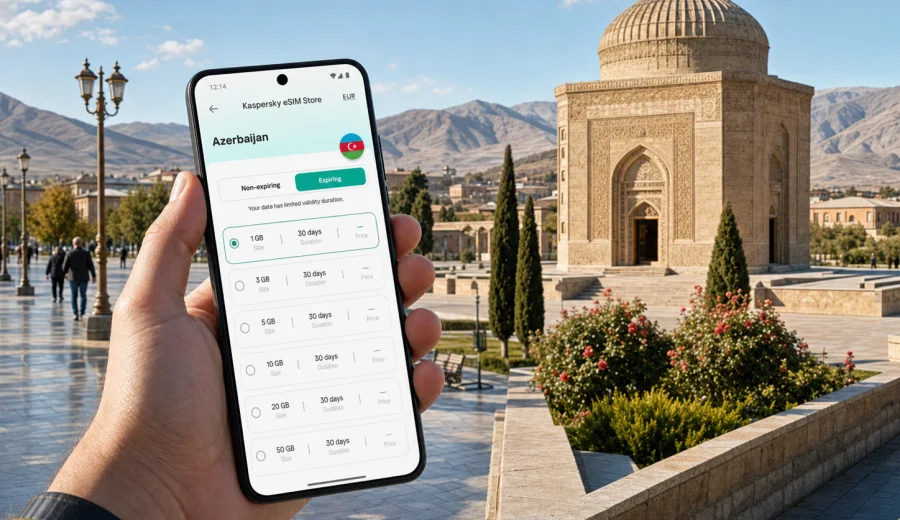
Nakhchivan eSIM Guide: Mobile Connection and Internet for Your Trip
Nakhchivan is a compact city, but it asks a lot from your phone. You may arrive by air, cross from Türkiye through the Sadarak direction, continue to Ordubad or Julfa, or spend only one business day moving between hotels, offices, cafes, and historical sites. In each case, mobile internet is not just a convenience. It is how you confirm your route, message a driver, check hotel details, translate a menu, and keep plans flexible when a local schedule changes.
An eSIM can make that part of the trip simpler because you do not need to look for a physical SIM card after arrival. You prepare a digital SIM profile on a compatible device, choose a data plan for Azerbaijan, and use mobile data for maps, messaging, ride coordination, email, and everyday travel tasks in Nakhchivan. It is especially useful in a city where many trips are short, practical, and location-specific: airport pickup, a meeting near the city center, a visit to Momine Khatun Mausoleum, a drive toward Ashabi-Kahf, or a day trip through the Nakhchivan Autonomous Republic.
Why mobile internet matters in Nakhchivan
Nakhchivan is easy to underestimate because distances inside the city are manageable. That does not mean you can rely on offline planning alone. A visitor may need mobile data at several points in the same day:
- checking the route from Nakhchivan International Airport to a hotel;
- messaging a host, driver, colleague, or guide;
- using maps around the central streets and landmarks;
- translating short Azerbaijani or Turkish phrases;
- confirming opening hours before crossing the city;
- sharing location details during a business visit;
- using banking, airline, or hotel apps;
- planning onward travel to Julfa, Ordubad, Batabat, or the Turkish border area.
Public Wi-Fi can help in hotels and some cafes, but it is not a complete travel connection. It may require a local number, may be unavailable outdoors, and may not help when you are already in a taxi, walking between landmarks, or coordinating a pickup. An eSIM is useful because it gives your compatible phone a prepared mobile data option for the trip.
Arrival scenarios: where an eSIM helps first
Most visitors feel the value of mobile internet in the first hour after arrival. Nakhchivan is not a city where you want to start your trip by searching for a shop, comparing unfamiliar SIM packages, and guessing whether a plan will cover your actual route.
| Arrival moment | Why mobile data helps | Practical use |
|---|---|---|
| Airport arrival | You need orientation quickly | Open maps, message a driver, confirm hotel address |
| Hotel transfer | Address spelling may differ across apps | Share your exact location and route |
| Business pickup | Timing can change | Keep messengers and email active |
| Border or regional route | Plans may depend on local timing | Coordinate the next leg before you leave the city |
| Evening arrival | Shops and service points may be limited | Use mobile data without waiting for Wi-Fi |
City movement: maps, taxis, walking routes, and districts
Nakhchivan's central area is walkable in parts, but a travel day can still involve several modes of movement. You may walk between central landmarks, use a taxi for a hotel transfer, and take a longer drive for sites outside the city. Mobile data supports each part differently.
For walking, it helps with map pins, route checks, weather, translation, and finding the next cafe or pharmacy. For taxis, it helps when you need to show the destination clearly, share live location, or confirm the fare and pickup point through a messenger. For longer regional trips, it helps with route awareness and communication before you reach areas where Wi-Fi is less available.
Useful Nakhchivan places to pin before you travel include:
- Nakhchivan International Airport;
- your hotel and a backup meeting point nearby;
- Momine Khatun Mausoleum;
- Khan Palace or museum stops on your plan;
- restaurants or cafes near your hotel;
- a pharmacy and an ATM close to your base;
- departure points for Julfa, Ordubad, or other day trips.
Offline maps are still a smart backup. Download the city area before departure, then use mobile data for live details: traffic, messages, search, booking confirmations, and changed meeting locations.
How much data do you need for Nakhchivan?
Data use depends more on your habits than on the city. A traveler who uses maps, messengers, and email can manage with a modest package. A traveler who uploads video, uses cloud storage, or runs hotspot mode for a laptop will need more.
| Traveler type | Typical city use | Suggested data mindset |
|---|---|---|
| Stopover visitor | Maps, messaging, one hotel transfer | Choose a small plan with enough buffer |
| Weekend traveler | Maps, social apps, restaurant search, light photos | Pick a plan that covers several active days |
| Business traveler | Email, calls through apps, documents, taxi coordination | Prioritize stable access and a comfortable allowance |
| Regional explorer | Nakhchivan plus Julfa, Ordubad, Batabat, Ashabi-Kahf | Add extra data for navigation and messaging outside the city |
| Remote worker | Laptop hotspot, video calls, cloud files | Choose a larger plan and monitor usage closely |
As a practical rule, maps and messaging are light, video is heavy, and hotspot use can consume data quickly. If your Nakhchivan plan includes several day trips or work calls, choose more data than you would for a hotel-based city break.
Hotel Wi-Fi is useful, but it should not be your only plan
Hotel Wi-Fi is good for large updates, cloud backups, and relaxed browsing in the evening. It is less helpful during the moments that define a trip: arriving, leaving, crossing town, checking a route, or finding a contact when plans change.
Use hotel Wi-Fi for:
- operating system updates;
- long video calls from your room;
- backing up photos;
- downloading offline maps and documents;
- entertainment streaming.
Use mobile data for:
- airport and hotel transfers;
- maps while walking;
- messenger calls and texts;
- quick translation;
- email and calendar checks;
- taxi coordination;
- route checks before day trips.
This split keeps your eSIM data plan focused on travel-critical tasks while still using Wi-Fi when it is convenient and trusted.
Choosing an eSIM plan before a Nakhchivan trip
Before you buy any travel data plan, match the plan to the way you will actually move around Nakhchivan. A one-night business trip and a five-day regional itinerary do not need the same allowance.
Check these details before you choose:
- destination coverage: the plan should be suitable for Azerbaijan;
- data volume: enough for maps, messaging, and your work or media habits;
- validity period: long enough for the full trip, including arrival and departure days;
- activation timing: understand when the plan starts and how it is activated;
- device compatibility: your phone or tablet must support eSIM;
- hotspot rules: check whether you plan to share data with a laptop or another device;
- support route: know where to find help if installation or activation questions appear.
If you want to prepare before departure, Kaspersky eSIM Store helps you choose, set up, and activate a suitable eSIM data plan for travel. For this city article, use the Azerbaijan destination page to choose an eSIM plan for your Nakhchivan trip and compare data volume, validity, and price before you travel.
Device compatibility: check before you rely on eSIM
An eSIM only works on devices that support it. It also depends on whether the device is locked to a carrier and whether the model supports eSIM in your region. Do this check before you buy a plan, especially if your phone was purchased through a mobile operator contract.
Pre-trip compatibility checklist:
- confirm that your phone model supports eSIM;
- make sure the device is not carrier-locked;
- update the operating system if needed;
- keep your primary SIM active if you need calls or SMS on your usual number;
- confirm that you can scan a QR code or install the eSIM manually;
- keep the purchase and installation details available offline.
You can also check your device before choosing a plan. This is a small step, but it prevents the most frustrating travel problem: arriving in Nakhchivan with a data plan that your phone cannot install.
Installing eSIM before or after arrival
Many travelers prefer to install the eSIM profile before departure and activate mobile data when they arrive. This reduces pressure at the airport or hotel reception. The exact activation behavior can depend on the selected plan, so read the plan details before your trip.
A simple preparation flow:
1. Check that your device supports eSIM.
2. Choose Azerbaijan as the destination for your Nakhchivan trip.
3. Select a data volume and validity period that match your itinerary.
4. Install the eSIM profile while you still have reliable Wi-Fi.
5. Keep your usual SIM active if you need calls or SMS.
6. On arrival, select the eSIM for mobile data and confirm data roaming settings if the plan instructions require it.
7. Test maps and messaging before leaving the airport or hotel.
If you need device-specific installation steps, use the Android installation guide or the iOS installation guide. Follow the instructions for your device carefully and avoid deleting the eSIM profile unless the plan support instructions tell you to do so.
Business trips to Nakhchivan
For business travel, mobile data is less about browsing and more about reliability at exact moments. You may need to confirm a meeting address, open a document in a taxi, join a messenger call, or receive a schedule change while moving between the airport, hotel, and office.
Business travelers should prepare a slightly more generous data plan than the bare minimum. Email attachments, calendar apps, document previews, and hotspot use can add up. If you depend on a laptop connection, check hotspot availability in the plan details and avoid using mobile data for large sync tasks unless necessary.
Practical business setup:
- download meeting documents before travel;
- save hotel and office addresses offline;
- keep calendar entries available without internet;
- set your eSIM as the data line only;
- keep your primary number available for banking or corporate SMS if needed;
- test messenger calls on mobile data before the first meeting day.
This setup gives you more control without turning the phone into a complicated travel project.
Short stopovers and one-day visits
A short Nakhchivan visit has a different rhythm. You may not need a large data plan, but you do need mobile internet at the right times. The most important moments are arrival, transport, navigation between a few stops, and departure.
For a one-day plan, prepare:
- a small data plan with enough buffer for maps and messaging;
- offline map areas for the city center and airport route;
- saved hotel or meeting addresses;
- screenshots of booking details;
- a power bank if you will use navigation for several hours;
- the eSIM installation details saved where you can access them offline.
If your stopover includes a drive outside the city, add more data than you would for a simple airport-to-hotel transfer. Regional navigation and shared location can use more data when you keep maps active for a long time.
Day trips from Nakhchivan
Nakhchivan is often a base for trips beyond the city. Visitors may go toward Julfa, Ordubad, Ashabi-Kahf, or mountain and reservoir areas. These trips make mobile internet more useful, but also make planning more important.
Before leaving the city, do three things:
1. Download offline maps for the full route.
2. Send your itinerary or meeting point to a contact.
3. Check that your eSIM data is active and your battery is charged.
Mobile data can help you message a driver, confirm a return time, search a nearby place, or handle an unexpected change. Still, it should not be your only preparation. Save route names, hotel contacts, and key addresses offline because connectivity quality can vary by area, device, selected plan, and local conditions.
Practical data-saving tips in the city
The easiest way to make an eSIM plan last longer is to control background usage. You do not need to limit essential travel tasks; you only need to stop your phone from spending data on tasks that can wait for Wi-Fi.
Use these settings before active travel days:
- turn off automatic cloud photo backup on mobile data;
- disable app updates over mobile data;
- download offline maps on Wi-Fi;
- save important documents to the phone;
- reduce video quality in social apps;
- use Wi-Fi for large files at the hotel;
- check data usage daily if your plan has a small allowance;
- avoid laptop hotspot mode unless you planned for it.
For most visitors, maps, messaging, and translation do not use much data by themselves. The biggest surprises usually come from video, cloud sync, and hotspot sharing.
eSIM and your primary phone number
A travel eSIM for mobile data usually does not replace your usual phone number. Your regular SIM can remain in the device for calls, SMS, banking messages, and account verification, while the eSIM is selected for mobile data. This setup is useful in Nakhchivan because you can keep access to your usual accounts while using travel data for local navigation and messaging.
Before departure, review your phone settings:
- default line for calls;
- default line for mobile data;
- data switching behavior;
- roaming settings for the eSIM;
- messenger and banking app access;
- SMS access on your primary SIM.
If you expect important SMS messages, keep your primary line available. If you only need data, keep the setup simple and avoid switching lines repeatedly.
Common mistakes to avoid
Travel connectivity problems often come from small preparation gaps rather than from the city itself. Avoid these common mistakes:
| Mistake | Why it causes trouble | Better approach |
|---|---|---|
| Buying before checking compatibility | The device may not install eSIM | Check support first |
| Waiting until the airport to install | You may be tired or lack stable Wi-Fi | Install the profile before departure |
| Choosing too little data | Maps, media, and hotspot use can add up | Add buffer for active travel days |
| Deleting the eSIM profile | Some profiles cannot simply be reused | Keep it unless support tells you otherwise |
| Relying only on hotel Wi-Fi | It does not help in taxis or outdoors | Use Wi-Fi plus prepared mobile data |
| Forgetting offline backups | Routes and bookings may be needed without signal | Save maps and confirmations |
The best setup is boring in a good way: installed, checked, and ready before the trip begins.
FAQ: eSIM for Nakhchivan
Is an eSIM useful for Nakhchivan?
Yes, if your device supports eSIM and you need mobile data for maps, messengers, translation, taxis, hotel coordination, business communication, or day trips from the city. It is especially helpful when you want to avoid searching for a physical SIM card after arrival.
Do I need a separate city plan for Nakhchivan?
Usually, city travelers choose a plan by country or region. For Nakhchivan, choose a plan suitable for Azerbaijan and check the details before purchase. The city is the use case; the destination page is the country page.
Can I install eSIM before flying to Nakhchivan?
In many cases, you can install the eSIM profile before departure while you have stable Wi-Fi, then activate mobile data according to the plan instructions. Always read the activation details for the selected plan.
Will eSIM give me a local phone number?
Travel eSIM plans for mobile internet usually focus on data. They may not include a standard phone number, voice calls, or SMS unless the plan details state otherwise. For calls and messages, many travelers use internet-based apps.
Is eSIM enough for a business trip?
For many business tasks, yes: email, messengers, maps, calendar updates, and taxi coordination. If you need long video calls or laptop hotspot use, choose a larger data allowance and use hotel Wi-Fi for heavier work when possible.
What should I do before leaving the hotel?
Check that mobile data is active, save your destination offline, keep your phone charged, and confirm your pickup or meeting point. For longer trips outside Nakhchivan, download the route on Wi-Fi before leaving.
Final checklist before your Nakhchivan trip
Before you travel, make your phone ready for the city rather than fixing settings after arrival:
- confirm your phone supports eSIM;
- choose an Azerbaijan data plan that matches your Nakhchivan itinerary;
- install the eSIM profile on stable Wi-Fi;
- save hotel, airport, and meeting addresses offline;
- download maps for the city and any day-trip routes;
- keep your primary SIM available if you need SMS or calls;
- plan a data buffer for maps, messaging, and unexpected changes.
Kaspersky eSIM Store is an app and website where you can quickly choose, set up, and activate an eSIM with a suitable mobile data plan for international travel. If Nakhchivan is your next destination, prepare an eSIM plan for Azerbaijan before you go, check your device compatibility, and arrive with mobile internet ready for the first route, message, and map search.