Travel connectivity guide
Nakuru eSIM: Mobile Data for Your Kenya Trip
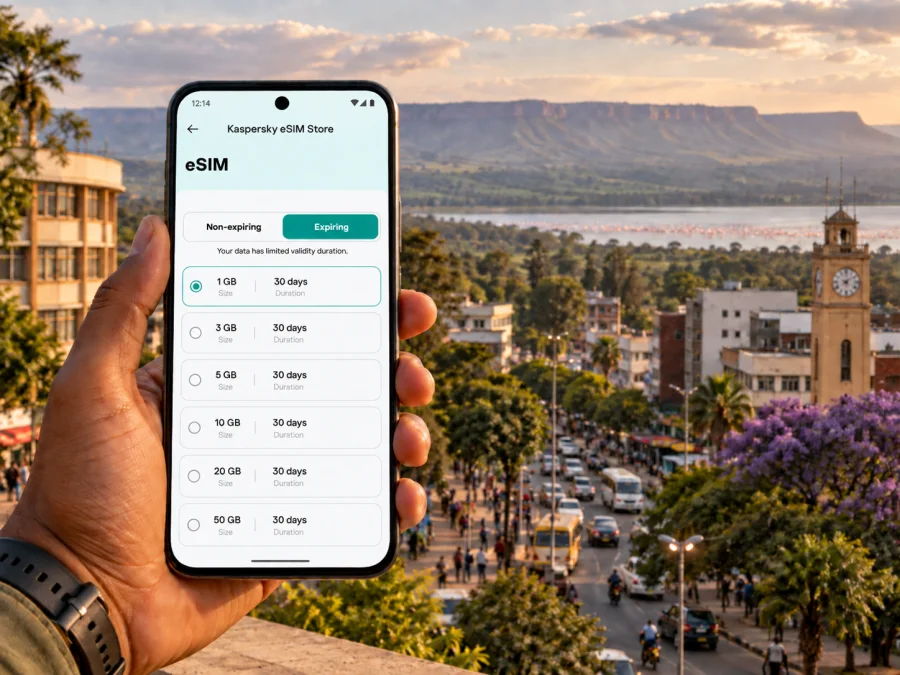
Nakuru eSIM: Mobile Connection and Internet for Your Visit
Nakuru is a useful base for a Kenya itinerary, whether you are arriving for work, spending a few days around the Rift Valley, or adding a city stop before or after a wildlife outing. A mobile data connection can make the practical parts of the visit easier: checking a route, confirming a hotel address, messaging a driver, or sharing a change of plan. Preparing an eSIM before travel gives you one more thing to arrange in advance, while leaving you free to choose how you move around once you arrive.
The city is inland, northwest of Nairobi, and is closely associated with Lake Nakuru and the surrounding Rift Valley landscape. It is not a single compact attraction where every visitor follows the same route. Your plans may bring you between the town centre, accommodation farther out, a meeting venue, and places beyond the built-up area. Think of mobile internet as a practical travel tool for those transitions, rather than a substitute for planning transport or checking local conditions.
Plan around the shape of your visit
Start with the places you actually need to reach. Add your accommodation, the first point of arrival, any meeting location, and the sights you have decided to visit to a saved map. Nakuru’s centre is a convenient reference point for many errands, but a hotel or appointment on the edge of town can make the day feel different. Check the estimated route and travel time for each leg on the day, since traffic, weather, and road conditions can change how long a journey takes.
A few minutes of preparation helps when your phone is doing several jobs at once:
- Save the exact spelling and map pin for your hotel, not only its name.
- Keep the address and a contact number in a note you can open offline.
- Download an offline map for the parts of Nakuru and the wider area you expect to visit.
- Save tickets, booking details, and meeting instructions somewhere accessible without a data connection.
- Carry a power bank if you expect to navigate, take photographs, and message throughout the day.
These steps matter whether you use an eSIM, a physical SIM, or roaming. Navigation apps may use mobile data for live updates, while an offline map can still help you understand the general layout when reception or battery is limited. For a first visit, use live directions as a guide and confirm the final pickup point with your driver or host.
Arriving in Nakuru
Many visitors reach Nakuru overland from another Kenyan city or town. If your itinerary begins at an airport elsewhere in the country, the onward journey is a separate part of the plan: confirm the departure point, expected arrival location, and pickup arrangement before setting off. Do not assume that an intercity arrival point is the same as your hotel or that a driver will automatically know which entrance you mean.
On arrival, pause before getting into a vehicle. Compare the destination name and map pin with the address supplied by your accommodation or host. If you have arranged a pickup, send a short message when you are ready and state a clear landmark or meeting point. A connected phone is useful here because it lets you check messages and maps, but having the address saved offline gives you a fallback if you have to reconnect later.
Moving around the city
In Nakuru, the best way to get around depends on distance, time of day, luggage, and your comfort with local transport. Taxis or app-based ride options may be useful for a door-to-door journey where available; agree on the pickup point and destination before travelling. Matatus and other shared transport can suit familiar routes, but ask locally about the right stop and direction instead of relying on a map label alone. Motorcycle taxis can cover short trips, though visitors should discuss the destination and fare before setting off and consider whether the ride suits their safety needs.
Walking can be practical for short errands in a busy central area, but not every route is pedestrian-friendly or pleasant at every hour. Heat, rain, road crossings, uneven surfaces, and traffic can turn a short map distance into a less comfortable walk. Use a map to understand the route, then make a local judgment about the street itself. If a route feels unclear, ask your hotel or a trusted local contact to identify a suitable pickup point.
| Journey | What to check before leaving | How your phone can help |
|---|---|---|
| Hotel to a meeting | Exact entrance, arrival time, and return plan | Keep the address open and message if plans change |
| Short central errand | Whether walking is comfortable and the route is clear | Check the map, then save the return point |
| Shared transport | Correct stop, direction, and where to alight | Follow the route broadly and confirm with the conductor or local advice |
| Evening transfer | Agreed pickup location and transport arrangement | Share your location or send a clear landmark to your contact |
| Day trip outside town | Departure point, return timing, and operator instructions | Keep booking details and map pins available |
A map is a planning aid rather than a guarantee of the best local route. If the road name, entrance, or drop-off point seems unfamiliar, message the person you are meeting. For a driver, a pin plus a nearby recognizable landmark is often clearer than a long written description. At the end of a visit, save the pickup point before leaving a venue; it is easy to confuse gates or parking areas later.
Staying oriented between the centre and surrounding areas
Nakuru’s town centre is a practical hub for shops, services, and onward movement, while accommodation and appointments may be spread across a wider area. Names such as the central business district, Lanet, and Section 58 may appear in directions or lodging details. Treat them as orientation clues rather than precise addresses: confirm the street, entrance, or pin for the particular destination. Two places described with the same neighbourhood label can still be far enough apart to require separate trips.
If you are arranging mobile data before you travel, you can review eSIM options for Kenya and compare the plan details with the length and shape of your Nakuru stay.
Lake Nakuru and nearby outings
Lake Nakuru National Park is a well-known reason to visit the area, but a park outing requires more preparation than a city errand. Check current access arrangements, opening information, fees, and transport details with the relevant provider before you go; these details can change. Confirm whether your transport plan includes the return journey and agree what happens if the schedule shifts. Do not rely on continuous mobile coverage throughout a park or remote stretch: save essential directions and booking information in advance and follow guidance from your tour operator or park staff.
Menengai Crater is another prominent local landscape and can be considered as an outing from the city. Conditions, access, and the suitability of a route depend on the specific visit, so arrange the trip with current local information rather than treating a map pin as a complete plan. Tell someone where you intend to go, carry water appropriate to the outing, and retain enough battery for the return and any changes. If you are travelling with a guide or driver, agree in advance where and when you will meet again.
Nakuru can also fit into a longer Rift Valley itinerary. Whether you continue toward another town or return to Nairobi, check the onward departure point and timing separately from your local plans. A map may show a route but not confirm a service is running or a seat is available. Keep tickets and provider contact details offline, and avoid assuming that a late arrival will leave the same range of onward options as a daytime one.
Mobile internet for navigation, work, and everyday coordination
In a city visit, data tends to be most useful in short practical moments: locating a hotel, checking directions, confirming a ride, translating a message, or notifying colleagues that you are running late. For a work trip, you might also need email, video calls, calendar updates, and access to cloud documents. Think through the expected use before choosing a plan, since a day of text and maps differs from frequent video meetings or uploading large files.
A simple way to estimate your needs is to list what you will do each day:
- Light use: messaging, occasional map checks, and booking confirmations.
- Regular use: frequent navigation, browsing, photo sharing, and routine work messages.
- Data-heavy use: video calls, streaming, cloud backups, or large file transfers.
On hotel Wi-Fi, consider postponing large updates and backups until you have a stable connection. Turn off automatic media downloads if you want to manage data use, and check which SIM is selected for mobile data after activating an eSIM.
Prepare an eSIM before the trip
An eSIM is a digital SIM profile that can be installed on a compatible device. Kaspersky eSIM Store is an app and website that helps travellers choose, arrange, and activate an eSIM with a suitable plan for mobile internet abroad. The available plan details, including data allowance, validity, and conditions, should be reviewed before you choose. The eSIM is intended for data; unless a specific plan says otherwise, it does not include a regular phone number, voice calls, or SMS.
Before choosing an option for Nakuru, consider:
- How many days you will be in Kenya, including any travel outside the city.
- Whether you mainly need maps and messaging or expect video and work use.
- The plan’s data allowance, validity period, and activation terms.
- Whether you want to install before departure or follow the plan’s instructions at another time.
- How you will keep your usual SIM available for calls or messages, if needed.
Check that your device supports eSIM and is not restricted by its carrier; device variants can differ by market. Check your device compatibility before purchase. Keep access to a stable Wi-Fi connection for installation if the plan instructions require it, and follow the activation timing specified for the option you select. The exact steps may differ between devices and plans.
Installation and activation sequence
- Choose a plan for Kenya after reviewing its data, validity, and conditions.
- Confirm device support and make sure you can access the email or account used for the order.
- Install the eSIM by following the steps for your operating system: Android installation instructions or iOS installation instructions.
- Label the new line clearly in your phone settings so you can distinguish it from your usual SIM.
- Set the eSIM as the mobile data line when the plan is ready to use, following the plan’s activation guidance.
- Check the settings for data roaming and automatic data switching against the instructions for your selected plan and device.
Avoid deleting an eSIM profile while troubleshooting unless the plan instructions tell you to do so; reinstalling may not always be possible in the same way. If something does not work, check the selected data line, activation status, and plan conditions first. Keep the order details available so you can refer to the correct plan and installation steps.
Practical questions travelers ask
Will an eSIM help me navigate Nakuru?
A data-enabled eSIM can support online maps and travel apps when the selected plan is active and service is available. Save offline maps and important addresses as a backup, and confirm the final destination with your driver or host.
Can I use an eSIM for calls and SMS?
Travel eSIM plans in Kaspersky eSIM Store are for mobile data unless the individual plan explicitly states otherwise. They do not generally provide a separate phone number, standard calls, or SMS. You can use internet-based messaging and calling apps where your connection and the app support them.
Should I install the eSIM before arriving?
You can prepare it before travel if that fits the plan’s instructions and activation terms. Read those terms closely: installation and activation are not always the same step, and timing can vary by plan. Keep access to the installation details until the eSIM is working as expected.
What should I do if a map pin does not match the directions?
Stop somewhere safe and compare the street or entrance with the booking details. Contact the host or venue for a corrected pin, and share that specific location with your driver. Do not continue based only on a destination name if the address seems inconsistent.
A calm plan for a connected visit
A smooth Nakuru visit begins with a few clear details: where you are arriving, how you will get to your first stop, and which destinations matter most. Save addresses, allow time for travel, and check local arrangements for outings beyond the city. Use mobile internet to coordinate and navigate while keeping offline copies of the essentials. Before departure, review your device, the eSIM plan terms, and the activation instructions so you know what to expect.
When you are ready to prepare data for the trip, choose an eSIM plan for Kenya through Kaspersky eSIM Store. Review the plan details, select an option that fits your stay in Nakuru, and follow its instructions to install and activate the eSIM.


