Travel connectivity guide
Nanjing eSIM: Mobile Internet for Your Trip
Nanjing eSIM: Mobile Connection and Internet for Your Trip
Nanjing is a large, layered city: Qinhuai River lanes and historic sites sit alongside university districts, business centers and major rail connections. A phone with mobile data can make the transitions between them easier, from checking a station name to confirming a hotel entrance or adjusting a day plan. Preparing a travel eSIM before you arrive gives you a way to get online without first looking for a physical SIM counter, provided your device and chosen plan are compatible.
This guide covers arrival, local journeys, sightseeing, work trips and the checks to make before choosing a mainland China plan.
Start with the city’s layout
Nanjing is a large city in Jiangsu Province, eastern China. A day may combine the Qinhuai River and Confucius Temple area, central commercial districts, Zhongshan Mountain and places farther from the center. A map helps you compare whole journeys, save a hotel pin and see whether two sights fit into one half-day.
| Area | Why you might go | Useful phone task |
|---|---|---|
| Qinhuai River and Confucius Temple | Historic lanes, river views and evening walks | Save a meeting point and route back to your hotel |
| Xinjiekou and central Nanjing | Shopping, restaurants, offices and connections | Check addresses and directions between appointments |
| Zhongshan Mountain | Sun Yat-sen Mausoleum, Ming Xiaoling Mausoleum and outdoor visits | Find entrances and plan walking time |
| Xuanwu Lake and northern center | Lakeside walks and a break from dense streets | Choose an approach and check the return route |
| Nanjing South Railway Station | High-speed rail and onward travel | Keep bookings and transfer directions handy |
These are planning zones, not neighboring stops. Check current routes and opening arrangements close to your visit; the last stretch may involve a walk, taxi or another transit connection.
Arriving at Nanjing Lukou International Airport
Nanjing Lukou International Airport is in Lukou Town, Jiangning District, south of the urban core. The city transport bureau describes two passenger terminals and a transportation center. Save your accommodation’s full address, not just its name.
Metro Line S1 connects the airport with Nanjing South Railway Station, where you can transfer to city lines or continue by rail. Check the route and service on the day. A taxi or other ground transport may suit you better if you arrive late, carry bulky bags or are staying far from a station.
Before leaving arrivals:
- Confirm the eSIM profile is installed and selected for mobile data.
- Keep your hotel address and booking available offline.
- Check whether the S1 route and transfer at Nanjing South fit your arrival.
- Save essential directions and contact details.
- If data does not connect, follow the plan’s setup guidance before changing settings.
At the airport, mobile data can help you confirm a pickup, find a station, translate an address or message your hotel about a delay. Download important details in advance too; service should not be assumed in every indoor space.
Getting around without losing time to the map
The Nanjing Metro is a useful backbone for journeys between major districts, while walking and road transport fill in the gaps. For each trip, check the complete route: the station exit and final walk can matter as much as the train ride.
- Check the destination spelling. Save the Chinese characters for a hotel or venue with its English name; showing the original address can help when transliterations differ.
- Compare complete routes. Look at transfers and walking distance. With luggage, fewer stairs or a shorter walk may matter more than the shortest ride.
- Keep a fallback. Save a map area, booking confirmation and key directions before entering a station or crowded site.
- Recheck after a change. Refresh the route when a meeting moves or a visit runs late.
A phone connection can support ride-hailing, but service accounts, payments and identity requirements vary. Set up intended apps in advance and carry another payment option. A data plan alone does not create a local number or guarantee access to every local service.
Choose where to stay with your itinerary in mind
Qinhuai District puts you near the riverfront and older commercial lanes; central Nanjing around Xinjiekou offers shops, restaurants and connections across town. Near Nanjing South may suit an early train or short rail stop, but can mean extra travel to evening sights. For work, prioritize a predictable commute to your venue.
During check-in and the walk from a station, mobile data helps confirm an entrance or message reception. Save your hotel address and booking before leaving home, and compare the exact map location rather than relying only on a district name.
Choosing an eSIM for Nanjing
Nanjing is in mainland China, so choose a plan whose destination and service conditions explicitly cover mainland China. Hong Kong and Macao are separate markets for many mobile products; a plan described for either place should not be assumed to cover Nanjing. If your itinerary includes more than one region, check the destination list and terms for each part of the trip before purchasing.
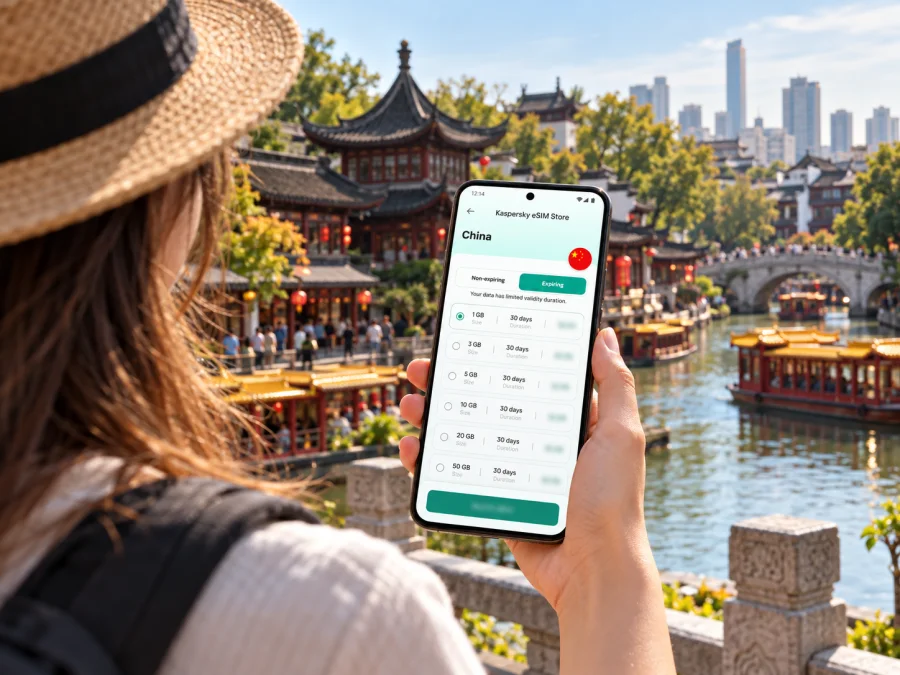
Kaspersky eSIM Store is an app and website where you can select, arrange and activate an eSIM with a suitable data plan for an international trip. The plan is supplied under its own stated terms; review the destination, data allowance, validity period, supported network conditions and activation timing shown for the option you select. To review options for your itinerary, choose a mobile data plan for China.
A useful comparison is about fit, not just the largest data allowance. A traveler who mostly checks maps and messages may need a different amount from someone who regularly uploads video or joins work calls. Estimate your use by day, account for navigation and messaging, and leave some room for unexpected changes. Confirm whether validity begins at installation, activation or first connection according to the plan details; these terms can differ.
| Travel pattern | Questions to ask before choosing |
|---|---|
| Weekend or short stop | Will the validity period cover arrival through departure, including any late-night or early-morning travel? |
| Several sightseeing days | How much data do maps, translation, photos and messaging normally use for your habits? |
| Business visit | Will your calls use internet-based meeting apps, and do you need reliable access to work services under your organization’s rules? |
| Nanjing plus other destinations in China | Does the plan’s coverage description include every place on your route, and are there regional limitations? |
Do not treat a city name in a travel note as proof of a particular local network, speed or coverage level. Coverage and performance depend on the plan, its partner network, the device, local conditions and the place you are using it. Read the current plan information and avoid relying on a claim that a connection will work everywhere.
Device compatibility: check the exact variant
“eSIM-compatible” needs context. Support can vary by exact phone model, region of sale, software and carrier lock. A travel eSIM and an eSIM profile issued directly by a mainland Chinese operator are different services and markets.
Apple’s current guidance distinguishes iPhone models that can use eSIM profiles from mainland China operators from other iPhone variants, including models bought outside mainland China. Mainland operator eSIM activation has its own device and in-person carrier requirements; this does not by itself determine whether a travel eSIM is compatible. Check the phone’s exact model number and regional modifier against the manufacturer’s guidance and the plan requirements. Check your device’s eSIM compatibility.
For Android, do not rely on the family name alone: regional variants may differ in SIM hardware or software support. Confirm the phone is unlocked and check the device you will actually use for data.
Prepare and activate before you need directions
Install the eSIM over a stable internet connection and follow the instructions for your phone: Android setup instructions or iPhone setup instructions. Keep the confirmation details until installation is complete. Installation and the start of a plan’s validity may be separate events, so follow its stated activation rules.
A simple sequence:
- Confirm exact-model eSIM support and carrier-unlock status.
- Review destination, data allowance, validity and activation details.
- Install the profile using the relevant device instructions.
- Label the travel profile and choose which line handles mobile data.
- Enable the travel line when the plan’s activation conditions are met; enable data roaming only if its instructions require it.
- Test a basic data task, such as loading a map, before leaving reliable Wi-Fi.
Do not delete an eSIM as a troubleshooting shortcut unless the provider confirms it can be reinstalled. Save support details and your order information offline.
Match your connection plan to the day
First afternoon: airport, hotel and Qinhuai River
After landing, focus on one task at a time: confirm transport, reach the hotel, save the route back and then explore. The Confucius Temple and Qinhuai River area can make a natural first walk if it fits your arrival time. Crowds, weather and opening hours can change the pace; save your return route before exploring smaller lanes.
A cultural day around Zhongshan Mountain
Sun Yat-sen Mausoleum and Ming Xiaoling Mausoleum are major destinations in the Zhongshan Mountain area. Allow for walking and check current entry arrangements. A map can help locate an entrance, but keep essential details saved in case service is weak among buildings or crowds. Avoid packing distant attractions together just because they look close on a zoomed-out map.
Meetings in central districts
Store venue names in English and Chinese where available, keep the full address and contact details offline, and allow time for the walk from transit. Mobile data can support email and online meetings; follow your organization’s rules for work accounts and approved apps. Confirm a changed address before setting off.
A short stopover
Decide whether a city visit leaves enough time to return. The airport is south of the center, and the metro route via Nanjing South takes time before adding road traffic or waiting. For a short layover, remaining near the airport or station may be more practical than visiting a distant landmark. Keep your ticket, terminal and return directions ready.
Before you leave: Nanjing connectivity checklist
- [ ] My plan is for mainland China and covers the locations in my itinerary.
- [ ] I checked the exact device variant, eSIM support and carrier-unlock status.
- [ ] I understand when the plan starts and how long it remains valid.
- [ ] I have installed or prepared the eSIM according to its instructions.
- [ ] I know which line is selected for mobile data and how to switch it if needed.
- [ ] My hotel address, arrival details and key bookings are saved offline.
- [ ] I have checked the route from Lukou Airport and know whether Line S1 to Nanjing South suits my arrival.
- [ ] I have a backup payment method and essential contact details.
Common questions
Is Nanjing covered by a China travel eSIM?
Nanjing is in mainland China. Check that the selected plan names mainland China in its destination or coverage details. Do not infer coverage from a plan for Hong Kong or Macao.
Does a travel eSIM give me a local Chinese phone number?
A data travel eSIM is generally intended for mobile internet. It may not include a local number, ordinary voice service or SMS unless the plan explicitly says so. Check the terms and keep your existing line available if needed.
Can I install an eSIM at home?
Installation may be possible before travel, but the steps and activation timing depend on the plan and phone. Follow the supplied instructions; installation does not necessarily start validity.
Will a mainland-China iPhone support a travel eSIM?
Check the exact model. Mainland carrier eSIM and travel eSIM are different contexts, and Apple’s current guidance varies by model and region of sale. Confirm with the manufacturer and the selected plan.
What if mobile data does not work after arrival?
Check that the travel profile is enabled, selected for data and configured as instructed. Confirm the plan is active for your location. If the issue remains, use the plan’s support channel and saved order details; do not delete the profile before checking recovery steps.
Is mobile internet enough for transport and payments?
Not always. A service may require an account, identity check, supported payment method or local number. Set up what you need ahead of time, carry a backup payment option and save addresses offline.
Make the first connection part of your trip plan
A little preparation can make Nanjing easier to navigate: save your accommodation address, understand the airport-to-city route, group sights by area and choose a data plan that fits your actual travel days. Check the exact device variant and the plan terms before you leave, then keep essential details available offline.
Use Kaspersky eSIM Store, the app and website, to choose and activate an eSIM with a suitable plan for your journey. Choose a China plan for your Nanjing trip, install it using the device instructions and follow its activation conditions so mobile internet is ready for your maps, messages and changing plans.


