
Travel connectivity guide
Narva eSIM: Mobile Internet for Estonia Travel
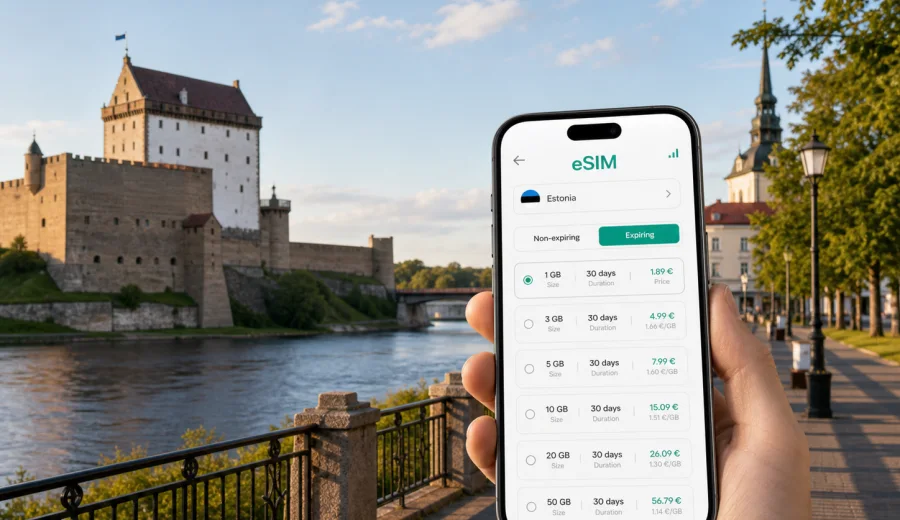
Narva eSIM: mobile connection and internet for a trip to Estonia's border city
Narva is one of Estonia's most distinctive city trips. It is compact enough for a short stay, serious enough for business travel, and unusual enough that you will probably use your phone more than expected: maps along the river, hotel check-in messages, train or bus updates, restaurant searches, translation, ride planning, weather, and photos from the castle promenade.
For many visitors, the first practical question is not where to take the best photo of Hermann Castle. It is how to stay online from the moment the trip starts. Narva sits in Estonia's far east, about 210 km from Tallinn, near the Narva River and the border area. You may arrive by train, intercity bus, rental car, or as part of a route through northeast Estonia. In each case, mobile internet matters because the city is easy to explore, but your plans can change quickly.
An eSIM can make that part simpler. Instead of looking for a physical SIM card after arrival, you can prepare a digital SIM card on a compatible phone, choose a data package for Estonia, and use mobile internet during the trip according to the conditions of the selected tariff. Kaspersky eSIM Store is an app and website where you can quickly choose, arrange, and activate an eSIM with a suitable tariff for mobile internet in an international trip.
Why mobile internet matters in Narva
Narva rewards independent movement. The main sights are close to each other, but the city is not only a postcard view of a castle. You may move between the railway station, Peetri Square, the river promenade, hotel areas, cafes, industrial heritage sites, shopping streets, and routes toward Narva-Joesuu on the coast. A stable data plan helps you keep the trip flexible instead of planning everything around Wi-Fi.
Common phone tasks in Narva include:
- opening maps after arriving at Narva railway station or bus stops;
- checking walking routes to Hermann Castle, the promenade, and the town center;
- messaging your hotel or apartment host about arrival time;
- translating menus, signs, and service messages;
- checking public transport or taxi options;
- sharing documents during a business visit;
- navigating day trips around Ida-Viru County;
- using cloud tickets, boarding passes, and booking confirmations.
Narva is also a city where geography makes connectivity planning more important. You are traveling in Estonia, so the right eSIM choice should match Estonia, not a neighboring country or a vague regional guess. If your route takes you near the river, to the promenade, or toward the border area, keep your phone's network settings clear and avoid unnecessary manual switching.
Arrival scenarios: when you need data first
Your first hour in Narva is often practical. You need to locate your hotel, check the route, confirm a meeting, or decide whether to walk or take transport. If mobile internet is already prepared, that first hour is less dependent on station Wi-Fi or asking for directions.
| Arrival scenario | What you may need internet for | Practical eSIM tip |
|---|---|---|
| Train from Tallinn | Maps from the station, hotel messages, taxi search | Install the eSIM before departure and activate according to the tariff instructions |
| Intercity bus | Arrival stop, walking route, ticket updates | Keep booking emails available offline as backup |
| Rental car | Navigation, parking search, route changes | Download the first route offline before you leave Tallinn |
| Business visit | Calendar, messenger calls, shared files | Choose enough data for video calls and hotspot use if your tariff allows it |
| Short stopover | Fast orientation around the center and castle | Use a simple data plan with enough validity for your stay |
Narva is manageable on foot once you are in the center, but mobile data still saves time. A hotel may be only 15 minutes away, yet you may need to find the correct entrance, check winter walking conditions, or message someone about your exact arrival.
City focus: where data is useful during the day
The classic Narva route starts around Hermann Castle and the river promenade. From there, travelers often continue through the center, stop for coffee, look for viewpoints, or plan a trip to Narva-Joesuu. These are simple activities, but each one creates small data moments: checking opening hours from a saved note, translating a phrase, finding a nearby cafe, or comparing routes.
For sightseeing, mobile internet is especially useful in these parts of the trip:
- Hermann Castle and the promenade: navigation, photos, weather, and meeting points;
- Peetri Square and the central streets: restaurants, shops, taxis, and hotel routes;
- railway station area: arrival planning and onward transport;
- Narva-Joesuu route: beach plans, bus or car navigation, and return timing;
- business districts and industrial sites: maps, document access, and calls;
- winter visits: route checks, taxi apps, and weather updates.
The city is compact, but it is not always ideal to rely only on public Wi-Fi. Hotel Wi-Fi helps in the evening. Cafe Wi-Fi can be useful. But when you are moving between sights, transport, and appointments, your own mobile data is usually the more predictable option.
Choosing an eSIM data plan for Narva
The best eSIM choice depends on what you do in the city. A traveler who spends one day walking around the castle needs less data than a remote worker who joins video calls from a hotel. A family sharing routes, photos, and messenger calls may use more data than a solo traveler checking maps.
Use this quick guide before you choose a tariff:
| Trip style | Typical stay | Data behavior | What to look for |
|---|---|---|---|
| Day trip from Tallinn | 1 day | Maps, messages, photos, light browsing | Short validity and a modest data package |
| Weekend in Narva | 2-3 days | Navigation, restaurants, cloud bookings, social apps | A plan with enough data for daily use |
| Business visit | 2-5 days | Email, files, calls, hotspot if allowed | More data and clear validity dates |
| Estonia route | 5-10 days | Tallinn, Narva, coast, road navigation | Estonia-wide data with validity for the whole route |
| Family trip | 2-7 days | Multiple devices, messaging, photo sharing | Check whether hotspot is allowed by the tariff |
Before you buy, read the tariff conditions carefully: data volume, validity period, destination, activation rules, and whether tethering is allowed. eSIM tariffs for travel usually focus on mobile internet. They may not include a local phone number, voice calls, or SMS unless the selected tariff says so. For calls and messages, you can usually use internet-based apps while your data plan is active.
If Narva is part of a wider route through Estonia, it is sensible to prepare the same country plan before you leave. You can choose an eSIM tariff for your trip to Estonia in Kaspersky eSIM Store, then install it on a compatible device and use it according to the selected tariff's instructions.
Before departure: prepare your phone
The easiest eSIM experience starts before the trip. You do not have to activate everything too early, but you should avoid discovering compatibility or installation issues while standing outside a station with luggage.
Use this checklist before traveling to Narva:
- confirm that your phone supports eSIM;
- check that the device is not locked to one mobile operator;
- update your operating system if an update is already planned;
- keep your main SIM active if you need bank messages or calls;
- save hotel address, booking references, and first route offline;
- read the selected tariff's activation rules;
- make sure you know which SIM is used for mobile data;
- keep the QR code or installation method accessible.
If you are not sure whether your phone can use a digital SIM card, check your device before you choose a tariff. Compatibility depends on the exact device model, region, and operator lock status, so it is better to confirm it early.
Installing eSIM for a Narva trip
Installation is usually a short setup process, but the exact steps depend on your device and the selected tariff. In general, you choose a tariff, complete the purchase flow, add the eSIM profile to your phone, and then activate it according to the instructions.
For device-specific setup, use the official installation pages: Android instructions and iOS instructions. Follow the steps for your phone rather than guessing from another model, because menu names and activation behavior can differ.
A practical setup flow looks like this:
1. Choose Estonia as the destination for your Narva trip.
2. Select a tariff by data volume and validity period.
3. Install the eSIM profile on the compatible phone you will use during the trip.
4. Label the eSIM clearly, for example "Estonia travel".
5. Keep your primary SIM for calls or bank messages if you need it.
6. Set the eSIM as the mobile data line when you are ready to use the tariff.
7. Check whether data roaming must be enabled for the eSIM line.
Do not delete an installed eSIM profile unless you are certain you no longer need it. In many cases, an activated eSIM cannot simply be moved to another phone.
Hotels, apartments, and business travel
Hotel Wi-Fi is useful, but it should not be your only connection plan. Check-in instructions may arrive by message. Apartment hosts may send entry details close to arrival. Business travelers may need to join a call before reaching the hotel. In these moments, mobile internet is a practical backup and often the main connection.
For business trips to Narva, check three points before choosing a tariff:
- Data volume: video calls and file sharing use more data than maps and messages.
- Validity period: the plan should cover travel days, not only meeting days.
- Hotspot rules: if you plan to connect a laptop, confirm whether tethering is allowed.
If your work depends on constant access, prepare redundancy. Download key files offline, keep meeting addresses saved, and avoid using all mobile data for streaming or large uploads before important calls.
A one-day Narva mobile internet plan
If you visit Narva for a day, your phone will probably support a simple route:
1. Arrive by train or bus and open the walking route to the center.
2. Check the castle and promenade area on the map.
3. Save a cafe or lunch spot near the route.
4. Share your location with travel companions if needed.
5. Use translation for short signs, menus, or service messages.
6. Check the return train or bus time.
7. Upload photos later on hotel Wi-Fi or when you have enough data left.
This is light-to-moderate data use. The risk is not one big download, but many small actions across the day. If you only rely on Wi-Fi, each route change becomes less convenient.
Common mistakes to avoid
The technical part of an eSIM trip is usually simple, but mistakes happen when travelers rush. Avoid these problems:
- buying a tariff for the wrong country or region;
- installing the eSIM on a phone that does not support it;
- deleting the eSIM profile after installation;
- assuming that a data-only plan includes normal calls and SMS;
- forgetting to set the eSIM as the mobile data line;
- using mobile data for large automatic backups;
- choosing a validity period that ends before the return journey;
- relying on public Wi-Fi for arrival, transport, and hotel access.
The most useful habit is to separate travel-critical data from entertainment data. Maps, tickets, hotel messages, and transport updates should remain available even if you decide to upload photos later.
Quick comparison: roaming, Wi-Fi, and eSIM in Narva
| Option | Good for | Limits to consider |
|---|---|---|
| Standard roaming | Keeping your usual SIM active and receiving calls | Conditions and cost depend on your home operator |
| Public Wi-Fi | Hotel work sessions, large downloads, backups | Not always available while moving; may require registration |
| Physical SIM | Longer stays where you specifically want a local SIM | Requires finding a point of sale and handling setup after arrival |
| Travel eSIM | Mobile internet for navigation, messages, bookings, and route changes | Requires a compatible, unlocked device and attention to tariff conditions |
For many Narva visitors, the practical answer is a combination: keep your usual SIM for essential calls or bank messages, use hotel Wi-Fi for heavy downloads, and use travel eSIM mobile data for movement around the city.
FAQ about eSIM for Narva
Is Narva a separate eSIM destination?
Usually you choose Estonia as the destination, because Narva is a city in Estonia. For a city article, the relevant plan page is the country page for Estonia.
Can I install eSIM before traveling to Narva?
In many cases you can install the eSIM before departure, then activate or start using it according to the selected tariff's rules. Always read the activation conditions before you travel.
Does an eSIM include a phone number?
Travel eSIM tariffs often focus on mobile internet. Voice calls, SMS, or a local number are not included unless the chosen tariff states otherwise.
Can I use maps and messengers with eSIM data?
Yes, mobile internet can support maps, messaging apps, email, browsing, and other online travel tasks, subject to the selected data package and local network conditions.
Should I still download offline maps?
Yes. Offline maps are a useful backup, especially for the first route from the station or bus stop, and they help reduce data use.
Can I use eSIM for a laptop hotspot?
Check the tariff conditions first. Some plans allow tethering, while others may restrict it.
Final checklist before you go
Before your Narva trip, make sure you have:
- a compatible phone with eSIM support;
- the correct destination selected: Estonia;
- a data package that covers your full stay and return route;
- installation instructions saved or opened on your device;
- your hotel address and first route saved offline;
- cloud backups and large updates set to Wi-Fi only;
- a clear label for your travel eSIM in phone settings.
Narva is easier to enjoy when the practical details are already handled. Prepare your mobile internet before arrival, keep your main travel documents accessible, and choose a data plan that matches how you actually move through the city.
For a smoother trip, choose an eSIM tariff for Estonia in Kaspersky eSIM Store before you travel to Narva. You can select the destination, review the tariff conditions, install the eSIM on a compatible phone, and keep mobile internet ready for maps, messages, hotel access, and city movement.