Travel connectivity guide
Ndola eSIM: Mobile Internet for City Travel
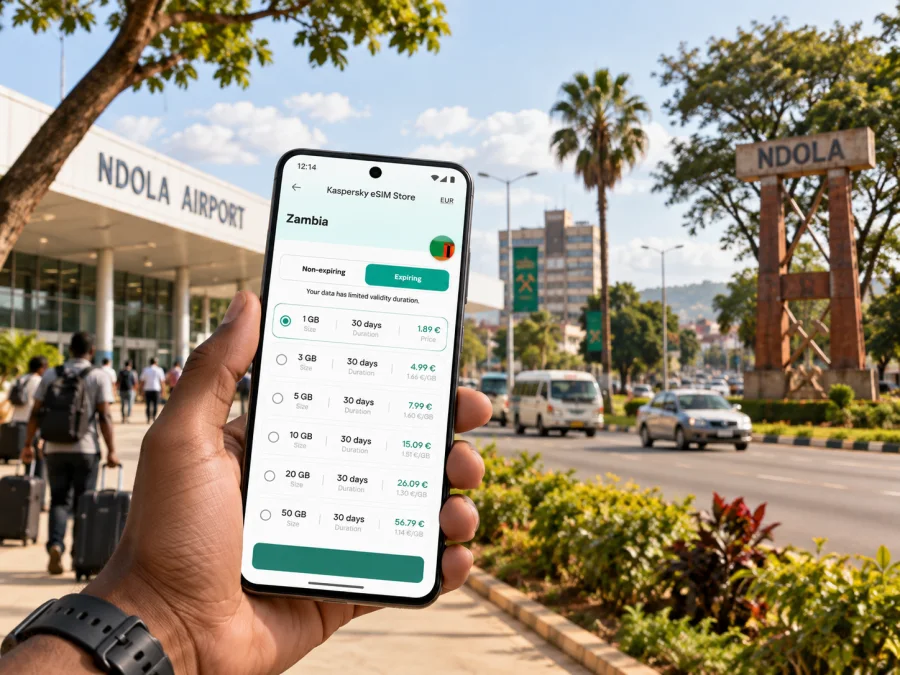
Ndola eSIM: Mobile Connection and Internet for a City Trip
Ndola is a practical base for work and travel in Zambia’s Copperbelt. Visitors may arrive for meetings, continue by road to nearby towns, or stay briefly before moving on. A prepared mobile connection helps with the useful details that shape those days: confirming a pickup, checking an address, navigating between the airport and town, and keeping plans accessible while out.
An eSIM can make that preparation easier if your phone supports it. You choose a plan for the destination, install the eSIM profile, and use mobile data according to its terms. Kaspersky eSIM Store is an app and website that helps travellers choose, arrange, and activate an eSIM plan for mobile internet abroad. It does not replace local calling arrangements, so keep any hotel, driver, or meeting contact details available in the way that suits your trip.
What to plan before landing in Ndola
The most useful preparation is usually simple. Save your accommodation address, the name and phone number of the person meeting you, and the location of your first appointment. Download or pin any map areas you expect to use, and keep a copy of your itinerary available offline. These steps help whether your data connection is already active or you are still getting settled after arrival.
Ndola is served by Simon Mwansa Kapwepwe International Airport. The airport is outside the central city area, so think about the onward journey before you land: arrange a pickup where appropriate, confirm the destination with the driver, and allow room in your schedule for the road journey. Your hotel or business host can advise on the most suitable transfer option for your arrival time. Avoid relying on a map pin alone; match it with the property name, district, and a contact number.
A useful arrival checklist:
- Save the full accommodation name and address, including any local directions supplied by the host.
- Confirm who is collecting you and how you will identify one another.
- Keep your flight and booking details accessible offline.
- Check which SIM line is selected for mobile data after installing an eSIM.
- Carry a charging cable or power bank for a long arrival day.
- If you are travelling for work, save the office name and the name of your local contact separately from the map pin.
Mobile data is most valuable when it supports a clear task. A map can guide you toward a meeting, but a local contact can confirm a gate, building entrance, or pickup point. Keep both approaches in mind, especially when the destination is a large site or the address is written in more than one format.
Reaching your hotel, office, or meeting
For many visitors, the first trip is from the airport to a hotel, office, or host’s home. Ndola is a regional commercial centre, and work trips may involve more than one stop: a city-centre appointment, an industrial or business location, then a return to the hotel. Share your schedule with the driver or host in advance where possible. If plans change, a working data connection makes it easier to send the new address or check a message without searching for public Wi-Fi.
Before setting off, compare the destination displayed on your phone with the name given by your host. Businesses can have similar names, and a map may point to an entrance that is not the one visitors should use. If you have a meeting invitation, note the company name, contact person, and arrival instructions. For a day with several appointments, place them in the order you expect to visit them and leave flexible time between stops; road conditions, traffic, and local arrangements can affect the actual journey.
A practical handover message can be short:
“I have arrived at the airport. I am travelling to [hotel or office name]. Please confirm the entrance or pickup point.”
The message avoids depending on a pin by itself. It also gives the recipient a chance to clarify the exact location before you are on the way.
Keep directions usable when plans move
Use navigation as a guide, then check it against local information. Before leaving a hotel, ask reception or your host whether there is a preferred route or a road condition to know about. If a driver suggests a different route, confirm the destination rather than trying to follow every turn on screen. In an unfamiliar city, attention to the road and the driver’s directions matters more than continuous map viewing.
When you are walking, check the next leg while stationary and put the phone away as you move through busy areas. For rides, tell the driver the destination verbally as well as showing the address. If your battery is low, switch to essential use: send the arrival message, save the next turn or location, and reduce background app activity.
Moving around Ndola and the Copperbelt
Ndola’s central business district is a useful reference point for visitors, with offices, shops, and services concentrated in the town centre. Your actual base may be elsewhere, so it helps to organize the city around the places you need to reach rather than assuming that every errand is a short walk. Ask your accommodation which nearby services are convenient and whether they recommend arranging transport for a particular trip.
The city also works as a starting point for travel around the Copperbelt. Kitwe, Luanshya, Chingola, and other towns are separate destinations, not neighbourhoods within Ndola. If your itinerary includes more than one, confirm the departure point, expected travel time, and return arrangements with a local host or transport provider. Do not assume that a city map’s estimate captures every delay or that onward transport will be available exactly when you need it.
| Trip purpose | Useful preparation | Mobile data can help with |
|---|---|---|
| Airport to accommodation | Confirm pickup, property name, and address | Sending arrival updates and checking directions |
| Hotel to a meeting | Save the office name and contact details | Finding the location and notifying a host of a change |
| Several appointments | Order stops and allow flexible gaps | Reviewing messages and adjusting the next destination |
| A day around town | Ask locally about the places you plan to visit | Looking up saved locations and coordinating a ride |
| Travel to another Copperbelt town | Confirm the departure point and return plan | Keeping itinerary details and contacts accessible |
Treat this as a planning framework, not a promise about journey duration or transport availability. Local advice is particularly helpful if you are visiting an industrial site, an event venue, or a place outside the centre. Share your intended return time with someone you trust when travelling beyond your usual base.
Choose a data plan around your actual itinerary
The right amount of data depends on how you use your phone. A visitor who mainly checks messages, directions, and email has different needs from someone who joins video calls, uploads large files, or streams media. Estimate the number of days you will be in Ndola and the Copperbelt, then consider whether the plan’s validity covers arrival, meetings, and onward travel. Check the plan details before you commit, including the destination, data allowance, validity period, and any usage conditions.
For a city-focused trip, start with these questions:
- How long will you stay? Include any travel days before or after your hotel booking.
- What will use data? Maps, messaging, email, rides, cloud documents, and video all add up differently.
- Will you travel outside Ndola? A wider route may affect which destination coverage you need to review.
- Can your phone use an eSIM? Check the device specifications and confirm it is not restricted to another carrier.
- When should the profile be installed or activated? Follow the plan’s instructions and timing rather than guessing.
If you would like to compare options for your trip, review eSIM plans for Zambia and check the terms against your dates and route. The page is for the country destination; your day-to-day plan can still be specific to Ndola, such as airport arrival, city appointments, and a possible trip to another Copperbelt town.
Estimate your usage without overbuying
Think in activities, not just days. Navigation and brief messages tend to be lighter uses than media uploads or frequent video calls, but actual consumption varies by app settings and habits. If you expect to work remotely, check whether your organization’s tools use background sync and whether large files can be downloaded on Wi-Fi before travel. At your hotel, use Wi-Fi for updates or backups when it is appropriate and trusted; keep mobile data available for the moments when you are away from it.
A simple personal estimate can be written in a note:
- Essential: maps, messaging, email, and occasional browsing.
- Work-heavy: frequent email, cloud documents, calls over data, and shared files.
- Media-heavy: regular uploads, video, and high-resolution content.
Then choose a plan whose allowance and validity fit the level you expect, leaving a sensible margin for changes. Avoid selecting solely by the headline data amount: validity, destination, activation rules, and your device setup matter too.
Set up your eSIM before the first journey
If you have not used an eSIM before, complete the preparation while you have reliable Wi-Fi and time to read the instructions. Use the instructions for your phone’s operating system: Android eSIM installation guide or iOS eSIM installation guide. Menu names can differ by device and software version, so follow the steps shown for your model.
A careful setup sequence looks like this:
- Confirm that your phone supports eSIM and is not carrier-locked. Check whether your device supports eSIM.
- Review the selected plan’s destination, data allowance, validity, and activation details.
- Connect to a stable Wi-Fi network and follow the installation instructions for Android or iOS.
- Label the new line clearly, for example “Zambia travel,” so it is easy to identify in settings.
- Review which line handles mobile data and whether data roaming should be enabled for that eSIM, following the plan guidance.
- Keep your usual number available for calls or verification if you need it, and confirm the settings for calls and messages separately.
- When you arrive, check the selected data line and allow the phone to connect according to the plan instructions.
An eSIM plan for travel is generally intended for mobile data. Do not assume it includes a local phone number, standard voice calls, or SMS unless the plan terms say so. You can keep using your usual number for ordinary calls or verification, subject to your home provider’s conditions, while using the travel eSIM for data if your device allows that setup.
If installation instructions say to scan a QR code, use a second screen or another suitable method to display it. Keep the code and account information private. If your phone offers more than one eSIM line, give each a clear label and double-check the data selection before leaving your hotel.
Where mobile internet fits into a Ndola visit
A connection is most useful when it reduces small uncertainties. On arrival, it can help you tell a host that your flight has landed. During a workday, it can keep an updated address or meeting change within reach. While exploring, it can make saved places easier to find and help coordinate a return ride. None of these uses removes the value of local guidance: ask for current directions when a destination is unfamiliar or access arrangements matter.
The Copperbelt Museum is one of Ndola’s established cultural stops, with exhibits related to the region’s history and heritage. If it is on your list, confirm opening arrangements locally before setting out, and save its name as well as its location. For the Dag Hammarskjöld memorial site outside the city, plan the round trip in advance with a driver or host rather than treating it as a quick city-centre stop. Mobile navigation can support the outing, but a confirmed transport plan is what makes the day practical.
Lake Chilengwa is another possible excursion in the wider Ndola area. Conditions and access can change, so ask locally about the route and what to expect before leaving town. Carry water and any essentials suited to the outing, and tell your accommodation when you expect to return. If an excursion is optional, keep a city-based alternative in your schedule in case timing or transport does not work out.
A short stopover plan
If you have only a few hours in Ndola, avoid packing the schedule with distant stops. Keep luggage arrangements clear, choose one nearby activity or meal, and confirm how you will return to the airport or continue onward. Leave a generous buffer for the transfer and any airport procedures. Save your onward booking details and the contact for whoever is meeting you at the next stage.
For an overnight stay, use the evening to check the next day’s addresses, charge your phone, and download files you will need offline. This small reset is especially useful if the following morning begins with a meeting or a road journey to another Copperbelt town.
Business travel: keep the day coordinated
Business visitors often need reliable access to calendars, email, maps, and messaging, but a phone should not be the only place where essential details exist. Save the meeting address and a contact number in your calendar, and keep a copy of important booking details in an offline note. If a meeting moves, ask the organizer to send the revised location in writing so you can check the exact name and entrance.
For a day with several stops, group appointments by area when you can, then confirm the order with your local contact. A map can help you understand where places sit relative to one another, but do not promise yourself a fixed travel time based on a screen estimate alone. If a visit involves a factory, mine-related business, or a controlled site, follow the host’s entry instructions; the destination pin may indicate the general site rather than the visitor entrance.
A workday check before leaving the hotel:
- Phone charged; charging option packed.
- Meeting addresses and names saved in writing.
- Correct mobile-data line selected.
- Local host or driver contact available.
- Next destination and return plan reviewed.
- Work files needed on the road downloaded or available through your approved tools.
For sensitive work, follow your employer’s device and data policies. An eSIM is a way to access mobile data under the plan conditions; it does not replace your organization’s security requirements or guarantee a particular connection quality at every location.
Common questions about eSIM and Ndola
Will an eSIM help me navigate as soon as I land?
It can, once the eSIM is installed and active under the plan instructions and your phone connects to a supported network. Prepare the profile in advance where possible, save key addresses offline, and confirm the correct data line after arrival. Coverage and performance depend on local network conditions and the plan’s terms.
Is mobile internet enough for calls?
Travel eSIM plans are generally for data unless their terms explicitly say otherwise. Data can support internet-based messaging and calls through compatible apps, while ordinary calls and SMS remain subject to your usual number and provider arrangement.
Do I need data all the time in the city?
Not necessarily. You can use Wi-Fi where suitable and reserve mobile data for navigation, messages, changes to your schedule, and time away from your accommodation. Downloading useful information in advance also reduces dependence on a live connection.
Can I use one plan for Ndola and other Copperbelt towns?
Check the destination and coverage terms shown for the plan and compare them with your complete route. Ndola, Kitwe, Luanshya, and Chingola are distinct places, so include each intended stop when reviewing the plan details. Do not infer coverage from a city name alone.
What if the eSIM does not connect?
Start with the plan’s setup guidance: confirm the eSIM line is enabled, the correct line is selected for mobile data, and the required data-roaming setting is applied if specified. Restarting the phone may help it refresh its connection. If the issue continues, use the support route included with your purchase details and keep Wi-Fi or your usual SIM available as a backup where possible.
A practical final check
Before leaving home, confirm that the phone is compatible, the eSIM profile is installed as instructed, and you understand when the plan starts. Save your airport transfer details, hotel address, and first destination offline. After landing, verify the mobile-data line, message your pickup contact, and compare the map destination with the name they provided. For trips beyond Ndola, confirm the departure point and return plan with someone local.
When you are ready to prepare your mobile data for the journey, choose an eSIM plan for Zambia through Kaspersky eSIM Store. Review the plan details, complete installation on a compatible device, and keep the instructions available for your arrival in Ndola.


