
Travel connectivity guide
Nepal eSIM: mobile internet for travel
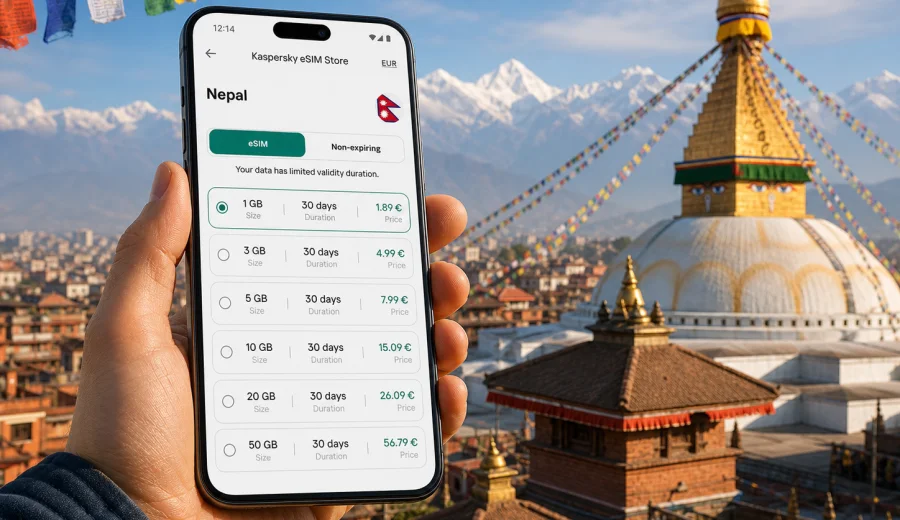
eSIM for Nepal: mobile connection and internet for your trip
Nepal is a country where mobile internet can shape the rhythm of the whole journey. You may need a map in Kathmandu, a hotel confirmation in Pokhara, a messenger call from a mountain town, or weather updates before a trekking day. A working mobile connection helps you make practical decisions when routes, timing, and local conditions change.
An eSIM is a digital SIM profile that can be installed on a compatible smartphone or tablet without inserting a physical SIM card. For travel in Nepal, it is especially useful if you want to prepare mobile internet before departure, avoid searching for a local SIM counter after landing, and keep your primary SIM available for bank messages or calls from home.
Kaspersky eSIM Store is an app and website where you can choose, arrange, and activate an eSIM with a data plan for mobile internet abroad. It helps you compare conditions before travel: destination, data allowance, validity, and price.
Why mobile internet matters in Nepal
Nepal combines large cities, valleys, rural roads, mountain routes, national parks, and border areas. Your internet needs can change several times in one trip. In Kathmandu, you may rely on mobile data for navigation and reservations. In Pokhara, you may use it for maps, transport, and restaurant searches. On mountain approaches, you may need to conserve data and check route information when signal is available.
Mobile internet is useful in Nepal for:
- opening hotel bookings, e-tickets, and travel insurance documents;
- using maps when street names, local landmarks, or road conditions are unfamiliar;
- coordinating airport pickup, guides, drivers, or trekking groups;
- checking weather, flight changes, and road updates;
- translating menus, signs, and short conversations;
- using messengers for calls and photos instead of traditional SMS;
- managing banking, two-factor authentication, and urgent email.
Public Wi-Fi can help in hotels, cafes, and some airports, but it is not a complete travel strategy. Wi-Fi may be slow, password-protected, crowded, or unavailable exactly when you need to move. A travel eSIM gives you a separate mobile data option on your device, so you are less dependent on finding a hotspot before making the next decision.
What an eSIM does and does not do
For a trip to Nepal, think of eSIM as a mobile data profile for a compatible device. It is designed to help you use the internet abroad without a plastic SIM card. It usually does not include a regular local phone number, voice calls, or SMS unless a specific plan states otherwise. For most travelers, that is enough: maps, messengers, email, browsers, cloud documents, banking apps, and translation tools all work over mobile data.
The practical rule is simple:
| Travel need | How eSIM helps |
|---|---|
| Maps and routes | Keeps navigation available when you leave hotel Wi-Fi |
| Messaging | Lets you use apps for chat and internet calls |
| Bookings | Helps you open confirmations, vouchers, and tickets |
| Work tasks | Supports email, documents, and light browser use |
| Safety planning | Helps you check weather, contacts, and transport details |
Before buying any eSIM plan, check that your device supports eSIM and is not locked to a mobile operator. You can use the compatibility window here: Check your device. This step is important because eSIM support depends on the exact device model, market version, and operator restrictions.
Nepal travel scenarios where eSIM is useful
The value of a travel eSIM is easiest to see in everyday situations. Nepal trips often include movement between cities, valleys, trailheads, and rural areas, so a plan that matches your itinerary is more useful than a generic idea of being online.
- Arrival in Kathmandu: message your hotel, find the pickup driver, check the address, or order transport without first searching for a SIM counter.
- Kathmandu and Bhaktapur sightseeing: use maps, translation, opening-time checks, and messenger calls while moving through busy streets and courtyards.
- Pokhara and lakeside travel: coordinate taxis, guides, cafes, day trips, and weather checks from one base.
- Trekking approaches: keep mobile data ready when coverage is available, while relying on offline maps and saved documents between connected areas.
- Chitwan and lowland routes: coordinate pickup times, accommodation messages, and family updates during longer road transfers.
How much data to prepare for Nepal
The right amount of mobile data depends on your route, trip length, and habits. Nepal travel often includes long days away from stable Wi-Fi, so it is better to estimate by activity instead of choosing only by the number of days.
| Usage style | Typical activities | Planning approach |
|---|---|---|
| Light | Messaging, maps, email, booking checks | Choose a modest data package and use hotel Wi-Fi for uploads |
| Balanced | Maps, browsing, translation, regular photo sharing | Pick more data for daily flexibility |
| Heavy | Video calls, cloud backups, streaming, remote work | Prepare a larger package and control background app use |
| Trekking-focused | Offline maps, messages when signal appears, weather checks | Download essentials first and conserve data on route |
Video, automatic photo backup, app updates, and social media stories can use more data than expected. Before you travel, turn off automatic cloud uploads on mobile data, download offline maps, save PDF copies of bookings, and update apps while still on home Wi-Fi. This keeps your travel data for tasks that actually need a live connection.
Choosing an eSIM plan for Nepal
When comparing eSIM options, do not look only at the price. A good plan for Nepal should fit your actual route and timing. If you will stay mostly in Kathmandu and Pokhara, your data habits may be different from a traveler spending several days on mountain approaches. If you will work remotely for part of the trip, your plan should leave room for calls, documents, and hotspot use where allowed by the plan and device.
Use this quick checklist before choosing:
- Destination: the plan should cover Nepal or the region you will use.
- Validity: the active period should match your travel dates.
- Data size: the allowance should fit maps, messengers, browsing, and planned media use.
- Activation rules: check when the plan starts and how installation works.
- Device support: confirm eSIM compatibility before paying.
- Phone number needs: remember that most data eSIM plans are for internet, not regular voice and SMS.
- Hotspot needs: check whether tethering is suitable for your plan and device settings.
For a simple planning step, you can review options and choose an eSIM plan for your trip to Nepal before departure. Keep the plan conditions visible while you compare trip length, expected data use, and the moments when you will rely on mobile internet most.
When to install and activate your eSIM
You can often install an eSIM before the trip while you still have stable home Wi-Fi. This is useful because the installation process needs an internet connection. Activation rules can differ by plan, so read the plan instructions carefully and avoid activating too early if the validity period starts immediately or after first connection to a supported network.
The safest workflow is:
1. Check that your device supports eSIM and is unlocked.
2. Choose Nepal as your destination and select a suitable data plan.
3. Complete the order through the app or website.
4. Install the eSIM profile while connected to reliable Wi-Fi.
5. Keep your primary SIM active if you need calls or banking messages.
6. After arrival, select the eSIM for mobile data and enable required settings.
7. Monitor data use during the trip.
If you need installation details, follow the official setup pages for your device type: Android installation guide and iOS installation guide. The exact menu names can vary by device model and operating system version, so check the instructions before you leave.
Practical settings before departure
A few phone settings can prevent common travel problems. Do them while you still have reliable Wi-Fi and time to check everything calmly.
| Setting | Why it matters |
|---|---|
| Label the eSIM | Helps you distinguish your travel data profile from your home SIM |
| Choose data line carefully | Prevents the wrong SIM from using roaming data |
| Disable app auto-updates | Saves data for maps, messages, and bookings |
| Download offline maps | Keeps navigation available when coverage is weak |
| Save important PDFs | Lets you access bookings without a live connection |
| Check data roaming setting | Some eSIM profiles may require data roaming to be enabled |
Keep your home SIM available if you need calls, bank verification messages, or emergency contact from your regular number. On dual-SIM phones, you can usually set one line for mobile data and another for calls or messages. Review settings before moving from the airport to your hotel, because the first hour after arrival is often when you need the phone most.
eSIM, roaming, local SIM, and Wi-Fi in Nepal
Travelers usually compare four ways to get online: roaming from the home operator, a local physical SIM, public Wi-Fi, and eSIM. Each option can work, but they solve different problems.
| Option | Strength | Limitation |
|---|---|---|
| Home roaming | Keeps your usual SIM active | Costs and conditions depend on your operator |
| Local SIM | Can be useful for longer stays | Requires local purchase steps and a physical SIM slot |
| Public Wi-Fi | Convenient in hotels and cafes | Not available everywhere and may be unreliable |
| Travel eSIM | Can be prepared before arrival and managed digitally | Requires compatible unlocked device and plan coverage |
For many short and medium trips, eSIM is a practical middle path: you can prepare it before departure, keep your regular SIM in place, and avoid depending only on Wi-Fi during key travel moments.
Common mistakes to avoid
Most eSIM problems are preventable if you check details before the trip.
- Buying a plan before confirming device compatibility.
- Installing the eSIM on the wrong phone.
- Deleting the eSIM profile after activation without checking whether reinstall is possible.
- Leaving the home SIM selected for mobile data and creating unexpected roaming use.
- Forgetting that data eSIM plans usually do not include a regular phone number.
- Activating a plan too early without reading validity rules.
- Using mobile data for automatic backups and app updates.
- Depending only on live maps in mountain areas instead of downloading offline maps.
Treat your eSIM like any other travel document: set it up before you need it, keep the instructions accessible, and understand the limits of the selected plan.
Internet planning for mountain and rural travel
Nepal's geography makes internet planning different from travel in flat, densely connected urban regions. A route may move from a city to a valley, then to a smaller town, then to a trail where connectivity becomes less predictable. Local network availability can depend on terrain, weather, infrastructure, and your exact location.
For remote segments, download offline maps, save accommodation contacts and booking documents, tell family or colleagues when you may be unreachable, and use mobile data first for essential updates: messages, weather, transport, and route changes. An eSIM is not a guarantee of signal in every valley or mountain village. It is a practical way to have mobile data ready when local coverage is available, without adding a physical SIM swap to your travel routine.
FAQ: eSIM and mobile internet in Nepal
Can I install an eSIM before flying to Nepal?
In many cases, yes. Installation usually requires an internet connection, so it is practical to install the eSIM profile while you still have stable Wi-Fi. Read the plan instructions to understand when validity begins.
Will an eSIM give me a Nepal phone number?
Usually no. Travel eSIM plans are generally focused on mobile data. Use messengers for internet calls and messages unless the specific plan says voice or SMS are included.
Can I keep my regular SIM active?
On many compatible dual-SIM devices, yes. You can use the eSIM for mobile data and keep your physical SIM or primary eSIM for calls, SMS, or bank verification messages.
Is eSIM enough for trekking in Nepal?
It can be useful, but you should not rely on any mobile option as your only source of information in remote areas. Download offline maps, save key documents, and expect coverage to vary by route and terrain.
Final checklist before your Nepal trip
Before you leave, make sure you have:
- a compatible, unlocked smartphone or tablet;
- the eSIM installed on the device you will carry;
- the correct mobile data line selected;
- offline maps for Kathmandu, Pokhara, and any trekking route;
- PDFs or screenshots of bookings, permits, insurance, and transport details;
- automatic updates and cloud backups limited on mobile data;
- a clear idea of how much data you expect to use;
- installation instructions saved in case you need to review settings.
Nepal rewards flexible planning. Flights, road transfers, weather, and mountain routes can require quick decisions, and mobile internet helps you make those decisions with less friction. Prepare your eSIM before the trip, understand your plan conditions, and keep offline backups for remote areas.
When your route is set, use Kaspersky eSIM Store to prepare an eSIM plan for mobile internet in Nepal and travel with a clearer connection plan from arrival day to the final transfer.