
Travel connectivity guide
eSIM for the Netherlands: travel internet
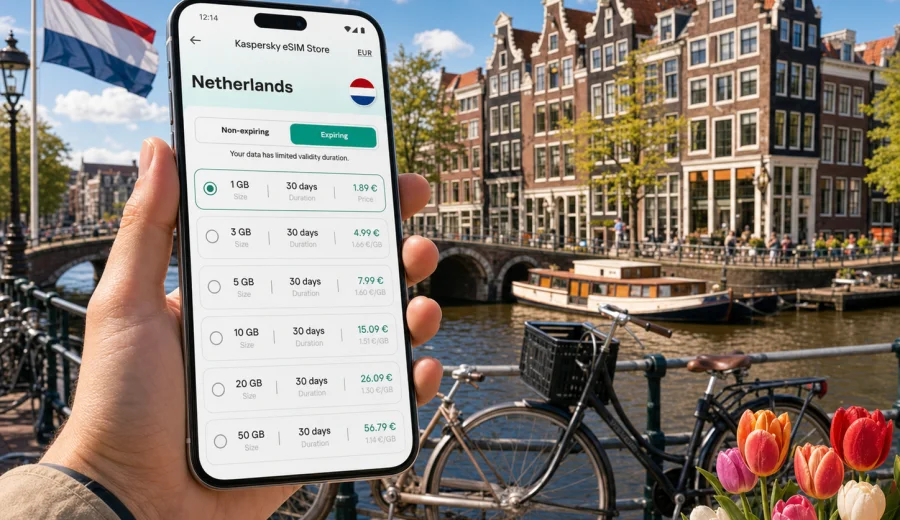
eSIM for the Netherlands: mobile connection and internet for travel
If you are planning a trip to the Netherlands, mobile internet is one of the first practical things to prepare. You may need maps from the moment you leave Amsterdam Airport Schiphol, train updates between Amsterdam, Rotterdam, Utrecht and The Hague, hotel check-in details, ride-hailing apps, museum tickets, banking alerts, work messages and family chats. An eSIM can help you get online in the Netherlands without looking for a physical SIM card after arrival.
An eSIM is a digital SIM profile installed on a compatible smartphone or tablet. For travel, it is usually used for mobile data: you choose a tariff for the country or region, install the eSIM profile, then select it for mobile internet while keeping your main SIM for calls or messages if your device supports dual SIM. Kaspersky eSIM Store is an app and website where you can quickly choose, arrange and activate an eSIM with a suitable data plan for mobile internet during an international trip.
This guide explains how to use eSIM in the Netherlands, how to estimate data needs, what to check before buying a plan, and how to avoid common mistakes with activation, roaming data settings and device compatibility.
Why eSIM is useful in the Netherlands
The Netherlands is compact, but travel inside the country is often app-driven. You may move between airports, train stations, hotels, coworking spaces, universities, ports and museums in a single day. Public Wi-Fi can help in some places, but it is not always available when you need directions, ticket changes or a confirmation code.
eSIM is useful because it lets you prepare mobile internet before the trip or shortly after arrival. There is no physical card to collect, no store visit required just to start using mobile data, and no need to remove your main SIM from the phone. Conditions still depend on the selected tariff and local network availability, so it is better to check the plan details before payment.
Common Netherlands travel moments where mobile data matters:
| Situation | Why mobile internet helps |
|---|---|
| Arrival at Schiphol | Open maps, transport apps, hotel messages and email confirmations. |
| Intercity train travel | Check route changes, delays, platform numbers and ticket QR codes. |
| Amsterdam city walks | Navigate canals, museums, restaurants and bike rental points. |
| Business travel | Use email, calendars, messaging apps and hotspot mode if the plan allows it. |
| Day trips | Stay online in Rotterdam, Delft, Leiden, Haarlem, Utrecht or The Hague. |
| Family travel | Share location, coordinate meeting points and keep children entertained. |
For many travelers, the main benefit is predictability. You choose a data allowance and validity period in advance, then use the eSIM profile for mobile internet in the destination. This can reduce dependence on standard roaming, local SIM shops and open Wi-Fi networks, but it should not be treated as a guaranteed replacement for every connectivity scenario.
What eSIM does and does not include
For a trip to the Netherlands, an eSIM plan is mainly a mobile data tool. It helps your compatible device connect to the internet through a digital SIM profile. It does not automatically include a local phone number, regular voice calls or SMS unless those features are clearly stated in the conditions of the specific tariff.
That distinction matters. If your bank, airline or hotel requires SMS verification on your home number, keep your primary SIM active for receiving messages if your device and mobile operator allow it. For everyday communication, many travelers use messengers, email and video calls over mobile data.
Before you rely on eSIM as your main travel internet option, check:
- whether your device supports eSIM;
- whether the device is unlocked and not restricted by an operator;
- which country or region the tariff covers;
- how much data is included;
- how long the tariff remains valid;
- when the validity period starts;
- whether tethering or hotspot mode is allowed;
- whether roaming data must be switched on for the eSIM profile.
The safest approach is to treat eSIM as a planned travel tool for mobile data in an international trip, with clear limits based on the selected tariff, device settings and local network conditions.
How much data do you need for the Netherlands?
Data usage depends on your habits, not only on the destination. A short city break with maps, messaging and ticket apps needs much less data than a business trip with video meetings and laptop tethering. The Netherlands has strong digital habits, so you may use mobile data often for transport, payments, reservations and navigation.
Use this simple estimate before choosing a tariff:
| Traveler type | Typical use | Practical data approach |
|---|---|---|
| Light user | Maps, messaging, email, occasional browsing | Choose a smaller plan and use hotel Wi-Fi for updates and backups. |
| Regular tourist | Navigation, social media, restaurant search, tickets, photo sharing | Choose a medium plan with enough margin for daily use. |
| Business traveler | Email, cloud files, calls, calendar, hotspot for laptop | Choose a larger plan and check hotspot availability in the tariff terms. |
| Family or group organizer | Maps, ride apps, tickets, bookings, shared location | Choose more data than you expect, especially if others depend on your phone. |
| Multi-country traveler | Netherlands plus Belgium, Germany, France or other stops | Consider whether a regional tariff fits the full route better than a single-country plan. |
Some habits consume data quickly: cloud photo backup, automatic app updates, streaming video, video calls and laptop tethering. Before departure, download offline maps, update apps over home Wi-Fi, save hotel documents and turn off automatic cloud uploads if you want to control data consumption.
A useful rule is to choose a plan based on your highest-demand day, not the quietest one. Arrival days, conference days and train-travel days often use more data because you rely on maps, tickets, messages and search at the same time.
Netherlands travel scenarios where eSIM helps
An eSIM for the Netherlands is not only for Amsterdam. It can be useful across the country because travel routes are often connected: you may land at Schiphol, sleep in Amsterdam, attend meetings in Rotterdam, visit The Hague, and take a train to Utrecht or Eindhoven. A country-focused eSIM plan can support that kind of movement if the selected tariff covers the Netherlands and your device is configured correctly.
Think through your route before choosing a tariff:
- Amsterdam city break: maps, museum tickets, restaurant bookings and ride or bike rental apps.
- Business trip: email, calendars, cloud files and messaging while keeping your regular number available on the main SIM.
- Family itinerary: train times, shared location, translation, weather and booking changes from one organizer's phone.
- Cross-border route: check whether a Netherlands-only, regional or broader plan fits if you continue to Belgium, Germany, France or Luxembourg.
How to choose an eSIM plan for the Netherlands
Start with your destination, then match the tariff to the length and style of your trip. Do not choose only by the largest number of gigabytes. A plan should fit the country, the validity period, your expected usage and your device.
Use this checklist:
1. Confirm that the tariff covers the Netherlands.
2. Compare the data allowance with your expected daily usage.
3. Check the validity period and when it starts.
4. Read whether hotspot mode is allowed if you plan to share data.
5. Check whether the plan is data-only.
6. Make sure your device supports eSIM before payment.
7. Save the installation instructions while you still have stable internet.
If you want to prepare the mobile internet part of your trip in advance, you can choose an eSIM plan for travel to the Netherlands through Kaspersky eSIM Store and review the available data options, validity periods and conditions before you install the eSIM profile.
The best plan is the one that matches your real route. A weekend in Amsterdam with hotel Wi-Fi may need a different allowance than a week split between Amsterdam, Rotterdam, Utrecht and The Hague. If you work from cafes or trains, leave more room for video calls, file transfers and hotspot use. If you mainly need maps and messaging, a smaller plan may be enough.
Device compatibility comes first
Not every smartphone or tablet supports eSIM. Some models also differ by region of sale, and some devices may be locked by a mobile operator. Before you pay for a tariff, check the device settings and confirm that you can add an eSIM profile.
Check your device before choosing a plan if you are unsure. This is especially important if your phone was bought through a mobile operator, if it is an older model, or if you travel with a secondary device that you do not use every day.
A compatible setup usually needs:
- an eSIM-capable device;
- no operator lock that prevents adding another mobile profile;
- a stable internet connection during installation;
- enough battery while scanning a QR code or using in-app setup;
- access to the email or profile where installation details are provided;
- the latest practical operating system updates for your device.
If you use dual SIM, decide which line will handle mobile data and which line will handle calls or SMS. Many travelers keep the home SIM active for receiving messages and set the eSIM as the data line for the trip. Check your device menu carefully because the names of these settings vary by phone brand.
How to install and activate eSIM
Install the eSIM when you have stable internet, enough battery and time to follow the steps calmly. You can prepare the profile before travel if the tariff conditions allow it, or install it after arrival using airport, hotel or other trusted Wi-Fi. Activation behavior depends on the plan, so read when the validity period starts.
For detailed platform steps, use the Android installation guide or the iOS installation guide. The general flow is similar:
1. Check that your device supports eSIM and is not operator-locked.
2. Choose a tariff for the Netherlands or for the full region of your trip.
3. Open the installation details in Kaspersky eSIM Store or use the QR code from the message you receive.
4. Add the eSIM profile in your device settings.
5. Name the eSIM line clearly, for example "Netherlands data".
6. Select the eSIM for mobile data when you are ready to use it.
7. Turn on data roaming for the eSIM if the instructions or device require it.
8. Wait a few minutes for the device to register on the local network.
Do not delete the eSIM profile unless you are sure you no longer need it. Some eSIM profiles cannot be installed again after removal, depending on the conditions of the profile and tariff. If the phone does not connect immediately, restart the device, check that the correct data line is selected, and confirm that mobile data and any required roaming data setting are enabled for the eSIM.
Before you travel: a practical preparation checklist
Preparation matters more than speed. A few minutes before departure can prevent awkward moments at the airport, train station or hotel desk.
Before leaving home:
- update your phone apps over Wi-Fi;
- save passport, booking and insurance documents offline;
- download offline maps for Amsterdam and any other cities on your route;
- check that your device supports eSIM;
- check whether your primary SIM is needed for bank SMS or calls;
- choose a data allowance that covers your busiest travel days;
- install the eSIM only according to the plan conditions;
- save support and installation information where you can access it offline;
- turn off automatic video backup and large app updates over mobile data.
On arrival in the Netherlands:
- select the eSIM profile for mobile data;
- enable mobile data for that line;
- enable roaming data for the eSIM if required;
- wait for network registration;
- test maps and messaging before leaving the airport or station;
- keep your main SIM settings under control to avoid unexpected standard roaming use.
If you are travelling with colleagues or family, share the plan for connectivity before departure. Decide who will use eSIM, who needs SMS on a home number, and whether any device will use hotspot mode.
eSIM, roaming and local SIM cards: what to compare
There is no single correct answer for every traveler. Standard roaming may be simple if your home operator includes favorable conditions. A local physical SIM can work for a long stay if you are comfortable visiting a shop and changing SIM cards. eSIM is often convenient when you want to prepare mobile data before travel and avoid handling a physical SIM.
| Option | Strength | What to check |
|---|---|---|
| Standard roaming | Uses your existing mobile number and operator relationship. | Daily fees, data limits, speed policy and accidental usage. |
| Local physical SIM | Can be useful for longer stays or local call needs. | Store availability, identification requirements, setup time and SIM slot use. |
| Travel eSIM | Digital setup, no physical card, can be prepared for a specific destination. | Device compatibility, data-only limits, validity period and plan coverage. |
For the Netherlands, eSIM is especially practical if your trip is short, your schedule is tight, or you want mobile data ready before you start moving around. It is also helpful when your phone has one physical SIM slot already occupied by your main number.
Common mistakes to avoid
The most common eSIM issues are usually configuration issues, not complicated technical failures. You can avoid many of them by checking the plan and phone settings before you need mobile data urgently.
Avoid these mistakes:
- buying a plan before confirming eSIM compatibility;
- choosing a country-only tariff when your route includes several countries;
- installing too early without checking when validity starts;
- forgetting to select the eSIM as the mobile data line;
- keeping standard roaming active on the wrong SIM;
- deleting the eSIM profile during troubleshooting;
- expecting a local phone number when the tariff is data-only;
- using hotspot mode without checking whether it is supported;
- letting cloud backups and app updates consume travel data.
If something does not work, start with the basics. Check signal, mobile data, the selected data line, roaming data for the eSIM and whether the country is included in the tariff. Then restart the phone and try again after a few minutes. If the issue continues, contact support with the device model, destination, tariff details and screenshots of the relevant settings if appropriate.
Frequently asked questions
Can I use eSIM in the Netherlands for calls and SMS?
Usually no, unless the selected tariff clearly says otherwise. Travel eSIM plans are commonly intended for mobile data. You can use messengers and calling apps over the internet, while your regular SIM may still be used for your home number if your phone settings and operator allow it.
Should I install eSIM before flying to the Netherlands?
You can often install it before travel if the plan conditions allow that, but check when the validity period starts. Install the eSIM while you have stable internet and enough time. Activate mobile data for the eSIM when you are ready to use it in the destination.
Do I need to turn on roaming data for eSIM?
Sometimes yes. On some devices and plans, data roaming must be enabled for the eSIM profile even though you are using it as a travel data plan. Follow the installation instructions and make sure roaming data is enabled only for the line you intend to use.
Can I rely on eSIM in every location in the Netherlands?
Coverage and speed depend on local network conditions, the selected tariff, device support and location. Avoid assuming that any mobile option has identical performance in every place. Check the plan details and allow for normal variations in indoor areas, trains, rural routes and crowded events.
Can I keep my regular SIM active?
On many dual-SIM phones, yes. You can keep the regular SIM for calls or SMS and select the eSIM for mobile data. Review your phone settings carefully so the correct line handles data and you avoid unexpected standard roaming charges.
What if my trip includes Belgium or Germany too?
Check your full itinerary before choosing a plan. If you will leave the Netherlands, a regional or multi-country option may fit better than a Netherlands-only tariff. The right choice depends on where you travel and how much data you expect to use in each country.
Choose mobile internet for your Netherlands trip
The easiest eSIM setup is the one you prepare before you urgently need it. Confirm that your phone supports eSIM, choose a tariff that covers the Netherlands, install the profile with stable internet, and set the eSIM as your mobile data line when you are ready to go online.
Kaspersky eSIM Store helps you move from planning to setup in a clear sequence: choose the destination, review the data allowance and validity period, arrange the selected tariff, then follow the installation steps on a compatible device. For your next trip, review eSIM options for the Netherlands and choose a plan that fits your route, travel dates and expected mobile internet use.