
Travel connectivity guide
New Zealand eSIM: mobile internet for travel
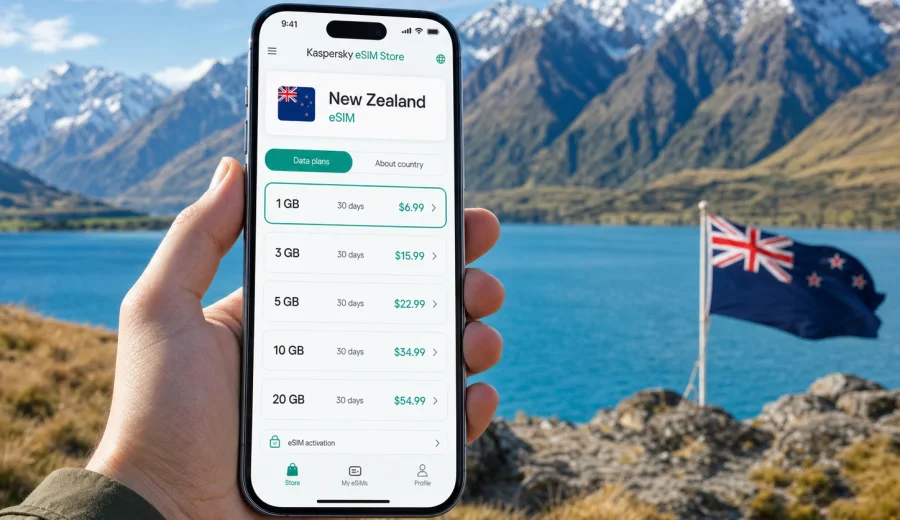
eSIM for New Zealand: mobile connection and internet for your trip
New Zealand is a country where mobile internet is useful from the first hour of the trip. You may need maps after landing in Auckland, a booking confirmation in Queenstown, weather updates before a ferry crossing, or messenger calls while driving between small towns. A prepared mobile connection helps you manage the practical side of travel without depending only on hotel Wi-Fi or airport counters.
An eSIM is a digital SIM profile that can be installed on a compatible smartphone or tablet. For a trip to New Zealand, it can help you get mobile internet without inserting a physical SIM card, while keeping your regular SIM available for calls, bank messages, or important notifications from home.
Kaspersky eSIM Store is an app and website where you can choose, arrange, and activate an eSIM with a suitable data plan for mobile internet abroad. It helps you review the destination, data allowance, validity period, and price before you travel.
Why mobile internet matters in New Zealand
New Zealand trips often combine long-distance movement with detailed planning. A route may start at Auckland Airport, continue through Rotorua or Wellington, cross to the South Island, and end with several days around Queenstown, Fiordland, or Christchurch. Between those points, mobile data can support navigation, transport updates, accommodation messages, and day-to-day decisions.
Mobile internet is especially useful in New Zealand for:
- opening hotel, campervan, ferry, and activity bookings;
- using maps on road trips where towns can be far apart;
- checking weather before hikes, lake trips, or mountain drives;
- coordinating pickup points for tours and transfers;
- translating short notices or checking local opening hours;
- using messengers for calls and updates with family or colleagues;
- managing banking apps, email, and travel insurance documents.
Public Wi-Fi can help in airports, hotels, cafes, and visitor centers, but it is not always available when you are moving. A travel eSIM gives you a separate mobile data option on your device, so you can handle essential online tasks without first searching for a Wi-Fi password.
What an eSIM does and does not do
For New Zealand travel, think of eSIM as a mobile data profile for a compatible device. It is designed to help you use internet abroad without a plastic SIM card. In most cases, a travel eSIM is focused on data and does not include a regular local phone number, ordinary voice calls, or SMS unless the selected plan says otherwise.
That distinction matters because many travel tasks no longer require a traditional phone number. Maps, email, ride apps, browsers, cloud documents, translation tools, and messenger calls all work over mobile data.
| Travel need | How eSIM helps |
|---|---|
| Arrival logistics | Open bookings, maps, pickup messages, and transport apps |
| Road trips | Use navigation, route changes, fuel searches, and accommodation details |
| Outdoor plans | Check weather, alerts from providers, and saved trail information |
| Work messages | Handle email, documents, and light browser use while away |
| Family contact | Use messengers for internet calls and location updates |
Before choosing any eSIM plan, check that your device supports eSIM and is not locked to one mobile operator. You can use the compatibility window here: Check your device. This step is important because eSIM support can depend on the exact model, market version, and operator restrictions.
New Zealand travel scenarios where eSIM is useful
The value of eSIM becomes clear in small practical moments. New Zealand is easy to travel, but routes can be spread out, weather can affect plans, and many activities depend on timely messages from providers.
- Arrival in Auckland: open your hotel address, message a transfer driver, check baggage updates, or navigate from the airport without looking for a SIM shop first.
- Road trip on the North Island: use maps between Auckland, Rotorua, Taupo, Wellington, and smaller towns while saving key documents offline.
- Ferry and inter-island travel: check sailing updates, boarding details, and accommodation messages before crossing Cook Strait.
- South Island routes: keep maps and weather tools ready around Christchurch, Lake Tekapo, Mount Cook, Wanaka, Queenstown, and Fiordland.
- Outdoor activities: receive provider messages for tours, kayaking, boat trips, skiing, guided hikes, or weather-related schedule changes.
An eSIM is not a guarantee of signal in every valley, national park, or remote road section. Terrain, distance from infrastructure, and local network availability can affect service. The practical advantage is that your mobile data plan is already prepared on your phone when coverage is available.
How much data to prepare for New Zealand
The right data allowance depends on your trip length and habits. A short city break in Auckland or Wellington needs less data than a two-week self-drive route across both islands. Video, cloud backups, app updates, and social media uploads can use far more data than maps and messaging.
| Usage style | Typical activities | Planning approach |
|---|---|---|
| Light | Messaging, maps, email, booking checks | Choose a modest data package and use hotel Wi-Fi for large downloads |
| Balanced | Daily maps, browsing, translation, photos, transport apps | Prepare more data for comfortable use between Wi-Fi points |
| Heavy | Video calls, remote work, cloud tools, frequent uploads | Choose a larger package and control background app traffic |
| Road-trip focused | Navigation, fuel stops, campsites, weather checks | Download offline maps and keep mobile data for live updates |
Before leaving home, download offline maps for the regions you will visit, save PDFs of bookings, update apps over Wi-Fi, and pause automatic photo backup on mobile data. These small steps protect your travel data for tasks that actually need a live connection.
Choosing an eSIM plan for New Zealand
When comparing eSIM options, do not look only at the lowest price. A good plan should match the country, trip length, expected data use, and activation rules. For New Zealand, it is also useful to think about the shape of your route: city-only, one-island road trip, both islands, or a route with many outdoor activities.
Use this checklist before choosing:
- Destination: the plan should cover New Zealand or the region you intend to use.
- Validity: the active period should fit your arrival and departure dates.
- Data size: the allowance should match maps, messengers, browsing, and planned uploads.
- Activation rules: check when validity starts and whether installation requires Wi-Fi.
- Device support: confirm that your phone or tablet supports eSIM.
- Phone number needs: remember that most travel data eSIM plans do not include regular calls or SMS.
- Hotspot needs: check whether tethering is suitable for your selected plan and device settings.
If your itinerary is already clear, you can review options and choose an eSIM plan for your trip to New Zealand. Compare the plan conditions with your route, expected data use, and the moments when mobile internet will matter most.
When to install and activate your eSIM
In many cases, it is practical to install the eSIM before departure while you still have stable Wi-Fi. The installation process needs an internet connection, and doing it at home gives you time to check settings calmly. Activation rules may differ by plan, so read the instructions carefully and avoid starting the validity period earlier than needed.
A simple workflow looks like this:
1. Check that your device supports eSIM and is not locked to one operator.
2. Choose New Zealand as your destination and select a suitable data plan.
3. Complete the order through the app or website.
4. Install the eSIM profile while connected to reliable Wi-Fi.
5. Keep your regular SIM active if you need calls or banking messages.
6. After arrival, select the eSIM as the mobile data line.
7. Monitor data use during the trip and adjust background app settings if needed.
If you need detailed setup steps, use the official guides for your device type: Android installation guide and iOS installation guide. Menu names can vary by device model and operating system version, so it is better to review the steps before you fly.
Practical phone settings before departure
Good preparation is not only about buying a plan. A few device settings can prevent unwanted roaming use, data waste, and confusion between SIM profiles.
| Setting | Why it matters |
|---|---|
| Label the eSIM | Helps you distinguish the travel profile from your home SIM |
| Choose mobile data line | Prevents your home SIM from using roaming data by mistake |
| Limit background data | Saves data for maps, messages, bookings, and weather |
| Download offline maps | Keeps navigation available when signal is weak |
| Save travel PDFs | Lets you open bookings without a live connection |
| Check data roaming for eSIM | Some eSIM profiles may require this setting to work |
Keep your primary SIM available if you need ordinary calls, SMS, or bank verification messages from your regular number. On many dual-SIM devices, you can use the eSIM for mobile data and keep your physical SIM or main eSIM for calls and messages.
eSIM, roaming, local SIM, and Wi-Fi in New Zealand
Travelers usually compare four ways to get online: home roaming, a local physical SIM, public Wi-Fi, and travel eSIM. Each option can work, but each one solves a different problem.
| Option | Strength | Limitation |
|---|---|---|
| Home roaming | Keeps your regular SIM active | Cost and conditions depend on your home operator |
| Local SIM | May suit longer stays | Requires local purchase steps and a SIM slot |
| Public Wi-Fi | Convenient in hotels and some public places | Not available everywhere and may be slow or crowded |
| Travel eSIM | Can be prepared before arrival and managed digitally | Requires a compatible, unlocked device and plan coverage |
For many short and medium trips, eSIM is a practical middle path. You can prepare mobile internet before departure, avoid changing a physical SIM at the airport, and keep your regular number available for important messages.
Road trips and outdoor travel: extra planning
New Zealand is famous for self-drive routes, national parks, lakes, coastal roads, and mountain scenery. These are also the situations where mobile internet should be planned with realistic expectations. A phone can be online in towns and many popular routes, then lose signal in remote terrain or areas with fewer towers.
Use this approach for road trips and outdoor days:
- save offline maps for the whole route, not only the destination;
- download booking confirmations for campsites, ferries, tours, and accommodation;
- check weather before leaving town or reliable Wi-Fi;
- keep a power bank in the car or daypack;
- tell someone your route if you plan remote hikes;
- use mobile data for essential tasks first: messages, maps, weather, and transport updates;
- avoid large uploads until you are back on stable Wi-Fi.
An eSIM helps you keep mobile data ready when a local network is available. It should sit alongside offline planning, charged devices, and common travel precautions.
Common mistakes to avoid
Most eSIM problems are avoidable if you check details before travel.
- Buying a plan before confirming device compatibility.
- Installing the eSIM on a phone you will not carry during the trip.
- Deleting the eSIM profile after activation without checking whether reinstall is possible.
- Leaving your home SIM selected for mobile data and creating roaming charges.
- Forgetting that a data eSIM usually does not include a local phone number.
- Activating a plan too early without reading validity rules.
- Using mobile data for automatic cloud backups or app updates.
- Depending only on live maps in remote areas instead of downloading offline maps.
Treat the eSIM like any other travel tool. Set it up before you urgently need it, keep instructions accessible, and understand the limits of the selected plan.
Quick data-saving checklist
Use this list before boarding and again after arrival:
- Download offline maps for Auckland, Wellington, Christchurch, Queenstown, and planned road routes.
- Save ferry, hotel, car rental, campervan, and activity confirmations as PDFs or screenshots.
- Turn off automatic app updates on mobile data.
- Pause cloud photo and video backup on mobile data.
- Set messengers to download media only on Wi-Fi if you expect heavy group chats.
- Keep weather apps and maps allowed to use mobile data.
- Check which SIM is assigned to mobile data after arrival.
- Monitor data usage in phone settings during the first two days.
This preparation helps you use mobile internet for the moments that matter: route decisions, check-ins, transport changes, and contact with people who are waiting for your updates.
FAQ: eSIM and mobile internet in New Zealand
Can I install an eSIM before flying to New Zealand?
In many cases, yes. Installation usually requires an internet connection, so it is convenient to install the eSIM profile while you still have reliable Wi-Fi. Read the plan instructions to understand when validity begins.
Will an eSIM give me a New Zealand phone number?
Usually no. Travel eSIM plans are generally focused on mobile data. Use messengers for internet calls and messages unless the specific plan says voice or SMS are included.
Can I keep my regular SIM active?
On many compatible dual-SIM devices, yes. You can use the eSIM for mobile data and keep your regular SIM for calls, SMS, or bank verification messages.
Is eSIM enough for remote routes in New Zealand?
It can be useful, but you should not rely on any mobile option as your only source of information in remote areas. Download offline maps, save key documents, and expect coverage to vary by location and terrain.
What should I check before choosing a plan?
Check destination coverage, data allowance, validity period, activation rules, hotspot needs, and device compatibility. Also confirm that your device is not locked to one operator.
Final checklist before your New Zealand trip
Before you leave, make sure you have:
- a compatible, unlocked smartphone or tablet;
- the eSIM installed on the device you will carry;
- the correct mobile data line selected;
- offline maps for cities, road routes, and outdoor areas;
- PDFs or screenshots of bookings, ferries, car rental, insurance, and activities;
- automatic updates and cloud backups limited on mobile data;
- a realistic data estimate for your travel style;
- installation instructions saved in case you need to review settings.
New Zealand rewards flexible planning. Distances, weather, ferry times, activity schedules, and outdoor routes can change the day quickly, and mobile internet helps you respond with less friction. Prepare your eSIM before the trip, understand your plan conditions, and keep offline backups for remote segments.
When your route is set, use Kaspersky eSIM Store to prepare an eSIM plan for mobile internet in New Zealand and travel with a clearer connection plan from arrival to the final transfer.