
Travel connectivity guide
Nicaragua eSIM: mobile internet for travel
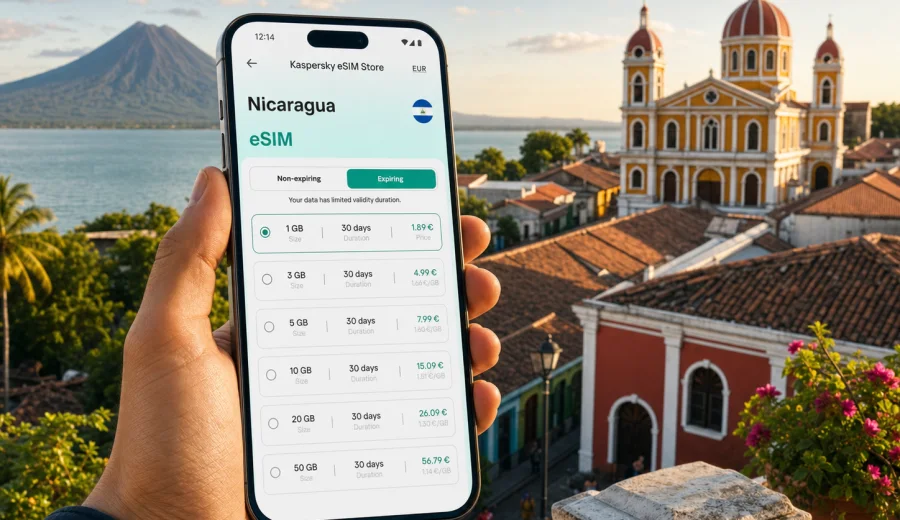
eSIM for Nicaragua: mobile connection and internet for your trip
Nicaragua is a country where mobile internet can quickly become part of the trip itself. You may need it when your flight lands in Managua, when you are comparing routes to Granada or Leon, when you are checking ferry times for Ometepe, or when you want to message a driver before leaving San Juan del Sur. A travel eSIM helps you prepare this part of the journey before you start searching for a local SIM card counter or relying on public Wi-Fi.
An eSIM is a digital SIM profile installed on a compatible smartphone or tablet. For travel, it is usually used for mobile data: maps, messengers, hotel apps, ride coordination, email, banking checks, online bookings and quick searches on the road. It does not normally replace a full local mobile contract, and a data eSIM does not include a regular phone number, voice calls or SMS unless the selected tariff says so.
For Nicaragua, the practical question is not only "Can I get online?" but "How much data do I need, when should I activate it, and what should I check before paying?" This guide explains how to plan mobile connection and internet for Nicaragua with eSIM in a calm, realistic way.
Why eSIM is useful for a trip to Nicaragua
Nicaragua trips often include several different travel modes. You may move from an airport to a colonial city, from a city to a volcanic island, from a beach town to a nature reserve, and then back to Managua for the flight home. Mobile internet is useful in each of these moments, but the way you use data can change during the trip.
Typical situations where an eSIM can help:
- opening offline and online maps while moving between cities;
- messaging hotels, guides, hosts and transport contacts;
- checking reservations, boarding passes and travel documents;
- translating short phrases, menus or transport information;
- confirming ferry, shuttle or bus details;
- using ride-hailing or taxi coordination where available;
- sharing photos and short videos when Wi-Fi is not convenient;
- accessing mobile banking or payment confirmations;
- keeping work communication available during a mixed business and leisure trip.
The main advantage is preparation. You can choose a suitable eSIM tariff before departure, install it on a compatible device, and activate it according to the instructions for the selected plan. This reduces the amount of admin you need to handle after arrival.
Where mobile internet matters most in Nicaragua
Nicaragua has several travel patterns where a prepared data connection is especially useful. Coverage and speed always depend on local network conditions, the selected tariff, the device and the exact location, so it is better to plan with realistic expectations.
| Travel scenario | Why internet helps | Data planning tip |
|---|---|---|
| Arrival in Managua | Transport, hotel messages, map checks | Have the eSIM installed before landing if the tariff allows it |
| Granada and Leon | Walking routes, restaurant searches, ticket details | Use Wi-Fi for large uploads and mobile data for navigation |
| Ometepe Island | Ferry timing, accommodation messages, maps | Save key routes offline before moving around the island |
| San Juan del Sur | Beach plans, shuttles, weather checks | Choose more data if you share photos or work remotely |
| Multi-country Central America route | Border timing, onward bookings, documents | Compare country and regional tariff options before departure |
For many travelers, the most valuable connection is not the fastest possible download speed. It is having enough dependable data for the everyday tasks that keep the trip moving.
eSIM, roaming and local SIM cards: what changes
Travelers usually compare three options: international roaming from their home operator, a physical local SIM card, and an eSIM travel tariff. Each option can be reasonable depending on the trip.
Roaming is convenient because it uses your existing SIM, but pricing and data limits can vary widely. A local SIM card may be useful for longer stays, yet it can require finding a shop, understanding local conditions and replacing or adding a physical SIM. An eSIM is often the middle path: you keep your main SIM for your regular number and add a separate digital profile for mobile data abroad.
| Option | Good for | What to check |
|---|---|---|
| Home roaming | Short trips where your operator has a clear roaming package | Daily fees, data cap, speed rules and billing conditions |
| Local SIM | Longer stays or people who need local mobile terms | Where to buy, registration rules, device SIM slot, top-up process |
| Travel eSIM | Preparing data before or during the trip without a physical SIM | Device support, tariff volume, validity period and activation rules |
The key is not to assume that one option is always best. Look at your route, your phone, your expected data use and your tolerance for handling setup after arrival.
Check your device before choosing an eSIM
Before buying an eSIM tariff for Nicaragua, confirm that your smartphone or tablet supports eSIM and is not locked to one mobile operator. Device support depends on the exact model, region, software version and operator restrictions. A model name alone may not be enough if the same phone is sold in different versions.
Use this short checklist before purchase:
- your device has eSIM support in settings;
- your device is not carrier-locked;
- you have a stable internet connection for installation;
- your camera can scan a QR code, or you can install manually if the instructions allow it;
- you know which SIM will handle mobile data after activation;
- you understand whether your main SIM should stay active for calls or SMS;
- you have enough battery before starting setup.
If you are unsure, check your device before selecting a tariff. This step is especially important when traveling with an older phone, a work-managed device or a phone bought in a market where eSIM support can differ by model variant.
How much data do you need for Nicaragua?
Data use depends more on habits than on the country. A traveler who mostly uses maps and messages can manage with a smaller package. Someone who uploads video, joins calls or uses a laptop hotspot may need much more.
Use the table below as a planning guide rather than a promise of exact usage.
| Activity | Typical data impact | Practical advice |
|---|---|---|
| Messaging and email | Low | Good for small packages if you avoid large attachments |
| Maps and navigation | Low to medium | Download offline maps before long transfers |
| Browsing and bookings | Medium | Keep hotel and transport apps updated on Wi-Fi |
| Social media photos | Medium to high | Upload batches on Wi-Fi when possible |
| Video calls | High | Use only when needed or choose a larger package |
| Streaming video | Very high | Avoid on mobile data unless your package is planned for it |
| Hotspot for laptop | High to very high | Check whether tethering is allowed by the selected tariff |
For a short city-and-beach trip, a modest package may be enough if you use Wi-Fi at hotels. For a longer route across Managua, Granada, Ometepe, Leon and the Pacific coast, it is safer to choose a tariff with a larger data allowance or a validity period that matches the whole trip.
When to choose your Nicaragua eSIM tariff
The best time to prepare mobile internet is before the trip, when you still have stable Wi-Fi and time to compare options. Kaspersky eSIM Store is an app and website where you can choose, arrange and activate an eSIM with a suitable mobile data tariff for international travel. You can review available conditions such as destination, data volume, validity period and price before deciding.
If you are planning a trip soon, you can choose an eSIM tariff for Nicaragua and match the package to your route, travel dates and expected data use. Make sure the chosen tariff covers the destination you need and that your device is compatible before purchase.
This middle-of-planning step is useful because it connects the travel itinerary with the data allowance. Instead of buying more or less data at random, you can look at the actual days when you will need mobile internet most.
How to install and activate an eSIM
Installation usually means adding the eSIM profile to your device. Activation means turning it on for mobile data according to the conditions of the selected tariff. In some cases, the validity period starts after installation; in others, it starts when the eSIM first connects to a supported network. Read the tariff details before you begin.
A simple preparation flow looks like this:
1. Confirm that your phone supports eSIM and is unlocked.
2. Choose Nicaragua as the destination and select a suitable tariff.
3. Complete the purchase and open the installation instructions.
4. Install the eSIM using the QR code or manual details.
5. Name the eSIM clearly, for example "Nicaragua data".
6. Set the eSIM as the mobile data line when you are ready to use it.
7. Keep your main SIM for calls or SMS if you still need your regular number.
8. Check whether data roaming must be enabled for the eSIM line.
For detailed setup steps, use the Android installation guide or the iOS installation guide. Follow the instructions for your device carefully, because menu names and screens can vary by phone model and operating system version.
Settings to check after arrival
When you arrive in Nicaragua, avoid changing many settings at once. If the eSIM is already installed, check the basics in a controlled order.
Start with these items:
- mobile data is enabled;
- the eSIM line is selected for mobile data;
- data roaming is enabled for the eSIM line if the instructions require it;
- airplane mode is off;
- the phone has had a few minutes to register on a local network;
- your primary SIM is not accidentally selected for roaming data;
- any data limit or low-data mode is configured intentionally.
If the connection does not appear immediately, restart the phone once and recheck the selected mobile data line. Do not delete the eSIM profile unless the support instructions specifically tell you to do so, because some eSIM profiles cannot simply be reinstalled after removal.
Security and privacy habits for mobile internet
Using mobile data can reduce dependence on public Wi-Fi, but good travel habits still matter. Keep your phone updated before departure, use screen lock, avoid installing unknown apps, and be careful with links in messages. For banking and important accounts, use official apps and multi-factor authentication where available.
A travel eSIM gives you a separate data profile for the trip, but it is not a VPN, anonymizer or tool for avoiding local rules. Treat it as a practical way to prepare mobile internet abroad. Your security still depends on device hygiene, account protection and careful behavior online.
Useful habits for Nicaragua:
- download maps, booking PDFs and insurance documents before travel days;
- save hotel addresses and transport contacts offline;
- keep a power bank for long transfers;
- avoid large app updates on mobile data;
- use Wi-Fi for cloud backups and long uploads;
- monitor remaining data in the app or phone settings;
- keep the eSIM QR code or installation details in a safe place until setup is complete.
Quick checklist before departure
Use this checklist one or two days before the flight:
- Passport, booking details and travel documents are saved offline.
- The phone supports eSIM and is not locked.
- The selected tariff matches Nicaragua and your travel dates.
- The eSIM installation instructions are available.
- The phone software is updated enough for stable eSIM setup.
- Offline maps are downloaded for Managua, Granada, Leon, Ometepe and planned coastal stops.
- Messaging apps are logged in and working.
- A charger and power bank are packed.
- You know which SIM line should use mobile data after arrival.
This preparation is not complicated, but it prevents small problems from becoming stressful at the airport or during a transfer.
FAQ: eSIM and mobile internet in Nicaragua
Can I install an eSIM before flying to Nicaragua?
In many cases, yes, but follow the instructions for the selected tariff. Check when the validity period starts before installing or activating the eSIM.
Does a travel eSIM give me a Nicaraguan phone number?
Usually no. Travel eSIM tariffs for mobile internet are typically data-focused. Voice calls and SMS are not included unless the tariff conditions say otherwise.
Should I turn on data roaming for the eSIM?
Some eSIM tariffs require data roaming to be enabled on the eSIM line. Follow the installation instructions and make sure roaming data is not accidentally enabled for your home SIM if you do not want to use it abroad.
What should I do if the eSIM does not connect immediately?
Check the selected data line, roaming setting for the eSIM, airplane mode and signal availability. Give the phone a few minutes, then restart it once. Avoid deleting the eSIM profile unless support instructions tell you to.
Final preparation for Nicaragua
Mobile connection in Nicaragua is easiest when it is planned like any other travel essential: choose the right option before departure, check device compatibility, understand the validity period and keep offline backups for important details. An eSIM can make the arrival and route between Managua, Granada, Leon, Ometepe and the Pacific coast simpler because you do not need to start the trip by searching for a physical SIM card.
Kaspersky eSIM Store helps you choose, arrange and activate an eSIM with a suitable data tariff for international travel through its app and website. Before you leave, prepare your eSIM tariff for Nicaragua, check the tariff conditions and set up your phone while you still have a stable connection.