
Travel connectivity guide
Nice eSIM for Mobile Internet in France
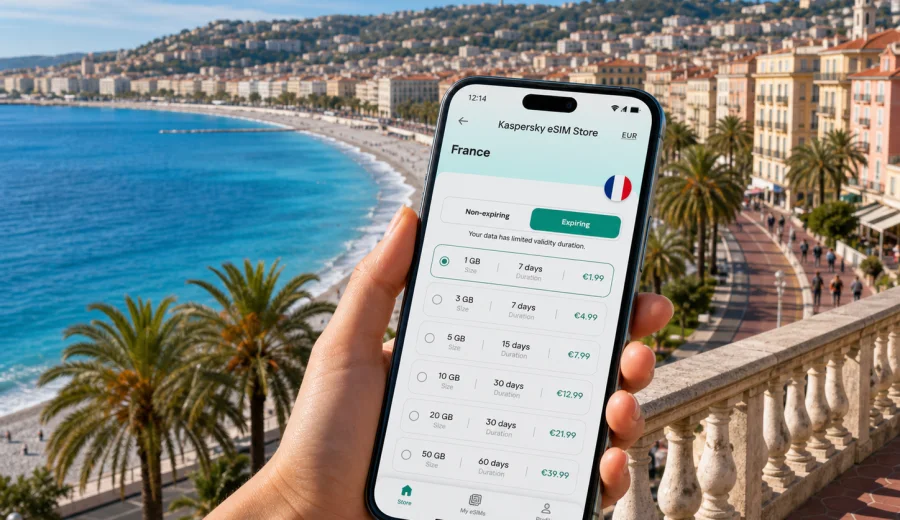
Nice eSIM: mobile connection and internet for your trip
Nice is an easy city to enjoy and a difficult city to navigate without mobile internet. The airport is close to the center, the Promenade des Anglais follows the sea for several kilometers, the old streets of Vieux Nice are compact, and many trips continue toward Monaco, Cannes, Antibes, Eze, or other towns on the French Riviera. In practice, your phone becomes the trip control panel: maps, tram routes, hotel messages, restaurant bookings, train times, ride details, boarding passes, and translation all depend on a stable mobile connection.
An eSIM can make that first hour in Nice much simpler. Instead of looking for a physical SIM after landing or relying on airport Wi-Fi, you can prepare a digital SIM profile before the trip and activate mobile data when it is useful. Kaspersky eSIM Store is an app and website where you can choose, order, install, and activate an eSIM with a suitable mobile internet plan for travel abroad. The important point is control: you can check the destination, data volume, validity period, and conditions before you leave.
This guide focuses on Nice as a city destination, not on France in general. It covers arrival at Nice Cote d'Azur Airport, moving between districts, using maps on the Riviera, handling hotel and business travel tasks, planning short stopovers, and deciding what kind of eSIM data allowance makes sense for your route.
Why mobile internet matters in Nice
Nice looks straightforward on a map, but the city quickly becomes more complex when you are moving with luggage, changing transport, or trying to reach a hotel in a pedestrian area. The seafront, the hills above the city, the port, the station area, and the old town all have different movement patterns. A short distance can feel very different depending on whether you walk, take a tram, use a bus, or wait for a train.
Mobile internet helps with everyday travel decisions:
| Travel moment in Nice | Why mobile data helps |
|---|---|
| Landing at the airport | Check messages, maps, hotel instructions, and transport options before leaving the terminal. |
| Going to a hotel | Compare walking, tram, taxi, and ride routes without guessing street names. |
| Walking in Vieux Nice | Use maps in narrow streets where it is easy to miss a turn. |
| Visiting the Promenade | Find beaches, restaurants, bike routes, and meeting points along the seafront. |
| Taking trains from Nice-Ville | Check platform updates and onward routes to Monaco, Cannes, Antibes, or Menton. |
| Working remotely | Keep a backup connection when hotel or cafe Wi-Fi is crowded or unstable. |
Nice is also a city where plans often change during the day. You might start with breakfast near Jean-Medecin, walk to the market in Cours Saleya, go up to Castle Hill, continue to Port Lympia, and then decide to take a train toward Villefranche-sur-Mer or Monaco. A prepared eSIM helps you make those changes without searching for a local shop or asking for Wi-Fi passwords at every stop.
Arrival at Nice Cote d'Azur Airport
Nice Cote d'Azur Airport is one of the main gateways to the Riviera. Many travelers arrive for a city break, a cruise connection, a conference, a family holiday, or a multi-city trip across southern France. Because the airport is close to the city, the first transfer can be quick, but you still need reliable information at the moment when your phone usually matters most.
Typical online tasks after landing include:
- confirming your hotel address and check-in details;
- messaging a host or colleague;
- checking whether your room is ready;
- comparing tram, taxi, ride, or private transfer options;
- downloading a map route before leaving the terminal;
- checking train options if you are continuing to Cannes, Antibes, Monaco, or Menton;
- opening mobile boarding documents for a return or onward flight.
Airport Wi-Fi may be enough for a quick message, but it is not a complete travel plan. It may require registration, slow down at busy times, or stop being useful once you move away from the terminal. With an eSIM prepared in advance, you can leave the airport with mobile data ready for navigation and communication.
Moving from the airport to the city
Nice is practical because the airport, seafront, central streets, and main station are relatively close. That does not remove the need for mobile data. It changes the kind of data you use. Instead of one long transfer, you may make several small decisions: where to get off, whether to walk the last part, how to avoid stairs with luggage, and whether the hotel entrance is on a main street or a smaller side street.
For a first arrival, use mobile internet to check:
1. The exact hotel entrance, not only the street name.
2. The difference between a route to the reception and a route to a nearby square.
3. Whether your accommodation is inside a pedestrian zone.
4. How long the walk is from the tram or bus stop with luggage.
5. Whether you need to notify the hotel before late check-in.
This is especially useful around Vieux Nice, the port, the station area, and hillside neighborhoods. In a coastal city, the map distance may look short, but a route can include slopes, steps, busy crossings, or narrow streets. Mobile navigation helps you choose the route that fits your luggage, arrival time, and comfort level.
City districts where a stable connection is useful
Nice rewards walking, but each area creates different phone habits. You may need maps in one district, reservations in another, and transport updates in a third.
| Area | Common travel task | Mobile internet use |
|---|---|---|
| Promenade des Anglais | Walking, beach time, meeting friends, airport transfer | Maps, ride pickup points, weather, restaurant search. |
| Vieux Nice | Markets, cafes, evening walks, historic streets | Navigation in narrow lanes, translation, booking confirmations. |
| Jean-Medecin and Massena | Shopping, tram connections, central hotels | Transport checks, payments, messaging. |
| Nice-Ville station area | Regional trains and onward travel | Train times, platform updates, route planning. |
| Port Lympia | Ferries, restaurants, walks toward the coast | Maps, reservations, photo backup, meeting points. |
| Cimiez and the hills | Museums, gardens, quieter hotels | Bus routes, walking times, ride requests. |
The most useful eSIM setup is not necessarily the largest data allowance. It is the plan that matches your actual Nice itinerary. A weekend based near the Promenade has different needs from a week with day trips to Monaco, Cannes, and hill villages. A business trip with video calls needs more margin than a leisure trip focused on messaging and maps.
How much mobile data you may need in Nice
Data use depends on behavior, not only on trip length. Maps and messaging are light. Video, cloud backup, social media uploads, and laptop tethering can use much more. Before choosing a plan, think about your travel style in Nice.
| Scenario | Typical data pattern | Planning tip |
|---|---|---|
| Short stopover | Maps, messages, transport, boarding documents | Choose a modest allowance with enough validity for delays. |
| Weekend city break | Navigation, restaurant search, photos, messaging | Keep mobile data for outdoor movement and use hotel Wi-Fi for heavy downloads. |
| Riviera base trip | Trains, day trips, maps, tickets, translation | Allow extra data for regional travel and route changes. |
| Business visit | Email, calendars, ride apps, possible tethering | Choose more data if you need a backup for hotel or venue Wi-Fi. |
| Family trip | Multiple maps, shared plans, messaging, entertainment | Monitor usage and avoid automatic video downloads on mobile data. |
Practical ways to control data use:
- download offline maps for Nice and nearby towns before departure;
- turn off automatic cloud photo upload on mobile data;
- update apps over Wi-Fi, not during the trip;
- lower video quality if you stream;
- use hotel Wi-Fi for large files, but keep eSIM mobile data for movement around the city;
- check the plan validity period, not only the data volume.
Choosing an eSIM plan for Nice
For a city article, the correct destination is the country that includes the city. Nice is in France, so the relevant country landing page is France. When you compare data volume, validity, and trip length, you can choose an eSIM plan for your trip to Nice in France through Kaspersky eSIM Store before you travel or when you are preparing your route.
The best plan choice depends on three simple questions:
1. How many days will you spend in Nice and the Riviera?
2. Will you use mobile data only on your phone, or also as a backup connection for a laptop or tablet?
3. Will your trip stay in Nice, or continue to Monaco, Cannes, Antibes, Menton, Paris, or another destination?
If your route is only Nice, a France plan is usually the most direct option. If your route continues across several countries, compare whether a regional option is more suitable for the full itinerary. Check the plan details before payment because data volume, validity, destination, and conditions can differ between plans.
Kaspersky eSIM Store should be understood as a practical travel tool: it helps you choose, order, install, and activate an eSIM with a suitable data plan for a trip abroad. It is not a mobile network operator and it does not replace the local operator behind the mobile service. Your experience still depends on the selected plan, compatible device, local network conditions, and correct phone settings.
Before you buy: device compatibility and settings
An eSIM is useful only if your device supports it. Before choosing a plan, check that your smartphone or tablet can use eSIM and is not locked in a way that prevents adding a travel profile. You can check your device before purchase to avoid problems during arrival.
Use this quick checklist:
- your device model supports eSIM;
- your phone is not restricted to one mobile operator;
- you have a stable internet connection for installation;
- you can receive account or payment confirmations before leaving home;
- your main SIM remains available if you need calls or SMS from your usual number;
- you understand whether the eSIM plan includes mobile data only or other services, according to the plan conditions.
Most travel eSIM use cases are about mobile internet. If you need regular voice calls or SMS, check the specific plan conditions and keep your primary SIM active if required. For calls and messages, many travelers use internet-based apps through mobile data.
Installing an eSIM before a trip to Nice
Installation is usually easier before departure, when you have reliable Wi-Fi and time to read each step calmly. You can install the eSIM profile before the trip and activate mobile data when appropriate under the plan conditions. The exact path depends on your device, operating system, and plan instructions.
For setup guidance, use the official installation pages: instructions for Android and instructions for iOS. Keep the installation details available offline if you expect to arrive late, travel with family, or move straight from the airport to another town.
A practical setup sequence:
1. Choose the France destination or another suitable route option.
2. Check data volume, validity period, and conditions.
3. Confirm that your device supports eSIM.
4. Install the eSIM profile while you have stable Wi-Fi.
5. Keep your primary SIM available if you need calls or SMS.
6. On arrival, select the eSIM for mobile data and check whether data roaming must be enabled for that profile.
7. Open a map or browser page to confirm mobile internet is working.
Avoid deleting an eSIM profile unless you are sure you no longer need it. Some eSIM profiles cannot simply be moved to another device after activation, depending on the plan and profile conditions.
Nice travel scenarios where eSIM is especially helpful
| Scenario | What happens in Nice | How mobile internet helps |
|---|---|---|
| Weekend on the Promenade | You move between the airport side, beach areas, Massena, and the old town. | Share locations, check pickup points, find restaurants, and avoid walking the wrong way along the seafront. |
| Vieux Nice and Castle Hill | Narrow streets, markets, viewpoints, and evening crowds make small route choices matter. | Use maps, translation, booking confirmations, and meeting points without hunting for Wi-Fi. |
| Business trip | Meetings may sit between the station, the seafront, hotels, and event venues. | Keep email, calendars, ride details, and documents available while moving. |
| Port or coastal connection | Port Lympia and the waterfront are walkable, but timing can matter. | Check weather, transport, port instructions, and group messages from land. |
| Day trips from Nice | Regional trains and buses connect Monaco, Menton, Villefranche-sur-Mer, Eze, Antibes, and Cannes. | Check return options, platform updates, ticket access, and walking routes after arrival. |
The same rule applies across these scenarios: use mobile data for movement, decisions, and urgent tasks, then use reliable Wi-Fi for large uploads or app updates. Keep enough battery for the return journey, especially after a beach day or a late dinner in the old town.
eSIM compared with other connection options in Nice
| Option | Strength | Limitation |
|---|---|---|
| Travel eSIM | Can be prepared before the trip, with no physical SIM swap. | Requires a compatible device and correct installation. |
| Standard roaming | Uses your existing SIM and number. | Conditions and costs depend on your home operator. |
| Public Wi-Fi | Useful in hotels, cafes, the airport, and venues. | Coverage, speed, and sign-in rules vary. |
| Physical local SIM | Can suit longer stays. | Requires a shop visit and physical SIM handling after arrival. |
An eSIM is most useful when you want mobile internet ready for the city itself: airport transfer, walking routes, station checks, hotel messages, and travel apps. It does not remove the need to read plan conditions, but it gives you a prepared data option for the trip.
Practical checklist for Nice
| Moment | What to do |
|---|---|
| Before departure | Choose France for a Nice stay, check eSIM compatibility, install the profile on Wi-Fi, save hotel and transport details, and download offline maps. |
| At the airport | Select the eSIM for mobile data, check whether data roaming must be enabled for that profile, and open a map before leaving the terminal. |
| In the city | Use mobile data for maps, transport, messages, tickets, and urgent tasks. Use Wi-Fi for large uploads when it is suitable. |
| If plans change | Check the plan validity period, monitor data use, and confirm destination coverage if your route crosses a border. |
FAQ: eSIM, mobile connection, and internet in Nice
Is an eSIM useful for a short trip to Nice?
Yes, it can be useful even for a weekend because the most important connection moments happen immediately: airport arrival, transfer, hotel check-in, maps, restaurant bookings, and messages. A short trip usually needs a modest but reliable data allowance.
Should I choose a France plan for Nice?
Nice is in France, so a France destination plan is the direct starting point for a city stay. If your trip includes several countries, compare options that match the whole route and read the conditions before payment.
Can I use an eSIM for calls and SMS in Nice?
Many travel eSIM plans focus on mobile data. Ordinary voice calls and SMS are not included unless the selected plan states otherwise. You can use internet-based calling and messaging apps over mobile data, and you can keep your primary SIM available for your usual number if needed.
Do I need eSIM if my hotel has Wi-Fi?
Hotel Wi-Fi helps in the room, but it does not cover airport arrival, walking routes, tram changes, beach plans, station updates, or day trips. eSIM mobile data is most valuable when you are moving around the city.
When should I install the eSIM?
Install it before departure if possible, using a stable Wi-Fi connection. Then follow the activation instructions and plan conditions so mobile data is ready when you need it in Nice.
What if I also visit Monaco or Italy?
Check your plan conditions before you travel. Nice is close to borders and popular cross-border routes, so the destination coverage and validity period matter. If your trip crosses into another country, choose an option that fits the full itinerary.
Final preparation before you travel
Nice is a city where mobile internet supports the whole rhythm of the trip: a quick airport transfer, a walk along the Promenade, a dinner booking in Vieux Nice, a train to Monaco, a meeting near the station, or a late return to your hotel. Prepare the connection before you need it, and you spend less time dealing with phone settings after arrival.
Before your flight, check that your device supports eSIM, choose a data volume that fits your route, install the profile on reliable Wi-Fi, and keep the activation instructions close. For a city stay or a Riviera route based in Nice, you can prepare an eSIM plan for France with Kaspersky eSIM Store and arrive with a clearer plan for mobile internet during the trip.