
Travel connectivity guide
Nicosia eSIM: mobile internet for Cyprus
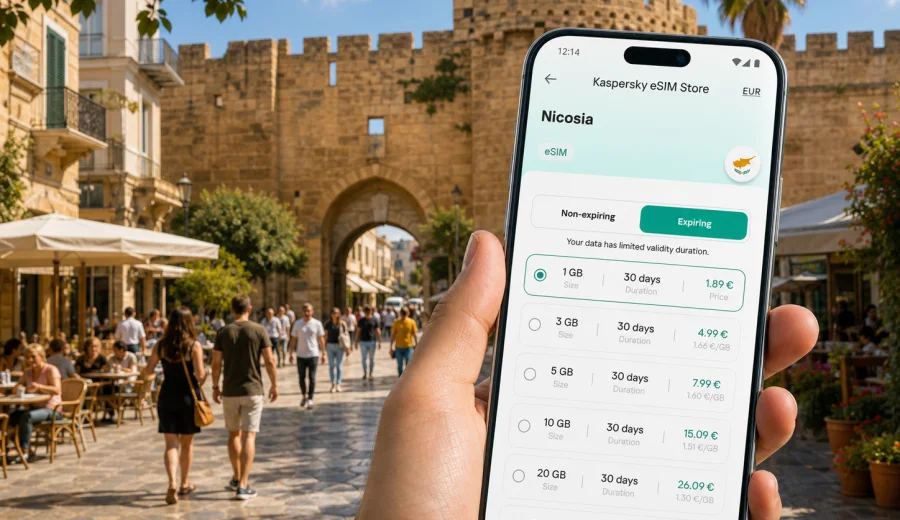
Nicosia eSIM: mobile connection and internet for your Cyprus trip
Nicosia is a city where a short walk can move you from business districts and government offices to quiet lanes inside the Venetian walls. For travelers, that mix is convenient but also practical: you may need maps for the old town, ride-hailing or taxi calls after a late arrival, hotel messages, meeting updates, restaurant bookings, and route planning for trips to Larnaca, Limassol, Paphos, Troodos, or the coast.
An eSIM can make that first day easier. Instead of looking for a physical SIM card after landing or relying on public Wi-Fi in the airport, cafe, or hotel lobby, you can prepare mobile internet for Cyprus in advance and activate it on a compatible phone. Kaspersky eSIM Store is an app and website where you can choose, arrange, and activate an eSIM with a suitable data plan for an international trip.
This guide focuses on Nicosia: how mobile connection and internet needs change when you arrive by road from the airport, move between districts, work from hotels and cafes, plan short stopovers, and use the city as a base for the rest of Cyprus.
Why mobile internet matters in Nicosia
Nicosia is not a resort city where most travelers stay in one hotel zone and walk only to the beach. It is an inland capital with offices, universities, embassies, museums, cafes, shopping streets, residential areas, and historic quarters spread across a wider urban area. A stable mobile data setup helps because many small decisions happen on the move.
Common Nicosia scenarios include:
- checking your transfer route from Larnaca Airport or Paphos Airport;
- messaging a hotel or apartment host about arrival time;
- navigating inside the old city, where streets can be narrow and repetitive;
- confirming business meetings in Strovolos, Engomi, Agioi Omologites, or the city center;
- finding parking, taxi pickup points, and bus routes;
- using translation, maps, banking apps, and travel documents;
- sharing your live location with colleagues, family, or a driver;
- planning day trips from Nicosia to other parts of Cyprus.
Public Wi-Fi can help in a hotel or cafe, but it is not always available exactly when you need it. It may also require registration, a password, or a purchase. With an eSIM data plan, you can use mobile internet on your own device without changing your physical SIM card.
Arrival in Nicosia: the first connection points
Nicosia does not function like a typical airport city for most international visitors. Many travelers arrive in Cyprus through Larnaca Airport, while some arrive through Paphos Airport, then continue to Nicosia by taxi, shuttle, rental car, or bus. That means your mobile internet can be useful before you even reach the capital.
If you land at Larnaca, mobile data can help you confirm the pickup zone, follow the road transfer, message your accommodation, and check whether your meeting or check-in time has changed. If you land at Paphos, the transfer is longer, so battery management, maps, and messaging become more important. If you rent a car, mobile internet is useful for route changes, fuel stops, parking searches, and real-time navigation around the city.
For a smooth arrival, prepare these items before the flight:
| Travel task | Why mobile data helps |
|---|---|
| Airport transfer | You can contact the driver, check pickup instructions, and track the route. |
| Hotel check-in | You can send your arrival time and open booking details without Wi-Fi. |
| Navigation | You can move from the ring roads into the old city with fewer wrong turns. |
| Payments and banking | You can confirm card notifications or use travel banking apps when needed. |
| Messaging | You can keep colleagues, family, or hosts updated from the road. |
If you will arrive late, install the eSIM before departure while you still have a reliable home connection. You can usually complete the setup steps before the trip and then turn on the eSIM line when you are ready to use mobile data in Cyprus. Activation details depend on the selected plan and your device, so check the plan conditions before travel.
Nicosia districts where eSIM is especially useful
Nicosia has several travel patterns. Some visitors stay near the old city for museums, cafes, and walking routes. Others stay in business hotels near government, finance, or embassy areas. Students, researchers, and conference visitors may move around Engomi and nearby university areas. A single city trip can include all of these.
In the old city, mobile internet helps with walking navigation, restaurant searches, museum opening times, and route choices near the Venetian walls. Around Ledra Street and the central pedestrian areas, you may rely on maps more than expected because the street pattern is compact and the most direct route is not always obvious.
In business districts such as Strovolos, Agioi Omologites, and Engomi, mobile data is often about timing. You may need to open a calendar invite, call a taxi, share a location, join a video call in transit, or download a presentation. Hotel Wi-Fi is useful once you are inside, but the handoff between lobby, taxi, meeting room, and restaurant is where mobile data becomes practical.
For visitors staying outside the center, eSIM can also help with everyday logistics: supermarket searches, food delivery, local bus information, parking apps, and quick translation. Nicosia is easy to navigate once you understand its rhythm, but the first day is smoother when your phone is already online.
How much data to plan for a Nicosia trip
The right amount of data depends less on the city itself and more on how you use your phone. Maps, messaging, email, and booking apps are usually modest. Video calls, cloud backups, streaming, and hotspot use can consume data quickly. Before choosing a plan, think about your trip style rather than picking a number at random.
Use this practical estimate:
| Trip style | Typical mobile internet use | What to consider |
|---|---|---|
| Short stopover or one night | Maps, messaging, taxi, hotel check-in | A smaller data package may be enough if you avoid video and streaming. |
| Weekend in Nicosia | Navigation, restaurant searches, photos, banking apps | Choose enough data for two or three days without depending on Wi-Fi. |
| Business trip | Email, documents, calendar, messaging, occasional calls via apps | Add extra data if you may tether a laptop or join calls outside the hotel. |
| Cyprus route with Nicosia as a base | Maps between cities, travel planning, uploads, messaging | Consider a plan that covers the full Cyprus stay, not only the capital. |
| Remote work stay | Hotspot, cloud tools, calls, large files | Check plan volume carefully and use hotel or office Wi-Fi for heavy files. |
One useful rule: reserve mobile data for tasks that matter while moving, and use trusted Wi-Fi for heavy updates or long streaming sessions. This keeps your eSIM data plan focused on navigation, communication, and travel decisions.
Choosing an eSIM plan for Nicosia
For a city article, the destination is Nicosia, but the relevant eSIM direction is Cyprus. You do not need a separate city-only plan; you need a plan that matches the country and your wider route. If Nicosia is one stop in a Cyprus itinerary, choose data volume and validity for the whole trip.
When comparing options, check:
- country or regional coverage shown in the plan conditions;
- data volume in GB;
- validity period;
- when the validity period starts;
- whether top-up is available;
- whether tethering is allowed under the plan conditions;
- whether your device supports eSIM and is not locked to one carrier;
- whether calls and SMS are included or whether the plan is data-only.
Kaspersky eSIM Store helps you view the destination, data amount, validity, and price before you arrange the plan. For Nicosia, you can choose an eSIM data plan for your Cyprus trip and prepare mobile internet before you arrive or once you have a stable connection.
Before you buy: device checks that prevent delays
The most common eSIM problem is not the city or the route. It is the phone. Before you travel to Nicosia, check that your device supports eSIM, that it is not locked to a specific carrier, and that you can access the internet during installation. Some devices also need data roaming enabled for the eSIM profile, depending on the plan instructions.
Use this checklist:
- Confirm that your phone or tablet supports eSIM.
- Make sure the device is not carrier-locked.
- Update the operating system if you have postponed updates for a long time.
- Keep your main SIM active if you need your regular number for banking or messages.
- Save your eSIM setup details before the flight.
- Do not delete an installed eSIM profile unless you are sure you no longer need it.
If you are unsure whether your device can use eSIM, check your device before arranging a plan. This is especially important for older phones, devices bought through a carrier contract, or models that differ by region.
How to install and activate eSIM for a Nicosia trip
You can install an eSIM before departure or after arrival, as long as you have a reliable internet connection during setup. Many travelers prefer installing before the flight, then switching mobile data to the eSIM line when they reach Cyprus. This avoids searching for Wi-Fi during the first hour of the trip.
Typical setup flow:
1. Choose Cyprus as the destination and select a plan by data volume and validity.
2. Arrange the plan through the app or website.
3. Open the eSIM installation details in your profile or email.
4. Add the eSIM to your phone using the on-screen steps or QR code.
5. Label the line clearly, for example Cyprus data or Nicosia trip.
6. On arrival, choose the eSIM line for mobile data.
7. Follow any plan instructions about data roaming for the eSIM profile.
Installation menus differ by device. If you need a step-by-step guide, use the Android installation instructions or the iOS installation instructions. Keep your phone connected to Wi-Fi or another data source until the eSIM setup is complete.
Practical scenarios in Nicosia
For a business trip, install the eSIM before travel, keep your regular SIM available if you need banking messages, and use the eSIM line for mobile data in Cyprus. Nicosia meetings can be spread between the city center, Strovolos, Engomi, hotels, embassies, and university areas, so maps, calendar updates, taxi apps, and email access are useful between appointments.
For a weekend in the old city, eSIM is less about heavy data and more about reliable access. Use mobile internet for walking routes, restaurant searches, ticket confirmations, translation, and messaging. Save your hotel location offline, but keep live data available for route changes after dark.
For a stopover before exploring Cyprus, choose a plan that covers the full route, not only the first night. Day trips to Limassol, Larnaca, Paphos, Troodos, or the coast often involve maps, weather checks, accommodation messages, and route changes.
Transport and navigation tips
Nicosia is manageable, but transport planning benefits from a connected phone. The old city is walkable, while business districts and suburban hotels may require taxis, buses, or a rental car. If you drive, be prepared for one-way streets, parking searches, and traffic around peak hours.
For a smoother trip:
- Save your hotel address in English before arrival.
- Pin meeting locations and parking areas before leaving the hotel.
- Keep a charger or power bank if you will use maps all day.
- Download offline maps as a backup, but use live data for route updates.
- Keep taxi pickup details visible in your messaging app.
- Check whether your hotel is inside a pedestrian or limited-access area.
Mobile internet is also useful when plans change. A restaurant may be full, a meeting may move, or a road may be slower than expected. With eSIM data, you can adjust without returning to the hotel for Wi-Fi.
Hotels, apartments, and remote work
Hotel Wi-Fi is useful for planned work sessions, but it does not cover every travel moment. You may need to open an apartment door code, confirm a late check-in, answer a message in a taxi, or join a short call before reaching the lobby. Use mobile data for navigation, chat, calendar, and banking, and save large downloads or backups for trusted Wi-Fi.
Remember that an eSIM data plan is mainly for mobile internet. It may not include a local phone number, voice calls, or SMS unless the selected plan says so. If your regular SIM must stay active for calls or banking codes, keep it installed and choose the eSIM line for mobile data.
Quick preparation checklist for Nicosia
Use this checklist a day or two before departure:
- Choose a Cyprus eSIM data plan that matches your whole route.
- Install the eSIM while you have stable internet.
- Name the line clearly so you do not confuse it with your home SIM.
- Save your hotel address, transfer details, and first meeting location.
- Download offline maps as a backup.
- Check whether your phone needs data roaming enabled for the eSIM.
- Keep the QR code or installation details accessible until setup is complete.
- Bring a charger or power bank if you will navigate for several hours.
- Use trusted Wi-Fi for large updates before leaving home.
This preparation is especially useful if your first day includes a road transfer, a late arrival, or a meeting soon after check-in.
FAQ: eSIM and mobile internet in Nicosia
Do I need a Nicosia-specific eSIM?
No. For a Nicosia trip, choose a plan for Cyprus or a suitable regional option if your route includes more countries. The city is the travel scenario; the plan coverage is based on the destination shown in the plan conditions.
Can I install eSIM before I fly to Cyprus?
In many cases, yes. You can install the eSIM while you still have a stable internet connection, then activate mobile data for that line when you arrive. Always follow the instructions for your selected plan and device.
Will eSIM give me a local phone number in Nicosia?
Not necessarily. Many travel eSIM plans are data-only. Use internet-based calling and messaging apps for communication, unless the selected plan clearly includes calls or SMS.
Is eSIM useful if my hotel has Wi-Fi?
Yes, because hotel Wi-Fi helps mainly inside the hotel. Mobile data is useful for airport transfers, walking routes, taxis, restaurant searches, business meetings, and day trips.
Can I use eSIM for trips from Nicosia to other cities in Cyprus?
Yes, if the selected plan covers Cyprus and remains valid during your route. Check the plan conditions, data volume, and validity period before travel.
What should I do if activation takes longer than expected?
Stay connected to Wi-Fi or another data source, check that the eSIM line is selected for mobile data, follow the plan instructions, and review device settings such as data roaming for the eSIM profile. If the issue continues, contact support through the app or website.
Choose mobile internet for your Nicosia trip
Nicosia rewards practical preparation. With mobile data ready on your phone, it is easier to manage the road from the airport, find your hotel, move between old city streets and business districts, keep in touch during meetings, and plan trips across Cyprus.
Before you go, check your device, choose a data volume and validity period that match your route, and install the eSIM while you have a stable connection. When you are ready, you can prepare an eSIM data plan for Cyprus in Kaspersky eSIM Store and keep your Nicosia trip focused on the city, not on finding a SIM card after arrival.