
Travel connectivity guide
eSIM in Niger: Mobile Internet for Travel
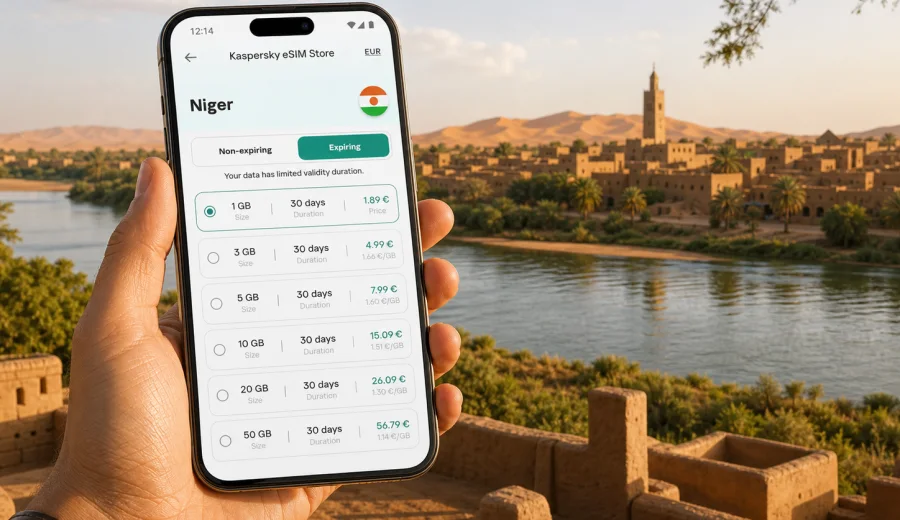
eSIM in Niger: mobile connection and internet for travel
Niger is a country where a practical mobile internet plan can change the way your trip feels from the first day. Distances are long, the climate is demanding, and many travel tasks depend on a working data connection: confirming a hotel address in Niamey, checking a route toward Dosso or Maradi, messaging a driver, translating a short phrase, or keeping family updated during a multi-day journey.
An eSIM can help you prepare for that routine before you leave. Instead of looking for a physical SIM card after arrival, you install a digital SIM profile on a compatible phone and use a selected mobile data tariff during the trip. For many travelers, this is simpler than relying only on hotel Wi-Fi, airport counters, or standard roaming.
This guide explains how to use eSIM for mobile internet in Niger, what to check before buying a data tariff, how much traffic different travel scenarios may need, and how Kaspersky eSIM Store can help you choose, set up, and activate an eSIM tariff for your route.
Why mobile internet planning matters in Niger
Niger is not a destination where every travel moment happens in one dense city center. Many visitors combine Niamey with road transfers, work meetings, field visits, family travel, or regional stops. Even if your itinerary is simple, you may need data in several different situations.
Typical mobile internet tasks in Niger include:
- messaging contacts on arrival;
- opening hotel and meeting addresses;
- checking airport transfer details;
- using maps before leaving Wi-Fi;
- translating short messages or signs;
- receiving bank, airline, or booking notifications;
- sharing documents with colleagues;
- checking weather and road timing;
- using messaging apps for calls when the data connection is stable.
The key point is control. A prepared eSIM tariff gives you a clear data allowance and validity period before you begin using it. That does not remove the need to check local conditions, device settings, or coverage expectations, but it gives you a cleaner starting point than arriving with no mobile data plan at all.
What an eSIM does for a trip to Niger
An eSIM is a digital SIM profile built into a compatible smartphone, tablet, or other device. You do not insert a plastic SIM card. You add the eSIM profile through your device settings, usually by scanning a QR code or following an installation flow, and then select it for mobile data.
For a trip to Niger, an eSIM is mainly about data. In most travel eSIM scenarios, the tariff is intended for mobile internet and does not include a regular local phone number, traditional voice calls, or SMS unless those features are clearly stated in the tariff conditions. Calls and messages can usually be handled through internet-based apps when the connection allows it.
Before you choose any eSIM tariff, check that your device supports eSIM and that it is not locked to one mobile operator. This step is especially important if your phone was bought through a carrier contract.
eSIM, roaming, local SIM, or Wi-Fi: what fits your trip?
There is no single best option for every traveler. The right choice depends on how long you will stay, how much data you use, how comfortable you are with local setup tasks, and whether you need internet immediately after landing.
| Option | Best for | What to consider |
|---|---|---|
| eSIM tariff | Travelers who want to prepare mobile data before the trip | Requires a compatible, unlocked device and correct activation settings |
| Standard roaming | Short trips where convenience matters more than price control | Conditions and costs depend on your home operator |
| Local physical SIM | Longer stays where you are comfortable buying locally | May require time, documents, store availability, and phone SIM slot changes |
| Public or hotel Wi-Fi | Light use at fixed locations | Not useful between locations and may be less predictable for sensitive tasks |
For Niger, many visitors prefer to reduce setup friction. If you arrive after a long flight or have a driver waiting, the first hour is not the ideal time to compare local options, search for a counter, or troubleshoot language barriers. Preparing an eSIM in advance can make that first hour calmer.
How much data do you need in Niger?
Your data usage depends more on habits than on the country itself. A person who only sends messages can use very little data. A person who watches video, joins calls, syncs photos, or shares a hotspot can burn through a small package quickly.
Use this practical estimate before choosing a tariff:
| Travel style | Likely data use | Practical notes |
|---|---|---|
| Light traveler | 1-3 GB for a short stay | Messaging, maps prepared offline, basic browsing |
| Standard traveler | 3-10 GB for one to two weeks | Maps, booking apps, email, social updates, translation |
| Work traveler | 10-20 GB or more | File sharing, video calls, cloud documents, laptop tethering |
| Content-heavy traveler | 20 GB or more | Frequent photo backup, video, hotspot, streaming |
Maps deserve special attention. If you download offline maps before you travel, you reduce mobile data use and keep navigation available when the signal is weak. If you depend on live maps, satellite layers, constant rerouting, and location sharing, your data use will be higher.
Video is the easiest place to save traffic. Streaming, short videos, and automatic cloud uploads can use more data than messaging, maps, and email combined. Before your flight, switch off automatic media downloads and cloud photo backup on mobile data if you want the tariff to last longer.
When to install and activate your eSIM
Installation and activation are different steps. Installation adds the eSIM profile to your device. Activation starts or prepares the tariff according to the rules of the selected plan. The exact behavior can vary by tariff, so read the plan conditions before you travel.
A careful setup sequence looks like this:
1. Check that your phone supports eSIM and is unlocked.
2. Choose Niger as your destination and compare data volume and validity.
3. Install the eSIM while you still have stable Wi-Fi.
4. Keep your primary SIM available for calls and important messages if needed.
5. On arrival, select the eSIM for mobile data.
6. Turn on data roaming for the eSIM if the installation instructions or device settings require it.
7. Test a simple webpage or messaging app before leaving the airport or hotel.
If you are using Kaspersky eSIM Store, you can review available options and prepare an eSIM tariff for Niger before departure. Place this step after you know your route and approximate data needs, not before you have checked device compatibility.
Practical scenarios for Niger travel
Niger trips often involve different connectivity patterns. A city stay in Niamey is not the same as a regional road itinerary. The following examples can help you choose a tariff more realistically.
Arrival in Niamey
Niamey is the most common entry point for international travelers. During arrival, mobile internet can help you contact a hotel, coordinate a pickup, confirm a meeting location, and open a map. If you already installed an eSIM, you can usually focus on device settings instead of searching for a physical SIM card.
Prepare before landing:
- save your hotel address offline;
- keep booking references in your files app;
- download key map areas over Wi-Fi;
- keep your eSIM installation QR code or instructions accessible;
- know which SIM line should handle mobile data.
Work trip with meetings
For business, NGO, research, or field coordination, data reliability is partly about preparation. You may need email, messaging, shared documents, and location pins throughout the day. If your schedule includes moving between offices, hotels, and project sites, a larger data package gives more room for unexpected use.
Good practice for work travel:
- bring a power bank;
- keep important documents available offline;
- avoid large system updates on mobile data;
- test hotspot use before a critical call;
- keep a backup communication channel with your team.
Regional travel beyond the capital
Road travel to places such as Dosso, Tahoua, Maradi, Zinder, or Agadez can involve long distances and changing network conditions. An eSIM tariff can help with mobile data where service is available, but it should not be treated as a guarantee of continuous connectivity. Save key information offline and tell contacts when you may be hard to reach.
For regional routes, prepare:
- offline maps for the full route;
- addresses and coordinates saved in advance;
- downloaded tickets, permits, or hotel confirmations;
- extra data allowance if you share location or use messaging heavily;
- a clear plan for emergencies that does not depend only on mobile data.
Family or group travel
Groups often use more data than expected because one person becomes the navigation point, translator, photo sender, and hotspot owner. If several travelers need mobile internet, each person with a compatible device can use their own eSIM tariff, or one person can share data when hotspot use is allowed by the tariff and device.
Check hotspot rules before relying on this plan. Some tariffs may allow tethering, while others may restrict it. The safest approach is to read the conditions of the selected tariff instead of assuming that every plan behaves the same way.
Choosing an eSIM tariff for Niger
Do not choose only by the smallest number on the screen. Look at the full set of conditions: data volume, validity, destination, activation rules, price, top-up options, and whether the tariff fits your actual use.
A practical decision checklist:
- Trip length: choose a validity period that covers the whole stay, including arrival and departure days.
- Data volume: estimate maps, messaging, work apps, and possible hotspot use.
- Activation timing: understand when the validity period starts.
- Device support: confirm eSIM compatibility before checkout.
- Main SIM needs: decide whether your home SIM should remain active for calls or bank messages.
- Settings: know where to switch mobile data lines on your phone.
- Support: keep access to help instructions in case setup takes longer than expected.
Kaspersky eSIM Store is an app and website where you can choose, arrange, install, and activate an eSIM with a suitable mobile internet tariff for an international trip. It helps you compare the available data amount and validity period for your destination before you travel.
Installing eSIM on iPhone or Android
The installation process depends on your device model and operating system version, but the general logic is similar. You add the eSIM profile, label it clearly, choose which SIM handles mobile data, and then test the connection when the tariff is ready to use.
For step-by-step setup, use the relevant internal guide: installation instructions for Android or installation instructions for iOS. Follow the guide while you have a stable Wi-Fi connection, because the device may need to download and register the eSIM profile.
After installation, give the eSIM a clear label such as "Niger data" or "Travel data". This makes it easier to avoid using the wrong SIM line for mobile data, especially if your primary SIM remains active for calls or messages.
Settings to check before you use mobile data
Many eSIM issues are not caused by the tariff itself. They happen because the phone is still using the home SIM for data, mobile data is disabled, roaming for the eSIM line is off, or the device has not selected the correct network settings yet.
Before you leave Wi-Fi, check:
- the eSIM profile is installed and visible in device settings;
- the eSIM is selected for mobile data;
- data roaming is enabled for the eSIM if required;
- your primary SIM is not accidentally selected for data roaming;
- low data mode is configured the way you want;
- automatic app updates are disabled on mobile data;
- the phone has been restarted if the connection does not appear after setup.
If the connection is slow, test a simple webpage before opening data-heavy apps. If nothing loads, review the installation instructions and selected SIM line first. Avoid deleting an eSIM profile unless the support instructions tell you to do so, because some profiles cannot be installed again after removal.
Data-saving tips for Niger
Good data management is useful in any country, but it matters more when you travel with a fixed package. A few settings can make a smaller tariff last much longer.
Use these habits:
- download offline maps before the trip;
- save hotel addresses, meeting locations, and tickets offline;
- disable automatic cloud photo backup on mobile data;
- turn off automatic video playback in social apps;
- send compressed images in messengers when quality is not important;
- update apps only on Wi-Fi;
- use Wi-Fi for large downloads when you trust the network;
- monitor remaining data in your eSIM account or device settings.
What to know about calls, SMS, and banking messages
Travel eSIM tariffs are usually designed for mobile data. That is enough for maps, email, browsers, messengers, translation, and many travel apps, but it may not replace every function of your regular SIM card.
Before you travel, check how your bank, airline, employer, and key services send verification codes. If they rely on SMS to your home number, keep your primary SIM active or arrange another verification method. On dual-SIM phones, you can often keep your home SIM available for calls or SMS while using the eSIM for data.
Common mistakes to avoid
Review these common issues before departure.
| Mistake | Why it causes trouble | Better approach |
|---|---|---|
| Buying before checking device compatibility | Some phones do not support eSIM or may be carrier-locked | Check support and unlock status first |
| Installing only after landing with no Wi-Fi | Setup may be harder if airport connectivity is limited | Install over stable Wi-Fi before travel when possible |
| Choosing too little data | Maps, calls, and uploads can use data quickly | Match the tariff to the whole itinerary |
| Leaving home SIM on for roaming data | Your phone may use the wrong line | Select the eSIM for mobile data |
| Deleting the eSIM profile during troubleshooting | Some profiles may not be reusable | Follow support instructions before removing anything |
| Ignoring validity rules | The tariff may expire before the trip ends | Check activation and duration conditions |
Quick preparation checklist
Use this checklist one or two days before your trip to Niger:
- confirm your phone supports eSIM;
- check that the phone is not locked to one carrier;
- choose a data amount and validity period for your itinerary;
- install the eSIM profile over Wi-Fi;
- label the eSIM clearly in settings;
- download offline maps for Niamey and planned routes;
- save hotel, airport, and contact details offline;
- disable automatic media backup on mobile data;
- keep your primary SIM available if you need SMS codes;
- test the setup process before a time-sensitive travel day.
FAQ: eSIM and mobile internet in Niger
Can I use eSIM in Niger for regular phone calls?
Most travel eSIM tariffs focus on mobile internet. A regular local phone number, voice calls, and SMS are not included unless the selected tariff clearly says otherwise.
Should I install the eSIM before I arrive?
In many cases, yes. Installing the eSIM profile over stable Wi-Fi before travel reduces pressure after arrival. Activation rules depend on the tariff, so read the conditions before you turn it on.
Will eSIM replace hotel Wi-Fi?
It can reduce your dependence on Wi-Fi, but use Wi-Fi for large downloads, app updates, and backups when you trust the network.
Is eSIM useful outside Niamey?
It can be useful where mobile data service is available, but conditions can vary by route and location. For regional travel, prepare offline maps and documents instead of relying only on continuous mobile data.
Can I keep my home SIM active?
Usually, yes, if your phone supports dual-SIM operation with eSIM. You can use the eSIM for mobile data and keep your primary SIM for calls or SMS, depending on your device and operator settings.
What if I need more data during the trip?
Check the conditions of your selected tariff and the options available in your account or app. If top-up or another tariff is available for your destination, choose it according to your remaining travel days and expected use.
Final advice before choosing an eSIM for Niger
The most reliable travel setup is the one you understand before you need it. Check your device, choose a realistic data amount, install the eSIM on Wi-Fi, save key route details offline, and know which SIM line your phone will use for mobile data.
For Niger, this preparation is useful because travel can involve long transfers, changing signal conditions, and moments when you need practical information quickly.
Before your trip, open Kaspersky eSIM Store and choose an eSIM tariff for your trip to Niger. Select the data volume and validity period that match your route, install the eSIM on a compatible device, and start the journey with your mobile internet plan already prepared.