
Travel connectivity guide
eSIM for Nigeria: mobile internet guide
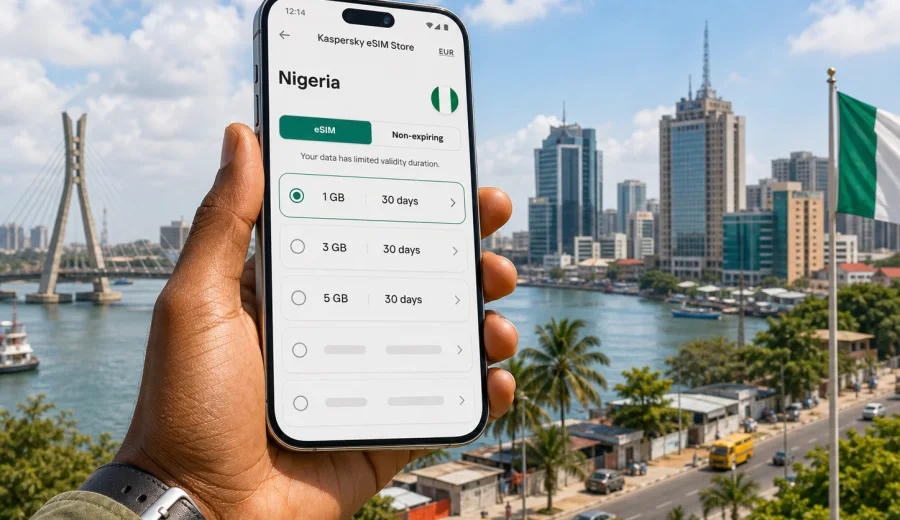
eSIM for Nigeria: mobile connection and internet for your trip
Nigeria is a country where mobile internet can be useful from the first minutes of a trip. You may need maps after landing in Lagos, a ride-hailing app in Abuja, messenger access for hotel check-in, or a stable data connection during a business visit to Port Harcourt, Kano, Ibadan, or coastal destinations. An eSIM helps you prepare this part of the trip before you start looking for a local shop or relying on airport Wi-Fi.
This guide explains how to use an eSIM for Nigeria, how to choose a data plan, what to check before purchase, and how Kaspersky eSIM Store fits into the travel scenario. The focus is practical: mobile connection, internet access, device compatibility, activation steps, and realistic expectations while you are abroad.
Why an eSIM can be useful in Nigeria
An eSIM is a digital SIM profile installed on a compatible phone or tablet. Instead of inserting a plastic SIM card, you add the eSIM profile to your device and use it for mobile data in the selected destination. For a trip to Nigeria, this can be convenient because your travel day often includes several online tasks at once: finding transport, opening booking confirmations, contacting a host, checking routes, and sharing arrival details.
With an eSIM, you can prepare mobile internet before departure or shortly after arrival. You do not need to wait until you find a mobile shop, compare unfamiliar local offers in a hurry, or depend on a public hotspot at the airport. This is especially useful if your first stop is not the same place where you will spend most of the trip.
Typical Nigeria travel scenarios where eSIM data helps:
- Arrival at Murtala Muhammed International Airport in Lagos and transfer to Victoria Island, Lekki, Ikeja, or the mainland.
- A work trip to Abuja with meetings across different districts.
- A multi-city route that includes Lagos, Abuja, Ibadan, Kano, Enugu, or Port Harcourt.
- A family visit where you still need maps, banking apps, messengers, and cloud documents.
- A short stopover where buying a physical SIM would take more time than it is worth.
The key benefit is not that eSIM removes every travel problem. It gives you a planned way to get mobile data on a compatible device, with the plan conditions visible before you start using it.
What an eSIM plan usually gives you
For travel, an eSIM plan is mainly about mobile data. It helps you open maps, use messengers, check email, browse websites, call through internet-based apps, upload documents, and use travel services. In many travel eSIM plans, ordinary voice calls and SMS are not included unless the specific plan says otherwise. If you need calls, check the plan terms before purchase and keep your main SIM active if you rely on your regular number.
The practical difference is simple:
| Task in Nigeria | How eSIM data helps |
|---|---|
| Navigation | Open maps, check traffic, and find hotels, offices, restaurants, or stations. |
| Transport | Use ride-hailing apps, booking apps, and arrival messages. |
| Work | Read email, join chat apps, upload files, and use cloud tools. |
| Travel admin | Access airline apps, hotel reservations, insurance documents, and payment confirmations. |
| Communication | Use messengers and internet calls when the app and local network conditions allow it. |
You should still keep a backup plan for critical moments. Save your hotel address offline, keep important booking references available without internet, and make sure your phone battery can last through the arrival day.
How to estimate mobile data for Nigeria
Choosing the right data volume depends on how you travel. A person who only needs maps and messaging will use much less data than someone who uploads videos, uses video calls, or works from a laptop through a hotspot.
Use this simple estimate before you choose a plan:
| Travel style | Common use | Possible plan logic |
|---|---|---|
| Light use | Maps, chats, email, occasional browsing | A smaller data package may be enough for a short trip. |
| Everyday travel use | Navigation, transport apps, browsing, social apps, photos | Choose a medium package with enough room for daily tasks. |
| Work-focused trip | Email, file sharing, video meetings, hotspot use | Consider a larger package and monitor usage closely. |
| Multi-city route | Frequent maps, transport, bookings, communication | Pick a plan with enough validity for the full route. |
Video is usually the fastest way to consume data. Short clips, video calls, cloud backups, automatic app updates, and photo synchronization can quickly reduce the remaining balance. If you want your plan to last, disable automatic downloads, update apps on trusted Wi-Fi, and reduce video quality when possible.
What to check before buying an eSIM for Nigeria
Before you buy a travel eSIM plan, confirm four things: device compatibility, SIM lock status, plan conditions, and timing. These checks take only a few minutes and can prevent the most common setup issues.
First, your phone or tablet must support eSIM. Many recent iPhone, Samsung Galaxy, Google Pixel, and some other devices support eSIM, but support depends on the exact model and region. Some devices sold through mobile operators may also be locked to one network. Before purchase, check your device and confirm that it can add an eSIM profile.
Second, read the plan details. Look at the destination, data volume, validity period, activation rules, and whether top-up is available. Do not assume that every plan starts the same way. Some plans start counting validity after installation, others after first connection to a supported network in the destination, depending on the terms.
Third, decide when you will install the eSIM. Many travelers prefer to install the profile before departure while they still have reliable home internet. Then they switch mobile data to the eSIM after arrival. If the plan terms say activation starts immediately after installation, adjust your timing.
Finally, make sure you can still receive important security messages. If your bank or airline sends SMS to your regular number, keep your primary SIM available when possible and check roaming settings for that line separately.
Kaspersky eSIM Store in this travel scenario
Kaspersky eSIM Store is an app and website where you can choose, arrange, and activate an eSIM with a suitable mobile internet plan for an international trip. It is not a mobile operator and it does not own a mobile network. The useful part for a traveler is that the country, data volume, validity period, and price are shown before you select a plan.
For Nigeria, this helps you prepare mobile internet in a more controlled way. You can compare available data packages for the destination, choose the size that fits your trip, and keep the eSIM details in your profile or app. This is more practical than deciding everything after a long flight, when you may need transport and directions immediately.
If your trip is already planned, you can view mobile internet options for Nigeria and choose a plan that matches your stay, expected data use, and device compatibility. This link is most useful after you have estimated your data needs and checked that your device supports eSIM.
How to choose an eSIM plan for Nigeria
Start with the length of your trip. A weekend in Lagos has different needs from a two-week route across several cities. Then check your expected daily use. If you use maps, chat, email, banking apps, and light browsing, your data needs may be modest. If you work remotely, join calls, share media, or use your phone as a hotspot, choose more data.
A practical selection checklist:
- Destination: the plan should include Nigeria or the relevant region.
- Validity: the plan should cover the full travel period, including arrival and departure days.
- Data volume: choose enough data for your normal usage, plus a buffer.
- Activation rules: check when the validity period starts.
- Top-up: check whether additional data can be added if you run low.
- Device: confirm that your phone supports eSIM and is not locked by a carrier.
Do not choose only by the smallest price. A plan that is too small can be inconvenient if you need maps, work access, and messaging every day. A plan that is much larger than your actual usage may be unnecessary for a short stay. The better choice is the one that fits your route, habits, and need for reliability.
Installing and activating an eSIM
The basic process is straightforward: choose a plan, complete the order, install the eSIM profile, and select it for mobile data. The exact screens differ between iOS and Android, so follow the instructions for your device. You can use the Android installation guide or the iOS installation guide when you are ready to add the profile.
A simple setup flow looks like this:
1. Connect your phone to stable Wi-Fi.
2. Open the eSIM details after purchase.
3. Add the eSIM profile by QR code or on-screen instructions.
4. Give the eSIM a clear label, such as "Nigeria data".
5. Keep your primary SIM for calls and SMS if you still need it.
6. After arrival, select the eSIM for mobile data.
7. Enable data roaming for the eSIM if the instructions or plan details require it.
8. Check that mobile data works before leaving the airport or hotel.
Do not delete the eSIM profile unless you are sure it is no longer needed. In many cases, an eSIM profile cannot simply be moved to another device after activation. If you change phones during a trip, check the plan conditions and support options first.
Practical settings for a smoother trip
Phone settings matter almost as much as the plan. A few small changes can reduce data waste and help the plan last longer.
Before departure:
- Update key apps on Wi-Fi: maps, banking, airline, hotel, ride-hailing, and messaging apps.
- Download offline map areas for Lagos, Abuja, and any city on your route.
- Save hotel addresses, booking references, and emergency contacts offline.
- Turn off automatic cloud backups over mobile data.
- Disable automatic app updates over mobile data.
- Check that your phone has enough free storage for app updates and offline maps.
After arrival:
- Set the eSIM as the line for mobile data.
- Keep your regular SIM for calls and SMS only if needed.
- Test maps, messaging, and browser access.
- Watch your data balance during the first day to understand real usage.
- Use trusted Wi-Fi for large downloads where available.
If mobile data does not work immediately, do not keep changing random settings. Confirm that the eSIM is installed, mobile data is assigned to the eSIM, data roaming is enabled if required, airplane mode is off, and your device is in an area with local network signal. Restarting the phone can also help after changing mobile profiles.
Nigeria travel situations where mobile internet matters
Mobile internet is most valuable when timing is tight. In Nigeria, a trip may include airport transfers, traffic changes, address checks, local coordination, and frequent messaging. If you arrive in Lagos, it is useful to have data before you leave the airport area, because routes and travel time can change quickly. If you are going to Abuja, you may need maps and contact details for government, business, or conference locations.
For leisure travel, data helps with everyday decisions: checking opening hours, finding restaurants, sharing your location with friends, and translating short messages. For family visits, it helps coordinate pickups, share arrival updates, and stay reachable across different neighborhoods. For work, it helps keep email, calendar changes, document access, and chat tools available without waiting for hotel Wi-Fi.
The point is not to be online every second. The point is to avoid losing access at moments when the internet is part of the trip itself.
eSIM, roaming, local SIM, and Wi-Fi: how they compare
There is no single best option for every traveler. Each method has tradeoffs.
| Option | Strengths | Things to consider |
|---|---|---|
| Travel eSIM | Can be prepared in advance, no physical SIM swap, clear data package terms. | Requires an eSIM-compatible unlocked device and correct setup. |
| Standard roaming | Uses your existing mobile number and operator account. | Costs and limits depend on your home operator; check terms before travel. |
| Local physical SIM | May be useful for longer stays or local voice needs. | Requires buying and installing a card after arrival; conditions may vary. |
| Public Wi-Fi | Useful for large downloads in hotels or offices. | Availability, speed, login rules, and security can vary. |
Many travelers combine options. For example, you can use eSIM for everyday mobile data, keep your regular SIM for important SMS, and use trusted Wi-Fi for large downloads. This approach gives you flexibility without depending on a single connection method.
Common mistakes to avoid
Avoid these mistakes when preparing mobile internet for Nigeria:
- Buying before checking device compatibility.
- Installing the eSIM too early without checking when validity starts.
- Forgetting to set the eSIM as the mobile data line after arrival.
- Leaving automatic video uploads and cloud backups on mobile data.
- Assuming a data eSIM includes a local phone number.
- Deleting the eSIM profile before the trip ends.
- Waiting until arrival to read the installation instructions.
A careful setup takes less time than solving connection problems after a long flight. If the trip is important, install and review everything while you still have a calm environment and stable Wi-Fi.
Quick summary for Nigeria
An eSIM for Nigeria is useful when you want mobile internet for maps, transport, messaging, work tools, and travel documents without buying a physical SIM card after arrival. Choose a plan by destination, validity period, data volume, and activation rules. Check device compatibility before purchase. Install the profile on stable Wi-Fi, then select it for mobile data when you arrive. Keep your regular SIM active if you need SMS or calls from your home number.
Kaspersky eSIM Store helps with the selection and activation flow by showing available plan conditions for the destination and giving you a place to manage the eSIM details through the website or app.
FAQ
Does an eSIM for Nigeria include calls and SMS?
Many travel eSIM plans are data-only. Ordinary voice calls and SMS are not included unless this is stated in the selected plan terms. You can usually use internet-based calling and messaging apps through mobile data.
Can I install the eSIM before flying to Nigeria?
In many cases, yes. Installing before departure can be convenient because you can use stable Wi-Fi at home. Check the plan conditions first, especially the rule for when validity starts.
Should I remove my regular SIM?
Usually, no. If your phone supports dual SIM with eSIM, you can keep your regular SIM for your usual number and use the eSIM for mobile data. Check your device settings carefully to avoid unwanted roaming charges on the wrong line.
What if my phone does not support eSIM?
You will need another option, such as standard roaming, a local physical SIM, or Wi-Fi. This is why compatibility should be checked before purchase.
Can I share eSIM data with a laptop?
Some devices and plans allow hotspot use, but this can depend on the plan terms and device settings. If you plan to work from a laptop, check the conditions and choose enough data.
What happens when the data runs out?
The next steps depend on the selected plan. Some plans may support top-up or an additional purchase. Monitor your balance, especially if you use video calls, cloud storage, or hotspot mode.
Choose an eSIM plan for your trip to Nigeria
Preparing mobile internet in advance can make the first day of travel easier. Check that your device supports eSIM, estimate your data needs, review the plan validity, and install the profile while you have reliable Wi-Fi. When you are ready, choose an eSIM plan for Nigeria in Kaspersky eSIM Store and set up mobile data for your trip before you need it on the road.