Travel connectivity guide
Nitra eSIM: Mobile Internet for Your Trip
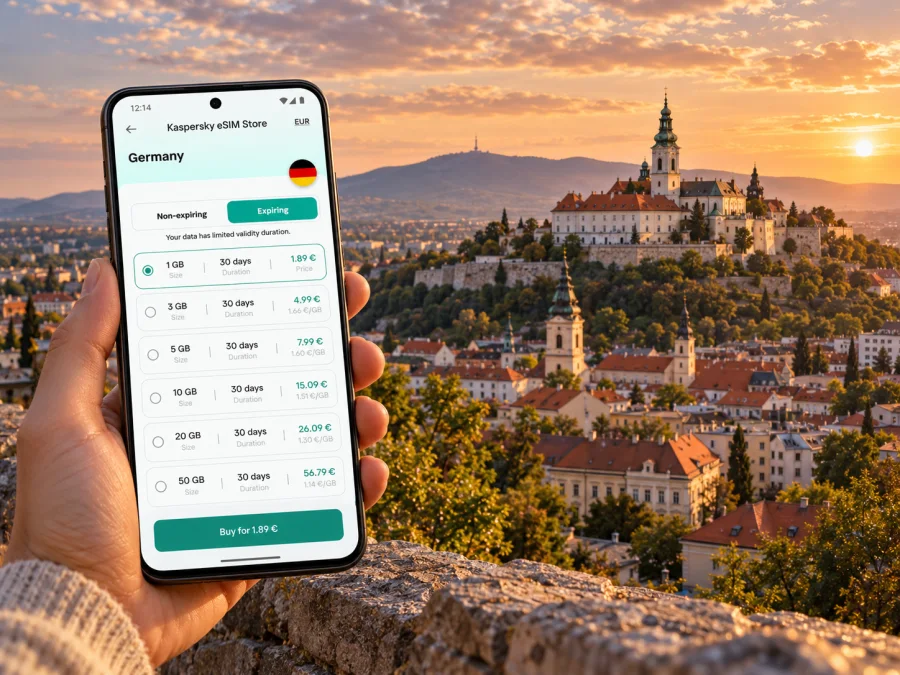
Nitra eSIM: Mobile Connection and Internet for Your City Trip
Nitra is compact enough for a weekend on foot, yet a visit can include a castle hill, a conference venue, an outlying district, or a walk toward Zobor. A working mobile connection helps with the practical links between those plans: checking a route, finding your accommodation, confirming a meeting, or messaging the people you are travelling with. An eSIM can prepare mobile internet for your Slovakia trip without replacing the physical SIM already in your phone.
The key is to prepare for the route you will actually take. Nitra does not have a regular commercial passenger airport in the city: its local airfield serves non-scheduled aviation. Many visitors therefore arrive in Slovakia through another airport and continue to Nitra by road or rail. If your booking lists a different arrival city, keep that transfer in mind when choosing a data allowance and when deciding where to install or activate your eSIM.
Where mobile internet helps in Nitra
Nitra’s historic centre is arranged around the old town and the castle above it. Streets and landmarks are close together, but the climb to the castle and walks toward the city’s hills make a map useful. A connection can help you check the best approach, confirm opening information before setting out, and find your way back to a bus stop or hotel after dark. Downloading an offline map before you leave is still a sensible backup.
The city also hosts exhibitions, congresses, festivals, and university activity. That gives a short visit a different rhythm from a sightseeing-only weekend: you may need to coordinate a meeting, receive a venue update, share a document, or look up a place to eat between appointments. For a lighter trip, messaging, online maps, ride details, and ticket information may be the main uses. For remote work, video calls and file transfers can use considerably more data, so estimate that separately rather than choosing a package based only on navigation.
Nitra’s centre has pedestrian streets and historic sights, while places such as the exhibition grounds, outlying neighbourhoods, and the Zobor side of town may involve a bus or a longer walk. Keep the address of your hotel saved offline and check the route before leaving a Wi-Fi connection. In older streets, use the map as a guide but watch street signs and local directions; a phone map does not tell you whether a gate, path, or venue entrance is open at that moment.
A useful first-hour checklist
- Save the accommodation address in both its written form and on an offline map.
- Check which airport or station is shown on your booking and how you will continue to Nitra.
- Keep your ticket, transfer details, and the first destination available offline.
- If you use an eSIM, confirm that its profile is installed and that you know which line is set for mobile data.
- Keep your primary number available for calls or verification messages if you still need it.
Arrival: plan the transfer as well as the city
The name “Nitra Airport” can be misleading for a visitor booking a standard European city flight. Nitra’s airfield is classified for non-scheduled traffic; it is not the city’s usual commercial passenger gateway. Check the airport code on your ticket before departure and plan the onward leg from that airport. Depending on your itinerary, the final transfer may be by coach, train, rental car, or a combination of services. Timetables and connections can change, so check them close to travel and leave enough margin for a missed connection.
If you arrive by train, locate your accommodation before leaving the station area. A map can help you compare a walk with a local bus or taxi, but do not assume that a route that looks short is flat: Nitra’s historic landmarks sit above parts of the centre. If you arrive by coach, check the exact stop name and whether it is the main bus station or another city stop. A saved pin helps when several street names are unfamiliar.
For a car transfer, keep the hotel address and parking instructions handy before the driver sets off. In a rental car, use navigation with audio prompts where possible and avoid handling your phone while driving. When crossing the city on foot, use the map for orientation, then put the phone away on steps, uneven paving, or busy crossings. Nitra’s old-town lanes and hillside approaches reward a slower pace.
A connection is most useful when it works with your real arrival sequence. If you install an eSIM before departure, you can be ready to use it when the relevant network is available, subject to the tariff’s activation rules and your device settings. If you prefer to wait, keep the QR code or installation details accessible offline and make sure you have a reliable Wi-Fi connection for setup. Do not remove an eSIM profile just because it has not connected yet; first check the instructions and the plan conditions.
Choosing an eSIM plan for a Nitra itinerary
An eSIM plan is generally selected for a country or region, rather than for a single city. For a stay in Nitra, check that the destination listed in the plan includes Slovakia. If you cross a border during the same trip, verify that the plan also covers the next country; a Slovakia-only option and a regional option are different products. The live terms on the plan page are the place to confirm current coverage, data allowance, duration, price, and any restrictions.
Plan in advance. Before comparing offers, map your trip rather than choosing by the city name alone. Note how many days you will spend in Slovakia, whether your onward journey crosses a border, and whether you need data during the transfer into Nitra. Then compare the plan’s stated destination, duration, allowance, and activation conditions against that itinerary. If the trip changes, revisit those terms before relying on the same allowance.
See the current eSIM options for a trip to Slovakia
Choose an allowance around your habits, not only the number of days. Maps and messages usually use less data than video calls, streaming, photo uploads, or cloud backups. Check recent phone usage, allow a reserve for delays, and use accommodation Wi-Fi for large downloads when practical.
| Trip pattern | Likely mobile-data use | What to check before choosing |
|---|---|---|
| One-day visit or stopover | Maps, messages, tickets, occasional searches | Plan duration and whether the validity period begins at installation, activation, or first connection |
| Weekend in the centre | Navigation, bookings, photos, messaging | Whether your photo backup or app updates may use mobile data automatically |
| Conference or business visit | Email, documents, maps, possible video calls | Expected call length, hotspot rules, and whether venue Wi-Fi will be available |
| Nitra plus other Slovak cities | Navigation and transport checks between stops | Country coverage, the full route, and the plan’s duration |
| Multi-country itinerary | Maps, messaging, travel coordination across borders | Every country included, network conditions, and any fair-use or activation terms |
Before payment, compare the package size with your own habits and read the full conditions. Confirm the listed validity, supported destination, how the plan starts, whether tethering is allowed if you need it, and what happens when the allowance is used. Do not rely on a headline such as “unlimited” without reading any speed, fair-use, or time limits shown in the current offer. A displayed plan can change, so check the live page again if you are booking well ahead.
Kaspersky eSIM Store is an app and website where you can choose, arrange, and activate an eSIM with a suitable tariff for mobile internet during an international trip. The tariff’s connectivity is supplied under its stated terms; Kaspersky eSIM Store is not a mobile network operator. A travel eSIM is intended for data unless the selected offer explicitly says otherwise. It may not include a regular phone number, voice calls, or SMS, so keep your existing line or use internet-based calling and messaging where appropriate.
Getting around: maps, buses, and hills
Nitra’s city buses connect the railway station and districts including Zobor, Klokočina, Chrenová, and the exhibition area. Routes and schedules are updated over time, so use current operator information rather than an old screenshot or a timetable copied into a travel note. The local BUS Nitra app provides route and service information, and its features include journey planning and a map of buses. Check current ticket options and activation rules before boarding; buying a ticket in an app may require you to activate it before you get on.
Mobile data helps you check a route while plans change, but it does not replace ticket validation. Keep a payment method that works for you and make sure you understand the local ticket instructions. If your battery is low, save the stop name and route number before leaving the hotel. At a transfer, compare the direction shown on the bus with the destination in your journey planner instead of relying on colour or number alone.
The historic centre can be explored on foot, with the castle as a natural point of reference. The route to the castle rises uphill, and walks toward Calvary or Zobor involve more elevation and may take longer than the distance on a screen suggests. Wear suitable shoes, check the weather, and download directions while you have Wi-Fi. If you set out on a marked trail, use an offline map and tell someone your plan; a city data plan should not be treated as a safety device or a substitute for preparation.
For a short sightseeing circuit, you could save these pins before leaving your hotel:
- Nitra railway station or your arrival stop;
- Svätopluk Square and the pedestrian area;
- Nitra Castle and the Upper Town;
- your chosen bus stop for the return journey;
- your accommodation and an alternative meeting point.
Keep the list focused. Too many saved places can make the map harder to read when you need a quick decision.
Work trip, conference, or fair
Nitra’s exhibition and conference calendar can bring visitors whose schedule revolves around a venue rather than the old town. In that case, navigation has a more specific job: identify the correct gate, find the route between your hotel and the venue, and keep colleagues updated if a meeting runs late. Save the event address and ticket or registration details before travelling. If the event sends schedule changes by email, make sure you can access the account or save essential messages offline.
For remote work, estimate data use by task. Email and document review are usually lighter than video meetings, large uploads, or hotspot use, but actual consumption varies by app and call quality. Ask whether the hotel or venue has suitable Wi-Fi, and check the eSIM plan’s tethering terms if you intend to connect a laptop. Carry a charging cable or power bank and keep the main meeting details accessible without a connection.
A simple workday setup can reduce surprises:
- Save the venue pin, appointment time, and contact details.
- Check the route from your accommodation at the time you expect to travel.
- Set mobile data to the eSIM only after confirming the correct profile is active.
- Use Wi-Fi for large downloads or updates when practical.
- Keep a backup route and enough battery for the return trip.
Compatibility and installation before you travel
Before choosing a plan, check whether your device supports eSIM and confirm it is not locked to a carrier. Compatibility can vary between devices that share a product name, including regional versions. Check the phone’s settings, the manufacturer’s information for your exact model, and any restrictions shown by your current mobile provider. If you are unsure, resolve that before paying; do not assume that a physical-SIM version and an eSIM version are identical.
Install the profile while you have a stable internet connection and enough battery. The exact menu names depend on the phone and operating-system version. Follow the instructions for your device: eSIM installation for Android or eSIM installation for iOS. Keep the QR code available on another screen or in a place where you can retrieve it, and follow the tariff’s directions about when to install and activate. Some plans start their validity at a particular stage, so read that condition before proceeding.
After installation, label the new line clearly, for example “Slovakia data,” and decide which line should handle calls and which should handle mobile data. When you reach the destination, select the eSIM for data if that is what the plan requires. Some plans require data roaming to be enabled for the eSIM; check the plan instructions rather than changing settings at random. To avoid unintended charges, confirm that your primary line is not using roaming data when you do not want it to.
Before-you-leave setup checklist
- [ ] Your exact phone variant supports eSIM and is not carrier-locked.
- [ ] The selected plan includes Slovakia and covers your travel dates.
- [ ] You know when the validity period begins and what the plan includes.
- [ ] The eSIM profile or QR code is accessible, and installation instructions are saved.
- [ ] Your primary number remains available for calls or messages if needed.
- [ ] Offline maps, accommodation details, and the first transfer are saved.
- [ ] You know how to switch the mobile-data line and how to contact support.
If the profile does not connect immediately, allow time for the device and local network to complete registration, then check the selected data line, the plan instructions, and any required settings. Restarting the phone can sometimes help, but do not delete the profile unless support or the specific instructions tell you to. If the device shows no service, confirm that the destination is covered and that the plan is active before assuming that the problem is the phone.
What an eSIM does and does not replace
A travel eSIM is useful for mobile data while you move around Nitra and Slovakia, subject to the selected plan’s conditions and local network availability. It can support maps, web searches, messaging apps, email, and internet-based calls. It is not automatically a replacement for your existing number. If you need ordinary calls or SMS to your usual number, keep your main SIM or eSIM active for those services and check your home provider’s roaming terms.
Do not assume that installing the travel profile turns off your home line or prevents roaming charges. Those are separate settings. Check which line is selected for mobile data, whether data switching is enabled, and whether your primary plan has roaming turned on. A dual-SIM phone can keep more than one line available, but the available controls differ by model. If you need bank verification texts or calls, test your setup before departure and keep your home line reachable in the way that suits you.
An eSIM also does not provide a guaranteed signal in every indoor space or on every route. Buildings, terrain, congestion, and the network used by the selected tariff can affect service. Save offline information for the moments when data is unavailable, and use the operator or emergency guidance appropriate to your situation if you need urgent help.
Frequently asked questions
Is there an eSIM specifically for Nitra?
Plans are generally listed for a country or region, not a city. Check that the current plan includes Slovakia and read its terms; a country page is not a city-specific coverage guarantee.
Can I use an eSIM as soon as I arrive?
Possibly, if the profile is installed, the plan is active under its terms, your phone is compatible and unlocked, and service is available. Check when validity begins before installing it.
Does a travel eSIM give me a Slovak phone number?
Not necessarily. Many travel eSIM plans are data-only. Check the specific offer if you need calls or SMS; internet-based messaging apps can use mobile data but do not create a regular phone number.
What if I arrive without mobile data?
Use your offline map and saved transfer details, then connect to trusted Wi-Fi if you need to finish setup. Check the profile, data line, plan status, and required settings. Contact support if service remains unavailable after following the plan instructions.
Can I rely on mobile data for buses?
It can help you check current routes, but it does not replace a valid ticket or required activation. Check the latest operator instructions before boarding, and save your stop name in case the connection drops.
Make the trip easier to navigate
For Nitra, prepare the first leg before departure, save the places you plan to visit, and choose an eSIM tariff by destination, duration, and realistic data use. Keep offline maps and travel details as a backup, check bus information close to travel, and confirm that your exact device variant supports eSIM. These steps make it easier to move between the station, the old centre, the castle, and the hills without depending on a single app or connection.
When you are ready, review the current Slovakia eSIM options, compare the stated terms with your route, and choose a plan that fits your trip. Install and activate it according to the plan instructions, then use the eSIM for mobile data when appropriate. Kaspersky eSIM Store helps you choose, arrange, and activate an eSIM for international travel; the tariff’s actual service and coverage depend on its listed conditions and the local network.


