Travel connectivity guide
Noida eSIM Guide: Mobile Internet for Your Trip
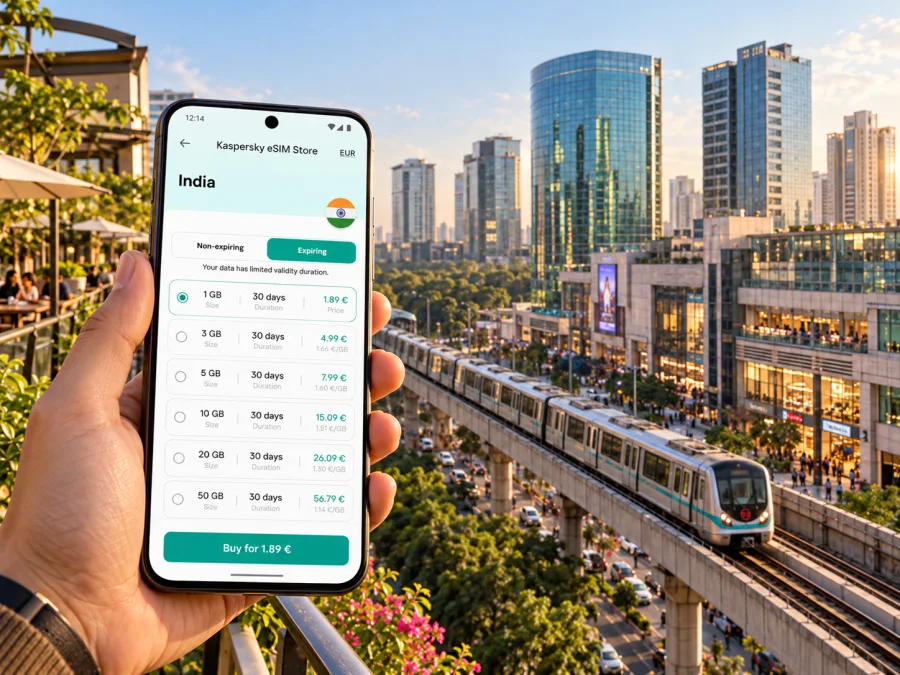
Noida eSIM for mobile connection and internet on your trip
Noida is a city in Uttar Pradesh, within the National Capital Region (NCR) around Delhi. Its sectors, office districts, shopping areas and residential neighbourhoods are spread over a wide urban area, so a working mobile connection can make the first hours of a visit much easier. You may need internet to confirm a hotel address, follow a route from the airport, check a meeting location, book a cab or message someone when plans change.
An eSIM gives a compatible phone a way to use a mobile data plan without inserting a physical SIM. For a visitor arriving from abroad, it can be prepared before departure and used for maps, ride-hailing, email and messaging once the plan is active and a supported local network is available. It does not automatically replace your existing number, and a data plan may not include ordinary calls or SMS. Check the individual plan terms and keep your regular SIM available if you need calls, bank verification texts or access to your home number.
This guide focuses on using mobile internet around Noida: arriving via Delhi, choosing where you need to go, moving between sectors and preparing an eSIM for a city itinerary. Network availability and performance depend on the local operator, location, building, device and current conditions. No plan should be assumed to work identically in every indoor space or at every moment.
Start with the geography: Noida, Delhi and Greater Noida
The names can be confusing on a first visit. Noida is in Gautam Buddha Nagar district, Uttar Pradesh, across the Yamuna from Delhi. It is connected to the wider NCR by roads and metro lines, but it is a separate city from Delhi. Greater Noida is another urban area farther south-east; the Noida Metro Aqua Line runs from Noida Sector 51 to Depot Station in Greater Noida. A hotel, office or event described as “Noida” may still be many kilometres from another address with the same city name.
The practical implication is simple: save the full address, including the sector and a nearby landmark, before you leave. “Sector 18,” “Sector 62” and “Sector 137” refer to different parts of the city. A map pin alone may be insufficient if a driver or building entrance uses a different gate. Keep the hotel name and address in an offline note as a backup, and confirm the sector with your host before setting out.
| If your destination is… | Plan for… | Useful mobile data task |
|---|---|---|
| Sector 18 or central shopping areas | A busy commercial district with several possible entrances and pickup points | Check the exact mall, market or meeting pin and share your pickup location |
| Sector 62 or the Electronic City end | An office and technology district near the Blue Line terminus | Confirm the office gate, building name and last-mile ride |
| Sectors 50–52 or central residential areas | A route that may combine a metro station with a short road transfer | Compare the station exit and the address before choosing a cab |
| Sectors 137–150 | A southern office and residential corridor served by Aqua Line stations | Check which station is closest to the exact sector and building |
| Greater Noida | A separate destination beyond Noida, reached by the Aqua Line or road | Verify that the booking and route say Greater Noida, not Noida |
Arriving in Noida through Delhi
Many international itineraries to Noida begin at Indira Gandhi International Airport (IGI) in Delhi. The onward journey is a transfer into Uttar Pradesh, not a short walk from the terminal to a Noida street. Before boarding, compare the destination address, traffic conditions and time of arrival. A pre-booked car, a taxi or a combination of airport and city transit may suit different trips; the best choice depends on luggage, arrival time and the exact sector.
The Delhi Metro network includes the Blue Line connection to Noida Electronic City and stations through Noida, as well as the Airport Express link between IGI Airport and New Delhi. The route may require an interchange, and the final station can still be some distance from your hotel or office. Check current service information and station access on the day of travel. If you arrive late, have heavy bags or are unfamiliar with the area, consider a direct road transfer rather than planning around a connection that may have limited operating hours.
A reliable data connection is useful before the transfer begins: you can find the correct terminal pickup zone, compare directions, message your driver and check whether a train journey needs a change. It is also helpful after landing if an airline, hotel or colleague sends an updated meeting point. Download your boarding pass, hotel confirmation and a map of the surrounding area before departure, so essential details remain available if you temporarily lose signal or battery power.
Moving around Noida: use sectors as route anchors
Noida is laid out around numbered sectors and broad roads. This makes an address easier to describe than in a dense maze of small lanes, but it does not make every trip simple: the same sector can include multiple blocks, gates and large developments. For each appointment, save the full destination name and a map pin, then check the last kilometre separately. If a navigation app offers several entrances, compare them with the instructions from your host or venue.
The Delhi Metro Blue Line serves Noida locations including Sector 15, Sector 16, Sector 18, Botanical Garden, Noida City Centre, Sector 52, Sector 61, Sector 62 and Noida Electronic City. NMRC’s Aqua Line serves Noida Sector 51 and continues through stations such as Sector 137 and Sector 142 towards Depot Station in Greater Noida. The lines are operated as different systems. Sector 51 on the Aqua Line and Sector 52 on the Blue Line are neighbouring interchange points, but check the walking connection, signage and current passenger guidance rather than assuming a same-platform transfer.
A useful rule for trip planning: use the metro for the main cross-city segment where it fits, then allow time for the station-to-door connection. Ride-hailing, taxis or local road transport may be more practical for a short route across a large sector, particularly with luggage, in hot or wet weather, or when you are going to an office park with a specific gate. Traffic can change journey times, so avoid relying on a fixed estimate for a meeting or flight connection.
| Journey pattern | What to check on your phone | Why it matters |
|---|---|---|
| Airport to hotel | Terminal, exact hotel entrance, traffic and pickup point | “Noida” by itself is not a precise drop-off location |
| Hotel to a meeting | Sector, building, gate and metro exit if using rail | Business parks can have multiple access roads |
| Sector 18 shopping stop | Mall or market name and agreed cab pickup location | A busy district can make a vague pickup pin hard to find |
| Noida to Greater Noida | The destination city and Aqua Line or road route | The names sound similar but describe different places |
| Same-day trip into Delhi | Metro line, interchange and last train information | Your return journey may cross a city boundary and a line change |
Keep your navigation app open only when you need it, especially during long outings. A downloaded map, saved places and screenshots of directions can reduce data use and provide a fallback. Mobile internet is especially useful for live changes, traffic, ride updates and messages, while offline information covers the basics if reception drops or your battery runs low.
Where mobile data helps most
A city visit is usually a chain of small decisions rather than one long navigation session. In Noida, an internet connection can help with the transition between those decisions:
- At arrival: retrieve a hotel confirmation, contact a driver and check the correct route from IGI Airport.
- Before a meeting: share your estimated arrival, verify the office building and find a visitor entrance.
- Between sectors: compare metro and road options, then arrange the final transfer.
- At a mall or market: coordinate a meeting point if your group separates and confirm the ride pickup gate.
- During a short stop: message your next host, check opening information and update a calendar invitation.
- On a day trip: load route information before leaving the city and confirm the return connection.
Maps and messaging usually need less data than prolonged video streaming or uploading large files, but actual use varies by app and settings. If you have a limited allowance, disable automatic app updates and cloud photo backups over mobile data, and download media or work files over Wi-Fi before you go out. Keep an eye on the remaining data and the plan’s validity period in the app or account where you purchased it.
For a work visit, test essential services before the first meeting. Open your calendar, verify that two-factor authentication works, and keep any necessary documents available offline. A travel eSIM intended for data can support internet-based messaging and video calls, but do not assume it includes a local phone number, voice minutes or SMS. If a service requires a text to your usual number, retain access to your home SIM or arrange another verification method before travel.
Choosing an eSIM plan for a Noida itinerary
Choose according to your trip, not just the city name. Noida is a specific destination, but your route may also pass through Delhi, Greater Noida or other parts of India. Read the plan’s country or regional coverage, data allowance, validity, activation instructions and any restrictions before purchase. If the same plan is intended for several destinations, verify that every place on your itinerary is covered under its terms.
Kaspersky eSIM Store is an app and website that helps you choose, complete and activate an eSIM with a suitable data plan for an international trip. The listed plan terms determine the allowance, validity and supported destination. Kaspersky eSIM Store is not a mobile operator and does not own the local network; network availability and performance are determined by the relevant local operator and conditions at your location.
Before choosing, answer these questions:
- How many days will you need mobile data, including arrival and departure days?
- Will you use navigation and messaging only, or also frequent video calls, hotspot sharing or large downloads?
- Does the plan cover the destinations on your full route, including any stop in Delhi or Greater Noida?
- When does validity begin: at purchase, installation, first connection or another point stated in the terms?
- Is tethering allowed if you intend to connect a laptop or tablet?
- Does the plan provide data only, or does its product description explicitly include calls or SMS?
- Is the phone unlocked and compatible with eSIM in its specific regional variant?
To compare available options for the country of your trip, you can choose an eSIM plan for travel in India. Review the conditions shown for the particular plan before completing your selection; country availability does not guarantee identical reception in every building or on every street in Noida.
Device and regional-variant checks
An eSIM-ready model name alone is not enough to confirm compatibility. Device support can vary by manufacturer, model number, country of sale and carrier lock status. Some regional variants differ from the version sold in another market. Before buying, check your exact device variant in the manufacturer’s specifications and confirm that it is not restricted to a home carrier. If travelling with a work phone, your organisation’s device policy may also affect whether you can add a travel profile.
You can check whether your device supports eSIM before selecting a plan. If the device does not support eSIM or remains carrier-locked, do not assume that an installation menu will make it compatible. Use the plan’s stated requirements and the phone maker’s information for your exact model. Keep a record of the device’s model number; the marketing name on the box may be shared by several regional versions.
Install and activate before you need directions
Prepare the eSIM on reliable Wi-Fi and follow the instructions for the specific plan. Check when validity begins; it may depend on the plan’s terms. Avoid deleting an installed profile during troubleshooting unless the provider instructs you to do so.
- Confirm eSIM support and that the phone is not carrier-locked.
- Review the plan’s destination, allowance, validity and activation conditions.
- Install the profile using the supplied app flow or QR code, then label it “India data.”
- Keep your home SIM available if you need its number. Select the travel eSIM for mobile data when the plan is ready, and follow its roaming settings.
- After arrival, test a webpage or message and check that the intended line is selected.
For device-specific steps, use the Android eSIM installation instructions or the iOS eSIM installation instructions. A data plan may not include regular calls or SMS; check home-operator roaming charges before leaving its line enabled abroad.
Troubleshooting when the eSIM does not connect
A connection issue may come from setup, phone settings, the local network or the location. Check that the eSIM is enabled and selected for data, confirm that the plan is active and has data remaining, then restart the phone or briefly toggle airplane mode. Follow the plan’s instructions for network selection and roaming; do not change advanced settings by guesswork. Try again outdoors or in another location, since indoor reception can differ. If service still does not work, contact the support channel shown with the plan and include your device model, approximate location and the steps tried.
Keep the accommodation address available offline during troubleshooting. Wi-Fi can help you get support, but avoid relying on a public network as your only connection for sensitive tasks.
Before you leave your hotel: a compact checklist
- [ ] Save the next destination with its sector, building and entrance.
- [ ] Check whether the route involves the Blue Line, Aqua Line or a road transfer.
- [ ] Confirm the meeting time and share your estimated arrival if it changes.
- [ ] Check remaining data and plan validity before a long outing.
- [ ] Carry a charged phone and, for a long day, a power bank.
- [ ] Keep key tickets, bookings and contact details available offline.
- [ ] Verify the return route, especially if your day ends in Greater Noida or Delhi.
- [ ] Retain access to your usual number if you need calls or verification SMS.
Frequently asked questions
Is Noida part of Delhi?
No. Noida is in Uttar Pradesh and belongs to Gautam Buddha Nagar district. It is part of the wider National Capital Region and is connected to Delhi, but it is a separate city. Use the full city and sector in bookings and directions.
Does the Noida Metro connect directly with Delhi Metro?
The Blue Line is part of the Delhi Metro network and serves Noida stations. The Aqua Line is operated by Noida Metro Rail Corporation and runs between Noida Sector 51 and Greater Noida. The systems meet around Sector 51/Sector 52, but passengers should follow current station guidance for the interchange and any walk between stations.
Will one eSIM work in Noida and Delhi?
That depends on the individual plan’s stated coverage. Check that the plan covers India and any other destination you will visit, then review its terms. A country-level plan does not promise the same signal quality at every location, inside every building or on every route.
Can I use an eSIM for regular phone calls?
A data-only eSIM does not provide ordinary voice calls or SMS unless the specific plan says that it does. Internet messaging and calls may work through compatible apps when data is available. Keep your usual number active if you need incoming calls or verification texts, and check your home operator’s roaming charges.
When should I install my eSIM?
Install it before departure when you have stable Wi-Fi and time to follow the plan’s instructions. Check when validity begins, because the trigger can differ by plan. If you are unsure whether installation starts the validity period, consult the conditions shown at purchase before proceeding.
What should I do if my phone shows no service?
Check that the eSIM is enabled and selected for mobile data, verify the plan is active and has data remaining, and follow the network-selection instructions supplied for it. Try a different location and restart the phone. If there is still no connection, contact the plan’s support channel with your device model and approximate location.
Prepare your Noida connection
A little preparation makes a multi-sector city easier to navigate: save complete addresses, understand whether your destination is in Noida or Greater Noida, and leave time for the final transfer from a metro station. Check the eSIM terms, device compatibility and activation steps before you travel so mobile data is ready for maps, messages and itinerary updates when you need it.
Use Kaspersky eSIM Store, the app and website for choosing, completing and activating an eSIM with a plan for your trip. Choose an eSIM plan for India and check its destination coverage, data allowance, validity and device requirements before you proceed.


