
Travel connectivity guide
Nola eSIM: Mobile Internet for Your Trip
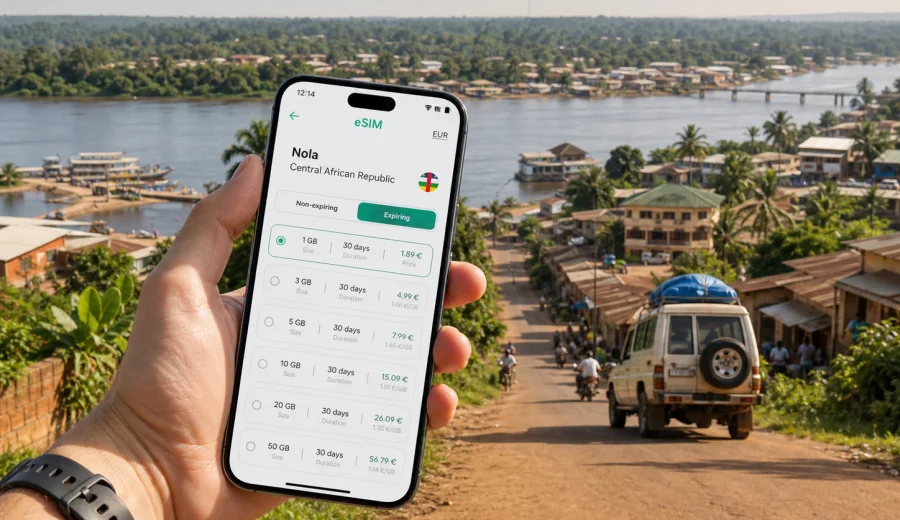
Nola eSIM: mobile connection and internet for Central African Republic travel
Nola is a practical stop for travelers heading into the south-west of the Central African Republic, whether the trip is connected with field work, conservation projects, regional trade, family visits, or onward travel toward forest and river routes. In this kind of journey, mobile internet is not just for casual browsing. It helps you coordinate arrival times, confirm accommodation, message a driver, check maps before leaving town, and keep documents available when Wi-Fi is unreliable.
An eSIM can make the first days in Nola simpler because you do not need to search for a physical SIM card as soon as you arrive. You choose a suitable eSIM plan for the Central African Republic before the trip or after arrival, install it on a compatible phone, and use it for mobile data according to the conditions of the selected plan. Kaspersky eSIM Store is an app and website that helps you choose, set up, and activate an eSIM plan for mobile internet during an international trip.
This guide focuses on Nola itself: arrival, local movement, hotel routines, road transfers, workdays, short stopovers, and trips onward from the city. The country matters because the eSIM plan must match the Central African Republic, but the travel scenario is local.
Why mobile internet matters in Nola
Nola is not a destination where you should assume that every task can wait until you find hotel Wi-Fi. Plans often depend on drivers, guides, office contacts, checkpoints, road conditions, weather, and time of day. A working data connection helps you reduce friction in small but important moments.
Common uses include:
- sending your location to a driver or colleague after arrival;
- saving a map area before a road transfer;
- confirming whether a meeting point is at a hotel, office, market area, river crossing, or roadside stop;
- translating short messages when French or Sango is needed;
- keeping booking confirmations, passport scans, and insurance details accessible;
- using messaging apps for calls when ordinary phone calls are not included in your data plan;
- checking bank, email, or work tools before leaving a stronger connection area.
The key point is not that eSIM replaces every local connectivity option. It gives you a prepared mobile data option on a compatible device, so you are less dependent on finding a SIM counter, asking for setup help, or relying on public Wi-Fi at the exact moment you need information.
Arrival scenarios: before Nola, in Nola, and after the first transfer
Many travelers reach Nola as part of a wider itinerary in the Central African Republic. You may land in the country first, continue by road or local transport, then use Nola as a base for work or regional travel. That means your mobile internet plan should cover more than the city center.
Think through the first 24 hours:
| Moment | What you may need online | Why eSIM helps |
|---|---|---|
| Before the final transfer | Driver messages, route updates, offline map downloads | You can prepare data before entering a lower-service area |
| On arrival in Nola | Accommodation contact, local address, meeting confirmation | You are not forced to find a physical SIM card immediately |
| First evening | Family updates, work email, travel documents | You can use mobile data if Wi-Fi is slow or unavailable |
| Next morning | Navigation, guide coordination, payment or booking checks | You can start moving without rebuilding your connectivity setup |
For a short stay, the main risk is wasting time at the beginning of the trip. For a longer stay, the main risk is choosing too little data or a plan duration that ends before your route does. eSIM planning should match both the city stay and the onward movement.
How to choose an eSIM plan for a Nola trip
Start with the country. For Nola, you need a plan that covers the Central African Republic, unless your route clearly requires a wider regional option. Then compare data amount, validity period, price, and activation conditions. Do not choose only by the lowest data allowance if you expect to use maps, messaging, cloud documents, or video calls.
Use this simple estimate:
- 1-3 GB can work for light messaging, maps, email, and a short stopover.
- 5-10 GB is more comfortable for several days with navigation, document sharing, and regular photo uploads.
- 20 GB or more may be useful for longer work trips, frequent hotspot use, or routes where Wi-Fi is not dependable.
Before buying, check whether your phone supports eSIM and is not locked to another operator. You can check your device before choosing a plan. Some phone models differ by region, so it is better to confirm support in advance rather than discover the issue during a transfer.
Also check how the plan starts. Some plans begin when installed, some when they first connect to a supported local network, and some have specific validity rules shown in the plan conditions. Read those details before you leave a reliable connection area.
Nola travel situations where eSIM is useful
Nola is a working city as much as a travel stop. You may be there for meetings, logistics, conservation work, field research, humanitarian coordination, or a route toward forest areas and nearby towns. Each scenario uses mobile data differently.
Road transfers and local navigation
Road routes in the south-west of the Central African Republic can be time-sensitive. Even when you do not rely on live navigation for every kilometer, data helps you confirm departure times, share your current position, and receive updated instructions. Download offline maps before the trip, then use mobile data for changes, messages, and checks.
Hotels and guesthouses
Accommodation Wi-Fi can vary. If you need to send documents, confirm onward transport, or join a short work call, eSIM gives you a separate mobile data option. It is also useful when a hotel network requires a password from staff who are not immediately available.
Business and field work
For business travelers, the most important tasks are often small: receiving a schedule update, sending a scanned document, checking a shared spreadsheet, or joining a messaging call. A prepared eSIM plan helps you avoid using the first hour in Nola to solve connectivity instead of starting the workday.
Stopovers and onward travel
If Nola is a stop before Bayanga, forest areas, mining or trade sites, or other regional destinations, choose a plan duration that covers the whole route. Do not buy a plan only for the arrival day if the more difficult connectivity moments are likely to happen later.
A practical data plan for your first day
Before you leave for Nola, prepare your phone as if you might have limited Wi-Fi on arrival.
1. Save your hotel or meeting address offline.
2. Download the map area you expect to use.
3. Keep passport, visa, ticket, booking, and insurance files available offline.
4. Add important contacts to your messaging app and phone contacts.
5. Choose an eSIM plan for the Central African Republic and install it while you still have stable internet.
6. Keep your primary SIM active for important SMS if you need it for banking or account verification.
If your route includes several days in Nola and surrounding areas, it is better to choose a plan that gives you a margin. Maps, translation, document sharing, and updates can use more data than expected when Wi-Fi is limited.
At this point in planning, you can choose an eSIM plan for travel to the Central African Republic and compare the available data amounts and validity periods before deciding what fits your Nola route.
Installing eSIM before the trip or after arrival
You can install an eSIM before traveling, as long as you understand when the selected plan starts. Installing in advance is often more comfortable because you can follow the steps on stable Wi-Fi and keep the QR code or profile ready. If you wait until arrival, make sure you still have internet access for the setup process.
For installation guidance, use the relevant Kaspersky eSIM Store instructions: Android setup guide or iOS setup guide. The exact menu names can vary by phone model and operating system version, but the general flow is similar.
Basic setup checklist:
- confirm that the phone supports eSIM;
- make sure the device is not locked by another carrier;
- connect to Wi-Fi or an existing mobile data connection for installation;
- add the eSIM profile by following the app, website, or QR-code instructions;
- select the eSIM profile for mobile data when you are ready to use it;
- enable data roaming for the eSIM if the plan instructions require it;
- wait a few minutes for the device to connect to a local network.
If the eSIM does not connect immediately, restart the phone, check that the right line is selected for mobile data, and review the plan conditions. Connection can take a few minutes and depends on the device, local network availability, and the selected plan.
How much data do you need in Nola?
The right amount depends on how you travel. A traveler who only sends messages and checks maps uses much less data than a field team sharing photos, documents, and hotspot access.
| Use pattern in Nola | Typical behavior | Suggested approach |
|---|---|---|
| Short stopover | Messaging, hotel coordination, maps | Choose a small plan with enough validity for delays |
| Several-day city stay | Maps, email, documents, translation | Choose a medium plan and monitor usage daily |
| Work trip | Cloud files, calls, hotspot, reports | Choose more data and avoid large updates on mobile data |
| Regional route | Nola plus surrounding areas | Match validity to the full itinerary, not just the city |
To control usage, turn off automatic photo backup, disable app updates on mobile data, download maps on Wi-Fi, and use lower-resolution media settings in messaging apps. These small changes matter if you are far from a stable Wi-Fi connection.
eSIM, local SIM, roaming, and Wi-Fi: what fits best?
There is no single best option for every traveler. The useful question is which option reduces friction for your specific route.
| Option | Good for | Watch out for |
|---|---|---|
| eSIM | Preparing mobile data before arrival and avoiding a physical SIM search | Requires a compatible, unlocked device |
| Local physical SIM | Longer stays where you want a local number or in-person support | Setup may take time and conditions can vary |
| Standard roaming | Keeping your usual number active with minimal setup | Costs and data limits depend on your home operator |
| Public or hotel Wi-Fi | Large downloads, backups, work at a fixed place | Availability, speed, and reliability can vary |
For Nola, many travelers use a mixed approach: eSIM for arrival and movement, Wi-Fi for large downloads when available, and the primary SIM for SMS verification if needed. This gives you flexibility without assuming that one option will cover every situation.
Phone settings to check before leaving a strong connection area
Do these checks while you still have stable internet:
- Mobile data line: make sure the eSIM is selected when you want it to carry data.
- Data roaming: enable it for the eSIM only if the plan instructions require it.
- Primary number: keep your regular SIM available if you need SMS codes.
- Hotspot: check whether tethering is allowed by your device and selected plan.
- Low data mode: turn it on if your plan has a small allowance.
- Offline maps: download Nola and your route area in advance.
- Battery: bring a power bank if you rely on the phone for navigation and messages.
Avoid running operating system updates, cloud photo sync, or large app downloads on a limited travel data plan. Those tasks can consume data quickly and may not be necessary during the trip.
Mobile internet for workdays in Nola
If you are traveling for work, plan around the tasks that cannot wait. For example, you may need to receive a revised meeting place, send a status update, download a document, or confirm a transport change. These are small data tasks, but they are high value.
A useful work routine:
1. Each evening, download the files you need for the next day.
2. Save the next address, contact, and route offline.
3. Keep messaging apps active for urgent changes.
4. Use mobile data for essential updates, not background syncing.
5. Review remaining data after each heavy-use day.
If your team includes several people, do not assume one phone hotspot can support everyone comfortably. A hotspot can drain battery and use data quickly. For field work, each key traveler should have an independent connectivity plan or a clear backup.
What to know about calls and SMS
Travel eSIM plans in Kaspersky eSIM Store are intended for mobile internet. They do not include a regular phone number, ordinary voice calls, or SMS unless a specific plan says otherwise. For calls and messages, use internet-based apps over mobile data.
Keep your primary SIM available if you expect bank codes, airline messages, or account verification SMS. On many dual-SIM phones, you can keep your usual number for calls or SMS while using the eSIM for mobile data. Check your phone settings before the trip so you know which line is handling each task.
Quick checklist for Nola
Before departure:
- confirm your phone supports eSIM and is unlocked;
- choose a plan that covers the Central African Republic;
- install the eSIM on stable Wi-Fi if possible;
- save maps, addresses, bookings, and documents offline;
- check when the plan validity starts;
- keep installation instructions available.
On arrival:
- select the eSIM for mobile data;
- enable roaming data for the eSIM if required by the plan instructions;
- wait a few minutes for network registration;
- test messaging, maps, and email;
- keep large downloads for Wi-Fi.
During the stay:
- monitor data use;
- turn off automatic backups on mobile data;
- save next-day routes offline;
- keep a power bank ready for long transfers;
- contact support if installation or activation questions remain after basic checks.
Frequently asked questions
Is eSIM useful for a trip to Nola?
Yes, if you have a compatible, unlocked phone and want mobile data prepared before or soon after arrival. It is especially useful for maps, driver coordination, messaging, work updates, and hotel communication.
Should I choose a Nola plan or a Central African Republic plan?
For a city article, the relevant destination is the country where the city is located. For Nola, choose a plan that covers the Central African Republic, unless your itinerary requires a broader regional option.
Can I install eSIM after I arrive in Nola?
Yes, but you need internet access to complete installation. Installing before the trip on stable Wi-Fi is often easier, especially if arrival involves road transfers or a tight schedule.
Does eSIM include a phone number?
Usually no. Travel eSIM plans for mobile internet do not include a regular phone number, voice calls, or SMS unless the selected plan states otherwise. Use messaging apps for calls over data and keep your primary SIM active if you need SMS codes.
What if my phone does not support eSIM?
You will need another connectivity option, such as a physical SIM, roaming from your home operator, or Wi-Fi. Check compatibility before purchase, because eSIM cannot be installed on a device that does not support it.
How can I save data while traveling around Nola?
Download maps on Wi-Fi, turn off automatic backups, restrict app updates, use lower media quality in messaging apps, and keep mobile data for navigation, messages, documents, and essential work tasks.
Choose mobile internet for your Nola trip
Nola is easier to manage when your phone is ready before the first transfer, meeting, hotel check-in, or onward route. An eSIM plan for the Central African Republic can help you keep maps, messages, documents, and travel coordination available without searching for a physical SIM card at the start of the trip.
Use Kaspersky eSIM Store to compare available options, review plan details, and prepare an eSIM for a compatible device. When you are ready, choose an eSIM plan for your trip to Nola and the Central African Republic, install it before departure or after arrival, and keep your mobile internet setup aligned with your route.