
Travel connectivity guide
Noord eSIM for mobile internet in Aruba
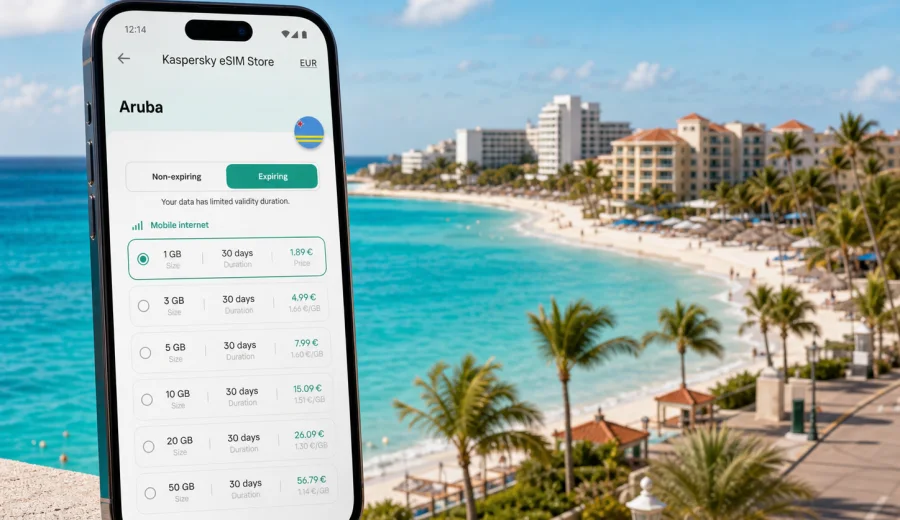
Noord eSIM: mobile connection and internet for your Aruba trip
Noord is where many Aruba trips become practical very quickly: the hotel zone near Palm Beach, beach clubs and restaurants along the coast, short taxi rides to Eagle Beach, early starts for boat tours, and evenings around shops, casinos, and dinner reservations. In that kind of trip, mobile internet is not only for scrolling between beach stops. It helps you confirm transfers, open maps, message your hotel, check tour pickup points, translate menus, share live locations, and manage bookings without hunting for public Wi-Fi.
An eSIM can be a convenient way to prepare mobile data for Noord before you fly. Instead of buying a physical SIM card after arrival, you install a digital SIM profile on a compatible phone and choose a prepaid data plan for the destination. Kaspersky eSIM Store is an app and website where you can choose, arrange, and activate an eSIM with a suitable mobile internet plan for an international trip.
This guide focuses on Noord as a city travel scenario: arrival, hotel districts, beach movement, navigation, short business stays, stopovers, and day trips across Aruba.
Why mobile internet matters in Noord
Noord is compact, but your plans may move between several small zones during the same day. You may start at a resort near Palm Beach, take a taxi to Eagle Beach, meet a tour operator near a pier, return to your hotel, then go out for dinner in the evening. A working data connection makes those transitions easier.
Common moments when mobile internet helps in Noord:
- checking the exact hotel entrance or apartment address before a driver arrives;
- using maps between Palm Beach, Eagle Beach, Malmok, and Oranjestad;
- confirming restaurant bookings and tour pickup times;
- calling or messaging through internet-based apps;
- checking flight status before leaving for Queen Beatrix International Airport;
- using translation, payment, banking, and travel insurance apps;
- sharing your location with family or colleagues during separate plans.
Noord is also a popular base for longer Aruba stays. Many visitors rent a car, book boat tours, work remotely for a few hours, or combine beach time with meetings. In each case, the useful question is not simply "Do I have internet?" but "Will my mobile data plan match the way I move around Aruba?"
Where eSIM is useful around Noord
| Travel moment | Why data helps | Practical tip |
|---|---|---|
| Arrival at the airport | Transfers, taxi apps, hotel messages, maps | Install the eSIM before travel so you only need to enable the correct line after landing. |
| Palm Beach hotel zone | Restaurant bookings, beach club updates, messaging | Keep your hotel Wi-Fi for heavier uploads and use mobile data while moving. |
| Eagle Beach and Malmok | Navigation, parking, pickup points | Save key locations offline, then use mobile data for live changes. |
| Boat tours and excursions | Confirmation messages, meeting points, schedule changes | Screenshot tickets in advance in case the signal is weaker near marinas or remote stops. |
| Business stay | Email, calendars, ride coordination | Choose a plan with enough data for maps, messaging, and hotspot use if the plan supports it. |
| Return trip | Flight updates, online check-in, airport transfer | Leave enough data for the final day, especially if you check out before your flight. |
The main benefit is control. You choose a plan for the country, see the data allowance and validity period, install the eSIM on a compatible device, and use mobile data during the trip according to the selected plan conditions.
Arrival in Aruba: first hours from the airport to Noord
Most visitors reach Noord after landing at Queen Beatrix International Airport near Oranjestad. The drive to the Palm Beach and Noord hotel area is usually short by island standards, but the first hour can still be busy: luggage, transportation, hotel check-in, and messages from travel companions.
Before you leave the terminal, mobile internet can help you:
1. confirm the name and location of your hotel, villa, or apartment;
2. message your driver or accommodation host;
3. open the route to Noord and estimate travel time;
4. check whether an early check-in or luggage storage option is available;
5. share your arrival status with family or colleagues.
If you rely only on airport or hotel Wi-Fi, you may lose connectivity exactly when you move between those places. An eSIM gives you another option for mobile data, provided your device supports eSIM and the selected plan is active for Aruba.
How to choose an eSIM data plan for Noord
For a city trip to Noord, start with your real itinerary rather than a generic data number. A short beach weekend has different needs from a two-week stay with video calls, navigation, and remote work.
Use this checklist before choosing a plan:
- Trip length: two days, one week, or longer.
- Main area: mostly Noord, or Noord plus Oranjestad, San Nicolas, beaches, and island drives.
- Data habits: maps and messaging only, or social media, cloud photos, video, and work apps.
- Device use: one phone only, or possible hotspot for a laptop or second device.
- Timing: whether you want the eSIM ready before departure or only after arrival.
- Conditions: data allowance, validity period, destination, price, and activation rules.
For light use, maps, messaging, ride coordination, and restaurant searches usually require less data than video calls and streaming. For a longer stay, it is safer to leave a margin for unexpected needs: a delayed flight, a changed pickup point, a hotel Wi-Fi issue, or a day trip where you use maps for several hours.
After you have an itinerary, you can choose a mobile internet plan for your trip to Noord in Aruba through Kaspersky eSIM Store and compare the available data amount, validity period, and destination coverage before you activate it.
Noord travel scenarios and data use
Beach and resort stay
If you are staying near Palm Beach, your mobile data use may come in short bursts: walking directions, restaurant menus, beach club reservations, messages, and quick searches. Hotel Wi-Fi may cover your room and lobby, but it will not help much when you leave the property, walk to dinner, or meet a boat tour.
For this scenario, choose a plan that covers everyday movement rather than only the flight arrival. Keep heavier uploads for trusted Wi-Fi if you want to preserve mobile data.
Family trip or group travel
Noord is common for family holidays and group trips. People split up between the pool, beach, shops, and excursions. Mobile internet helps keep the group coordinated without relying on one person being at the hotel.
Useful habits:
- create a shared map list for hotel, beach stops, restaurants, pharmacy, and airport;
- save booking confirmations offline;
- agree on one messaging app before the trip;
- keep the eSIM line selected for mobile data when you leave Wi-Fi;
- monitor remaining data if several people use hotspot from one phone.
Business visit
For a business trip based in Noord, the main risk is not sightseeing. It is the gap between hotel Wi-Fi and real movement: airport transfer, taxi to a meeting, a call from a lobby, or a calendar change while you are away from your room. eSIM mobile data can help keep email, calendars, messaging, and map apps available during those gaps.
If you expect laptop use, check whether tethering or hotspot is supported by the selected plan and your device settings. Also plan for more data if you need video calls, large files, or cloud backups.
Stopover or short stay
For a short stay, you may not want to spend time finding a local SIM shop. Installing an eSIM before the trip can make the first hour simpler: you land, enable the eSIM line for data when appropriate, and move straight to your transfer or hotel. For a stopover, the most important apps are usually maps, messaging, airline tools, and ride coordination.
Installing and activating eSIM before or after arrival
Installation is usually easiest when you still have a stable connection before the trip. After choosing a plan, follow the on-screen instructions, use the QR code if provided, and keep your primary SIM active for calls or messages if you need it. The exact steps depend on the device.
Helpful installation links:
A practical setup sequence for a Noord trip:
1. Check that your phone supports eSIM and is not locked to one carrier.
2. Choose Aruba as the destination and select a plan by data amount and validity period.
3. Install the eSIM while you have a reliable internet connection.
4. Keep the eSIM turned off for mobile data until the correct activation moment, if the plan conditions require it.
5. After landing, select the eSIM profile for mobile data and enable data roaming for that profile if the instructions or plan conditions require it.
6. Test maps or messaging before leaving the airport.
Before arranging a plan, check your device to confirm eSIM support. Some phones, tablets, and carrier-locked models may not support eSIM or may have restrictions that prevent activation.
What to check before you rely on eSIM in Noord
eSIM is practical, but it is still a mobile data setup. A few checks prevent most avoidable problems.
| Check | Why it matters |
|---|---|
| Device compatibility | Not every phone supports eSIM, and some models vary by region. |
| Carrier lock status | A locked device may reject another mobile profile. |
| Plan destination | For Noord, choose a plan that covers Aruba, not a different Caribbean destination. |
| Validity period | A plan should cover arrival day, full stay, and departure day. |
| Data allowance | Navigation, video calls, cloud sync, and hotspot use consume data quickly. |
| Activation rules | Some plans begin validity after installation, others after connecting to a supported network. |
| Voice and SMS | Many travel eSIM data plans do not include a regular phone number, calls, or SMS unless stated in the terms. |
If you need voice calls, check the plan details carefully. In many travel eSIM scenarios, calls and messages are handled through internet-based apps rather than a regular mobile number.
Local movement: maps, taxis, rental cars, and walks
Noord is easy to navigate, but addresses, hotel entrances, beach access points, and pickup zones can be less obvious than they look on a map. Mobile internet is useful because it lets you adjust in real time.
For taxi and transfer coordination, keep your hotel name, street address, and reservation number available offline. For rental cars, save the route to your accommodation and to the airport before you start driving. For beach walks, pin your return point if you leave towels, a car, or a meeting group behind.
Data-saving tips for moving around Noord:
- download offline maps for Aruba before departure;
- disable automatic cloud photo backup on mobile data;
- set app updates to Wi-Fi only;
- use low-data mode for social apps if available;
- keep video streaming for hotel Wi-Fi;
- close hotspot when you are not actively using it.
These steps help your eSIM plan last longer without making the trip less convenient.
Trips from Noord to the rest of Aruba
Noord is often the base, not the whole itinerary. You may drive to Oranjestad for shopping or dinner, visit Arikok National Park, explore beaches along the coast, or make a longer loop toward San Nicolas. Because Aruba is one destination for the plan, choose the eSIM based on country coverage and the full route, not only the hotel district.
For day trips, mobile data is useful for route changes, opening hours, messaging, and weather checks. Still, download important information in advance if you plan to visit quieter areas or spend time on the water. Mobile network quality can vary by location, building, weather, and local conditions.
Quick planning guide
Use this short guide to match your plan to your trip.
| If your trip looks like this | Consider this approach |
|---|---|
| Weekend in a Palm Beach resort | A smaller data plan may be enough for maps, messages, and bookings. |
| One week with beach days and island drives | Choose more data for navigation, photos, searches, and group coordination. |
| Remote work or business meetings | Leave room for email, calendars, hotspot use, and calls through internet apps. |
| Family or group travel | Plan for location sharing, messaging, and possible hotspot sharing. |
| Stopover or very short stay | Install before travel so you do not spend arrival time looking for connectivity. |
The best plan is the one that fits your trip length, data habits, and route. Avoid choosing only by the lowest data amount if you expect navigation, calls through messaging apps, or long days away from hotel Wi-Fi.
FAQ about eSIM for Noord
Is Noord a separate eSIM destination?
Usually you choose the country destination, not a separate city destination. For a Noord trip, select a plan for Aruba and check the plan details before activation.
Can I install the eSIM before flying to Aruba?
In many cases, yes. Installing before departure can make arrival easier, because you will not need to search for a SIM shop or depend only on airport Wi-Fi. Always read the activation rules for the selected plan so you know when the validity period begins.
Will eSIM replace my regular phone number?
Not necessarily. Many travel eSIM plans are for mobile data and do not include a regular phone number, voice calls, or SMS unless stated separately. You can often keep your primary SIM for calls and use the eSIM for mobile data, depending on your device.
Do I need data roaming enabled?
Some eSIM plans require data roaming to be enabled for the eSIM profile. Follow the plan instructions and keep roaming settings separate from your primary SIM if you want to avoid unintended charges from your home operator.
What if my hotel has Wi-Fi?
Hotel Wi-Fi is useful, especially for large uploads and video, but it does not cover airport transfers, beach movement, taxi coordination, and day trips. eSIM mobile data is most useful when you are away from the hotel network.
Can I use eSIM for hotspot?
It depends on the selected plan and device settings. If you need to connect a laptop or another phone, check hotspot support before relying on it for work or group travel.
Choose eSIM for a trip to Noord
For Noord, the practical goal is simple: prepare mobile internet before you need it. Check that your device supports eSIM, choose a plan for Aruba with enough data and validity for your stay, install the eSIM while you have a stable connection, and keep the instructions available for arrival.
Kaspersky eSIM Store helps you choose, arrange, and activate an eSIM with a suitable prepaid mobile internet plan for an international trip. If Noord is your base for beaches, hotels, meetings, transfers, or day trips around Aruba, you can prepare an eSIM plan for Aruba before your trip and arrive with a clearer mobile data setup.