
Travel connectivity guide
North Macedonia eSIM: mobile internet for travel
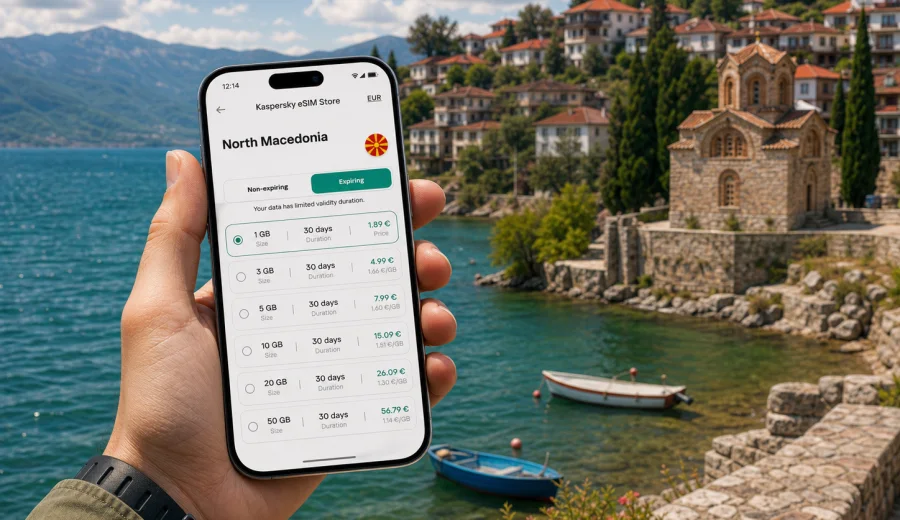
eSIM for North Macedonia: mobile connection and internet for your trip
North Macedonia is a compact country, but a trip there can move quickly between very different settings: Skopje’s airport and city centre, the canyon road to Matka, mountain routes near Mavrovo, and the lakeside streets of Ohrid. Mobile internet is useful from the first hour, because many travel tasks now depend on maps, messengers, booking apps, transport updates and quick confirmations.
An eSIM can help you prepare mobile data for North Macedonia without buying a physical SIM card after arrival. Instead of looking for a shop, comparing local packages in a hurry or relying only on hotel Wi-Fi, you can choose a data plan before the trip, install the eSIM on a compatible device and use it for mobile internet when you need it.
Kaspersky eSIM Store is an app and website where you can quickly choose, arrange and activate an eSIM with a suitable data plan for mobile internet during an international trip. It is not a mobile operator and does not replace the local network. The practical value is simpler preparation: you can check the destination, data allowance, validity period and activation flow in one place before you travel.
Why eSIM is useful in North Macedonia
For many visitors, North Macedonia is not a single-city trip. You may land in Skopje, spend a day around the old bazaar, travel south to Ohrid, take a day trip to Bitola or drive through mountain areas. Each move creates small moments where mobile data helps: opening a map, checking an address, messaging a host, translating a menu or confirming a bus schedule.
With eSIM, your phone uses a digital SIM profile instead of a removable plastic card. On supported devices, you can keep your regular SIM for calls or banking messages and use the eSIM profile for travel data. This is especially useful if your main number must stay active for two-factor authentication, work chats or family contact.
Typical travel situations where eSIM can help:
- finding your hotel or apartment after arrival at Skopje International Airport;
- checking taxi, shuttle or rental car information before leaving the terminal;
- using navigation between Skopje, Ohrid, Bitola, Mavrovo or smaller towns;
- staying in touch with your host, guide or colleagues through messengers;
- opening digital tickets, restaurant reservations and travel documents;
- using translation tools in shops, museums, pharmacies and transport offices;
- sharing a hotspot with a laptop when your selected plan and device settings allow it.
eSIM is mainly about control. You know the selected data allowance and validity period before you depend on the connection. You can also reduce your reliance on public Wi-Fi in airports, cafés and hotels, which is useful when you need to open banking apps, work tools or private messages.
What to check before choosing a plan
Before you select an eSIM plan for North Macedonia, check three things: your device, your route and your data habits. The right choice is not always the largest package. A short weekend in Skopje has different needs from a two-week route that includes navigation, video calls and remote work.
First, make sure your phone supports eSIM and is not locked to one mobile operator. Some device models differ by region of sale, and some phones that look similar may have different eSIM support. If you are not sure, use the device settings and manufacturer information, and check your device before paying for a plan.
Second, decide whether your trip is only in North Macedonia or part of a wider Balkan route. A country plan can be a good fit when you stay mostly in North Macedonia. If your itinerary includes several countries, compare whether a regional option is more practical for your route, your data use and the dates of travel.
Third, estimate your data needs honestly. Maps and messengers usually need much less data than video streaming, cloud backups or long video calls. If you plan to work from a laptop, upload files or use your phone as a hotspot, choose a larger allowance and check the plan conditions before relying on tethering.
| Travel style | Likely data use | What to prioritise |
|---|---|---|
| Weekend in Skopje | Low to moderate | Maps, messengers, short validity |
| Ohrid holiday | Moderate | Photos, restaurant searches, booking apps |
| Road trip across the country | Moderate to high | Navigation, route changes, larger allowance |
| Business trip | Moderate to high | Reliable preparation, enough data for calls and email |
| Remote work days | High | Larger allowance, hotspot rules, backup Wi-Fi |
The table is a planning guide, not a promise about exact consumption. Your real usage depends on app settings, video quality, cloud sync, background updates and whether you download maps or media before the trip.
How eSIM changes the first day of travel
The first day in North Macedonia is often when mobile data matters most. You may be tired, carrying luggage and trying to make quick decisions. A prepared eSIM can remove several small frictions from that moment.
Without prepared mobile data, the first steps may look like this: find airport Wi-Fi, register or wait for a code, search for a SIM shop, compare unfamiliar packages, check whether the shop accepts your payment method and then set up the card. This can work, but it costs attention when you may want to leave the airport or check in.
With an eSIM already installed on a compatible phone, the flow is usually simpler: you choose the eSIM profile for mobile data, follow the activation instructions, and wait for the device to register on an available local network. The connection may take a few minutes and depends on the device, location and selected plan conditions.
This is useful in North Macedonia because many practical tasks happen outside a hotel lobby:
- the airport is outside central Skopje, so navigation or transport information helps immediately;
- taxi and transfer details may arrive through chat apps;
- addresses can be written in different formats, so online maps reduce confusion;
- in Ohrid or mountain areas, you may need directions before reaching accommodation;
- travel plans can change due to weather, road conditions or opening hours.
Choosing data volume and validity for North Macedonia
The best eSIM plan is the one that fits your actual trip. A short validity period can be enough for a focused city visit, while a longer stay needs more room for navigation, calls and spontaneous searches. Avoid choosing only by the headline size; read the validity period, destination coverage, activation rules and data allowance together.
Use this quick estimate before choosing:
- 1-3 GB can fit light use: maps, messengers, email and occasional browsing.
- 5-10 GB can fit a typical holiday with frequent navigation, photo sharing and app use.
- 10 GB or more is better for longer stays, video calls, working on the move or hotspot use.
- If you use cloud photo backup, disable mobile-data backup unless you intentionally budget for it.
- If you stream video, lower the quality or wait for trusted Wi-Fi to protect your allowance.
For a short trip, validity can matter as much as volume. A large plan with a short active period may not help if your travel dates are longer. For a business trip, the opposite can be true: a compact but reliable amount of data over the exact meeting dates may be enough if your hotel and office have stable Wi-Fi.
When you are ready to compare options for the destination, you can choose an eSIM plan for a trip to North Macedonia and review the available data allowances and validity periods before deciding.
Practical scenarios across the country
North Macedonia rewards flexible travel. The country is small enough for multi-stop routes, but the details of each stop can change how you use mobile internet.
In Skopje, mobile data is useful for maps, rides, restaurant searches, card payment confirmations and business communication. If you are visiting for meetings, keep a buffer for video calls and document access. If you are sightseeing, download offline maps as a backup, then use mobile data for live navigation and opening hours.
Around Matka Canyon, Mavrovo and mountain routes, mobile internet can support navigation, weather checks and coordination with drivers or guides. Signal conditions depend on the local network and terrain, so do not treat mobile data as your only safety tool in remote areas. Save key addresses, accommodation details and emergency contacts offline as well.
In Ohrid, mobile data helps with walking routes, boat trip coordination, accommodation messages and restaurant reservations. The lake area is popular with visitors, so you may use more data than expected for photos, short videos and group chats. If your phone automatically uploads media, consider limiting sync to Wi-Fi.
For a regional Balkan itinerary, check your route before buying. If you cross borders into neighbouring countries, a North Macedonia-only plan may not cover the rest of the trip. In that case, compare country and regional plans based on the exact route, dates and data needs.
eSIM compared with roaming, local SIM cards and public Wi-Fi
There is no single best option for every traveller. The right choice depends on your phone, budget, trip length and how much time you want to spend arranging connectivity after arrival.
| Option | Main advantage | Main limitation |
|---|---|---|
| eSIM travel plan | Can be prepared before arrival and used without a plastic SIM | Requires an eSIM-compatible, unlocked device |
| Standard roaming | Uses your existing mobile number and operator settings | Costs and data rules depend on your home operator |
| Local physical SIM | May suit longer stays or local calling needs | Requires buying and installing a plastic SIM locally |
| Public Wi-Fi | Useful in hotels, cafés and airports | Not available everywhere and may be less convenient for private tasks |
For many short trips, eSIM is attractive because it reduces setup time. You keep your physical SIM slot free, avoid swapping cards and can manage the travel data profile from the phone. For longer stays, a local SIM may still be worth comparing if you need a local phone number, voice calls or very heavy data use. eSIM travel plans usually focus on mobile data, and ordinary voice calls or SMS are not included unless the selected plan clearly says otherwise.
How to install and activate eSIM
The exact steps depend on your device and operating system, but the general process is straightforward. You need an internet connection for installation, so it is often convenient to install the eSIM before departure while you are on trusted Wi-Fi. Activation and data use rules can vary by plan, so read the instructions shown for the selected option.
Basic setup flow:
1. Check that your phone supports eSIM and is not operator-locked.
2. Choose North Macedonia or the relevant region for your route.
3. Select a data allowance and validity period that match your trip.
4. Complete the arrangement process and open the eSIM details in your profile or app.
5. Install the eSIM by following the on-screen steps or using the QR code.
6. When you are ready to use it, select the eSIM profile for mobile data.
7. If the instructions require it, enable data roaming for the eSIM profile.
For device-specific setup, use the Android installation guide or the iOS installation guide. Keep your original SIM active if you need your regular number for calls, SMS or bank confirmations, and set the travel eSIM as the mobile data line when appropriate.
Do not delete the eSIM profile unless you are sure you no longer need it. In many cases, an activated eSIM profile cannot simply be transferred to another phone. If you change devices during the trip, check the plan conditions and support options before removing anything.
Pre-trip checklist
Use this checklist a day or two before leaving for North Macedonia:
- Confirm that your phone supports eSIM and is not locked to one carrier.
- Update your operating system if you usually postpone updates.
- Choose a plan with enough data and the correct validity period.
- Install the eSIM while you have stable Wi-Fi.
- Save the QR code or installation details where you can access them if needed.
- Download offline maps for Skopje, Ohrid and your planned route.
- Disable mobile data for cloud backups, automatic app updates and heavy media sync.
- Keep your regular SIM available for calls or SMS if you need it.
- Check which line is selected for mobile data before and after arrival.
- Save accommodation addresses and booking details offline.
The most common mistakes are simple: buying a plan before checking device compatibility, choosing too little data for a work-heavy trip, or leaving background apps free to consume mobile data. A few minutes of preparation usually prevents these problems.
How to manage data during the trip
Good data management makes a moderate plan last longer. Maps, messengers and email are usually manageable. Video, cloud sync and app updates are the heavy users.
Practical habits:
- Download maps, playlists and travel documents before departure.
- Use Wi-Fi for system updates and cloud photo backup.
- Lower video quality when using mobile data.
- Turn off automatic video playback in social apps.
- Monitor data use in your phone settings and in the relevant app or profile.
- Use hotspot only when needed and check whether the selected plan allows it.
If you travel with family or colleagues, avoid assuming one phone can cover everyone all day. Hotspot use can drain battery and data quickly. For work trips, carry a power bank and keep important files available offline.
Short answers for travellers
What is eSIM for North Macedonia?
It is a digital SIM profile that lets a compatible phone use a selected mobile data plan for travel in North Macedonia, without inserting a physical SIM card.
Does eSIM give me a North Macedonian phone number?
Usually, travel eSIM plans focus on mobile data. Voice calls and SMS are not included unless the selected plan clearly states otherwise. You can use internet-based messengers and calling apps over mobile data.
Can I install eSIM before I travel?
In many cases, yes. It is often convenient to install the eSIM while you still have stable Wi-Fi. Check the activation and validity rules for the selected plan before installing or switching it on.
Will eSIM replace my normal SIM card?
No. On many compatible phones, your regular SIM can remain active while the eSIM is used for travel data. Your exact options depend on the device and settings.
Is eSIM useful for Ohrid as well as Skopje?
Yes, if your selected plan covers North Macedonia and your device connects to an available local network. Coverage and speed depend on local network conditions, terrain and the plan.
What if mobile data does not start immediately?
Check that the eSIM profile is selected for mobile data, data roaming is enabled if required, airplane mode is off, and the phone has had a few minutes to register. If the issue continues, review the installation instructions or contact support.
Final preparation for mobile internet in North Macedonia
For a smooth trip, treat mobile internet as part of your travel planning, not as a problem to solve after landing. Check your device, choose a plan that fits your route, install the eSIM while you have a stable connection and keep offline backups for key documents and maps.
Kaspersky eSIM Store helps you prepare that flow through a site and app where you can select a destination, review plan details and activate an eSIM on a compatible device. For a country-focused trip, you can choose an eSIM plan for North Macedonia before departure and arrive with a clearer mobile data setup.