
Travel connectivity guide
North Side eSIM for Mobile Internet
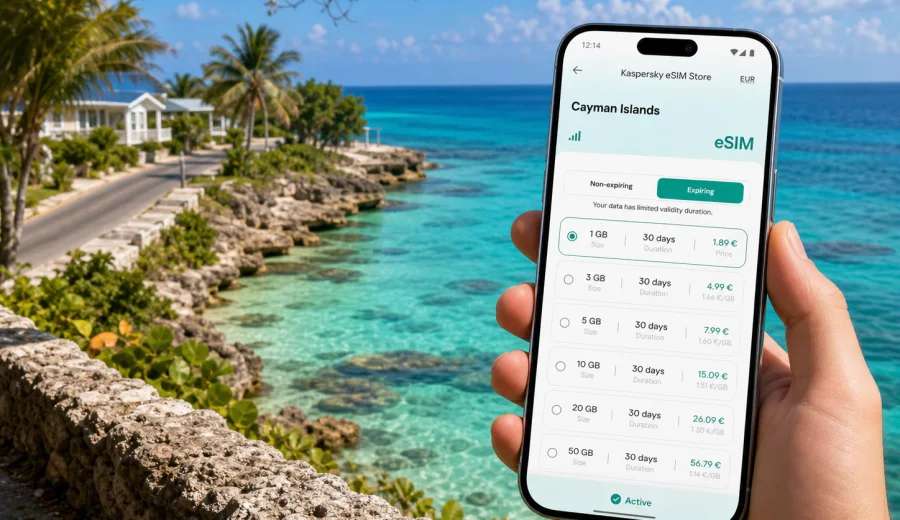
North Side eSIM: mobile connection and internet for your Cayman Islands trip
North Side is one of the calmest bases on Grand Cayman: quieter roads, coastal villas, beach stops, caves, dive operators, and easy day trips toward Rum Point, East End, Seven Mile Beach, and George Town. That relaxed rhythm is exactly why mobile internet matters here. You may not be moving through a dense city grid, but you still need maps, check-in messages, taxi or rental-car coordination, restaurant bookings, tide and weather updates, and access to travel documents while you are away from your hotel Wi-Fi.
An eSIM can make that part of the trip easier. Instead of searching for a physical SIM card after arrival, you can prepare a digital SIM profile on a compatible phone and choose a prepaid data plan for the Cayman Islands before you start exploring. Kaspersky eSIM Store is an app and website where you can quickly choose, arrange, and activate an eSIM with a suitable mobile internet plan for travel abroad.
This guide focuses on North Side travel scenarios: arrival from Owen Roberts International Airport, moving around by rental car, staying in villas or small hotels, visiting beaches and natural sights, working remotely for a few hours, and using data wisely when your trip includes more of Grand Cayman than one resort area.
Why mobile internet is useful in North Side
North Side is not a place where you want to depend only on hotel Wi-Fi. The district is spread along the northern coast of Grand Cayman, and many useful trip moments happen between fixed Wi-Fi points. You may be checking a route from the airport, sending your villa host an arrival update, finding the correct turn after dark, or confirming a boat departure while already on the road.
Mobile internet is especially useful for:
- navigation between the airport, North Side, Rum Point, East End, and George Town;
- messaging hosts, drivers, dive shops, restaurants, and family;
- opening booking confirmations, QR codes, and travel insurance documents;
- checking weather before beach, cave, boat, or snorkelling plans;
- using maps when roads are quiet and landmarks are limited;
- comparing routes when you decide whether to return through Bodden Town, George Town, or the eastern side of the island;
- working from a villa, cafe, or shared space when fixed Wi-Fi is unavailable or overloaded.
The practical point is simple: North Side rewards flexible movement. A prepared eSIM helps you avoid turning every small decision into a search for Wi-Fi.
Arrival: from the airport to North Side
Most international visitors arrive at Owen Roberts International Airport near George Town. From there, North Side is a cross-island transfer rather than a walkable city arrival. Depending on traffic, stops, and your exact accommodation, the drive can take a while, and you may need mobile data before you see your room key.
The first hour is when a prepared eSIM can be most useful. You may need to:
1. Message the accommodation host that you have landed.
2. Open the driving route to North Side.
3. Share your live location with someone travelling separately.
4. Confirm a rental-car pickup or taxi arrangement.
5. Check whether you should buy groceries before heading north.
6. Open payment, booking, or ID documents stored in your email or cloud account.
If your eSIM is installed before departure, you can usually switch to the travel data line after landing and follow the activation steps for the selected plan. Exact activation timing and network connection depend on the device, plan conditions, and local mobile coverage, so it is worth reading the plan details before you travel.
North Side travel style: why data needs are different here
North Side is not only a destination; it is a base for slow travel. Many visitors stay in vacation rentals, small hotels, or quiet coastal properties rather than large resort corridors. You may spend less time inside one Wi-Fi zone and more time moving between beaches, restaurants, caves, boat departures, grocery stops, and scenic drives.
| Travel situation in North Side | Why mobile data helps |
|---|---|
| Rental car pickup | Navigation, route changes, fuel stops, and arrival messages |
| Villa or apartment stay | Contacting the host, smart-lock instructions, shopping lists, and remote work backup |
| Beach and snorkelling plans | Weather checks, location sharing, and messaging tour operators |
| Day trip to George Town or Seven Mile Beach | Maps, parking searches, bookings, and return-route checks |
| Business stay away from the resort corridor | Email, calendar updates, and hotspot use if allowed by the plan |
How to choose an eSIM data plan for North Side
Start with your real itinerary, not only the number of days. A short beach stay may need data mainly for maps, messaging, email, and bookings. A week in a villa may need more if you expect video calls, photo uploads, or hotspot use. If you plan to explore the whole island, allow extra data for navigation and searches while driving.
Before choosing a plan, check:
- destination coverage listed in the plan;
- data volume and validity period;
- when the validity period starts;
- whether top-up is available;
- whether hotspot or tethering is allowed;
- whether the plan is data-only or includes any voice/SMS features;
- whether your phone supports eSIM and is not locked to one carrier.
Most travel eSIM plans are designed for mobile data. They usually do not include a regular local phone number, voice calls, or SMS unless the selected plan says otherwise. For calls and messages, use internet-based apps over mobile data.
Prepare before you fly
The best time to handle eSIM setup is before you need it. North Side is not difficult to navigate, but arriving with connectivity prepared removes friction from the first evening.
Use this checklist before departure:
- make sure your phone supports eSIM;
- confirm that the device is not carrier-locked;
- keep your primary SIM active if you still need bank texts or calls;
- save accommodation details offline;
- download an offline map as a backup;
- read the selected plan conditions, including activation and validity;
- install the eSIM while you still have stable Wi-Fi, if the plan allows pre-installation;
- label the travel line clearly, for example “Cayman data”.
If you are not sure whether your phone can use eSIM, check your device before choosing a plan. Compatibility is essential: an eSIM will not help if the phone cannot install a digital SIM profile or is carrier-locked.
A practical setup flow
The exact screen names vary by phone, but the workflow is usually straightforward:
1. Choose the Cayman Islands as your destination.
2. Compare available data volumes and validity periods.
3. Arrange the plan that matches your travel dates and expected use.
4. Install the eSIM profile on a compatible device.
5. After arrival, select the eSIM line for mobile data.
6. Turn on data roaming for the eSIM line if the plan instructions require it.
7. Check that mobile data is working before leaving your first Wi-Fi point.
For device-specific setup, follow the Android installation guide or the iOS installation guide. Installing the profile while you still have reliable Wi-Fi is easier than trying to troubleshoot at the roadside or in a busy arrival area.
When to choose and activate your plan
For most North Side trips, it is convenient to choose a plan before departure and install the eSIM while you are still at home or at your departure airport. This gives you time to read the instructions and avoid setup pressure after a long flight.
Activation depends on the selected plan. Some plans start validity when the eSIM connects to a supported local network; others may have different conditions. Read the details before you travel so you know when data usage and validity begin.
Once you have checked compatibility and estimated your data needs, you can choose a mobile internet plan for the Cayman Islands in Kaspersky eSIM Store and prepare the eSIM for your North Side trip. North Side does not need a separate telecom decision, but it does need the correct Cayman Islands destination.
Data planning by trip type
Different North Side travellers use mobile internet in different ways. Use these scenarios as a practical starting point, then adjust for your own habits.
| Trip type | Typical mobile data use | Practical plan approach |
|---|---|---|
| Weekend beach stay | Maps, messaging, restaurant searches, light social uploads | Smaller data volume may be enough |
| One-week villa stay | Navigation, messages, bookings, weather, moderate uploads | Choose a plan with room for daily use |
| Diving or boating trip | Messaging operators, weather checks, photo uploads when back on shore | Keep extra data for coordination and media |
| Business visit | Email, calendar, messaging, backup hotspot if allowed | Choose a larger package and check tethering rules |
| Family trip | Group chats, maps, restaurant searches, split plans | Consider more data for coordination across travellers |
| Island-wide itinerary | Continuous navigation and searches across Grand Cayman | Allow extra data for maps and route changes |
Avoid choosing the smallest possible plan if you know you will rely on mobile data for navigation every day. At the same time, do not buy more data than you realistically use. The useful habit is to match data volume to actual behaviour: maps and messaging are light; streaming, video calls, cloud backups, and frequent photo uploads are heavier.
Moving around North Side with mobile data
North Side is best understood through movement. You may stay near the coast, drive to Rum Point, visit caves, continue toward East End, or head back to the busier west side of Grand Cayman. Mobile data supports live navigation, route changes, pickup points, restaurant searches, and messages to hosts or tour contacts.
For beach days, check weather before you leave, save the meeting point, and keep booking details available offline as well as in email. For evening plans, confirm transport before driving out and keep the accommodation location saved in your map app. The goal is not to stay online constantly; it is to have internet ready when a practical decision depends on it.
Hotels, villas, and remote work
North Side accommodation often feels more private and residential than resort areas. That is part of the appeal, but fixed Wi-Fi quality can vary by property. If you need email, calendar updates, a short call, or a backup connection for a laptop, choose a plan with enough data and check whether hotspot use is allowed.
For a smoother work setup, save meeting links before leaving your accommodation, test the eSIM data line before an important call, keep a charger nearby, and turn off automatic cloud backup on mobile data. Use trusted Wi-Fi for large uploads when possible.
Data-saving habits and pre-purchase checks
Travel data is easier to manage when your phone is prepared. Download offline maps for Grand Cayman, disable app updates on mobile data, pause automatic photo backup, limit streaming quality, and set messaging apps to download large media only on Wi-Fi.
Before buying, confirm that your phone supports eSIM, is not carrier-locked, and can install a new digital SIM profile. Check that the selected plan includes the Cayman Islands, matches your travel dates, explains when validity starts, and states whether hotspot use is allowed. If you travel with family or colleagues, check each device separately; one compatible phone does not mean every phone in the group can use eSIM.
North Side trip examples
Quiet villa week. Mobile data is mainly for maps, messaging, weather, grocery stops, and restaurant decisions. A moderate plan is more comfortable than a very small one because you will use data most days.
Diving or boating schedule. Data use may be light on the water but important before and after each activity. Keep allowance for operator messages, route changes, and photo uploads when you are back on shore.
Business or remote-work stay. Wi-Fi may handle most heavy work, but eSIM data is useful as a backup. Choose a larger package if calls, email, and hotspot use are part of the plan.
Island-wide exploration. If you use North Side as a base for Seven Mile Beach, George Town, East End, and other stops, navigation becomes the main daily use case. Offline maps help, but mobile data is useful for live route checks and meeting points.
Common mistakes to avoid
- Waiting until you are already on a quiet road before trying to install an eSIM.
- Forgetting to check whether the phone is carrier-locked.
- Choosing a plan only by price without checking validity and data volume.
- Assuming every travel eSIM includes calls and SMS.
- Leaving cloud backup active on mobile data.
- Deleting an eSIM profile too early if you still need it.
FAQ
Is an eSIM useful if my North Side accommodation has Wi-Fi?
Yes, because many practical moments happen away from the property: airport transfer, navigation, beaches, restaurants, tours, and day trips. Wi-Fi helps at the accommodation; eSIM helps between Wi-Fi points.
Can I use eSIM for calls in North Side?
Many travel eSIM plans are data-only. Unless the selected plan says otherwise, use internet-based calling and messaging apps over mobile data for voice and messages.
Should I install eSIM before arriving in the Cayman Islands?
It is usually easier to install the eSIM profile before departure while you have stable Wi-Fi. Check the plan conditions to understand when validity and data usage begin.
Can I keep my regular SIM active?
In many dual-SIM phones, yes. You can keep your regular SIM for calls or banking messages and use the eSIM line for mobile data. Check your phone settings before travel.
Will eSIM replace hotel Wi-Fi?
It can be a useful backup, but it is not always the best choice for heavy streaming, large downloads, or long video calls unless you have chosen a suitable data package and the plan allows the required use.
What if my phone does not support eSIM?
You need a compatible device to use an eSIM. If your phone does not support eSIM or is carrier-locked, consider another device or a different connectivity option.
Choose an eSIM plan for North Side
North Side is a good place to slow down, but your travel logistics still move quickly: arrival messages, maps, beach plans, restaurant bookings, remote-work updates, and day trips across Grand Cayman. Preparing mobile internet before you travel gives you more control over those moments and reduces dependence on public Wi-Fi or last-minute SIM shopping.
With Kaspersky eSIM Store, you can choose the Cayman Islands as your destination, compare available data volumes and validity periods, arrange a suitable prepaid plan, and activate the eSIM on a compatible device. Before buying, check device compatibility, read the plan conditions, and decide how much data your North Side itinerary is likely to need.
When you are ready, prepare an eSIM plan for your trip to North Side and the Cayman Islands and keep mobile internet ready for the parts of the journey that happen beyond the hotel Wi-Fi zone.