
Travel connectivity guide
eSIM for Norway: mobile internet guide
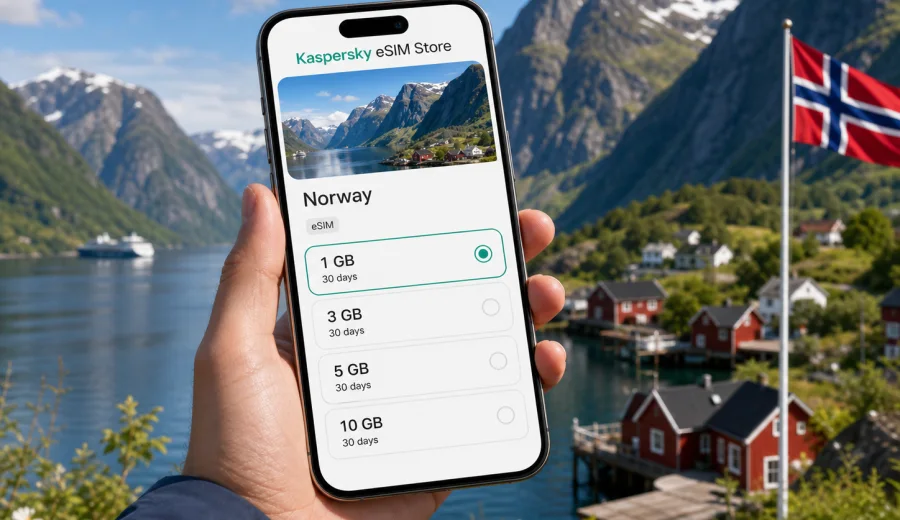
eSIM for Norway: mobile connection and internet for your trip
Norway is a country where mobile internet can quickly become part of the trip itself. You may need maps on the way from Oslo Airport to the city, train updates between Oslo and Bergen, ferry timetables on the fjords, weather forecasts before a hike, or messaging apps while moving between hotels, cabins and remote viewpoints. An eSIM helps prepare mobile connection before the trip without buying a physical SIM card after arrival.
An eSIM is a digital SIM profile that you install on a compatible smartphone or tablet. For travel, it is useful because you can choose a data package for Norway, add it to your device and use mobile internet for everyday trip tasks. It does not usually replace your main phone number. In most travel scenarios, the eSIM is used for data, while calls and messages continue through internet-based apps or through your primary SIM if you keep it active.
Why eSIM is useful in Norway
Norway is easy to travel around, but many trip decisions depend on live information. Weather can change quickly in coastal and mountain areas. A train, bus or ferry connection may depend on the latest timetable. Parking, electric car charging, hiking routes, hotel check-in and restaurant bookings are easier when your phone is online.
For a visitor, eSIM is practical because it can be prepared before departure. You do not need to search for a mobile shop at the airport or handle a physical SIM card. You can keep your main SIM in the device and add a separate data profile for Norway.
Typical uses for mobile internet in Norway include:
- navigation in Oslo, Bergen, Trondheim, Stavanger and Tromso;
- public transport apps, tickets and route changes;
- ferry schedules and road updates on fjord routes;
- messaging with hotels, tour operators and travel companions;
- mobile boarding passes and booking confirmations;
- translation, restaurant search and local services;
- photo backup when Wi-Fi is unavailable or unreliable;
- work messages during a business trip.
eSIM, roaming and public Wi-Fi: what changes for travelers
There are three common ways to stay online in Norway: roaming from your home operator, public Wi-Fi and a travel eSIM. Each option can be useful, but they solve different problems.
| Option | When it helps | What to check |
|---|---|---|
| Home roaming | Short trips where your existing plan already includes Norway on acceptable terms | Daily roaming fees, data limits, throttling and billing rules |
| Public Wi-Fi | Hotels, offices, airports and cafes | Availability, login pages, speed, privacy and whether you can use it while moving |
| Travel eSIM | Mobile internet on the go without a physical SIM card | Device compatibility, tariff size, validity, activation rules and coverage conditions |
An eSIM can reduce dependence on public Wi-Fi when Wi-Fi is not convenient: walking through a city, checking a ferry connection, driving through a region, or confirming a booking outside your hotel. Roaming may still be convenient if your home plan is favorable; the useful point is to compare the terms before you travel.
How to choose an eSIM tariff for Norway
The best eSIM tariff for Norway is the one that matches your trip length, data habits and route. A weekend in Oslo does not need the same package as a two-week fjord and Lofoten itinerary. Start with practical questions before choosing the package.
Checklist before choosing:
- How many days will you stay in Norway?
- Will you visit only one city or travel across regions?
- Do you need data every day or mainly during transfers?
- Will you use maps, video calls, social media or cloud backup?
- Will you share mobile data with a laptop or another device?
- Does your phone support eSIM and is it unlocked for another mobile profile?
- Do you need a Norway-only tariff or a broader Europe option for a multi-country route?
For a simple city break, a smaller data package may be enough if you mostly use maps, messaging and search. For a longer itinerary, choose a package with more data and a validity period that covers the full stay. For a work trip, consider extra data for video meetings, document sharing and hotspot use.
How much data do you need for Norway?
Data use varies by person, but it is possible to estimate a realistic range. The table below is not a promise of exact consumption; it is a planning guide for common travel behavior.
| Travel style | Typical use | Data planning approach |
|---|---|---|
| Light | Messaging, maps, tickets, search, email | Small package for short stays, with Wi-Fi used for heavy tasks |
| Standard | Maps, social media, photos, travel apps, regular browsing | Medium package for a week or mixed city and nature itinerary |
| Heavy | Video calls, hotspot, frequent uploads, streaming | Larger package and careful monitoring of background data |
| Business | Email, cloud documents, calls, hotspot for laptop | Larger package or a plan with enough margin for work tasks |
For Norway, many travelers underestimate maps, weather apps and photo uploads. A fjord road trip or northern lights tour can involve frequent checking of location, forecasts and messages. If you use cloud backup for photos and videos, set it to Wi-Fi only unless you deliberately choose a larger data package.
To keep data under control:
- download offline maps before departure;
- update apps before the trip, not on mobile data;
- disable automatic cloud backup on cellular data;
- reduce video quality in streaming apps;
- monitor data use in your phone settings;
- keep your primary SIM from using data roaming by mistake.
When you are ready to compare packages, you can use Kaspersky eSIM Store to choose an eSIM tariff for your trip to Norway and review the available data sizes and validity periods before you decide.
When to install and activate your eSIM
It is usually better to prepare the eSIM before departure while you still have reliable Wi-Fi. Installation and activation are related, but they are not always the same step. Installation adds the eSIM profile to your device. Activation or the start of validity may depend on the tariff conditions and network connection after arrival.
A practical timing plan:
1. Before departure, check whether your device supports eSIM.
2. Choose a tariff for Norway and complete the purchase.
3. Install the eSIM while connected to stable Wi-Fi.
4. Keep your regular SIM active if you need your usual number for banking or messages.
5. On arrival in Norway, select the eSIM for mobile data.
6. Enable data roaming for the eSIM profile if the instructions for your device or tariff require it.
7. Check that apps are using the correct data line.
If you install the eSIM at home, do not delete it from the device unless support instructions tell you to do so. Some eSIM profiles cannot simply be transferred or reinstalled on another device after activation. Read the tariff conditions and installation instructions before making changes.
For setup help, use the official installation guides: Android eSIM instructions and iOS eSIM instructions. Follow the steps for your device model and operating system version.
Device compatibility: check before you buy
Not every phone or tablet supports eSIM. Some devices support eSIM only in certain regions, and some phones may be locked by a mobile operator. Before buying a travel data plan, confirm that your exact device model can install an eSIM and use another data profile.
You should check:
- eSIM support for your exact device model;
- whether the phone is locked to your current operator;
- whether the operating system is up to date;
- whether you can scan a QR code or install from the app;
- whether dual SIM settings are available;
- whether your primary SIM is needed for calls, SMS or bank verification.
You can check your device before choosing a tariff. This step is especially important if you use an older smartphone, a device purchased through an operator, or a model with different regional versions.
Compatibility is not only a technical detail. If a device cannot install eSIM, the tariff will not solve the problem. Checking first is the simplest way to avoid delays before departure or after landing.
Practical scenarios for Norway
Different trips call for different data habits. Use these scenarios to think through your own route.
| Trip scenario | Why mobile internet matters | Planning tip |
|---|---|---|
| Weekend in Oslo | Airport transfer, city maps, tickets, restaurant bookings | A smaller package may be enough if hotel Wi-Fi covers heavy tasks |
| Fjord route from Bergen | Train, ferry, weather and pickup-point updates | Choose more data than for a single-city trip and download maps offline |
| Northern Norway and Tromso | Tour coordination, aurora forecasts, winter transport, photo sharing | Keep battery backup and avoid relying only on live data in remote areas |
| Business travel | Email, calendar, rides, documents and possible hotspot use | Leave data margin for calls and laptop tethering |
For outdoor travel, remember that eSIM does not guarantee service in every valley, mountain pass or remote coastal area. Availability depends on local networks, terrain and the selected tariff conditions. Treat mobile internet as a travel tool, not as a safety system.
Step-by-step setup before departure
Use this checklist a few days before your flight or train journey:
1. Confirm your phone supports eSIM and is not operator-locked.
2. Check your route and decide whether you need Norway-only or regional coverage.
3. Estimate data use for maps, messaging, work and photo uploads.
4. Choose a tariff with a validity period that covers the whole trip.
5. Install the eSIM using Wi-Fi.
6. Name the profile clearly, for example "Norway data".
7. Set your primary SIM for calls and SMS if you still need it.
8. Keep mobile data on your regular SIM disabled if roaming charges are a concern.
9. Save installation instructions and purchase details where you can access them offline.
10. On arrival, select the eSIM profile for mobile data and test browsing or messaging.
Common mistakes to avoid
Avoid these mistakes:
- buying a tariff before checking device compatibility;
- deleting the eSIM profile after installation;
- forgetting to select the eSIM as the mobile data line;
- leaving data roaming enabled on the wrong SIM;
- assuming that a data-only eSIM includes a local phone number;
- using cloud backup or streaming without monitoring data use;
- choosing a validity period that ends before the trip does;
- waiting until arrival to install the eSIM without reliable Wi-Fi;
- expecting mobile coverage in every remote landscape or mountain area.
If something does not work, start with the basics: check that the eSIM is installed, selected for mobile data and allowed to use data roaming if required. If the issue remains, contact support with the tariff details, device model and screenshots of relevant settings.
Frequently asked questions
Does an eSIM for Norway include calls and SMS?
Many travel eSIM tariffs are designed for mobile data. They may not include a local phone number, voice calls or SMS unless those features are clearly stated in the tariff conditions. For calls and messages, many travelers use internet-based apps while the eSIM handles data.
Should I install the eSIM before I leave?
In many cases, yes. Installing before departure is convenient because you can use home or hotel Wi-Fi and avoid setup pressure after landing. Check the tariff conditions so you understand when validity starts.
Do I need to enable data roaming?
Some eSIM profiles require data roaming to be enabled for the eSIM line. This does not mean you should enable roaming on your primary SIM. Make sure you adjust the settings for the correct profile.
What if I run out of data?
Options depend on the selected tariff and account settings. Check whether top-up or another package is available in your profile or app. It is better to monitor usage during the trip, especially if you use hotspot, video calls or cloud backup.
Can I use eSIM in remote parts of Norway?
Mobile service depends on local network availability, terrain and the tariff conditions. Norway has strong digital infrastructure in many populated and travel areas, but remote valleys, mountains and sea routes can still have variable service. Prepare offline tools for important travel information.
Prepare mobile internet for Norway with Kaspersky eSIM Store
Kaspersky eSIM Store is an app and website where you can choose, arrange and activate an eSIM with a suitable data tariff for international travel. For Norway, this means you can review available options, check the data allowance and validity period, install the eSIM on a compatible device and use it for mobile internet during the trip.
Before you travel, check compatibility, choose the right package for your route and install the eSIM while you have stable Wi-Fi. Then, when you arrive, select the eSIM as your mobile data line and keep your trip tools ready: maps, tickets, weather, transport, bookings and messages.
If Norway is your next destination, you can prepare an eSIM tariff for Norway in Kaspersky eSIM Store before departure and start the trip with your mobile internet plan already organized.