Travel connectivity guide
Nuku'alofa eSIM: Mobile Internet & City Travel Tips
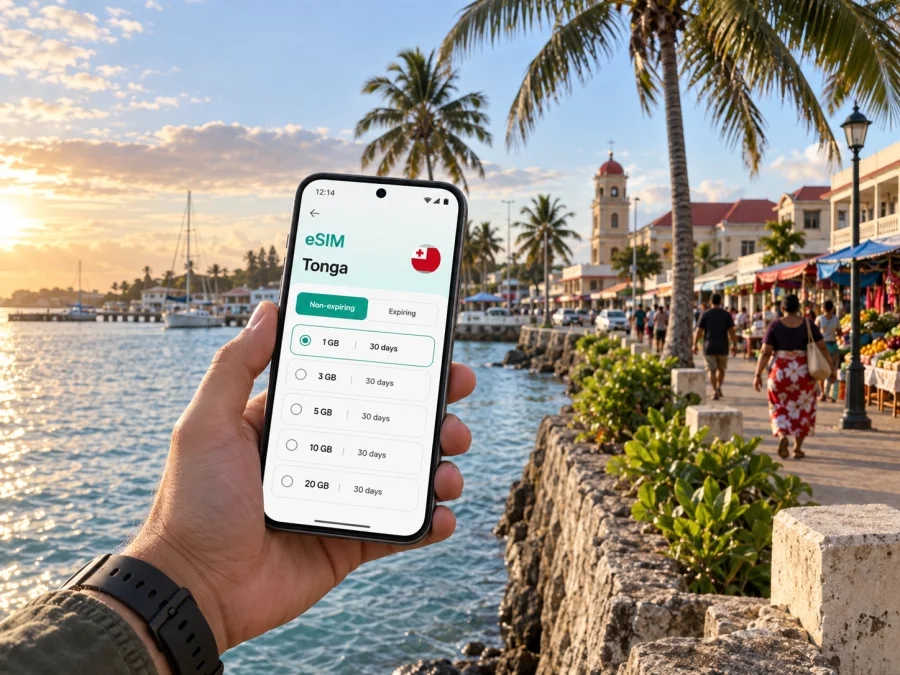
Nuku'alofa eSIM: mobile connection and internet for a city stay
Nuku'alofa is Tonga's compact capital on Tongatapu, where a short walk can take you from the waterfront to shops, cafés, government offices and the central market. For a visitor, mobile internet is most useful in the practical transitions: confirming an airport pickup, finding a hotel entrance, checking a meeting location, and coordinating a ride when plans change. An eSIM can make those tasks easier without replacing your regular physical SIM.
This guide focuses on using mobile data around Nuku'alofa: what to plan before landing, how to move through the town, which details matter for a short stop or a work visit, and how to choose a travel data plan that matches your stay. Local transport and opening hours can vary, so confirm arrangements with your accommodation or host before you set out.
Start with the arrival, not the map
International visitors to Nuku'alofa arrive at Fua'amotu International Airport on Tongatapu. The airport is outside the town, so the first leg is a road transfer rather than a walk into the centre. Do not assume that a city bus will be available when your flight lands. Arrange a pickup with your accommodation, host, or a taxi contact before departure, and save the name and phone number somewhere you can access offline.
A mobile connection is useful as a backup for messaging the person meeting you, checking the latest flight or accommodation information, and sharing your location if a pickup point is unclear. It is not a substitute for a confirmed transfer: after a long flight, it is better to know who is collecting you and where to meet before you leave the arrivals area.
A calm first-hour checklist
- Keep the accommodation address and pickup details in a note or screenshot.
- Confirm whether your host will meet you inside the terminal or at a stated meeting point.
- Save a second contact method in case a message does not go through.
- Download or pin the area around your lodging on a map before departure.
- Once you are in the vehicle, check that the destination shown on your map matches the address you were given.
If the driver knows the place by a landmark, save that alongside the written address.
Getting your bearings in central Nuku'alofa
Central Nuku'alofa is practical to explore on foot. The commercial centre, Vuna Road waterfront and Talamahu Market provide useful reference points. A phone map can confirm direction, but listings and entrances may be imprecise; ask your accommodation or a nearby shop to verify a difficult final turn. Downloaded maps help when data is unavailable, while live data refreshes directions and messages.
| Place or area | How it helps with orientation | Mobile-data task |
|---|---|---|
| Town centre | A practical base for shops, services and short walks | Search for an address and message a host |
| Vuna Road and the waterfront | A clear route for a harbour-side walk and nearby stops | Check a meeting point or share your location |
| Talamahu Market | A recognizable central reference point and local visit | Look up directions and confirm the route back |
| Your accommodation | The anchor for late returns and day-trip departures | Keep the address available and coordinate pickup |
Check opening times directly before visiting, and use a familiar road or ask locally if a map route looks uncertain.
Walking and navigation
For a short visit, walking can be the simplest way to connect central stops. Start with a route that has a clear endpoint, such as your accommodation, the market or the waterfront. If you are walking after dark or carrying luggage, choose a pre-arranged ride instead. Local advice helps when lighting, sidewalks or construction affect the route.
Keep navigation simple:
- Pin your hotel or guesthouse before leaving.
- Search for one destination at a time rather than stringing together several unfamiliar stops.
- Check the street name and a nearby landmark before turning off a main road.
- Save the return route, especially if you are visiting a market or waterfront area near closing time.
- If data drops, use your downloaded map and verify the next turn locally.
Map searches and new areas use data. Download the central area over Wi-Fi and keep data for updates and messages.
Moving around town and across Tongatapu
Nuku'alofa is not a large city with a metro or a dense network of scheduled urban transit. On Tongatapu, visitors commonly use taxis, local buses and rental vehicles, with the best choice depending on distance, time of day and whether they are staying in town or exploring the island. Ask your accommodation which option is operating for your route and when the last return journey is expected.
Local buses serve some routes between Nuku'alofa and communities on Tongatapu, but service is limited rather than turn-up-and-go. Published guidance says buses generally end in the afternoon and do not run on Sundays; confirm current routes and times locally before relying on one for an appointment or flight.
| Journey | Practical choice | What to confirm before leaving |
|---|---|---|
| Airport to accommodation | Pre-arranged hotel or host transfer, or a taxi | Pickup point, fare, payment method and flight arrival time |
| Short trip in central Nuku'alofa | Walking in daylight or a taxi | Exact entrance and the return plan |
| Town to another Tongatapu community | Bus, taxi or rental car, depending on route | Route, operating day, last return and travel time |
| Evening return | A ride arranged through your accommodation | Driver details and an agreed pickup location |
For taxis, agree on the destination and fare before starting. Ask your accommodation to recommend a driver. Messaging can coordinate a pickup, but does not guarantee driver availability.
Traffic in Tonga keeps to the left. If renting a car, check licence and rental requirements, avoid unfamiliar night drives, and never use a phone while driving. Review the route before setting off.
Choose mobile data around the shape of your stay
The right plan depends less on the word “unlimited” or a headline allowance than on how you will actually use your phone. Email and maps use less data than frequent photo uploads or video streaming. Estimate your needs from your own habits and check the plan's allowance, validity period, destination coverage and any other terms before purchase.
For Nuku'alofa, a practical data plan might be used for:
- map searches and turn-by-turn directions around town;
- confirming transfers and meeting points by message;
- checking travel updates and accommodation details;
- opening work documents or joining a call when Wi-Fi is unavailable;
- sending a few photos and keeping in touch with family.
Video calls, cloud backups, downloads and streaming use more data. Use Wi-Fi where appropriate, disable automatic media downloads, and keep booking details and addresses offline.
Kaspersky eSIM Store is an app and website that lets you choose, arrange and activate an eSIM with a suitable data plan for an international trip. Before choosing, compare the plan's data amount and validity with the dates you will be in Tonga, and check what the plan says about activation and data use. You can review eSIM options for Tonga while planning your Nuku'alofa stay.
An eSIM plan for mobile data does not automatically provide a regular phone number, voice calls or SMS unless its terms say otherwise. Keep your primary number available for calls or texts you still need, and use internet messaging or calling apps for data-based communication. Check how your phone handles two SIMs so that mobile data uses the intended line and your usual line does not incur roaming charges unexpectedly.
Before you buy: a short device and plan check
An eSIM is a digital SIM profile installed on a compatible device. Compatibility can vary by model and regional version, and a carrier lock can prevent an otherwise capable phone from using another provider's profile. Check both points before purchase; check whether your device supports eSIM if you need to confirm compatibility.
Use this checklist before selecting a plan:
- Destination: the plan must include Tonga for the dates and route you have planned.
- Validity: the active period should cover the time when you expect to use mobile data.
- Allowance: choose enough data for maps, messaging, email and your typical media use.
- Device: confirm eSIM support for your exact model and that it is not carrier-locked.
- Installation: make sure you can access the setup details and a reliable internet connection when adding the eSIM.
- Primary SIM: decide whether to keep your regular number enabled for calls and messages.
If your trip also includes other Tongan islands, read the destination terms carefully rather than assuming that a plan for one place covers every leg in the same way. Coverage and plan conditions depend on the selected offer. Keep the plan details available in your account or as a screenshot, especially if you are travelling between towns or changing accommodation.
Install before departure, activate with a plan
Setting up an eSIM before leaving can reduce the number of tasks to handle after landing. Follow the instructions for your operating system and the steps shown for your selected plan. You will need a compatible, unlocked device and an internet connection during installation. Depending on the plan, installation and activation may be separate steps, so read the displayed terms rather than turning on data early by assumption.
- Open the app or website and choose the destination and plan that fit your trip.
- Review the data allowance, validity and activation information.
- Add the eSIM by following the on-screen instructions while connected to Wi-Fi.
- Label the new line clearly, for example “Tonga data”, so it is easy to identify later.
- In your mobile settings, select the intended eSIM for mobile data when you are ready to use it.
- If the plan instructions require data roaming for that eSIM, enable it for that line and check that roaming remains disabled on your primary SIM if you do not want to use it abroad.
For step-by-step help, use the Android eSIM installation instructions or the iOS eSIM installation instructions. Menu names can differ by device and software version, so follow the wording shown on your phone.
Before leaving, check the selected data line and eSIM status. If it does not connect, review the plan's activation instructions and data-line settings. Do not delete an installed profile unless the instructions or support team advises it.
Short-stay, work and day-trip scenarios
For a short stop, keep the route compact: confirm your transfer, leave luggage where possible, and choose one or two central stops. A business visitor should save the venue address and host contact offline, allow time for the road transfer, and check Wi-Fi or mobile-data needs before a call. For a day trip beyond town, agree on the return arrangement before leaving and download the map area. In all three cases, a saved address and confirmed pickup plan matter as much as live navigation.
Common questions
Is an eSIM useful for a visit limited to Nuku'alofa?
It can help with maps, messages and travel information away from Wi-Fi. Your stay length, data habits and plan terms determine how much data you need. A short visit with a confirmed transfer may use less than a trip with frequent movement around Tongatapu.
Can I rely on a bus from the airport?
Confirm current service rather than assuming there is an airport bus. The airport is outside town, and published travel guidance notes that public buses do not currently serve it. Arrange a transfer with your accommodation or host, or confirm a taxi option before departure.
Can I walk everywhere in Nuku'alofa?
Walking suits some central errands in daylight, but not every journey. Luggage, heat, evening plans, lodging outside the centre and island trips affect the choice. Check the route and arrange transport when walking would be inconvenient.
Does a travel eSIM include a local phone number?
Not unless the selected plan terms say so. Travel eSIM plans described here are for mobile data; keep your usual number for calls you need, and use internet messaging apps for data-based communication.
When should I install the eSIM?
Prepare it before departure over a reliable internet connection if that suits your itinerary, then follow the plan's activation instructions. Installation and activation timing can differ, so read the selected plan details.
A simple plan for staying connected
For a smooth Nuku'alofa visit, prepare the transfer before landing, save your accommodation and meeting points offline, and use a map to connect a small number of stops at a time. Check bus and taxi arrangements locally, especially for Sundays, evenings and journeys beyond the town centre. Choose an eSIM plan by destination, validity and realistic data use, then install it on a compatible device and confirm which line handles mobile data.
Kaspersky eSIM Store lets you choose, arrange and activate an eSIM with a suitable data plan for your trip. Review the plan conditions, prepare the profile before departure if that suits your itinerary, and choose a data plan for Tonga before travelling to Nuku'alofa.


