Travel connectivity guide
Nuuk eSIM: Mobile Internet for Greenland Trips
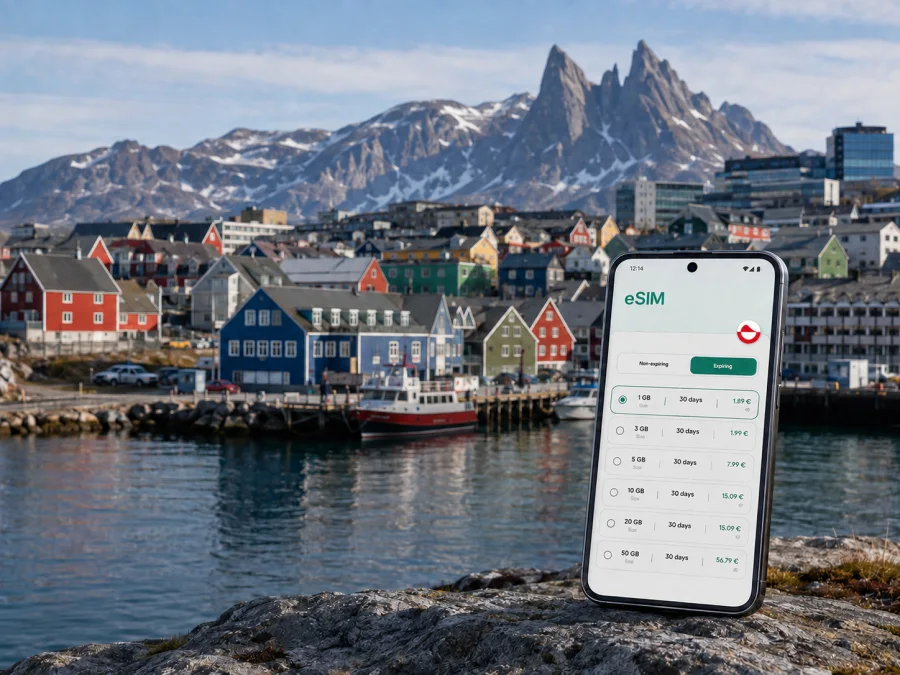
Nuuk eSIM: mobile connection and internet for your Greenland trip
Nuuk is a compact capital with a very different travel rhythm from a typical large city. You may arrive with a tight transfer, walk between the waterfront and the centre, travel out to a viewpoint or harbour, and still need your phone for maps, messages, bookings and weather updates. An eSIM can make that first connection easier without removing the physical SIM already used at home.
For a trip to Nuuk, Kaspersky eSIM Store is an app and website where you can choose, arrange and activate an eSIM with a suitable mobile-data plan for an international journey. The practical goal is simple: prepare a digital SIM before departure, then use the selected profile for mobile internet in Greenland on a phone that supports eSIM and is unlocked. The exact conditions depend on the plan you choose, so check the destination, data allowance and validity period before you pay.
Why mobile data matters in Nuuk
Nuuk is easy to underestimate on a map. The built-up area is walkable in parts, but your plans can quickly involve different neighbourhoods, a hotel outside the centre, a harbour meeting point, a bus ride or a boat departure. A working data connection is useful for each small decision:
- checking the location of an accommodation and the best way to reach it;
- sending a message when an arrival time changes;
- opening a map while walking between the city centre, the waterfront and nearby viewpoints;
- confirming a tour, restaurant booking or meeting location;
- using translation, weather and transport information when conditions change;
- sharing a photo or calling home through an internet messenger.
Public Wi-Fi can be helpful in a hotel or café, but it is not a complete travel plan. You may need data before check-in, between stops or outdoors. An eSIM provides another option while allowing you to keep your usual physical SIM in the phone. It is primarily for mobile internet, not automatically for a conventional phone number, voice calls or SMS; use internet messengers when those services are not included.
Arrival in Nuuk: prepare the first hour
Air travel is the most common way to reach Nuuk. The airport is not the moment to begin a complicated setup if your luggage, transfer or meeting is waiting. A short preparation routine before departure reduces the number of tasks you have to solve after landing.
Before leaving home
- Check that your phone supports eSIM and that it is not locked to a mobile operator. Support can vary by model and regional version, so use the device settings and the manufacturer’s information rather than assuming that every version is identical. You can also check your device compatibility before choosing a plan.
- Make sure the phone has enough battery and can connect to Wi-Fi during installation.
- Choose a Greenland plan whose validity period matches your itinerary. If your route includes destinations beyond Nuuk, read whether the plan is country-specific or regional.
- Review the allowance, activation rules, supported top-up options and the point at which validity begins. These details may differ between plans.
- Install the eSIM while you have reliable Wi-Fi, unless the plan instructions advise another sequence. Leave your usual line available for calls if you need it.
At the airport and on the way to your accommodation
After landing, check that the correct line is selected for mobile data. On some phones you may need to enable data roaming for the travel eSIM; this is a setting for the eSIM profile and should be used only when the plan instructions require it. Turn off data roaming on your home line if you want to reduce the chance of accidental roaming charges.
Keep your accommodation address, booking details and a basic offline map available as a backup. Select the travel profile, enable mobile data, wait briefly, then test a simple webpage or messenger instead of changing several settings at once.
Getting around the city without losing your bearings
Nuuk rewards a practical approach to navigation. Distances that look short may feel different in wind, snow, rain or uneven terrain. Plan each leg from a known place rather than relying on a single route for the entire day.
Walking in the centre and Old Nuuk
The central area is useful for an initial orientation: shops, services, cafés, cultural venues and the waterfront are close enough to combine in one outing, depending on your accommodation. Old Nuuk has a distinct historic character and is best explored slowly. Use your map to locate the next street or building, but keep your eyes on the surface and weather rather than walking continuously with the screen open.
For a short walking itinerary, save these points in advance:
| Travel task | What to prepare on the phone |
|---|---|
| Find the hotel after arrival | Address, reception number if supplied, and a map pin |
| Walk to a meeting | Exact building name, entrance note and calendar time |
| Visit the waterfront | A saved route plus a weather check before leaving |
| Return after dinner | Accommodation pin and a backup taxi contact method |
| Meet a boat or tour | Operator message, meeting point and departure time |
Buses, taxis and transfers
Use the current local information available to you for bus routes, stops and timetables. Schedules can change, and a route that looks convenient may involve a longer walk than expected. Save the stop name and destination before you leave Wi-Fi. For taxis or pre-arranged transfers, keep the booking message visible and check the pickup point carefully; in a new city, a nearby landmark can be more useful than a street number alone.
Nuuk neighbourhoods and where data is useful
The most useful way to think about Nuuk is by daily task rather than by a checklist of attractions. The centre is convenient for services and short walks. The waterfront and harbour connect sightseeing with practical departures. Old Nuuk is a slower historic area. Nuussuaq and Qinngorput extend the urban area and may place you farther from the cluster of central services.
When choosing a hotel, compare its location with your actual schedule. A central room can reduce transfers for a short city break; a place farther out may work well if your meeting is nearby. Save the hotel pin and a second route before setting out. For business travel, mobile data covers the gaps between a hotel network, a meeting room and a café.
Choosing an eSIM plan for a Nuuk itinerary
There is no single correct data allowance for every traveller. Select it from your own pattern of use, the length of the stay and the route after Nuuk. A person who mostly uses hotel Wi-Fi and sends messages will need less than someone who shares photos, joins video meetings or uses navigation throughout the day.
| Your trip pattern | What to consider |
|---|---|
| One or two days in Nuuk | A short validity period and enough data for arrival, maps and messages |
| Several days in the capital | A balance between validity and everyday browsing, bookings and photos |
| Remote work or frequent uploads | A larger allowance, reliable charging and a backup plan for meetings |
| Nuuk plus other Greenland stops | Whether the plan applies to the whole country or only a stated region |
| A short transit with no overnight stay | Data for the airport, transfer, messages and a quick map check |
Choose a plan by reading its actual conditions, not by the largest number alone. Check whether validity starts at installation or first use, whether a top-up is possible and whether tethering is permitted for a laptop. For a group, decide whether one person will use a hotspot or each phone needs its own eSIM.
At the planning stage, you can choose an eSIM plan for a trip to Greenland and compare the options shown for the destination. The city-specific use case is Nuuk, but the plan’s coverage and terms are defined by the destination page and the selected offer. If your itinerary later includes another country, do not assume that a Greenland plan will apply there; check the route before purchase.
Installing and activating eSIM
The cleanest time to install an eSIM is usually before departure, when you have stable Wi-Fi and time to read the instructions. Activation rules differ, so follow the plan’s own guidance and do not delete a profile simply because it is not yet the selected data line.
A simple preparation sequence
- Open the Kaspersky eSIM Store app or website and select the destination and plan that fit your Nuuk itinerary.
- Complete the purchase or arrangement process and keep the QR code or activation details accessible on another screen when possible.
- Add the eSIM in the phone’s mobile-network settings. The menu name varies by manufacturer.
- Label the profile clearly, for example “Greenland trip”, so that you do not confuse it with your usual line.
- Select the travel eSIM for mobile data when you are ready to use it. Keep calls and SMS on your main line only if that matches your roaming preference.
- If the plan requires data roaming for the eSIM, enable that setting for the travel profile and disable it for lines you do not want to use abroad.
- Test a small amount of data, then check the plan status and the phone’s selected data line.
For detailed device steps, use the Android installation instructions or the iOS installation instructions. If the QR code is displayed on the same phone, use the manual activation details when the device offers that option, or open the code on another screen. Do not scan an unfamiliar code from an untrusted source.
Three useful Nuuk connection scenarios
Short stopover. Before leaving the airport, confirm the accommodation or meeting pin, send your arrival message and save the return route. Use data for transport, navigation and one or two messages; avoid automatic updates.
Weekend city break. Connect the centre, waterfront and a cultural stop on a saved map. Check the weather before longer walks and keep any harbour meeting point or excursion confirmation available offline.
Business trip. Prepare the phone and laptop before travel, confirm whether tethering is supported, download essential files for offline access and keep the exact meeting location in your calendar. A charger or power bank is part of the connection plan too.
Trips beyond the centre
Nuuk can be a base for activities on the water and in the surrounding landscape, but departures depend on season, weather and the operator’s schedule. Confirm the meeting point, departure time, return expectations and clothing guidance before leaving the city. Save the booking, harbour location and accommodation details offline, and ask the organiser about communication when the route leaves dense urban areas.
Before you buy: a Nuuk eSIM checklist
Use this quick review before committing to a plan:
- [ ] The destination is Greenland, and the plan terms fit the itinerary.
- [ ] Your phone supports eSIM and is not operator-locked; check device compatibility.
- [ ] The validity period covers the dates when you expect to use data.
- [ ] You understand when validity starts and what counts as activation.
- [ ] The data allowance suits maps, messages, bookings, work or media you expect to use.
- [ ] You know whether tethering is allowed if you will connect a laptop.
- [ ] You have stable Wi-Fi for installation and a backup copy of booking details.
- [ ] You know which line will carry mobile data after arrival.
- [ ] You have considered data roaming settings for both the travel eSIM and your home line.
- [ ] You have a basic offline fallback for accommodation, transport and emergency information.
If a condition is unclear, read the plan details and contact support before installation.
If mobile data does not start
Check that the eSIM is enabled, selected for mobile data and within its validity period. If the plan requires it, enable data roaming for that profile only, then briefly toggle airplane mode or restart the phone. If the issue remains, compare the settings with the Android or iOS guide and contact support with the device model and eSIM status. Avoid deleting the profile as a first response; some profiles may not be installable again under the same conditions.
Frequently asked questions
Does an eSIM replace my phone number?
Not usually. A travel eSIM for mobile data is not automatically a conventional voice-and-SMS line. Keep your normal number for services that require it, and use internet messengers for calls or messages when the selected plan and app support that use.
Should I install the eSIM before flying to Nuuk?
Installing before departure is often convenient because you have Wi-Fi and time to troubleshoot. Whether the plan starts immediately or only after a later step depends on its conditions. Read those conditions before installation and do not activate earlier than you intend to use the plan.
Do I need data roaming?
Some travel eSIMs require data roaming to be enabled for the eSIM profile. This does not mean you should enable roaming on every line. Check the instructions, then keep the home line’s mobile data and roaming settings under control.
What if my Nuuk plans include another country?
Check whether the selected offer is limited to Greenland or covers a wider region. A city plan helps with the Nuuk part of the journey; if the route crosses a border, review the next destination separately.
A calmer way to stay prepared
An eSIM is a practical way to prepare mobile internet for the moments between airport Wi-Fi, hotel networks, transport stops and outdoor plans. Before departure, check the device, read the plan conditions, install with reliable Wi-Fi and save essential details offline. In Nuuk, use data for maps, messages, reservations and work while keeping battery and weather in mind beyond the centre.
When you are ready, choose an eSIM plan for your Nuuk trip and prepare the profile before you leave. Select the allowance and validity period that fit your own itinerary, then follow the installation steps for your device.


