Travel connectivity guide
Nuwara Eliya eSIM: Mobile Internet for Your Trip
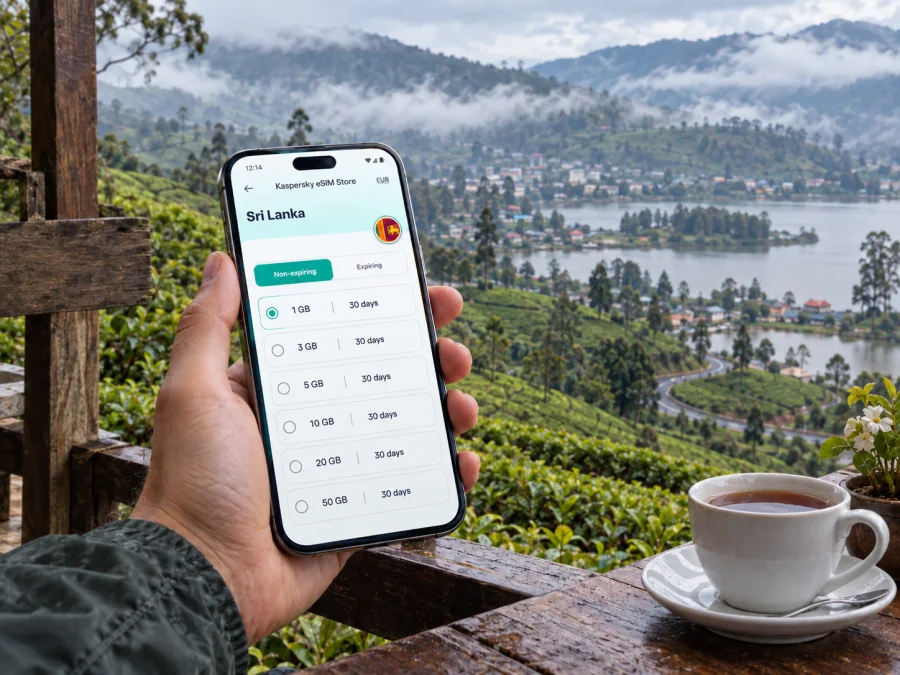
Nuwara Eliya eSIM: mobile connection and internet for your trip
Nuwara Eliya is a hill-country destination where mobile internet can simplify arrival, navigation, hotel messages, and transfers on winding roads. An eSIM, or digital SIM, lets you prepare mobile data for Sri Lanka without removing your everyday physical SIM card.
This guide covers arriving from Colombo or Kandy, reaching town from Nanu Oya, moving between districts, handling a stopover, and taking trips into the highlands. Kaspersky eSIM Store is an app and website for choosing, arranging, and activating an eSIM with a suitable mobile-internet plan for an overseas trip.
Why mobile internet matters in Nuwara Eliya
The town sits in Sri Lanka’s central highlands at roughly 1,868 metres above sea level. Roads curve through the hills, accommodation is spread beyond the centre, and a place that looks close on a map can take longer to reach than expected.
Mobile data is useful for small decisions that shape the day:
- checking a hotel location and check-in instructions;
- sharing your arrival time from Nanu Oya or another transfer point;
- opening a map near the town centre or Lake Gregory;
- arranging transport for a tea estate, garden, viewpoint, or trailhead;
- confirming a reservation, sending messages, and checking weather before an excursion.
An eSIM does not replace every communication service. Unless the conditions of a particular plan say otherwise, it is intended for mobile data rather than a regular local phone number, traditional calls, or SMS. You can continue using your usual number for calls and messages when your device and home operator allow it, while selecting the travel eSIM for mobile data.
Arriving in Nuwara Eliya: plan the connection before the hills
Most visitors reach Nuwara Eliya after travelling through another Sri Lankan city or transport hub. The final approach is where navigation is especially useful: you may be moving between a station, a bus stop, a hired car, and a hotel several kilometres away.
If you arrive by train, Nanu Oya is the railway station associated with Nuwara Eliya, so you still need a road transfer into town. Keep the accommodation address and booking details available, and make sure the travel eSIM is ready before leaving the station area. Mobile data can help you contact the property or share your location if the driver needs clarification.
If you come by road from Kandy, Colombo, Hatton, or another highland stop, check the route before leaving your previous hotel, note the arrival area, and message your Nuwara Eliya accommodation. This reduces decisions on a winding road.
A simple arrival checklist
Before the final transfer, check the following:
- your phone is charged and the eSIM profile has been installed;
- mobile data is assigned to the travel eSIM rather than your home line;
- the accommodation address is saved in the booking app or notes;
- the property name and phone number are available if contact is needed;
- you know whether the first night is in the centre, near Lake Gregory, or farther out;
- data roaming is enabled only if the plan and device instructions require it;
- your physical SIM remains configured for calls or messages you still want to receive.
Where a connection helps around town
Nuwara Eliya is spread across a town centre, the Lake Gregory area, residential lanes, gardens, and hillside accommodation. That makes the exact location of your hotel more important than a simple distance on a map. Use mobile data to compare walking and driving routes, confirm a meeting point, and message a property when rain, luggage, or a winding road changes the plan.
Lake Gregory is a useful reference point for an afternoon, while tea estates and highland sights usually require a separate transport arrangement. Save the property address, the driver’s meeting point, and any booking details before leaving. A map pin alone may not explain which entrance or road is suitable, so keep a written description as well.
Choosing an eSIM plan for a Nuwara Eliya itinerary
Start with the whole Sri Lanka route, even when Nuwara Eliya is your main destination. A country plan may be more useful when your journey includes Colombo, Kandy, Nanu Oya, Ella, or another stop. Choose by the destination shown in the plan, the trip length, and your expected data use.
Use this planning table as a practical guide rather than as a promise of a particular amount of data:
| Travel pattern | Typical data tasks | What to consider |
|---|---|---|
| One or two nights in town | Maps, messages, bookings, occasional searches | A smaller prepaid package may be enough if you use Wi-Fi for long browsing sessions. |
| A multi-day highland stay | Navigation, transport messages, photos, weather checks, calls through apps | Allow for daily route planning and communication with accommodation. |
| A Sri Lanka circuit | Maps between several destinations, reservations, translation, work messages | Choose a country plan whose validity covers the full route, not only Nuwara Eliya. |
| A work trip with leisure time | Video calls, email, cloud documents, hotspot use | Estimate work traffic separately and review tethering conditions before relying on it. |
The most useful details to compare are:
- Destination. Confirm that the plan is for Sri Lanka and that it fits your full route.
- Validity. Match the period to your arrival and departure dates. Check when the validity starts and when data begins to be used.
- Traffic allowance. Navigation and messaging are lighter tasks than video meetings, photo backups, or streaming. Leave room for the way you actually travel.
- Price and currency. Review the current amount shown at checkout.
- Top-up conditions. If you may extend the stay, check whether the plan can be topped up.
- Device requirements. Confirm eSIM support and that the phone is not operator-locked.
When you are ready to compare the current options, you can choose an eSIM plan for a trip to Sri Lanka. The country page is relevant for a Nuwara Eliya stay because the town is part of your wider Sri Lanka route; it is not a separate city network plan.
How to install and activate an eSIM
Installation is easiest before departure, while you still have stable internet access and time to read the on-screen instructions. Some travellers prefer to install the profile at home and enable the line after landing. Others wait until arrival. Follow the conditions of the selected plan, since activation and the start of validity are not necessarily the same action.
Before installation
Prepare your phone, profile details, and a second way to display a QR code if required. Do not delete an existing mobile profile until you understand the device’s limits and plan conditions.
Before buying or installing, check whether your device supports eSIM. Also confirm that the device is unlocked for other operators and that it can connect to the internet during installation.
Installation steps
- Check compatibility. Confirm eSIM support for your exact phone model and sales region.
- Open mobile settings. Find the option to add a mobile plan or add an eSIM.
- Scan or enter the details. Use the QR code or manual information supplied with your eSIM profile.
- Name the line. Use a clear label such as “Sri Lanka travel” so that you do not confuse it with your everyday line.
- Keep your home line available. Decide whether it should remain active for calls and messages, and check any home-operator roaming conditions.
- Select the travel line for data. Set the Sri Lanka eSIM as the line for mobile data when you want to use it.
- Enable data roaming if required. Some travel eSIMs need this setting for the profile to work; follow the plan instructions rather than enabling it on every line.
- Test after arrival. Give the phone a little time to register, then open a simple page or send a message. If it does not connect, check the selected data line and the plan settings before reinstalling anything.
For device-specific guidance, use the Android eSIM installation instructions or the iOS eSIM installation instructions. Installation may take several minutes and can depend on the phone, the local network, and the conditions of the selected plan.
Using mobile data for transport and navigation
A Nuwara Eliya day often involves short journeys. Treat your phone as a navigation aid, not the only source of information: check the destination, return route, meeting point, terrain, and road layout before leaving.
For a transfer from Nanu Oya, send the accommodation name and arrival message. For a hired vehicle or a trip to a tea estate or national park area, agree on an easy meeting point and return time.
Navigation uses data continuously when you are moving, but it is not usually the only activity consuming your allowance. Automatic photo backups, video, app updates, and social feeds can use much more. To keep the plan predictable:
- turn off automatic updates and pause cloud photo backup while on mobile data;
- save language packs or offline maps before leaving when the app supports it;
- use messaging instead of video for a quick status update;
- keep a power bank available and check data-heavy apps if the allowance falls quickly.
If you use your phone as a hotspot, remember that work applications, system updates, and video calls can consume traffic quickly. Estimate work use separately from maps and messages.
Hotels, work trips, and short stopovers
For a hotel stay, save the property name, address, and entrance details. If it is on a narrow or steep road, ask how the driver should approach it and send your updated arrival time. For a business visit, use hotel Wi-Fi for larger work tasks when suitable, and keep mobile data for maps, messages, and urgent work away from your desk. If Nuwara Eliya is only a stopover, install and label the eSIM before the transfer rather than trying to do it while changing trains or vehicles.
Trips from Nuwara Eliya
The town can be a base for tea-growing areas, viewpoints, gardens, Lake Gregory, Nanu Oya, and Horton Plains National Park. These are different outings, not one walk from the centre. Before leaving, keep the meeting point, organiser’s contact, return window, accommodation address, and a written description of the location together. Roads, weather, access arrangements, and opening conditions can change, so check current details with the organiser before setting out.
What to check before purchase
Use this short checklist before you confirm a plan for Nuwara Eliya:
- [ ] The destination is Sri Lanka and covers the route you intend to take.
- [ ] The validity period matches the complete travel window.
- [ ] The traffic allowance fits maps, messages, browsing, photos, and work use.
- [ ] Your exact phone model supports eSIM.
- [ ] The phone is not locked to your home operator.
- [ ] You know which line will handle mobile data after arrival.
- [ ] You understand whether data roaming must be enabled for the travel profile.
- [ ] Installation instructions and purchase details are available.
- [ ] Essential hotel and transport information is saved for offline access.
This check helps you choose by actual phone use, not only by the number of days in Nuwara Eliya.
Common questions about eSIM in Nuwara Eliya
Can I use an eSIM for Nuwara Eliya and other parts of Sri Lanka?
Yes, when the selected plan is for Sri Lanka and its validity covers the whole route. Check the destination and conditions before purchase; the city article helps you plan local use, while the plan is selected for the country or region shown at checkout.
Should I install the eSIM before travelling?
Usually, installing it before departure gives you more time to check the settings. You can then choose when to use the profile for mobile data. Follow the plan instructions because installation, activation, and the start of validity can have different conditions.
Will the eSIM give me a Sri Lankan phone number?
Not usually. Travel eSIM plans in this context are for mobile internet and do not include a regular phone number, traditional calls, or SMS unless the selected plan specifically says otherwise. Messaging apps can be used over mobile data.
What if my phone does not connect after I arrive?
First check that the eSIM profile is turned on and selected for mobile data. Confirm that the phone is not using the wrong line and that data roaming is enabled for the travel profile if required. Wait a few minutes, then try again. If the issue continues, review the plan instructions and contact support with the device and profile details.
A calm connection plan for your highland stay
The practical value of an eSIM in Nuwara Eliya is not a promise that every road, hotel, or attraction will feel the same. It is the ability to prepare a mobile-data line for the moments when you need directions, a message, a booking, or a route update during a changing mountain itinerary. Choose a Sri Lanka plan that matches the complete journey, check the device and settings in advance, and keep essential information available offline as a backup.
When you are ready to prepare the connection for your trip, choose an eSIM plan for Sri Lanka and your Nuwara Eliya itinerary. Install it on a compatible device that is unlocked, activate it according to the plan conditions, and select it for mobile data when you arrive. That leaves you free to focus on the roads, gardens, tea country, and cool highland pace of Nuwara Eliya.


