
Travel connectivity guide
Odense eSIM: mobile internet for Denmark trips
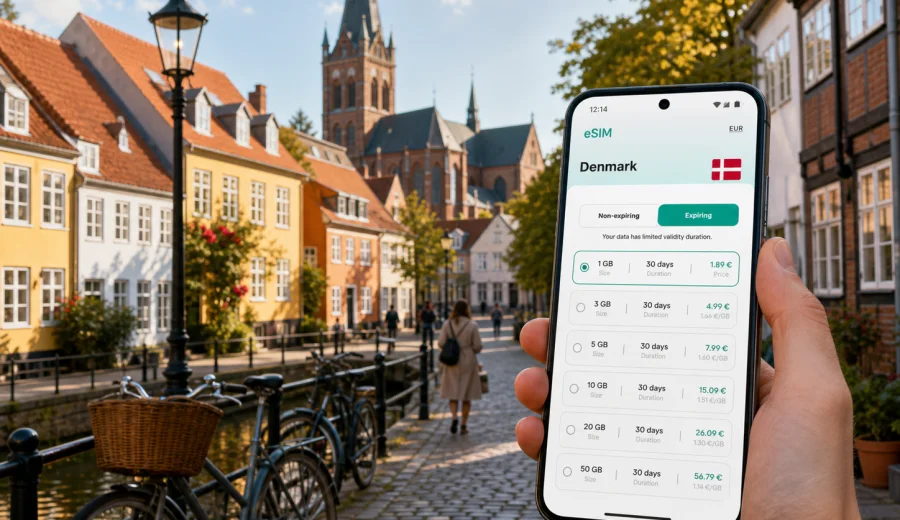
Odense eSIM: mobile connection and internet for your Denmark trip
Odense is an easy city to enjoy when your phone is already ready for the day. You may need maps for the old streets around the H. C. Andersen quarter, train updates for trips across Funen, messenger access for hotel check-in, or mobile data for a short business visit. An eSIM can help you prepare mobile internet before you arrive in Denmark, without looking for a physical SIM card after landing.
This guide is about using an eSIM in Odense specifically: arrival routes, local transport, walking areas, hotels, conferences, day trips, and the small online tasks that make a city visit smoother. It is not a general country guide. Denmark matters here because the eSIM tariff must match the country where Odense is located, but the practical focus stays on Odense.
Why mobile internet matters in Odense
Odense is compact, but it is not a city where you want to depend only on hotel Wi-Fi. Many useful moments happen between fixed connections: finding the right bus stop, checking train platforms, opening a digital ticket, messaging a host, or navigating from the station to a meeting on foot.
Mobile internet is especially useful in Odense when you:
- arrive by train and need walking directions from Odense Station;
- land at a Danish airport and continue to Funen by train, car, or bus;
- move between the city center, university area, harbor district, and hotels;
- use maps for the H. C. Andersen quarter, Munke Mose, Brandts, and the cathedral area;
- coordinate a business visit, campus meeting, conference, or hospital appointment;
- take day trips from Odense to other places in Denmark;
- need messaging, translation, banking, ride apps, and booking confirmations during the day.
An eSIM does not replace every communication need. Many travel eSIM tariffs are designed for mobile data, not for a regular Danish phone number, voice calls, or SMS unless the tariff terms say otherwise. For most city travel tasks, mobile data is the important part: maps, chat apps, email, tickets, hotel apps, and browser access.
First hours after arrival
Odense is well connected, so many visitors arrive after a transfer rather than by a direct international flight. You may come from Copenhagen Airport, Billund Airport, Hamburg, Aarhus, or another Danish city. The first online tasks are usually simple, but they are easier if your eSIM is already installed on a compatible device.
Typical first-hour tasks include:
1. Turn on the eSIM line for mobile data after reaching Denmark.
2. Check your train or bus route into Odense if you are still in transit.
3. Open the hotel address and save it offline as a backup.
4. Message your host, colleague, or family to confirm arrival.
5. Check whether your room, apartment, or meeting venue uses a digital entry system.
6. Keep your main physical SIM available for calls if you still need it.
If you arrive at Odense Station, mobile data helps with the short but detail-heavy final stretch: choosing the right exit, checking the walking route, finding a taxi stand, or confirming whether your accommodation is in the historic center, near the harbor, close to the university, or in a quieter residential area.
Odense situations where eSIM helps
| Situation in Odense | Why mobile data is useful | Practical note |
|---|---|---|
| Walking through the old center | Maps, opening hours, restaurant bookings | Streets are easy to walk, but small lanes can be confusing on a first visit. |
| Business meetings | Email, calendar updates, messaging, file access | Keep enough data for video calls only if you truly need them. |
| University or hospital visit | Route planning across several districts | Save key addresses before leaving the hotel. |
| Family trip | Shared locations, tickets, translation, photos backup | One larger data package may be better than several tiny top-ups. |
| Stopover in Odense | Fast navigation and train checks | A short-validity tariff can be enough if Denmark is the only country. |
| Day trip from Odense | Train updates, maps, mobile tickets | Check that the tariff covers Denmark, not only a different destination. |
The main benefit is control. You can choose a prepaid eSIM tariff, see the data allowance and validity period, install it before travel, and avoid spending the first part of the trip searching for a SIM counter or relying on public Wi-Fi.
Choosing a data allowance for Odense
There is no single perfect data amount for every visitor. A quiet weekend with maps and messaging uses much less data than a work trip with tethering and video meetings. Think about the city tasks you expect to do, then match the tariff to the length of stay.
For many Odense trips, these ranges are a useful starting point:
- 1-3 GB: short stay, maps, messaging, tickets, light browsing.
- 3-5 GB: long weekend, regular navigation, restaurant search, social media, email.
- 5-10 GB: one week, daily maps, photo sharing, work messages, occasional calls over apps.
- 10 GB or more: business travel, hotspot use, cloud files, heavier media, multiple day trips.
Streaming video, cloud photo backup, laptop tethering, and long video calls can consume data quickly. If you plan to work from a hotel, cafe, university building, or coworking space, check whether trusted Wi-Fi is available and keep mobile data as a reliable fallback for movement between locations.
What to check before you buy
Before choosing an eSIM tariff for a trip to Odense, check the basics carefully. This is a small step, but it prevents many travel-day problems.
- Your phone or tablet must support eSIM.
- The device should not be locked to a mobile operator that blocks other SIM profiles.
- The selected tariff should include Denmark.
- The validity period should match your arrival date and trip length.
- The data volume should match how you actually use your phone.
- You should understand when the validity period starts according to the tariff terms.
- You may need to enable data roaming for the eSIM line on some devices.
If you are not sure whether your device supports eSIM, use the compatibility check before paying: Check your device. Do this before the airport day, not while standing outside the station with luggage.
How Kaspersky eSIM Store fits the trip
Kaspersky eSIM Store is an app and website where you can quickly choose, arrange, and activate an eSIM with a suitable mobile internet tariff for international travel. For an Odense visit, the important part is selecting Denmark as the destination, checking the data allowance and validity period, and installing the eSIM on a compatible device.
This does not make Kaspersky a mobile network operator or a provider of mobile coverage. The practical role is simpler: the service helps you prepare an eSIM tariff for the destination, see the main conditions, and manage the setup through the site or app.
If your itinerary is focused on Odense and other places in Denmark, you can choose a mobile internet tariff for Denmark before the trip and keep the setup ready for arrival. If your route includes several countries, compare the destination coverage in the tariff terms before you decide.
Installing eSIM before Odense or after arrival
The most comfortable option is to install the eSIM before you travel, while you have stable Wi-Fi and time to read each screen. Then, when you reach Denmark, you can switch mobile data to the eSIM line according to the instructions for your device.
A simple setup flow looks like this:
1. Check that your device supports eSIM and is not operator-locked.
2. Choose Denmark or the appropriate regional destination.
3. Select the data volume and validity period.
4. Complete the order and open the eSIM details in your profile or app.
5. Install the eSIM using the QR code or on-screen steps.
6. When needed, set the eSIM as the mobile data line.
7. Keep your primary SIM for calls or SMS if you need your usual number.
For device-specific setup, use the official guides: Android instructions and iOS instructions. Follow the steps on your actual device, because menu names can vary by manufacturer, model, and operating system version.
Local movement: station, center, harbor, university
Odense rewards walking, but mobile data helps you link several districts in one day. The station is close to the central streets, yet a hotel may be on the other side of the center or near a tram stop. The harbor area has a different rhythm from the older lanes, and university or business destinations may require a tram, bus, bike, or taxi.
Use mobile internet for:
- live maps when walking from the station to the hotel;
- public transport checks when switching between tram and bus;
- parking apps or route planning if you drive;
- bike rental information if you choose cycling;
- weather checks before a long walk;
- updated opening hours for museums, restaurants, and cultural venues;
- translation and messaging if a booking detail is unclear.
In a city like Odense, the online value is often not one big task. It is many small checks that save time: which bridge to cross, which direction the tram runs, whether a cafe is still open, or whether a colleague has moved a meeting by 20 minutes.
Practical scenarios for different visitors
Weekend traveler
For a two- or three-day stay, you may use mobile data mostly for maps, restaurant search, tickets, weather, and messaging. A modest data package can be enough if you avoid video streaming and use hotel Wi-Fi for heavier uploads.
Business visitor
For meetings, conferences, or university visits, choose more data than a leisure traveler would. Calendar changes, email attachments, ride coordination, hotspot backup, and video calls can increase usage quickly. If a laptop hotspot is likely, check that tethering is allowed under the tariff conditions.
Family trip
Families often use data in bursts: maps, shared locations, attraction information, photos, food delivery, and messaging across several devices. If each traveler has a compatible phone, each can use their own eSIM. If only one person manages navigation, make sure that phone has enough data and battery for the whole day.
Short stopover
If Odense is a stop between Copenhagen and another Danish destination, a smaller tariff may be enough. The main tasks are train updates, navigation, food search, luggage coordination, and staying reachable while plans change.
Data-saving habits in Odense
Good data habits can make a smaller tariff last longer:
- download offline map areas before the trip;
- turn off automatic cloud photo backup on mobile data;
- update apps over trusted Wi-Fi, not on the eSIM line;
- use lower quality for video calls if the connection is only for coordination;
- keep streaming for hotel Wi-Fi;
- close background apps that refresh too often;
- monitor data use in your phone settings during the first day.
Do not reduce data so aggressively that the phone becomes difficult to use. The goal is not to avoid using mobile internet. The goal is to keep it available for the moments when it matters: navigation, tickets, payments, messaging, and urgent travel changes.
Odense and trips beyond the city
Many visitors use Odense as a base for Funen or as a midpoint between Copenhagen and Jutland. If you plan to travel beyond the city, the eSIM choice should still follow your real route.
Choose a Denmark-focused tariff if your movement stays within Denmark. Consider a regional option only if your trip continues into other countries and the tariff terms match that route. Do not assume that a tariff for one country covers a neighboring country unless the conditions say so.
Useful day-trip data tasks include:
- checking train departures and platform changes;
- finding walking routes from smaller stations;
- confirming ferry or bus times if your route includes islands;
- messaging accommodation hosts outside Odense;
- using maps where public Wi-Fi is not available;
- keeping payment and booking apps accessible.
Common mistakes to avoid
- Buying a tariff for the wrong destination because the city name was searched separately from the country.
- Waiting until the arrival platform to check device compatibility.
- Assuming eSIM includes a local phone number when the tariff is data-only.
- Installing the eSIM but leaving mobile data assigned to the old SIM.
- Forgetting that some devices require data roaming to be enabled for the eSIM line.
- Using cloud backup or video streaming on the first day without checking data use.
- Choosing a validity period that ends before the final travel day.
These mistakes are easy to avoid if you prepare the eSIM while you still have stable Wi-Fi, time to read the tariff terms, and access to your account email.
Quick preparation checklist
Before leaving for Odense, make sure you have:
- a compatible, unlocked phone or tablet;
- the eSIM installed or the installation details ready;
- Denmark selected as the destination if Odense is your main stop;
- enough data for maps, messaging, tickets, email, and day trips;
- your primary SIM configured for calls or SMS if you need it;
- hotel address and key meeting locations saved;
- offline map backup for the city center;
- charger or power bank for long walking days.
On arrival, test mobile data before you depend on it. Open a map, load a webpage, send a short message, and check that the phone is using the eSIM line for mobile data. If something does not work, review the installation steps and device settings while you still have access to airport, station, hotel, or cafe Wi-Fi.
FAQ: eSIM for Odense
Is there a separate eSIM just for Odense?
Usually you choose an eSIM tariff by country or region, not by individual city. For Odense, select a tariff that includes Denmark and check the data volume and validity period.
Can I install the eSIM before I arrive in Denmark?
Yes, installing before travel is often more convenient because you can use stable Wi-Fi and avoid rushing after arrival. Activation and validity rules depend on the selected tariff, so read the terms before the trip.
Does an eSIM give me a Danish phone number?
Many travel eSIM tariffs are for mobile data only and do not include a regular phone number, voice calls, or SMS unless this is clearly stated. You can usually use internet-based calling and messaging apps over mobile data.
Should I keep my physical SIM in the phone?
In many cases, yes. You can use the eSIM for mobile data while keeping your usual SIM available for calls, SMS, or bank confirmations, depending on your phone settings and your home operator terms.
Is public Wi-Fi enough for Odense?
Public or hotel Wi-Fi can help, but it is not always available when you need navigation, transport updates, check-in messages, or ticket access. eSIM mobile data reduces dependence on fixed Wi-Fi points during the day.
What if I need help with activation?
Check the installation guide for your device first, confirm that eSIM is supported, and make sure the phone is connected to the internet during setup. If questions remain, contact support through the available service channels.
Choose eSIM mobile internet for Odense
Odense is easier to navigate when mobile data is ready before the first walk from the station, the first hotel message, or the first tram ride across the city. A suitable eSIM tariff can help you keep maps, tickets, messaging, and travel updates available without searching for a physical SIM card in Denmark.
Before you go, check device compatibility, choose the right data volume, read the validity terms, and install the eSIM while you have stable Wi-Fi. For an Odense-focused trip, you can prepare an eSIM tariff for your Denmark journey through Kaspersky eSIM Store and arrive with your mobile internet setup already planned.