
Travel connectivity guide
Ofu eSIM for Mobile Internet in American Samoa
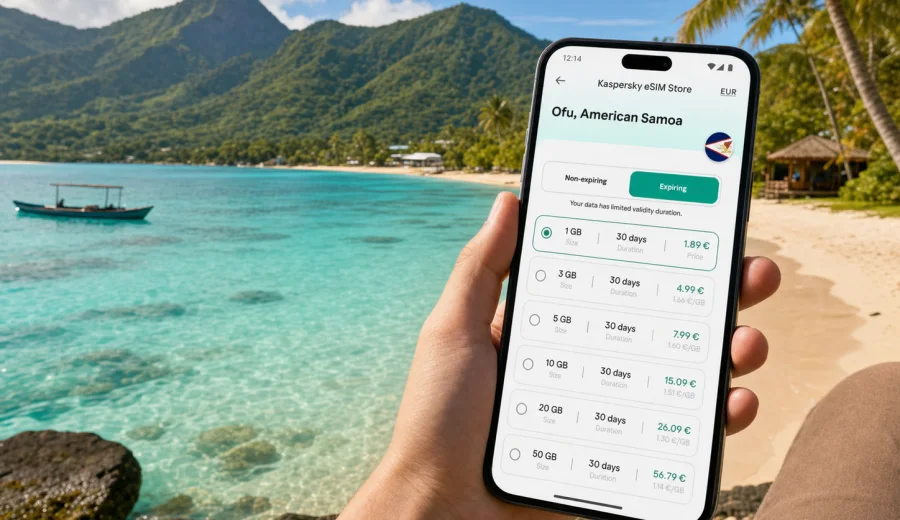
Ofu eSIM: mobile connection and internet for your trip to American Samoa
Ofu is not the kind of destination where you want to solve mobile internet at the last minute. The island is small, quiet and remote, with beach days, boat transfers, short local rides and plans that can change with weather or transport availability. If you arrive with maps, booking details and messages already available on your phone, the first hours feel much easier.
An eSIM can help you prepare mobile data for Ofu without searching for a physical SIM card after arrival. You choose a suitable tariff for American Samoa, install the eSIM on a compatible device and use mobile data for navigation, messengers, travel updates and everyday trip tasks. It is especially useful when your route includes Pago Pago, the Manu'a Islands and local movement between Ofu and nearby Olosega.
This guide focuses on practical Ofu scenarios: arrival, transfers, hotels or guesthouses, beach plans, hikes, short business visits, stopovers and onward trips in American Samoa. It also explains what to check before buying an eSIM and how to use Kaspersky eSIM Store correctly as an app and website for choosing, arranging and activating an eSIM tariff for travel.
Why mobile internet matters in Ofu
Ofu is known for its beach, coral reef scenery and the calm pace of the Manu'a Islands. That calm is part of the reason to go, but it also means you should not expect the same travel infrastructure as in a large city. Mobile data helps you manage the practical parts of the trip while keeping the island experience simple.
You may need internet in Ofu for:
- checking flight, boat or transfer messages before leaving Tutuila;
- contacting a guesthouse, driver or local host;
- opening saved maps and confirming walking or driving directions;
- using messaging apps with family, colleagues or travel companions;
- checking weather before beach time, snorkeling or a hike;
- managing bookings, travel insurance details and payment confirmations;
- translating short messages or place names when needed;
- using mobile boarding passes or reservation screenshots on the way back.
Ofu is a place where a small planning gap can become inconvenient. A missed message from a host, a changed pickup time or an unsaved map can cost more time than it would in a larger destination. A prepared eSIM gives you another way to stay online when public Wi-Fi is not nearby or not suitable for the task.
Arrival scenarios: before Ofu, at Ofu and on the road
Most trips to Ofu involve more than one travel step. Many visitors pass through Pago Pago on Tutuila, then continue toward the Manu'a Islands by local air or sea arrangements. Timetables and availability can vary, so a flexible communication setup is useful before you reach the island.
For a smooth arrival, prepare your phone in three stages.
| Stage | What you may need mobile data for | Practical tip |
|---|---|---|
| Before departure to Manu'a | Messages from airline, host or local contact | Download key confirmations and keep them offline too |
| First minutes after arrival | Pickup details, maps, route to accommodation | Keep the eSIM installed before the transfer day |
| First evening in Ofu | Contacting family, checking plans, confirming next day | Use Wi-Fi when available, but keep mobile data ready |
If you land at Ofu Airport, the journey from the airport to accommodation or a local meeting point is short compared with major city transfers. The challenge is not distance; it is coordination. You may need to confirm who is meeting you, where to wait, or whether plans changed because of weather, luggage, local events or transport timing.
If your route includes Olosega, remember that Ofu and Olosega are closely connected in daily movement. A phone with mobile data can make it easier to coordinate a short ride, find your way along the coastal road and keep travel companions updated without relying only on a hotel connection.
Choosing an eSIM tariff for an Ofu trip
For a city article, the correct eSIM direction is the country that the city belongs to. For Ofu, that means American Samoa. You do not need a separate city tariff for Ofu; you need a tariff that matches your destination and travel route.
When comparing options, look at:
- Destination: choose American Samoa if your trip is focused on Ofu and other locations in the territory.
- Data volume: short trips may only need light data for maps and messages; remote work or frequent media uploads need more.
- Validity period: match the tariff length to the full trip, including arrival and departure days.
- Activation timing: check when the validity period starts and whether activation begins on installation or first connection.
- Top-up options: if available, understand how to add more data before the package runs low.
- Device support: confirm that your phone or tablet supports eSIM and is not locked to one operator.
A useful way to estimate data is to list what you actually plan to do. Messaging and map checks use far less data than video calls, cloud backups or uploading long beach videos. If you are unsure, choose enough data for arrival, daily coordination and departure, then turn off automatic backups before the transfer day. When you are ready to compare options, you can choose an eSIM tariff for your Ofu trip in American Samoa and review the available data volume, validity period and destination details before you decide.
Before you travel: set up the phone, not just the tariff
An eSIM is useful only if the phone is ready for it. Before paying for a tariff, check device compatibility and operator lock status. Some devices support eSIM in one market but not another, and some phones may be restricted by the carrier that originally sold them.
Use this pre-trip checklist:
- Check your device to confirm eSIM support.
- Make sure your phone is not locked to a single carrier.
- Update the operating system before travel, not during a transfer.
- Keep your primary SIM active if you need calls or SMS on your regular number.
- Save important hotel, flight and transfer details offline.
- Turn off automatic cloud backup over mobile data.
- Download offline maps for Ofu, Olosega and any route through Pago Pago.
- Keep your eSIM installation details available in your account or email.
Kaspersky eSIM Store helps you choose, arrange and activate an eSIM tariff for mobile internet in a foreign trip. It is not a replacement for your home mobile number unless a particular tariff explicitly says otherwise. In most travel scenarios, you keep your regular SIM for calls or SMS and use the eSIM profile for mobile data.
How to install and activate an eSIM for Ofu
Installation is usually easiest before the travel day, while you have stable Wi-Fi and time to follow the steps carefully. Activation rules can differ by tariff, so read the conditions before you install or turn on data roaming for the eSIM profile.
A simple setup sequence looks like this:
1. Check that your phone supports eSIM and is not carrier-locked.
2. Choose American Samoa as the destination and select a tariff that matches your trip length.
3. Complete the order and open the installation details in your profile, app or email.
4. Install the eSIM using the QR code or on-screen instructions.
5. Name the eSIM profile clearly, for example “American Samoa data”.
6. Keep your usual SIM as the default line for calls if you still need your regular number.
7. Set the eSIM as the mobile data line when you are ready to use it.
8. If the instructions require it, enable data roaming for the eSIM profile.
For device-specific steps, use the official setup guides: Android installation instructions and iOS installation instructions. Follow the instructions for your phone model and operating system, because menu names can vary.
Do not delete the eSIM profile after installation unless the instructions or support team tell you to do so. Some eSIM profiles cannot be reinstalled after removal, depending on the tariff conditions.
Ofu travel situations where mobile data saves time
In Ofu, mobile data is most valuable in short, practical moments. A pickup time changes, a local contact sends a new meeting point, weather affects a beach plan, or your group splits between the guesthouse and the shore. With mobile data, you can see the update before waiting in the wrong place.
It also helps when your plan includes nearby Olosega, a short work task, or a departure day back through Pago Pago. These are not heavy browsing scenarios. They are small decisions where maps, messages and confirmations keep the day moving.
Local movement: maps, roads and realistic expectations
Ofu is compact. You are not navigating a large transit system, metro lines or a dense hotel district. The local questions are simpler: where is the pickup, how far is the beach, which road connects the next village area, and when should you leave.
Download maps before arrival, save your accommodation location, and keep screenshots of key instructions from your host. Then use mobile data for updates rather than every step of navigation.
For better data control:
- use offline maps for general orientation;
- keep mobile data on for messages and urgent searches;
- limit background app refresh;
- pause automatic app updates until you are on Wi-Fi;
- check data usage each evening, especially on a short tariff.
Signal quality can vary by exact place, terrain, device and local conditions. Plan important downloads before you travel, and treat mobile data as a practical travel tool rather than a guarantee that every beach, path or indoor room will feel the same.
Hotels, business trips and stopovers
Accommodation Wi-Fi can be useful, but it should not be your only plan. You may need internet before check-in, after checkout, during a ride, near the beach or while waiting for transport. Use Wi-Fi for heavier tasks such as large photo uploads, app updates and cloud backups. Use mobile data for time-sensitive tasks: messaging your host, opening maps, checking departure details, confirming a booking or sending a quick work email.
Ofu is not a typical business hub, but work travel can happen for education, conservation, research, community projects, media or field visits in the Manu'a Islands. Before the trip, install the eSIM, save contact names and calendar details offline, download documents you may need, carry a power bank and tell colleagues when response times may be slower.
If Ofu is part of a wider American Samoa route, choose the tariff around the full itinerary. You may need data in Pago Pago before the flight or boat arrangement, on the transfer day, in Ofu, on Olosega and again on the return. A two-day stopover, a week of nature travel and a field-work visit all need different data volumes and validity periods.
Quick checklist for Ofu
Use this checklist one or two days before leaving for the Manu'a Islands.
- Confirm your route to Ofu and save all transport details offline.
- Install the eSIM while you have stable Wi-Fi.
- Check whether the eSIM should be activated before travel or on arrival.
- Save your accommodation address and contact.
- Download offline maps for Ofu, Olosega and Pago Pago if needed.
- Turn off automatic backups over mobile data.
- Keep your regular SIM active if you need SMS verification.
- Charge your phone and power bank before the transfer.
If you are traveling with family or colleagues, ask everyone to do the same setup. Several prepared phones are better when people split up or one battery runs low.
Frequently asked questions
Do I need a separate eSIM for Ofu?
No. For Ofu, choose a tariff for American Samoa, because Ofu is part of American Samoa.
Can I install the eSIM before I fly to Ofu?
Yes. Installation before travel is often more convenient because you can use stable Wi-Fi. Check the tariff terms so you understand when validity starts.
Will eSIM give me a phone number in American Samoa?
Not usually. Many travel eSIM tariffs are designed for mobile data. Voice calls and SMS are included only if the selected tariff says so.
Should I keep my regular SIM active?
In many cases, yes. Keep your regular SIM if you need calls, SMS verification or your usual number. Set the eSIM as the line for mobile data.
What if my device does not support eSIM?
You need an eSIM-compatible device to use an eSIM tariff. Check compatibility before buying and confirm that the phone is not locked to a single operator.
Choose an eSIM tariff before your Ofu trip
Ofu rewards travelers who prepare the practical details before arrival. Save your route, keep important documents offline, check your device, install the eSIM correctly and choose a data tariff that fits the full American Samoa part of your trip.
Kaspersky eSIM Store helps you choose, arrange and activate an eSIM tariff for mobile internet in a foreign trip through the app or website. Before leaving for the Manu'a Islands, review the available options and prepare an eSIM tariff for American Samoa so your phone is ready for maps, messages, bookings and trip updates when you need them.